


Setting up a VoIP server means installing PBX software such as Asterisk or FreePBX on a machine or VPS, connecting a SIP trunk for external calls, creating extensions for your users, and opening the right firewall ports for SIP signaling and RTP media. Most setups take an afternoon once the network and security groundwork is done. If you would rather skip server management entirely, managed platforms like VideoSDK handle real-time audio infrastructure for you.
Running your own VoIP server can cut a small business phone bill dramatically. Instead of paying per-seat fees to a hosted provider, you pay only for a SIP trunk and the modest bandwidth each call consumes. A single G.711 call needs roughly 100 kbps in each direction, so even a basic connection supports several simultaneous calls.
The tradeoff is that you become responsible for installation, security, NAT traversal, and call quality. This guide walks through the entire journey: planning the deployment, choosing software, configuring trunks and extensions, securing the server, testing calls, and scaling later. Everything is explained in plain language, with no command-line steps, so you understand what each phase accomplishes before you touch a terminal.
Understanding VoIP Server Basics
A VoIP server is the brain of an internet-based phone system. Before you build one, you need a clear picture of what it actually does, because the two protocols involved behave very differently and cause very different problems.
What is a VoIP Server?
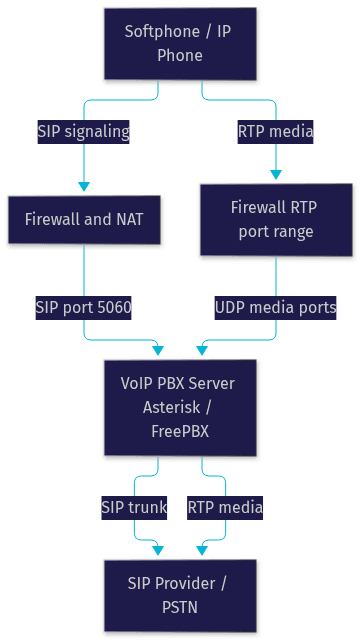
A VoIP server is defined as software that manages call signaling and media exchange between phones over an IP network. The most common signaling protocol is SIP (Session Initiation Protocol), which handles registration, dialing, ringing, and hangup. The actual voice audio travels separately over RTP (Real-time Transport Protocol) streams. This split matters enormously: a call can successfully connect via SIP while the audio fails entirely because RTP packets are blocked by a firewall or misdirected by NAT. Understanding that signaling and media are separate paths is the single most important concept when setting up a VoIP server.
Core Components of a VoIP System
Every VoIP server setup shares the same core pieces. The PBX software (Asterisk, FreePBX, or an alternative) provides call logic, voicemail, and dial plans. SIP trunks connect your server to the public phone network through a provider. Extensions are the internal user accounts that phones register against. RTP port ranges carry the audio, typically a block of UDP ports reserved for media. Optional analog telephone adapters let you keep legacy handsets, and softphones turn computers and smartphones into extensions. VideoSDK's own telephony integration shows how SIP endpoints can bridge into modern WebRTC rooms when you want browser and mobile participants alongside traditional phones.
Planning Your VoIP Server Setup
Planning decisions made now determine whether your VoIP server installation is smooth or painful. The two biggest choices are where the server lives and what network conditions it will face.
Home vs. VPS Deployment for Your VoIP Server
A home VoIP server gives you full hardware control, zero monthly hosting cost, and low latency to local devices. The downsides are residential internet: dynamic IP addresses, asymmetric upload bandwidth, and consumer-grade routers that handle NAT traversal poorly. A VPS VoIP server offers a static public IP, datacenter bandwidth, and better uptime, which eliminates most NAT headaches for a modest monthly fee. The general rule practitioners follow: home deployment works well for learning and internal-only calling, while anything that receives inbound calls from the public network belongs on a VPS with a static address. A middle path is running the server at home but forwarding SIP and RTP ports carefully, accepting that some routers will still fight you.
Hardware and Network Requirements for VoIP
VoIP server hardware requirements are modest because call processing is lightweight. A dual-core CPU, 2 to 4 GB of RAM, and 20 GB of storage comfortably handle a dozen concurrent calls with Asterisk. Bandwidth is the real constraint: budget about 100 kbps per direction per call for uncompressed G.711, or around 30 kbps with Opus or G.729. Latency matters more than raw speed; keep total round-trip latency under 150 ms for natural conversation. Jitter and packet loss degrade voice faster than bandwidth shortages, so a wired connection and a stable route to your SIP provider matter more than a faster plan. Choose a VPS region geographically close to your SIP provider's servers.
Selecting the Right Software Stack for Your VoIP Server
Your PBX software choice shapes everything downstream, from the admin interface you'll live in daily to how easily you can add features later.
Asterisk vs. FreePBX vs. Other Options
Asterisk is the open-source PBX engine underneath a huge share of self-hosted VoIP. It is powerful and free, but configuration is text-file based and has a real learning curve. FreePBX wraps Asterisk in a web management interface, making extension creation, trunk setup, and dial plans point-and-click. For most people setting up a first VoIP server, FreePBX is the pragmatic choice. Other options include Kamailio for high-volume SIP routing (better as a proxy front end than a full PBX), 3CX as a commercial alternative, and open-source projects like FreeSWITCH for developers wanting deeper programmatic control. Choose raw Asterisk when you want maximum control and don't mind configuration files; choose FreePBX when you want a working system this week.
Supporting Tools: Softphones, IP Phones, and Adapters
On the endpoint side, softphones such as Zoiper, Linphone, or the open-source Jitsi desktop client register to your server as extensions from any computer or smartphone. Dedicated IP phones from Yealink, Grandstream, or Cisco offer better audio hardware and one-touch operation for desk users. Analog telephone adapters (ATAs) bridge traditional handsets or fax machines onto your SIP network. Plan for at least two endpoints during setup so you can place real test calls between extensions before connecting a trunk.
Step-by-Step Guide to Setting Up a VoIP Server
This section walks through the full VoIP server installation as a narrative. Each phase has a clear goal and a verifiable outcome, so you always know whether you're ready to move on.
The overall architecture you're building looks like this:
Preparing the Environment for VoIP Server Installation
Start with a clean, minimal operating system; a long-term-support Linux distribution is the standard choice for both Asterisk and FreePBX. Apply all pending system updates before installing anything, because PBX software assumes current underlying libraries. Conceptually, preparation means three things: a fresh OS with updates applied, network settings confirmed (static IP or reserved DHCP so the server address never changes), and time synchronization enabled, since SIP authentication is timestamp-sensitive and clock drift causes mysterious registration failures. Verify you have administrative access and that no other service is already listening on the SIP port.
Installing the PBX Software on Your VoIP Server
Installation follows a consistent pattern across distributions. You either install the PBX from the distribution's package repository or download the source and compile it, which lets you pick codec and feature options. Compiling sounds intimidating but is a guided process: the build system checks dependencies, you select modules, and the result is a registered system service. After installation, the PBX should start automatically at boot, and its web interface (in FreePBX's case) should be reachable from your browser. The outcome to verify at this stage: the service is running, survives a reboot, and you can log into its administration interface. Don't configure anything yet; just confirm the foundation is solid.
Configuring SIP Trunks and Extensions on the VoIP Server
Configuration happens in three layers. First, create extensions: these are the internal user accounts, each with a number, a secret password, and a codec list. Register a softphone against one and confirm it shows as online in the PBX status view. Second, define the dial plan: the rules that decide how dialed numbers route, such as sending anything starting with 9 out the trunk, or mapping three-digit numbers to internal extensions. Third, connect a SIP trunk: enter the credentials your SIP provider issued, set the registration and host details, and place an outbound test call. The most common mistake here is one-way audio caused by telling the PBX the wrong external IP address for NAT situations; the server must know both its private address and the public address callers will see.
Securing Your VoIP Server Setup
VoIP servers are constantly scanned by bots attempting fraudulent international calls, so security is not optional. Close the firewall to everything except the SIP signaling port, the RTP media port range, and the admin interface, and restrict the admin interface to specific source addresses where possible. Enable TLS for SIP signaling so registration secrets and credentials are encrypted rather than sent in the clear. Configure NAT handling explicitly so the server advertises correct addresses in its signaling. Use long, random extension passwords, enable fail-to-ban style protection that blocks repeated failed registration attempts, and set call rate limits with your provider so a breach cannot run up charges. Review the server's own hardening guidance, such as VideoSDK's telephony security documentation on IP whitelisting and secure SIP, for patterns that apply to any SIP deployment.
Testing and Troubleshooting Your VoIP Server
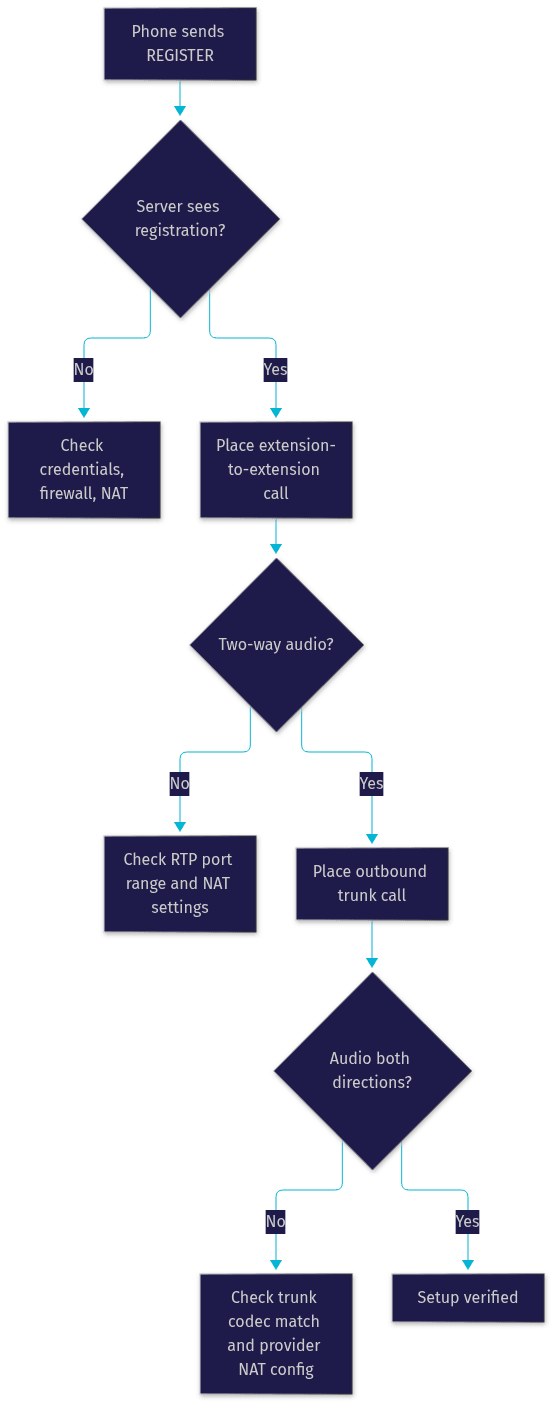
Testing should follow a deliberate sequence, because each stage isolates a different layer of the system. Troubleshooting is dramatically easier when you know exactly which hop failed.
Verifying Registration and Call Flow
Verification starts with registration: each softphone or IP phone should appear as online in the PBX dashboard within seconds of connecting. Next, place a call between two internal extensions and confirm audio flows in both directions, not just one. Then place an outbound call through the trunk to your mobile phone, and finally have someone call your inbound trunk number to verify incoming routing and the dial plan. At each stage, the PBX's live channel view shows the call legs, the codec selected, and the RTP streams, which tells you exactly where the chain breaks when something fails.
Common VoIP Server Issues and Fixes
Three problems account for most setup failures. One-way or no audio almost always means RTP is blocked or misdirected: verify the firewall forwards the full UDP media port range and that NAT settings advertise the correct public IP. Authentication failures usually come from a typo in the extension secret, clock drift between phone and server, or the phone registering to the wrong port. Codec mismatches appear as calls that connect but sound robotic or fail entirely; ensure the extension, trunk, and phone all share at least one common codec, with G.711 as the safe universal fallback. Echo and choppy audio typically point to jitter, which QoS configuration addresses in the next section.
Optimizing VoIP Performance and Quality
A working call is not the same as a good call. Quality tuning focuses on protecting voice packets from everything else competing for your bandwidth.
Bandwidth Management and QoS for VoIP
Quality of service means telling your router to prioritize the UDP ports that carry RTP ahead of bulk traffic like file downloads and video streaming. On a managed router or a small office network, enable QoS rules that classify SIP and RTP traffic as high priority and cap lower-priority classes so they can't starve voice. If your server sits behind a shared office connection, this single change often eliminates the choppy audio that appears whenever someone starts a large upload. Keep total concurrent call bandwidth comfortably under your upload capacity, leaving headroom, since saturated links produce jitter before they produce drops.
Monitoring and Logging Your VoIP Server
The PBX's own logs are your best diagnostic tool: they record every registration attempt, call attempt, codec negotiation, and hangup cause code, and reading them regularly teaches you the system's normal rhythm. Watch a few key metrics: registration failures (potential attacks or misconfigured phones), call duration patterns (unexpected international calls signal fraud), and audio reports from users. Simple uptime monitoring that alerts you if the SIP port stops responding catches outages before callers do. For teams that outgrow self-monitoring, managed RTC platforms like VideoSDK include session analytics and observability as built-in features rather than things you assemble yourself.
Maintenance and Scaling Your VoIP Server
A VoIP server is a living system. A modest maintenance routine keeps it reliable, and a scaling plan keeps it from becoming a bottleneck.
Backups, Updates, and Ongoing Monitoring
Back up the full configuration, including extension definitions, dial plans, and trunk credentials, on a schedule, and test that a restore actually works. Apply PBX and operating system security updates promptly, since VoIP vulnerabilities are actively exploited. Keep an eye on disk space for recordings and logs, rotate old logs, and periodically review the failed-registration log for attack patterns. A monthly checklist of backup verification, update application, and log review is enough for most small deployments.
Scaling a VoIP PBX for More Users
Scaling starts cheap: adding extensions is usually just creating accounts, and a modest server handles dozens of concurrent calls. When you approach hardware limits, options include moving to a larger VPS, splitting media processing from signaling with a dedicated media relay, or placing a SIP proxy such as Kamailio in front of multiple PBX instances to load-balance registration and call setup. If your growth includes browser or mobile participants, hybrid architectures that bridge SIP into WebRTC rooms, the approach VideoSDK's telephony integration takes, let traditional phones and app users share the same conversations.
Cost Considerations and Choosing a Provider
A self-hosted VoIP cost analysis usually comes out strongly favorable, but the components differ. The PBX software itself (Asterisk, FreePBX) is free. A VPS costs a few dollars per month at the small end, scaling with CPU and bandwidth. SIP trunk pricing varies: some providers charge a flat monthly rate including a bucket of minutes, others bill per minute, and inbound local numbers (DIDs) typically cost one to three dollars monthly. Watch for per-channel fees, since providers that charge per simultaneous call can change your economics at scale. Compare at least three providers on inbound number availability in your region, outbound rates to the countries you actually call, and whether they support TLS-secured SIP. For teams whose real goal is embedding calls into an application rather than replacing an office phone system, developer-focused platforms with free tiers, like VideoSDK's free credits for real-time communication, may deliver more value per dollar than a pure SIP approach.
Definitions Glossary
VoIP server: Software that manages internet-based calling by handling call signaling and media exchange between phones, typically running PBX software such as Asterisk or FreePBX.
SIP (Session Initiation Protocol): The signaling protocol that handles phone registration, dialing, ringing, and call teardown; it carries no audio itself.
RTP (Real-time Transport Protocol): The protocol that carries the actual voice audio as UDP packets over a reserved port range, separate from SIP signaling.
SIP trunk: The virtual connection between your VoIP server and a SIP provider that enables inbound and outbound calls to the public phone network.
PBX (Private Branch Exchange): The call-switching core of a phone system that routes calls between extensions and to outside lines, providing features like voicemail and dial plans.
NAT traversal: The set of techniques and settings that let devices behind a router's address translation correctly exchange SIP and RTP traffic with the outside world.
Key Takeaways
- Setting up a VoIP server involves installing PBX software, creating extensions, connecting a SIP trunk, and correctly handling SIP signaling and RTP media as separate network paths.
- A VPS with a static IP avoids most NAT traversal pain, while a home VoIP server works well for learning and internal-only calling.
- FreePBX offers a web interface over Asterisk and is the pragmatic first choice; raw Asterisk suits those wanting full control.
- Security is non-negotiable: firewall the RTP port range, enable TLS for SIP, use strong extension passwords, and block repeated failed registrations.
- One-way audio, authentication failures, and codec mismatches cause most problems and are all diagnosable from the PBX logs and channel view.
Conclusion
Knowing how to set up a VoIP server gives you a phone system you control, at a fraction of hosted per-seat pricing, built from free software and a modest VPS. The path is consistent: plan the deployment, install the PBX, configure extensions and a SIP trunk, secure the server, then test each call leg in sequence. Once the basics are stable, QoS tuning and a maintenance routine keep quality high as you scale. If your next step is embedding real-time voice or video into an application rather than just replacing desk phones, explore the VideoSDK quickstart and its telephony integration, or grab free credits at app.videosdk.live/login. What are you building with your VoIP server? Drop a comment, I'd love to hear what kind of calling use case you're working on.
Free $20 Balance for AI Voice Agents & Video Calls
FAQ