


Introduction to Text to Speech Programs
A text to speech program (TTS) is a sophisticated form of speech synthesis technology that transforms written digital text into spoken words. Once a niche tool, TTS is now a mainstream solution for enhancing software accessibility, productivity, and learning. As natural voices and advanced neural models improve, the relevance of TTS in 2025 is at an all-time high—empowering developers to create more inclusive, versatile, and user-friendly applications. Whether you are building accessible software for the visually impaired, a language learning app, or a productivity tool, understanding how a text to speech program works is essential for modern software engineering.
How Does a Text to Speech Program Work?
Speech synthesis, at its core, is the process of generating human-like speech from machine-readable text. A typical text to speech program consists of several key components:
- Input Text: The raw text string to be spoken.
- Voice Engine: The heart of TTS, which includes pronunciation rules, speech speed, pitch control, and voice models (e.g., SAPI5-based engines on Windows).
- Output Audio: The resulting waveform, often available as real-time playback or audio file (MP3, WAV).
The flow is straightforward: input text is parsed, processed (with optional OCR for scanned text), and then rendered using natural voices. Developers can leverage various APIs or SDKs for integration. For example, if you’re building real-time communication tools, integrating a Voice SDK can help you add live audio features alongside TTS capabilities. Here is a simple Python example using the popular
pyttsx3 library:1import pyttsx3
2
3engine = pyttsx3.init()
4engine.setProperty('rate', 150) # Adjust speech speed
5engine.setProperty('voice', 'english+f3') # Select voice
6engine.say("Text to speech program demo in Python.")
7engine.runAndWait()This snippet demonstrates initializing a TTS engine, customizing voice and speed, and synthesizing speech from a string. Similar APIs exist for other languages and platforms, such as integrating a python video and audio calling sdk to enable both TTS and audio/video communication in Python applications.
Types of Text to Speech Programs
Text to speech programs come in different flavors, each suited to particular use cases and platforms.
Desktop Text to Speech Programs
Desktop TTS programs are installed locally on operating systems like Windows, macOS, and Linux. Windows TTS leverages SAPI5, supporting a wide range of voices and languages. macOS offers built-in TTS with high-quality natural voices. Linux users can access open source speech solutions like eSpeak or Festival. For developers working on web-based tools, a javascript video and audio calling sdk can be combined with TTS to deliver seamless multimedia experiences.
Online Text to Speech Services
Browser-based platforms allow users to convert text to speech without local installations. These services are ideal for cross-platform use, often offering cloud-based neural voices and extensive language support. They are frequently used in web applications, browser extensions, and SaaS tools. Integrating a Voice SDK into these services can further enhance user interaction by enabling live voice features.
Open Source vs. Commercial Solutions
Open source text to speech software (e.g., eSpeak, Festival) provides flexibility, customization, and zero cost, but may lack the naturalness and polish of commercial offerings. Commercial TTS solutions (e.g., Natural Readers, ReadSpeaker) offer advanced neural voices, robust support, and accessibility features, but at a premium. If your application requires telephony integration, consider using a phone call api to add voice calling capabilities alongside TTS.
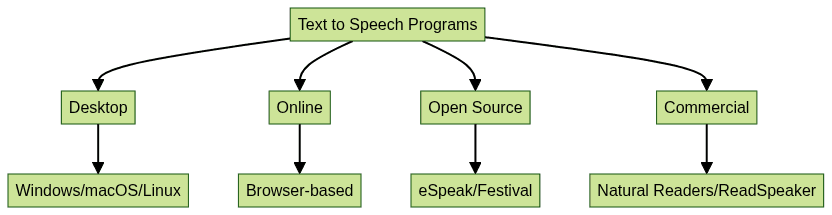
This diagram illustrates the landscape of TTS programs by deployment and licensing type.
Features to Look for in a Text to Speech Program
Not all text to speech programs are built the same. When evaluating a TTS solution for your project or personal use, consider these key features:
Voice Quality and Naturalness
Modern TTS engines use deep learning to generate human-like prosody, intonation, and inflection. Look for programs that offer neural or AI-powered natural voices for the most life-like results. For developers aiming to build interactive audio experiences, leveraging a Voice SDK can help you achieve high-quality, real-time voice communication.
Language and Voice Variety
A robust text to speech program supports multiple languages, dialects, and both male and female voices. Some advanced TTS tools let you select accents, regional variations, and even celebrity voices. If your solution also requires video communication, integrating a Video Calling API can provide a comprehensive multimedia platform.
Customization (Speed, Pitch, Highlighting)
Adjustable speech speed and pitch are vital for accessibility and learning. Some programs also allow visual highlighting of spoken words, aiding comprehension and language learning. For applications that require both TTS and phone integration, a phone call api can be a valuable addition.
Accessibility Features
For visually impaired users, integration with screen readers, keyboard shortcuts, and OCR (optical character recognition) support for scanned text are crucial. Look for software that adheres to accessibility standards. Developers can also enhance accessibility by using a Voice SDK to enable voice-driven navigation and interaction.
File Output Options (MP3, WAV)
Many TTS programs can save synthesized speech as audio files. MP3 and WAV output is useful for podcast creation, offline listening, or embedding in other applications.
Popular Text to Speech Programs Reviewed
Let’s examine five leading text to speech programs, each with unique strengths and features:
Invicta-TTS Web Reader
- Pros: Browser-based, intuitive UI, excellent language support, natural voices, works on all platforms.
- Cons: Cloud reliance, limited offline features.
- Unique Features: Real-time highlighting, browser integration, voice speed and pitch controls.
Natural Readers
- Pros: Neural voices, OCR, batch file reading, accessible software with screen reader compatibility.
- Cons: Premium features require subscription.
- Unique Features: Web and desktop apps, MP3 export, pronunciation editor.
TextAloud
- Pros: Powerful customization, multi-voice support, file output (MP3, WAV), SAPI5 compatible.
- Cons: Windows only, dated UI.
- Unique Features: Pronunciation editor, hotkeys, batch conversion.
eSpeak
- Pros: Open source speech, lightweight, cross-platform, programmable API.
- Cons: Robotic voice quality, limited language selection.
- Unique Features: Command-line interface, embeddable, supports custom phonemes.
MWS Reader
- Pros: Supports numerous document formats, configurable voices, accessible for visually impaired.
- Cons: Windows only, basic design.
- Unique Features: Clipboard monitoring, auto-reading, voice speed and pitch adjustment.
Here’s a feature comparison of these TTS programs:
Use Cases for Text to Speech Programs
Text to speech programs are more than just voice readers—they are essential tools in modern digital workflows:
- Accessibility for Visually Impaired: TTS and screen readers enable blind and low-vision users to access digital content. Developers can further enhance accessibility by integrating a Voice SDK for seamless audio interaction.
- Language Learning: TTS helps with pronunciation, listening, and comprehension for language learners.
- Productivity and Multitasking: Listen to documents, emails, or articles hands-free while working on other tasks.
- Proofreading and Editing: Reading aloud highlights errors and awkward phrasing, improving writing quality.
How to Choose the Right Text to Speech Program
Selecting the best text to speech program depends on your specific needs:
- Needs Analysis: Identify your primary use case—accessibility, language learning, content creation, etc.
- Budget: Determine if a free, open source speech solution suffices or if you need premium features.
- Platform Compatibility: Ensure the TTS program supports your OS (Windows, macOS, Linux) or offers a browser-based alternative for maximum flexibility.
Conclusion and Next Steps
Text to speech programs have evolved significantly by 2025, offering natural voices, robust features, and broad accessibility. Whether you’re a developer or end user, TTS can enhance software inclusion, productivity, and learning. If you’re ready to explore these capabilities, Try it for free and see how text to speech can transform your applications and workflows.
Free $20 Balance for AI Voice Agents & Video Calls
FAQ