


Introduction to Text to Speech in Python
Text to speech (TTS) is a transformative technology that converts written text into spoken voice output. In 2025, TTS is more important than ever for enabling accessibility, automating content delivery, and powering intelligent assistants. Python, with its extensive ecosystem and ease of use, has become a go-to language for implementing robust text to speech solutions. Whether you're building a voice assistant, generating audiobooks, or making your applications more accessible, understanding text to speech in Python opens up a world of possibilities.
How Text to Speech Works in Python
At its core, speech synthesis (TTS) involves transforming sequences of text into audible speech using algorithms and voice models. In Python, this process is facilitated by a variety of libraries that can operate either online (requiring internet access) or offline (working locally on your machine). Online TTS engines, such as gTTS, leverage powerful cloud APIs to generate lifelike voices, while offline engines like pyttsx3 allow for complete privacy and flexibility.
Python’s TTS ecosystem enables:
- Accessibility: Making content available to visually impaired users
- Automation: Generating spoken alerts, notifications, or reports
- Content Creation: Producing podcasts, audiobooks, and video voiceovers
If you're looking to expand beyond TTS and integrate real-time communication features, consider using a python video and audio calling sdk to add live audio and video capabilities to your Python applications.
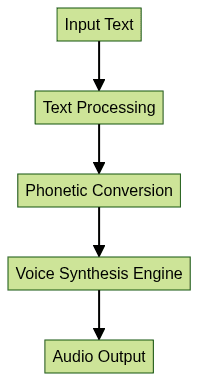
Here’s a high-level look at the TTS process flow:
Popular Text to Speech Libraries in Python
Python offers several TTS libraries, each with unique features and use cases. Let’s explore the most popular options.
gTTS: Google Text-to-Speech
gTTS (Google Text-to-Speech) is a simple yet powerful Python library that interfaces with Google’s online TTS API. It supports multiple languages, delivers natural-sounding voices, and is ideal for quick projects. However, gTTS requires an active internet connection and may have usage limitations for high-volume or commercial use.
If you're building applications that require both TTS and real-time voice communication, integrating a Voice SDK can help you create interactive audio experiences such as live audio rooms or group calls.
Key Features:
- Supports 30+ languages
- Easy-to-use API
- Produces high-quality, realistic voices
Basic Usage Example:
1from gtts import gTTS
2
3tts = gTTS(text="Hello, welcome to text to speech in Python!", lang="en")
4tts.save("output.mp3")
5
pyttsx3: Offline TTS Engine
pyttsx3 is a fully offline TTS library that works seamlessly across Windows, macOS, and Linux. It uses native speech engines (SAPI5, NSSpeechSynthesizer, espeak) and allows for extensive voice customization, including gender, rate, and volume. Perfect for applications requiring privacy or no internet connectivity.
For developers interested in integrating calling features, a phone call api can complement your TTS solution by enabling automated or interactive phone calls directly from your Python application.
Key Features:
- Works offline, no network required
- Customizable voice, rate, and volume
- Cross-platform support
Basic Usage Example:
1import pyttsx3
2
3engine = pyttsx3.init()
4engine.say("This is an offline text to speech example in Python.")
5engine.runAndWait()
6
Other Advanced Libraries
For state-of-the-art, neural voices, libraries like OpenAI TTS and HuggingFace Transformers offer deep learning-powered TTS with unparalleled realism and flexibility. These platforms enable developers to access the latest advancements in speech synthesis.
If your project needs to combine TTS with advanced communication tools, the python video and audio calling sdk is a robust option for adding both audio and video calling features.
Step-by-Step Guide: Implementing Text to Speech in Python
Let’s walk through setting up and using text to speech in Python, covering both online and offline methods.
Installing Required Libraries
Begin by installing the necessary Python packages. Open your terminal or command prompt and run:
1pip install gtts pyttsx3
2
For advanced neural TTS, you can also install transformers:
1pip install transformers
2
Tip: If you encounter permissions issues, try adding
--user to your pip commands.If you want to experiment with live voice features, you can also explore a Voice SDK for real-time audio integration.
Example 1: Using gTTS for Online Text to Speech
Here’s how to convert text to speech in Python using gTTS, save the result as an MP3, and play it back:
1from gtts import gTTS
2import os
3
4text = "Python makes text to speech simple and effective."
5language = "en"
6
7speech = gTTS(text=text, lang=language, slow=False)
8speech.save("example_gtts.mp3")
9
10# Play the audio file (Windows)
11os.system("start example_gtts.mp3")
12# For macOS: os.system('afplay example_gtts.mp3')
13# For Linux: os.system('mpg123 example_gtts.mp3')
14
This code synthesizes speech online and saves it as an MP3 file, which you can play with your system’s default player. For applications that require both TTS and calling capabilities, integrating a phone call api can automate voice notifications or alerts.
Example 2: Using pyttsx3 for Offline Text to Speech
pyttsx3 enables offline TTS with more control over the voice properties. Here’s how to set it up, customize the voice, and generate speech:
1import pyttsx3
2
3engine = pyttsx3.init()
4engine.setProperty("rate", 150)  # Speed of speech
5engine.setProperty("volume", 1)  # Volume (0.0 to 1.0)
6
7voices = engine.getProperty("voices")
8engine.setProperty("voice", voices[0].id)  # Use the first available voice
9
10engine.save_to_file("Offline text to speech in Python is powerful.", "example_pyttsx3.mp3")
11engine.runAndWait()
12
This script works entirely offline and allows you to customize various properties for more natural output. For those looking to build full-featured communication apps, the python video and audio calling sdk is an excellent tool to integrate alongside TTS.
Advanced Features: Customization and Realism in Python TTS
Changing Voices and Language
You can select different voices (male/female) and languages, especially using pyttsx3. Here’s how to list and change the available voices:
1import pyttsx3
2
3engine = pyttsx3.init()
4voices = engine.getProperty("voices")
5
6for idx, voice in enumerate(voices):
7    print(f"Voice {idx}: {voice.name} ({voice.languages})")
8
9# Set to a different voice
10engine.setProperty("voice", voices[1].id)  # Change index as desired
11
For even more interactive audio experiences, consider integrating a Voice SDK to enable features like live audio rooms or group discussions.
Adjusting Speed, Volume, and Pitch
Fine-tune your speech output for realism and clarity by adjusting properties:
1import pyttsx3
2
3engine = pyttsx3.init()
4engine.setProperty("rate", 180)  # Words per minute
5engine.setProperty("volume", 0.8)  # Volume (0.0 to 1.0)
6# Note: Pitch adjustment is not natively supported by all engines
7engine.say("Custom voice properties enhance text to speech in Python.")
8engine.runAndWait()
9
If your application requires seamless integration of text to speech and calling features, the python video and audio calling sdk can help you build unified communication solutions.
Improving Realism with Neural TTS
For the most lifelike voices, integrate OpenAI TTS or HuggingFace Transformers, which leverage deep learning for neural speech synthesis. These platforms are ideal for professional content, dubbing, and accessibility solutions. If you want to add outbound calling or telephony to your TTS workflow, a phone call api can automate the process of delivering synthesized speech over the phone.
Applications of Text to Speech in Python
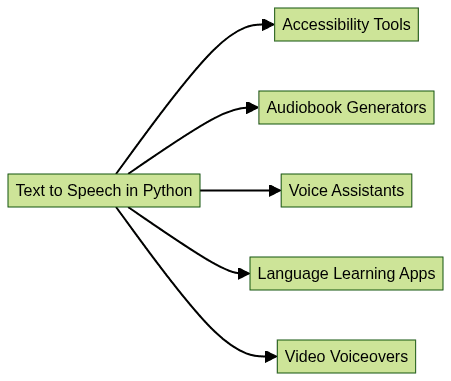
Text to speech in Python powers a wide range of real-world applications:
- Accessibility: Reading content aloud for visually impaired users
- Audiobook Generation: Automating the creation of audio versions of books and articles
- Voice Assistants: Building smart assistants like Jarvis
- Language Learning: Helping users practice pronunciation and listening skills
- Content Voiceover: Automating narration for videos, presentations, and e-learning
If your project involves both voice synthesis and real-time communication, integrating a python video and audio calling sdk can help you deliver a seamless user experience.
Below is a mermaid diagram showing the TTS application ecosystem:
Comparing Python TTS Libraries: Pros and Cons
| Library | Online/Offline | Customization | Voice Realism | Best Use Case |
|---|---|---|---|---|
| gTTS | Online | Limited | High | Quick projects, multi-language |
| pyttsx3 | Offline | Extensive | Moderate | Privacy, offline apps |
| OpenAI TTS | Online | Advanced | Very High | Professional, content creation |
| HuggingFace | Online | Advanced | Very High | Research, neural TTS projects |
For developers seeking to add interactive audio features, a Voice SDK can be a valuable addition to your Python toolkit.
Choose your library based on requirements like internet access, desired voice quality, and customization needs.
Troubleshooting and Best Practices
- Network Errors: gTTS requires an active internet connection; ensure connectivity for online TTS.
- Unsupported Languages: Check the library’s documentation for supported languages and voices.
- Natural Speech: Use punctuation and adjust speech rate for more natural-sounding output.
- Security: Be cautious with sensitive data; avoid sending confidential text to online TTS APIs.
- Ethical Use: Respect copyright, privacy, and avoid misuse of synthesized voices.
If you want to try these features and more, Try it for free and start building your own text to speech and communication solutions in Python.
Conclusion: The Future of Text to Speech in Python
Text to speech in Python is evolving rapidly, driven by advances in neural networks and AI. With powerful libraries like gTTS, pyttsx3, OpenAI, and HuggingFace, developers can build accessible, intelligent, and interactive voice-driven applications. Experiment with different libraries, customize your voices, and stay updated—the future of text to speech in Python is brighter than ever in 2025.
FAQ