


A Python text to speech API lets your application convert written text into natural-sounding spoken audio by sending synthesis requests to a cloud or self-hosted speech model and receiving audio back as a file or a live stream. Python SDKs from providers like Google Cloud, OpenAI, and ElevenLabs wrap the HTTP complexity so you can focus on voice selection, latency, and playback. If you are building voice assistants, IVR systems, or audiobook pipelines, start with a free tier, then scale based on cost and streaming needs.
Voice is becoming the default interface for a growing share of software. Screen readers, audiobook generators, phone agents, and LLM-powered assistants all depend on one core capability: converting text into speech that sounds human. A decade ago that meant robotic formant synthesis. Today, neural models produce speech so natural that listeners routinely mistake it for a human recording, and the best of them respond in under a few hundred milliseconds.
Python sits at the center of this shift. It is the language of choice for AI pipelines, and every major TTS provider ships a Python client or SDK. This guide covers what a Python text to speech API actually is, the major providers and how they compare, a full integration walkthrough in plain language, and the production concerns that separate a demo from a deployed system. We will also look at how TTS fits into real-time voice pipelines, such as the ones you can build with VideoSDK's AI voice agents.
What Is a Python Text to Speech API?
A text to speech API is a service that accepts text as input and returns synthesized audio as output. A Python text to speech API is the same thing, accessed through a Python library that handles authentication, request formatting, audio decoding, and error handling on your behalf. Instead of constructing raw HTTP requests and parsing audio bytes yourself, you work with a client object, pass in text and voice parameters, and receive audio data or a stream of audio chunks.
A typical synthesis request contains four things: the text to speak, a voice model identifier, a language code, and an output format such as WAV or MP3. Some APIs add parameters for speaking rate, pitch, emphasis, and pronunciation hints. The voice model is the neural network that does the actual synthesis, and model quality is the single biggest driver of how natural the output sounds.
Python wrappers simplify two things that are painful with raw HTTP. First, authentication: the SDK reads your API key from an environment variable or service account and attaches it to every request automatically. Second, streaming: modern SDKs expose asynchronous iteration, so you receive audio in small chunks as they are generated rather than waiting for the entire clip to finish. That distinction, synchronous batch output versus asynchronous streaming, matters enormously for interactive applications, and we will return to it throughout this guide.
Major Python TTS Providers
The provider landscape splits into large cloud platforms, AI-native startups, and open-source alternatives. Each has a distinct strength.
Google Cloud Text-to-Speech
Google Cloud Text-to-Speech is the enterprise default. It offers more than 100 voices across dozens of languages, built on Google's neural2, Studio, and Chirp model families. The Python client is part of the official Google Cloud client library, integrates cleanly with service-account authentication, and supports both batch synthesis and streaming. Pricing is usage-based per million characters, with a free monthly allotment before charges begin. Its strengths are language coverage, regional reliability, and mature documentation. Its weakness is that the most expressive voices cost noticeably more than the standard tier.
OpenAI Text-to-Speech
OpenAI's TTS API is popular with developers already building on its ecosystem. Its current speech models produce conversational, highly natural output with a small set of well-tuned voices, and the API supports real-time streaming so audio starts playing before generation finishes. The Python SDK is the same one used for the company's language models, so if you already have an OpenAI key, adding speech output is a small step. Pricing is per input token or character depending on the model, and the newer mini speech models are inexpensive enough for high-volume use.
ElevenLabs API
ElevenLabs is the quality leader for expressive, human-like speech. Its Python SDK supports its flagship voice models, voice cloning from short audio samples, and a large library of community and designed voices. Latency is low enough for conversational agents, and streaming is first-class. The trade-off is cost: ElevenLabs is more expensive per character than Google or OpenAI, and its free tier carries a commercial-use restriction. It is the right choice when voice quality is the product, such as audiobooks, brand voices, and premium assistants.
Play.ht (pyht)
Play.ht ships an official Python package, commonly known as pyht, focused on real-time streaming synthesis. It offers a broad catalog of voices and multiple output formats, and its streaming-first design makes it a solid fit for applications that need audio to start flowing immediately, such as live narration and interactive agents. Pricing is subscription-based with character quotas per tier.
Open-Source Options (SpeechFlow, AnyVoice, MiniMax)
Open-source and self-hostable options round out the landscape. Projects like SpeechFlow and AnyVoice emphasize asynchronous, Python-native design with pluggable back-ends, so you can swap the underlying model without rewriting your application. MiniMax's T2A API offers competitive multilingual synthesis with an accessible Python integration. Self-hosting removes per-character costs and keeps audio data on your infrastructure, at the price of GPU management and model maintenance. For teams with privacy requirements or very high volume, this path often wins on cost.
Choosing the Right Python TTS Provider
Choosing a provider is a matching problem between your application's constraints and each API's strengths. Six dimensions matter most.
Latency. If audio must start within a few hundred milliseconds, such as in a live voice assistant, you need a streaming-capable API with low time-to-first-audio. Batch APIs that return a complete file are fine for audiobooks and notifications.
Cost. Providers charge per character, per second of audio, or via subscription quotas. Estimate your monthly character volume, then multiply by the rate for the voice tier you actually need, not the cheapest tier.
Language coverage. Google leads on breadth; ElevenLabs and OpenAI lead on English expressiveness; MiniMax is strong across Asian languages. Match the API to the languages your users actually speak.
Voice quality and cloning. If you need a custom brand voice, ElevenLabs' cloning is the most mature. If stock voices suffice, every provider has acceptable options.
Streaming support. Interactive systems need chunked, asynchronous delivery. Pre-recorded content does not.
Authentication and operational complexity. Cloud providers use service accounts and IAM; AI-native startups use simple API keys; self-hosted models use neither but require GPU infrastructure.
The decision flow below maps these dimensions into a path:
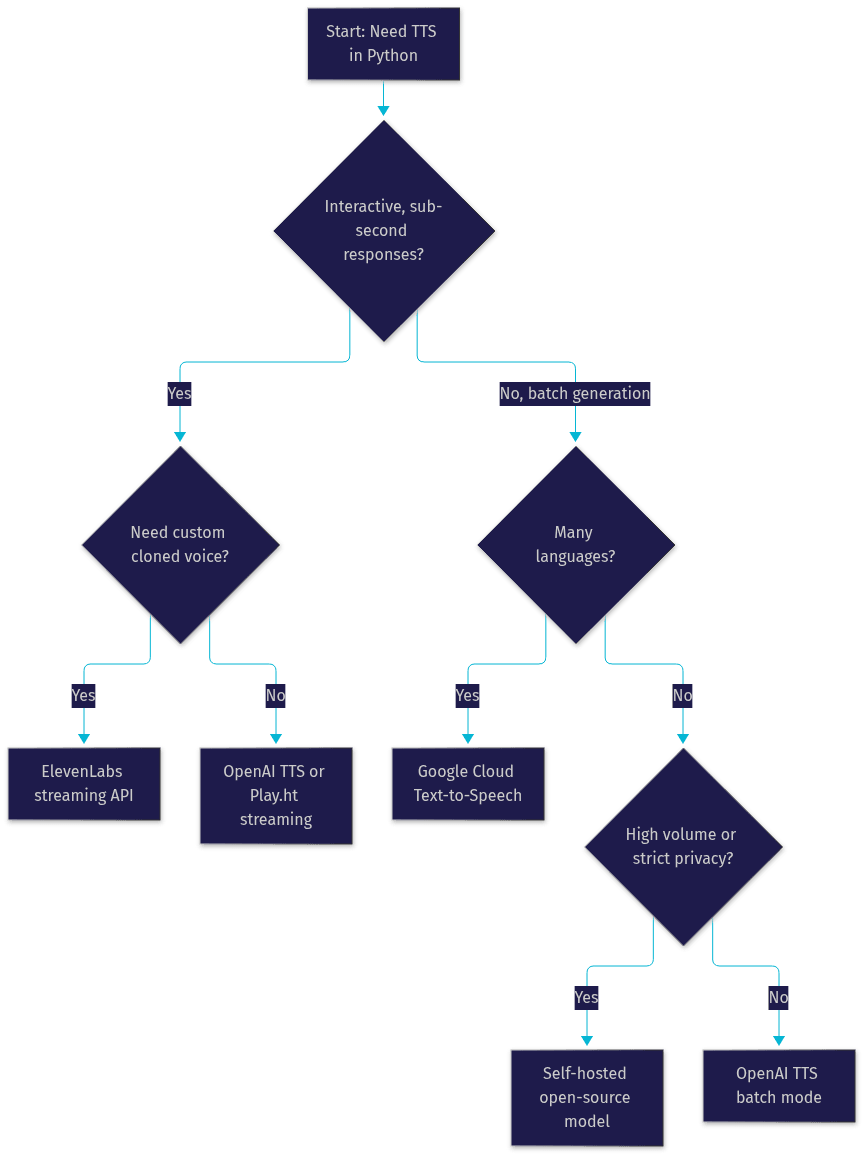
A practical rule from deployed systems: prototype with whichever API your team already has credentials for, measure real latency and cost on your actual text, then switch. Migration between providers is cheap when your code isolates the TTS call behind a single interface, which is exactly what the integration pattern in the next section encourages.
Integrating a Python TTS API: End-to-End Walkthrough
This walkthrough describes the full integration path in plain language. The same five steps apply to nearly every provider, which is why wrapping them in one internal module pays off.
Step 1: Set Up Authentication
Every TTS API requires credentials, and the first rule is that credentials never belong in source code. Create an API key in your provider's console, store it as an environment variable or in a secrets manager, and let the SDK read it at runtime. Google Cloud uses a service-account JSON file with IAM roles instead of a simple key, which is more setup but gives finer access control. Confirm the key works by making a minimal synthesis request before building anything else, because authentication errors are the most common first-day failure.
Step 2: Install the Python SDK
Each provider distributes its client as a standard Python package installable from the package index. Install the official client for your chosen provider, and consider optional extras for audio handling, such as libraries for WAV manipulation or asynchronous playback, at the same time. Keep the SDK version pinned in your project's dependency file so a provider-side update cannot silently change behavior. When you later add a second provider for redundancy or cost comparison, install it alongside the first; the clients do not conflict.
Step 3: Build the Synthesis Request
A synthesis request answers four questions: what text, which voice, which language, and which format. Choose text that is clean and finalized, because most APIs charge per character regardless of whether you use the audio. Select a voice by its identifier, and test the same sentence across several voices before committing, since perceived quality varies by content type. Set the language code to match the text, and pick an output format based on your downstream need: WAV for lossless processing, MP3 or Opus for smaller files and web delivery. Add rate or pitch adjustments only if the default output is unsuitable, since defaults are usually tuned well.
Step 4: Handle Streaming Versus Batch Output
Batch mode returns the complete audio clip once synthesis finishes, which is simple and right for pre-generated content. Streaming mode returns audio in small chunks as they are produced, and the SDK exposes this through asynchronous iteration: your code receives each chunk, can forward it to a speaker or a websocket, and can start playback before generation completes. For interactive applications, streaming cuts perceived latency dramatically, often from several seconds to a few hundred milliseconds. Save batch output directly to a file; for streaming, either accumulate chunks into a file or pipe them onward in real time.
Step 5: Error Handling and Retries
TTS calls fail in predictable ways: invalid or expired credentials, quota exhaustion, rate limiting, text that exceeds the per-request length limit, and transient network timeouts. Handle each explicitly. Retry transient failures with exponential backoff, respect rate-limit responses by pausing rather than hammering the endpoint, and surface authentication errors immediately rather than retrying them. Log the text length and provider response time with every request, because those two numbers become your cost and latency dashboards later.
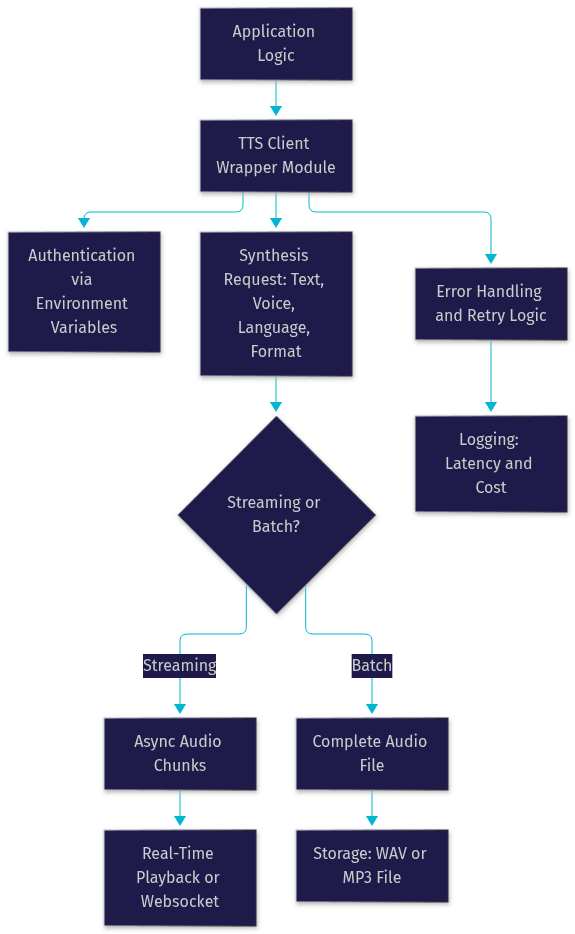
The architecture below shows how these pieces fit together in a typical application:
Production-Ready Considerations
A working prototype and a production system differ in five areas.
Rate limiting and quota management. Production traffic is bursty. Implement a client-side limiter that keeps you below provider quotas, and queue excess requests rather than dropping them. Monitor quota consumption daily, because a runaway loop that synthesizes the same text repeatedly can produce a surprisingly large bill.
Caching. Many applications synthesize the same phrases over and over: greetings, prompts, standard notifications. Cache generated audio keyed by the combination of text, voice, and format, and serve repeats from storage. A simple object-store cache can cut TTS spending by a large fraction in prompt-heavy systems like IVR.
Credential security. Store keys in a secrets manager or encrypted environment configuration, rotate them on a schedule, and scope them to the narrowest permission the SDK needs. Never log credentials, and never ship them in container images.
Monitoring. Log per-request latency, character counts, and errors, and alert on latency spikes and error-rate changes. These metrics tell you when a provider is degrading before your users tell you.
Deployment model. Serverless functions work well for batch synthesis triggered by events, but cold starts and execution-time limits make them awkward for long streaming sessions. Containers or long-running services handle persistent streaming connections better. If you are building a full conversational voice agent rather than just TTS, a managed runtime like VideoSDK's Agent Cloud handles the session lifecycle, turn detection, and TTS caching for you, which removes much of this operational burden.
Real-World Use Cases
Accessibility tools. Screen readers and reading-assistance apps use TTS to make written content audible. Here, consistency and low latency matter more than expressiveness, and broad language support is often the deciding factor, which favors large cloud providers.
Audiobook generation. Audiobook pipelines convert entire manuscripts into chapter-length audio. Cost per character and voice stamina across hours of narration dominate the decision, making caching, batch processing, and careful voice selection essential. Expressive voice models justify their premium here because the voice is the product.
Interactive voice response. IVR systems speak prompts to callers and route their responses. Prompt sets are finite, so aggressive caching plus a reliable, low-latency provider is the standard pattern. If your IVR is evolving toward conversational AI, VideoSDK's telephony integration bridges SIP phone calls into rooms where a Python agent can speak and listen in real time.
Real-time voice assistants. LLM-powered assistants chain speech recognition, a language model, and TTS into a live loop. Streaming TTS is mandatory, and end-to-end latency is the product experience. This is exactly the pipeline VideoSDK's open-source AI Agent SDK orchestrates: the agent worker manages the STT-to-LLM-to-TTS chain, turn detection, and audio delivery into a live session, so you compose the pipeline instead of building the plumbing.
Definitions Glossary
Text to Speech (TTS): The conversion of written text into synthesized spoken audio using neural or concatenative models. Python TTS APIs wrap this capability in a client library that handles requests, streaming, and authentication.
Voice model: The neural network and its associated voice identity that performs speech synthesis. Model quality determines naturalness, and providers expose multiple voices per language.
Streaming TTS: A delivery mode where audio is returned in small chunks as it is generated, allowing playback to begin before synthesis completes. Essential for interactive, low-latency applications.
Voice cloning: Creating a custom voice model from samples of a real person's speech. ElevenLabs is the best-known provider of cloning through a Python SDK.
Agent Worker: In VideoSDK's AI agent architecture, the Python process that runs a voice agent's session, orchestrating the speech recognition, language model, and TTS pipeline in real time.
Key Takeaways
- A Python text to speech API wraps synthesis behind a client library, handling authentication, request formatting, streaming, and error handling so you can focus on voice and latency decisions.
- Provider choice is a matching problem: Google Cloud wins on language breadth, OpenAI on conversational quality and price, ElevenLabs on expressiveness and cloning, and self-hosted models on privacy and volume cost.
- Streaming versus batch is the most consequential architectural decision, because it determines whether your application can respond in hundreds of milliseconds or must wait seconds.
- Production systems need caching, quota management, credential rotation, and latency monitoring; a prompt-heavy system without caching will overspend significantly.
- For full conversational voice agents, VideoSDK's AI Agent SDK and Agent Cloud orchestrate the entire STT, LLM, and TTS pipeline, including turn detection and TTS caching, in one Python runtime.
Conclusion
Choosing a Python text to speech API comes down to four questions: how fast must audio start, how much will you synthesize per month, which languages and voices do you need, and does the voice need to be custom. Answer those, and the provider shortlist writes itself. Start with a free tier from Google Cloud, OpenAI, or ElevenLabs, isolate the TTS call behind one wrapper module so you can switch providers cheaply, and measure real latency and cost on your own text before scaling. If your end goal is a live voice agent rather than standalone TTS, explore VideoSDK's AI agents documentation and the code samples library, or sign up at app.videosdk.live/login to try the free tier. What are you building with Python text to speech? Drop a comment, I'd love to hear which use case you are working on.
Free $20 Balance for AI Voice Agents & Video Calls
FAQ