



Python text to speech (TTS) is the process of converting written text into spoken audio using a speech synthesis library or cloud API. Python developers typically choose between offline engines like pyttsx3, which run locally with no network dependency, and cloud services like Amazon Polly and ElevenLabs, which deliver higher-fidelity neural voices. The right choice depends on latency, cost, language coverage, and whether your app must work offline. This guide walks through the full pipeline, library comparison, and integration steps so you can ship speech output confidently.
Speech output has quietly become a baseline expectation in modern applications. Accessibility standards demand it, voice assistants depend on it, and automated notification systems use it to turn text alerts into audible messages. If you are building any of these in Python, you will face the same early decision: which text to speech engine fits your project, and how do you integrate it without spending a week fighting audio drivers.
Python's TTS ecosystem is unusually broad. You can go fully offline with a local speech synthesis engine, or you can call a cloud neural model that produces voices nearly indistinguishable from human recordings. The trade-offs between those two paths, latency, cost, voice quality, and platform support, are where most developers either make a great choice or a painful one.
By the end of this article you will understand how a TTS pipeline actually works, how the major Python libraries compare, how to integrate any of them following a clear natural-language process, and how to troubleshoot the audio problems that trip people up in production.
What Is Python Text to Speech?
Python text to speech is defined as the use of a Python library or API to convert written text into synthesized spoken audio. The conversion happens either on your own machine through an offline speech synthesis engine bundled with the operating system, or remotely through a cloud service that runs large neural models and returns an audio file or stream.
Offline synthesis relies on system voices, such as the SAPI5 voices on Windows, NSSpeechSynthesizer on macOS, and eSpeak on many Linux distributions. These engines are free, instant, and private, but their voices sound robotic compared to modern neural output. Cloud synthesis sends your text to a provider like Amazon Polly or ElevenLabs, which generates high-fidelity speech at the cost of network latency, per-character pricing, and data leaving your infrastructure.
The Python ecosystem wraps both worlds. Libraries like pyttsx3 expose local engines through a single interface, while lightweight API clients connect Python applications to cloud neural voices. Some wrappers, such as Voicebox, unify multiple engines behind one consistent interface so you can switch providers without rewriting your application logic.
Core Components of a TTS Pipeline
Every text to speech system, whether a 1990s rule-based engine or a 2026 neural model, follows the same fundamental pipeline from raw text to playable audio. Understanding this flow helps you diagnose where quality problems originate and why different engines sound so different.
The process begins with text preprocessing, where the engine normalizes input: expanding abbreviations, converting digits into words, and splitting sentences into manageable chunks. A tokenizer then breaks the normalized text into linguistic units. A phoneme generator converts those units into phonetic representations, the discrete sounds a language uses. The acoustic model, the heart of the system, maps phonemes to actual audio waveforms. Older engines use concatenative synthesis, stitching together recorded sound fragments, while modern engines use neural networks that generate waveforms directly. Finally, the audio rendering stage produces the output file or stream in a format like MP3 or WAV.
When you hear a TTS voice mispronounce an unusual name or stumble on a number, the failure almost always happened in the preprocessing or phoneme stages, not the acoustic model. That insight alone makes troubleshooting far more systematic.
Popular Python TTS Libraries
Choosing a library starts with knowing what each one actually offers. The five options below cover the full spectrum from fully offline to premium neural cloud synthesis.
pyttsx3: Offline and Cross-Platform
pyttsx3 is the default answer for offline Python text to speech. It wraps the operating system's native speech engines, SAPI5 on Windows, NSSpeechSynthesizer on macOS, and eSpeak on Linux, behind a single Python interface. It is open source, requires no API key, and works with Python 3.10 and newer releases. Voice quality depends entirely on the system voices installed, which means it sounds acceptable on Windows and macOS but dated on Linux. It is best for desktop tools, accessibility features, and prototypes where network access cannot be assumed.
gTTS: Simple Google-Powered Cloud Synthesis
gTTS sends text to Google Translate's text to speech endpoint and returns an MP3 file. It requires an internet connection but no API key or billing account, which makes it the fastest path from zero to audible speech. The voices are clear and pleasant for major languages, though the service is unofficial for production use and offers limited control over pacing or emphasis. It suits hobby projects, quick scripts, and internal tools where reliability guarantees are not critical.
Amazon Polly: Scalable AWS Synthesis with SSML
Amazon Polly, accessed through the AWS SDK for Python, is the workhorse choice for production systems already on AWS. It offers dozens of languages, neural voice variants, and full SSML support, meaning you can control pauses, pronunciation, pitch, and emphasis with markup embedded in your text. Pricing is per character of synthesized text, and the free tier is generous enough for development. Polly fits notification systems, content preview tools, and any application where predictable latency and enterprise support matter.
ElevenLabs: High-Fidelity Neural Voices and Cloning
ElevenLabs provides some of the most natural-sounding neural voices available through a Python-friendly API, including voice cloning from short audio samples. According to independent evaluations such as the Artificial Analysis Speech Arena, its models consistently rank among the top performers for naturalness. The trade-offs are per-character pricing that adds up at scale and a strict dependency on network availability. It is best for customer-facing products, branded voice experiences, and applications where voice quality is the differentiator.
Voicebox: A Unified Wrapper for Multiple Engines
Voicebox-style wrappers abstract several engines behind one interface, letting you switch between offline and cloud providers by changing a configuration rather than rewriting integration code. This is valuable when you want offline fallback for poor connectivity and cloud quality when bandwidth allows. Licensing and maturity vary, so evaluate the wrapper's maintenance activity before committing production traffic to it.
Choosing the Right Engine for Your Project
The fastest way to pick wrong is to start with the library and work backward to your requirements. Reverse that. Begin with four questions: must synthesis run offline, how latency-sensitive is playback, which languages do you support, and what is your acceptable cost per thousand characters?
If offline operation is mandatory, for privacy, reliability, or air-gapped environments, your realistic options are pyttsx3 or a wrapper's offline mode. You accept system-voice quality in exchange for zero latency, zero cost, and zero data egress.
If cloud synthesis is acceptable, the decision becomes quality versus cost versus control. Amazon Polly wins on control and predictability, especially if you need SSML-driven pronunciation tuning or you already run on AWS. ElevenLabs wins on raw voice quality and cloning, at a higher price point. gTTS wins on simplicity for non-critical projects.
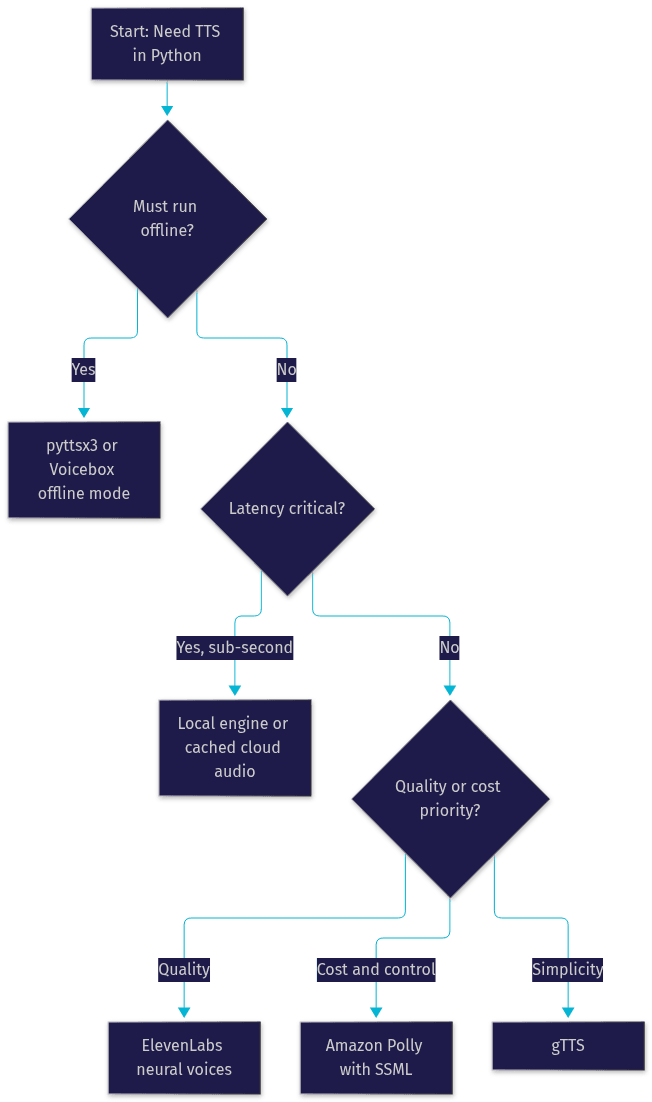
A hybrid pattern works well in practice: use a cloud engine to pre-generate audio for known content like menu prompts or notifications, and fall back to a local engine for dynamic, unpredictable text. That combination gives you neural quality where it counts and guaranteed availability everywhere else.
How to Integrate a Python TTS Library Step by Step
You can integrate any Python text to speech library by following the same high-level sequence. The details differ per engine, but the shape of the work is consistent.
Step 1: Install the Package
Install the library into your project's environment using your standard package manager. For offline engines, also verify the underlying system speech binaries exist: on Linux distributions, the eSpeak package is often not installed by default, and pyttsx3 will fail at initialization without it. On Windows and macOS the native engines ship with the operating system.
Step 2: Obtain Credentials for Cloud Engines
For Amazon Polly, create an IAM user or role with Polly permissions and configure credentials through the standard AWS credential chain. For ElevenLabs, generate an API key from your account dashboard. Never hardcode credentials in source files; use environment variables or your platform's secret manager. For offline engines, skip this step entirely.
Step 3: Initialize the Engine and Select a Voice
Initialize the engine at application startup rather than per request, since engine initialization is the slowest part of the cycle for local libraries. Select a voice by its identifier, and set properties like speaking rate and volume. For cloud engines, initialization mostly means constructing an authenticated client.
Step 4: Pass Text and Handle the Audio
For offline engines, speech plays directly through the system audio output, and you can also save to a file. Cloud engines return audio bytes that you either write to disk as an MP3 or WAV file, stream directly to the user, or buffer in memory. Decide early whether your application needs a persistent file, a temporary file, or a live stream, because that choice affects your storage and cleanup logic.
Step 5: Play or Stream the Output
Playback is where platform differences bite. Windows applications route through SAPI5 without issue, macOS may require the speech engine's process to run on the main thread in some wrappers, and headless Linux servers have no audio sink at all, so you must write files instead of playing them. If you serve audio from a Flask or Django backend, return the audio file as an HTTP response with the correct content type and let the browser handle playback.
A common pitfall worth calling out: on Linux servers, developers frequently report initialization failures that are actually missing audio subsystem dependencies, not library bugs. Installing the system speech and audio packages resolves most of these cases. Another frequent mistake is generating speech inside a request handler on every call, when caching repeated phrases would cut both latency and cloud costs dramatically.
Performance and Quality Considerations
Speech generation latency and voice naturalness are the two axes that define user perception of your TTS feature, and they usually pull in opposite directions.
Latency has three components: network round-trip for cloud engines, synthesis time on the provider's models, and transfer time for the audio payload. Local engines skip all three, which is why they feel instant even though they sound dated. For cloud engines, latency scales with text length, so splitting long passages into sentences and streaming them sequentially can cut time-to-first-audio dramatically.
Voice naturalness is best judged with independent, blind comparisons rather than vendor demos, which are cherry-picked. The Artificial Analysis Speech Arena runs crowd-sourced blind ratings of leading TTS models and is a reasonable starting point for comparing providers before you commit.
When benchmarking engines yourself, keep the test fair: use identical source text, measure time from request to first audible sample, and evaluate output at the sample rate your application will actually use. A high-fidelity 44.1 kHz voice downsampled for a phone channel wastes its advantage. Also test the specific voices you plan to ship with, not the provider's flagship demo voice, because quality varies significantly within a provider's catalog.
Troubleshooting Common Python TTS Issues
Most Python text to speech problems fall into a small set of recurring categories, and each has a straightforward remedy.
Missing system binaries is the most common. On Linux, an engine that cannot initialize usually means the eSpeak package or its development headers are absent from the system. Installing the distribution's speech synthesis packages resolves it. On macOS, permission prompts for microphone or speech services can silently block initialization if dismissed.
API quota and authentication errors appear as sudden failures after a period of working behavior. Check whether you have exceeded a rate limit, whether credentials expired, or whether the free tier character allowance was consumed. Cloud providers return distinct error codes for each case, and handling them separately prevents your app from treating a billing issue as a network outage.
Audio clipping and distortion usually come from volume settings or sample-rate mismatches. If output sounds clipped, reduce the engine volume property before synthesis rather than lowering system volume afterward, which only masks the problem. If audio plays at the wrong speed or pitch, the sample rate of the generated file does not match your playback configuration.
Finally, on headless servers, remember that "no audio device" errors are expected. The fix is architectural, not technical: generate files server-side and play them client-side in the browser.
Future Trends in Python TTS
Three trends are reshaping Python text to speech as of 2026. First, lightweight neural models that run on-device are closing the quality gap with cloud engines, making high-quality offline synthesis realistic on consumer hardware. Second, multi-modal voice assistants that combine speech recognition, large language models, and TTS into single real-time pipelines are becoming the default architecture, and Python is the primary orchestration language for these systems. Third, voice cloning is moving from a premium feature to a standard capability, raising both creative possibilities and consent-related responsibilities that developers must handle deliberately.
For Python developers, the practical implication is that engine choice is becoming less permanent. Wrappers and standardized interfaces let you swap in better models as they arrive, so architect your integration with swappability in mind.
Definitions Glossary
Text to Speech (TTS): The conversion of written text into synthesized spoken audio, performed either locally by a system speech engine or remotely by a cloud neural service.
Offline TTS: Speech synthesis that runs entirely on the local machine using operating system voices, requiring no network connection and incurring no per-character cost.
SSML: Speech Synthesis Markup Language, a markup format that lets developers control pronunciation, pauses, pitch, and emphasis within synthesized speech, supported by services like Amazon Polly.
Voice Cloning: Generating a synthetic voice modeled on a real person's speech from short audio samples, offered by providers such as ElevenLabs.
Phoneme: The smallest discrete unit of sound in a language, the intermediate representation TTS engines convert text into before generating audio waveforms.
Key Takeaways
- Every TTS system follows the same pipeline: text preprocessing, tokenization, phoneme generation, acoustic modeling, and audio rendering, so quality problems can be traced to a specific stage.
- Match the engine to your requirements first: pyttsx3 for guaranteed offline operation, Amazon Polly for control and SSML support, ElevenLabs for maximum voice quality, gTTS for simple non-critical projects.
- Integration follows a consistent sequence: install the package, configure credentials for cloud engines, initialize once at startup, synthesize, then play, stream, or persist the audio.
- Platform differences, especially Linux system dependencies and headless servers without audio devices, cause most integration failures.
- Benchmark engines with identical text and measure time to first audible sample, and consult independent blind ratings like the Artificial Analysis Speech Arena rather than vendor demos.
Conclusion
Python text to speech in 2026 is a solved problem with a wide solution space: the craft is matching your requirements to the right engine and integrating it with production awareness. Understand the pipeline, choose between offline reliability and cloud fidelity deliberately, cache what you can, and test on the platforms you actually ship to. If you are building beyond standalone TTS, VideoSDK's AI voice agent infrastructure lets you connect Python TTS pipelines directly into real-time rooms, with an open-source agents SDK and support for providers like ElevenLabs and Amazon Polly. Explore the VideoSDK AI Agents documentation or grab free credits at app.videosdk.live/login to start building. What are you building with Python text to speech? Drop a comment, I'd love to hear what kind of voice experience you're working on.
Free $20 Balance for AI Voice Agents & Video Calls
FAQ