


Introduction to Kidaroo Text to Speech
Kidaroo text to speech has surged in popularity among developers, content creators, and educators in 2025. Known for its recognizable, cartoon-style AI voice, Kidaroo is a go-to solution for anyone looking to add personality and entertainment value to digital content. With advanced customization features and cross-platform support, Kidaroo TTS (text to speech) stands out as a premier choice for projects needing engaging audio output. Its versatility powers applications in education, media, accessibility, and online entertainment, making it an essential tool in today's content creation landscape.
What is Kidaroo Text to Speech?
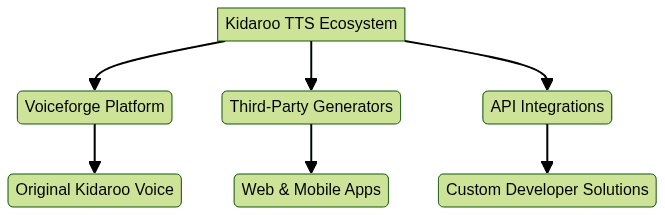
Kidaroo text to speech is an AI-powered TTS engine that generates a distinct, energetic cartoon voice originally popularized on the Voiceforge platform. The "Kidaroo" character voice is instantly recognizable: playful, slightly robotic, and perfect for both comedic and educational use cases. While Voiceforge began as a web-based TTS playground, Kidaroo's appeal has inspired numerous online generators and API integrations across platforms, including integration with Voice SDK solutions for real-time audio experiences.
Key aspects of Kidaroo voice:
- Exaggerated, expressive tone
- High clarity and intelligibility
- Suitable for character-driven audio, gaming, and edutainment
Kidaroo TTS is now accessible through various platforms and APIs, making it an appealing solution for developers aiming to create engaging user interactions or memorable branding elements.
How Kidaroo Text to Speech Works
Kidaroo text to speech leverages state-of-the-art AI, natural language processing (NLP), and TTS synthesis. The process starts when a user inputs text, which is then analyzed for linguistic context, punctuation, and intended emotion. An AI model maps the input to phonetic representations, applies Kidaroo's unique voiceprint, and synthesizes the final audio. For developers looking to expand their applications, integrating with a Video Calling API can add live communication features alongside Kidaroo's TTS capabilities.
Key workflow steps:
- Text input and preprocessing (tokenization, normalization)
- NLP-based analysis (intonation, prosody)
- AI voice synthesis with Kidaroo's voice signature
- Audio output (download, share, or stream)

Key Features of Kidaroo Text to Speech
Kidaroo text to speech is packed with features that appeal to both developers and end users:
- Voice Customization: Adjust pitch, speed, and add effects to match project requirements or enhance engagement.
- Multi-Platform Support: Available on Android, iOS, and web-based platforms for seamless integration. For those building cross-platform apps, leveraging a Live Streaming API SDK can help you broadcast Kidaroo-generated audio to larger audiences in real time.
- Language Options: While primarily English, some platforms offer additional languages or regional accents.
- API Access: Integrate Kidaroo TTS into your projects via RESTful APIs or SDKs. Developers working with Python can benefit from a python video and audio calling sdk to add both TTS and real-time communication features.
Example: Using a hypothetical Kidaroo TTS API in Python
1import requests
2
3api_url = "https://api.kidaroovoice.com/v1/synthesize"
4payload = {
5    "text": "Welcome to Kidaroo text to speech!",
6    "voice": "kidaroo",
7    "pitch": 1.2,
8    "speed": 0.95
9}
10headers = {"Authorization": "Bearer YOUR_API_KEY"}
11
12response = requests.post(api_url, json=payload, headers=headers)
13if response.status_code == 200:
14    with open("output_kidaroo.wav", "wb") as f:
15        f.write(response.content)
Popular Use Cases for Kidaroo Text to Speech
Educational Content
Kidaroo text to speech is popular in educational apps and e-learning platforms. Its playful tone keeps students engaged during lessons, quizzes, and interactive tutorials, improving knowledge retention and making learning fun. For interactive classroom experiences, integrating Voice SDK can enable live audio discussions alongside TTS content.
Entertainment and Media
Content creators use Kidaroo TTS for memes, animation dubbing, and YouTube videos, leveraging its cartoonish charm to entertain broad audiences. If your project requires real-time communication or collaborative features, consider using a javascript video and audio calling sdk for seamless integration with Kidaroo-generated audio.
Content Creation and Social Media
Kidaroo TTS powers short-form videos, TikTok voiceovers, and interactive social posts, helping creators stand out in crowded feeds. For those looking to add calling features to their content, a phone call api is a valuable addition.
Accessibility and Assistive Technology
The clarity and expressiveness of Kidaroo's voice make it useful for screen readers and assistive apps, enhancing digital accessibility for users with visual or reading impairments. Developers can also enhance accessibility by integrating Voice SDK for live voice interactions.
Step-by-Step Guide: Using Kidaroo Text to Speech Online
- Choosing a Platform: Select from popular services like Voiceforge, TopMediai, or Vocalize.fm. Each offers browser-based interfaces and, in some cases, mobile apps for both Android and iOS.
- Registration and Setup: Create a free or paid account. Some platforms require email verification, while others offer instant guest access.
- Entering Text: Input your desired text in the provided field. Most platforms offer options for voice selection, pitch, speed, and effects.
- Converting and Previewing: Click "Generate" or "Convert" to process your text. The platform uses AI and TTS technology to synthesize the Kidaroo voice.
- Downloading & Sharing: Once satisfied, download the audio file (WAV, MP3) or share it directly to cloud storage or social media. If you're interested in exploring Kidaroo TTS capabilities, you can Try it for free on select platforms.
Integrating Kidaroo TTS in a Web Application
Below is an example of how you might call a Kidaroo TTS API using JavaScript/Node.js:
1const axios = require("axios");
2
3const synthesizeKidaroo = async (text) => {
4    const response = await axios.post(
5        "https://api.kidaroovoice.com/v1/synthesize",
6        {
7            text: text,
8            voice: "kidaroo"
9        },
10        {
11            headers: { "Authorization": "Bearer YOUR_API_KEY" }
12        }
13    );
14    if (response.status === 200) {
15        // handle audio file (save, play, etc.)
16        console.log("Audio generated!");
17    }
18};
19
20synthesizeKidaroo("Hello from Kidaroo text to speech!");
Top Alternatives to Kidaroo Text to Speech
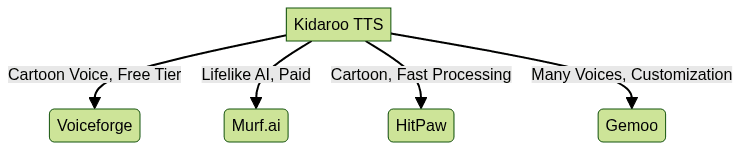
While Kidaroo text to speech is unique, several alternatives provide high-quality AI voiceovers with various character voices, accents, and customization options. Some of the leading platforms include:
- Murf.ai: Offers lifelike voices suitable for business, education, and entertainment.
- HitPaw: Known for its user-friendly interface and quick voice conversion.
- Gemoo: Provides a range of cartoon and professional TTS voices.
- Voiceforge Alternatives: Various web-based generators exist, each with different character voices. For developers seeking more advanced features, integrating with Voice SDK can further enhance the versatility of these alternatives.
Tips for Getting the Best Results with Kidaroo TTS
- Script Preparation: Keep sentences clear and concise for optimal voice synthesis. Use punctuation to guide natural intonation.
- Voice Tuning: Experiment with pitch and speed settings to match your project's desired tone.
- Audio Post-Processing: Apply noise reduction, equalization, or background music to enhance the final output, especially for professional content.
Reviews: What Users Say About Kidaroo Text to Speech
Pros:
- Highly engaging and fun for both creators and audiences
- Quick voice synthesis and easy sharing features
- Free and paid options accommodate most budgets
Cons:
- Limited language options on some platforms
- Output may sound too cartoonish for formal contexts
- Occasional server delays during high demand
User reviews frequently highlight Kidaroo TTS's unique voice and entertainment value, especially for YouTube, gaming, and educational projects in 2025. Many developers appreciate the API accessibility and ease of integration.
Conclusion
Kidaroo text to speech continues to be a top choice for developers and content creators in 2025. Its blend of character-driven audio, customization, and wide platform support makes it ideal for education, entertainment, and accessibility projects. Try Kidaroo TTS to inject personality into your next app, video, or web project.
Free $20 Balance for AI Voice Agents & Video Calls
FAQ