


Introduction to Gemini Text to Speech
Text to speech (TTS) technology has rapidly evolved, reshaping accessibility, content creation, and user experiences across digital platforms. In 2025, Google Gemini Text to Speech (TTS) emerges as a cutting-edge solution, promising unprecedented realism and flexibility for developers and creators. This gemini text to speech review dives deep into the capabilities, features, and developer experience of Gemini TTS, exploring how it stands out in a crowded field of AI-driven voice technologies.
Gemini TTS distinguishes itself with native audio generation, multi-speaker support, and emotional control, pushing the boundaries of what users expect from AI voice. Whether you’re building next-generation apps, creating podcasts, or enhancing accessibility, Gemini TTS might be the tool that transforms your workflow. But does it live up to the hype? This review answers that question and more.
What is Gemini Text to Speech?
Gemini Text to Speech is Google’s flagship AI voice generation system, part of the broader Gemini 2.5 ecosystem. Initially branded as Gemini Parrot TTS, it now powers natural, expressive speech synthesis across Google’s products and APIs. At its core, Gemini TTS leverages deep learning and large language models to generate human-like audio from text, offering developers integration via API, Python libraries, and mobile app features.
For developers seeking to add interactive voice features to their applications, integrating a Voice SDK can complement Gemini TTS by enabling real-time audio experiences alongside synthesized speech.
Unlike traditional TTS, which often sounds robotic and limited in nuance, Gemini TTS uses advanced neural networks to model voice, intonation, and emotional context. Developers can access Gemini TTS through Google Cloud APIs, the Python Gemini TTS library, or integrated tools within the Gemini app. This seamless integration and high-quality output set Gemini TTS apart in the competitive TTS landscape, as explored in this gemini text to speech review.
Key Features of Gemini Text to Speech
Native Audio Generation
Gemini TTS delivers authentic, native-quality audio with both single-speaker and multi-speaker modes. Its voice models capture subtle inflections, maintaining clarity and emotion across various languages and accents. Developers can select from a range of realistic and expressive voices, tailoring the output to specific applications such as audiobooks, podcasts, or accessibility tools.
If your project also requires video and audio communication, consider integrating a python video and audio calling sdk to enable seamless real-time interactions alongside Gemini TTS-generated content.
Emotional and Style Control
One of Gemini TTS’s most powerful features is its ability to adjust emotional tone, style, and speech speed. This enables developers to create dynamic, engaging audio tailored to context. For example, you can generate a calm, empathetic narration for guided meditation or a lively, upbeat voiceover for an educational video.
For those building collaborative or interactive platforms, a robust Voice SDK can be used in tandem with Gemini TTS to power live audio rooms and enhance user engagement.
Here’s a Python code snippet demonstrating emotional and style prompting with Gemini TTS:
1import gemini_tts
2
3audio = gemini_tts.speak(
4    text="Welcome to the Gemini text to speech review. Enjoy your stay!",
5    voice="en-US-Wavenet-F",
6    style={"emotion": "cheerful", "speed": 1.1}
7)
8with open("output.wav", "wb") as f:
9    f.write(audio)
Audio Overview & Podcast Creation
Gemini TTS includes an Audio Overview feature, which can summarize documents or articles and generate podcast-style audio. This is ideal for education, accessibility, and content creation, enabling users to consume information hands-free.
For developers looking to add video communication features to their platforms, a Video Calling API can be integrated alongside Gemini TTS to deliver a complete multimedia experience.
Use Cases:
- Education: Convert textbooks to engaging audio lessons.
- Accessibility: Transform written content for visually impaired users.
- Content Creation: Generate podcasts from blog posts with minimal effort.
If you want to enable users to join or initiate calls directly from your application, leveraging a phone call api can further extend the capabilities of Gemini TTS-powered solutions.
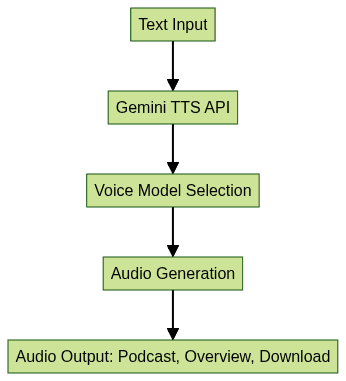
Mermaid Diagram: Gemini TTS Workflow
How to Use Gemini Text to Speech
Installing Gemini TTS
To get started with Gemini TTS, you’ll need Python 3.8+, a Google Gemini API key, and the required dependencies. Installation is straightforward:
1pip install gemini-ttsOr, if you prefer to install from source:
1git clone https://github.com/google/gemini-tts.git
2cd gemini-tts
3pip install .
If you’re looking to embed video calling sdk features within your web or mobile apps, you can do so alongside Gemini TTS for a unified communication experience.
Generating Audio
After installation, generating audio with Gemini TTS is simple. Here’s a basic example:
1import gemini_tts
2
3audio = gemini_tts.speak(
4    text="Gemini TTS brings AI voice to your apps in 2025.",
5    voice="en-US-Wavenet-D"
6)
7with open("output.wav", "wb") as f:
8    f.write(audio)
This code takes your input text, selects a preferred voice, and saves the output as a WAV file.
If your application involves live broadcasts or interactive events, integrating a Live Streaming API SDK can help you deliver real-time audio and video streaming experiences alongside Gemini TTS-generated content.
Using Audio Overview in Gemini App
For mobile users, Gemini’s Audio Overview is accessible via the Gemini app on Android and iOS:
- Open the Gemini app and navigate to the document or article you want summarized.
- Tap the "Audio Overview" button.
- The app will generate a podcast-style summary, which you can play, download, or share via social channels.
For developers seeking to enhance their apps with advanced voice features, integrating a Voice SDK can provide additional capabilities such as real-time audio chat and collaborative audio spaces.
Diagram Suggestion:
- Screen 1: Document screen with "Audio Overview" button
- Screen 2: Audio player interface with download/share options
Gemini Text to Speech in Action: Real-World Examples
Gemini TTS serves diverse use cases beyond simple text narration:
- Language Learning: Interactive pronunciations and dialogues for learners.
- Audiobooks: High-quality, multi-speaker narration for immersive listening.
- Guided Meditation: Calm, natural-sounding voices for relaxation scripts.
- Voiceovers: Content creators on YouTube and TikTok use Gemini TTS for dynamic, engaging voiceovers.
If your project requires both live audio and TTS capabilities, combining Gemini TTS with a Voice SDK can deliver a seamless, interactive audio experience for your users.
Case Study: A popular YouTube educator used Gemini TTS to create multilingual science explainers, rapidly producing audio tracks in English, Spanish, and Hindi by adjusting style and emotion.
Sample Code:
1import gemini_tts
2
3audio = gemini_tts.speak(
4    text="This is a sample for the gemini text to speech review.",
5    voice="en-US-Wavenet-C",
6    style={"emotion": "neutral", "speed": 1.0}
7)
8with open("sample_review.wav", "wb") as f:
9    f.write(audio)
Audio Links:
Gemini Text to Speech Benchmark: Performance & Quality
In this section of the gemini text to speech review, we benchmark Gemini TTS against top competitors like GPT-4o (OpenAI), ElevenLabs, and Qwen3. Gemini TTS excels in native audio quality, speaker variety, and emotional control, but may lag in ultra-fast generation or open-source flexibility.
Pros:
- Superior audio naturalness and expressiveness
- Extensive style/emotion customization
- Seamless mobile and Python integration
Cons:
- API quotas may restrict heavy use
- Limited open-source customization compared to some alternatives
Limitations & Challenges of Gemini Text to Speech
Despite its strengths, Gemini TTS has limitations. Achieving perfect emotional nuance and naturalness remains challenging, especially for edge-case accents or rapidly changing speech. Privacy and data handling are key concerns, as speech data is processed in the cloud. Developers should also be aware of API quotas and potential usage costs, especially for large-scale applications.
Future of Gemini Text to Speech & AI Voice Tech
Looking ahead, Google’s roadmap for Gemini TTS includes advanced voice cloning, deeper custom voice training, and broader language support. As AI voice technology matures, Gemini TTS will play a pivotal role in making digital content more accessible and engaging for all users.
Conclusion: Is Gemini Text to Speech Worth It?
To summarize this gemini text to speech review, Gemini TTS offers state-of-the-art voice synthesis for developers and creators. Its strengths lie in audio realism, emotional expressiveness, and seamless integration. While it has some limitations regarding openness and API quotas, it’s a top choice for those seeking high-quality, customizable AI speech in 2025.
If you’re ready to experience the next generation of AI voice and multimedia communication, Try it for free and see how Gemini TTS and advanced SDKs can transform your projects.
Free $20 Balance for AI Voice Agents & Video Calls
FAQ