


Introduction to Free Text to Speech Converters
A free text to speech converter is a software tool or online service that transforms written text into spoken audio using advanced speech synthesis technology. In 2025, the use of text to speech (TTS) tools has surged among developers, content creators, educators, and businesses. These solutions make information more accessible, boost productivity, and enable new ways to interact with digital content.
TTS converters leverage artificial intelligence (AI) and machine learning to deliver natural-sounding voices, support multiple languages, and offer extensive customization. Whether you want to create an audiobook, add narration to a YouTube video, or enhance accessibility for visually impaired users, free TTS tools are now more powerful and convenient than ever.
In this guide, we’ll explore how free text to speech converters work, their key features, leading free TTS platforms, and practical integration tips for developers. We’ll also cover privacy considerations and when to consider upgrading to a paid tool for advanced needs.
How Free Text to Speech Converters Work
At the core, text to speech converters rely on speech synthesis—a process that generates spoken language from written input. Modern TTS systems use AI models, particularly neural networks, to analyze text and produce lifelike vocalizations. This technology, known as neural TTS, is trained on vast datasets of human speech, allowing it to capture natural rhythm, intonation, and emotion.
There are two main types of TTS technology:
- Rule-based TTS: Uses linguistic rules and pre-recorded sounds (diphones/phonemes) to construct speech. While efficient, it often sounds robotic.
- AI-powered TTS: Employs deep learning and neural networks for advanced speech synthesis, resulting in natural, expressive voices.
The TTS conversion process can be illustrated as follows:
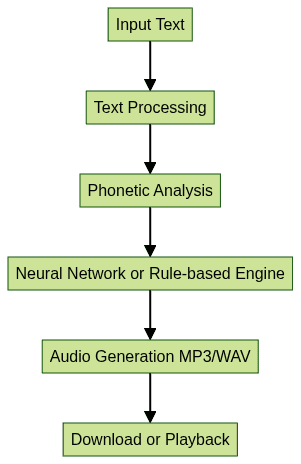
This pipeline allows developers to convert any textual content into high-quality speech with minimal effort, either through web apps or by integrating APIs. For those looking to add real-time audio features, integrating a Voice SDK can further enhance interactivity in applications.
Key Features of a Free Text to Speech Converter
Modern free TTS tools offer a wealth of features tailored for developer and content creator needs:
Multiple Languages and Voices
Leading platforms support dozens of languages—English, Spanish, Mandarin, Hindi, and more—plus regional accents and both male and female voices. This flexibility is vital for global applications and localization. Developers building communication platforms may also benefit from a javascript video and audio calling sdk to add seamless voice and video features alongside TTS.
Natural-Sounding AI-Generated Speech
AI voice generators use sophisticated speech synthesis models that mimic human prosody and emotion. As a result, generated speech is far more pleasant and realistic than traditional robotic TTS. For projects requiring live audio rooms or collaborative features, leveraging a Voice SDK can provide additional value.
Audio Format Options
Most converters allow you to download or stream audio in common formats such as MP3, WAV, or OGG, making it easy to use output files in various programming and multimedia contexts. If your application also requires phone integration, exploring a phone call api can help you connect TTS with telephony solutions.
Voice Customization: Speed, Pitch, and Emphasis
Developers can often fine-tune speech output using parameters for speed, pitch, or even emphasis on particular words. Many platforms support SSML (Speech Synthesis Markup Language), enabling advanced control over the spoken result. Here’s a sample SSML snippet to demonstrate:
1<speak>
2    <voice name=\"en-US-JennyNeural\">Hello, <emphasis level=\"strong\">developer</emphasis>! Welcome to free text to speech in 2025.</voice>
3    <prosody rate=\"90%\" pitch=\"+2st\">This sentence is slower and slightly higher pitched.</prosody>
4</speak>
5
For even more advanced voice features, consider integrating a Voice SDK to unlock real-time voice interactions and customizations.
Batch Processing and Bulk Conversion
Free TTS platforms increasingly offer batch processing, allowing users to convert multiple files or large amounts of text in a single session. This is ideal for audiobook production or processing numerous documents for accessibility. If your workflow involves both TTS and video communication, a javascript video and audio calling sdk can streamline the integration of voice and video capabilities.
No Account or Sign-Up Required
Privacy-conscious users value platforms that don’t require account creation or personal information. Many top free TTS tools enable immediate usage, reducing friction and enhancing trust. For those interested in exploring advanced features without commitment, you can Try it for free to evaluate premium SDKs and APIs.
Benefits of Using a Free Text to Speech Converter
The adoption of free text to speech converters brings significant advantages to tech professionals and organizations:
- Accessibility: TTS ensures digital content is accessible for visually impaired or dyslexic users, supporting inclusivity.
- Content Creation: Developers and creators can quickly generate narration for YouTube, e-learning, podcasts, or audiobooks without hiring voice actors.
- Language Learning: TTS tools aid in pronunciation, comprehension, and practicing new languages.
- Business and Productivity: Automate voicemail greetings, customer support scripts, and internal training materials, saving time and resources. Businesses seeking to integrate voice into their communication stack may also consider a robust phone call api for seamless connectivity.
Top Free Text to Speech Converters Reviewed
FreeTTS
- Features: Supports over 50 languages, multiple voices, export to MP3. Offers batch processing and SSML support.
- Pros: No sign-up required, fast conversion, straightforward interface.
- Cons: Occasional voice monotony for long texts, usage limits per day.
- Ideal Use: Quick TTS conversion for websites, demos, or accessibility projects.
TTSMP3
- Features: Wide language selection, natural-sounding neural voices, downloadable MP3s, supports SSML and voice effects.
- Pros: Free with generous limits, customizable speech, voice effects (e.g., whisper, shout).
- Cons: Ads on free tier, some premium voices locked.
- Ideal Use: Content creation, e-learning, and demo apps requiring realistic speech. For projects that demand live audio features, integrating a Voice SDK can further enhance user experience.
TTSConverter.io
- Features: MP3 downloads, multiple languages, voice selection, batch processing.
- Pros: Simple UI, no account needed, quick processing.
- Cons: Limited voice options, less advanced customization.
- Ideal Use: Fast conversion for personal or small-scale projects.
TTSynth
- Features: AI-powered voices, API integration, multiple formats, supports projects and batch jobs.
- Pros: Robust for developers, free API tier, advanced controls.
- Cons: Requires API familiarity, some features require registration.
- Ideal Use: Integrating TTS into apps, automation workflows. If your application also requires video communication, consider leveraging a Video Calling API for a comprehensive multimedia solution.
Text-to-Speech.online
- Features: Multilingual, no sign-up, simple conversion and MP3 download.
- Pros: Instant use, clear voices, no account needed.
- Cons: Fewer customization features, basic interface.
- Ideal Use: Quick, one-off conversions and accessibility testing.
How to Use a Free Text to Speech Converter: Step-by-Step Guide
Let’s walk through a typical workflow using FreeTTS or a similar online tool:
- Navigate to the Website: Open FreeTTS in your browser.
- Paste or Type Text: Enter the desired text into the input box.
- Choose Language and Voice: Select from available languages and voices (e.g., US English, Female).
- Customize Voice Settings: Adjust speed, pitch, or use SSML for emphasis if supported.
- Click Convert: The tool processes your input and generates speech.
- Download or Play Audio: Listen to the playback or download the MP3 file for further use.
Screenshot guide:
- Step 1: Homepage with text input box and language selector visible.
- Step 2: Text area filled, options adjusted, and "Convert" button highlighted.
- Step 3: Playback and download buttons shown for result.
Integrating TTS in a Web Project (JavaScript Example)
Developers can also embed TTS functionality in web apps. Here’s a simple JavaScript example using the Web Speech API:
1function speakText(text) {
2    const synth = window.speechSynthesis;
3    const utter = new SpeechSynthesisUtterance(text);
4    utter.lang = \"en-US\";
5    utter.rate = 1;
6    utter.pitch = 1;
7    synth.speak(utter);
8}
9
10// Usage
11speakText(\"Welcome to your free text to speech converter!\");
12
For advanced projects, consider integrating a TTS API (like TTSynth) to generate MP3s server-side, queue batch jobs, and handle multiple voices programmatically. If you want to add interactive audio rooms or live voice features, a Voice SDK can be a powerful addition to your tech stack.
Comparing Free vs. Paid Text to Speech Tools
While free TTS tools are powerful, paid solutions offer extra capabilities. Here’s a comparison:

Upgrade to paid if you require:
- Unlimited usage or commercial licensing
- Advanced voice models and effects
- API integrations at scale
- Priority support
Privacy & Security Considerations
Always review the privacy policies of free text to speech converters. Reliable platforms delete your uploaded text after processing and do not store audio files long-term. For sensitive data, use tools that do not require account creation or personal information, and avoid transmitting confidential materials unless the service offers end-to-end encryption.
Conclusion
Free text to speech converters are essential tools for modern developers, educators, and businesses in 2025. With advanced AI voices, customization, and simple integration, they empower users to create accessible, engaging audio content quickly. Start experimenting with free TTS tools today to enhance your projects and reach wider audiences.
FAQ