


ChatGPT text to speech is OpenAI's API service that converts written text into natural-sounding spoken audio using neural models like GPT-4o-mini-tts. It supports multiple voices, languages, and streaming playback, and can be styled through natural-language instructions. For developers building voice into apps, pairing it with a real-time communication layer like VideoSDK lets you deliver spoken AI responses inside live video and audio rooms with sub-second latency.
AI voice has moved from a novelty to an expectation. Users now assume that a chatbot can talk, that an article can be listened to, and that a support agent can speak back. ChatGPT text to speech sits at the center of this shift, because it gives developers the same voice quality that made ChatGPT's own voice mode feel uncannily human, exposed as a simple API.
For developers, the stakes are concrete. Voice increases accessibility for users with visual impairments or reading difficulties, boosts engagement in conversational products, and opens entirely new interfaces like AI phone agents and voice-first mobile apps. The catch is that "add TTS" is rarely the whole story. You need to understand latency, cost per minute of audio, voice selection, streaming behavior, and how the choice of provider affects your architecture.
This guide covers what ChatGPT text to speech actually is, how the pipeline works under the hood, when to use it versus dedicated TTS providers, and how to integrate it into a production application without getting burned by rate limits or surprise bills.
What is ChatGPT Text-to-Speech?
ChatGPT text to speech is defined as OpenAI's speech synthesis service that generates spoken audio from text using neural network models, accessible through OpenAI's audio API. The current workhorse model is GPT-4o-mini-tts, a compact speech model descended from the same family that powers ChatGPT's voice conversations. It succeeds the earlier TTS-1 and TTS-1-HD models, offering better naturalness at lower cost.
The service works by accepting a block of text, a voice selection, and an optional natural-language instruction that shapes delivery style, then returning synthesized audio. Output formats include MP3, Opus, AAC, and FLAC, covering web playback, mobile apps, and archival use. OpenAI provides a set of built-in voices with distinct personalities, ranging from calm and measured to upbeat and conversational, and the model handles dozens of languages with reasonable accent quality.
What separates it from traditional TTS providers is the instructions parameter. With legacy engines, controlling tone meant fiddling with SSML tags and prosody markup. With ChatGPT TTS, you describe the desired delivery in plain English, such as speaking like a sympathetic customer service agent, and the model adjusts pacing, emphasis, and emotional coloring accordingly. That makes it feel less like a speech engine and more like a voice actor you direct.
How ChatGPT TTS Works Under the Hood
Understanding the pipeline helps you predict latency and debug quality issues. ChatGPT TTS works by passing your text through a language-model-based frontend that converts words into phonetic and prosodic representations, then through a neural vocoder that renders those representations into an audio waveform.
The process starts with text preprocessing. Your input is normalized, meaning numbers, abbreviations, and symbols are expanded into speakable words. Tokenization then breaks the normalized text into units the model understands. Model inference produces an intermediate acoustic representation that encodes not just which phonemes to speak, but how: pitch contours, stress patterns, and pauses. Finally, the vocoder synthesizes the actual audio samples, which are encoded into your chosen output format and streamed or returned as a complete file.

Two properties of this pipeline matter in practice. First, inference is sequential, so longer text takes proportionally longer to synthesize, which is why streaming mode exists: audio chunks start arriving before the full clip is generated. Second, the prosody decisions happen at inference time, which is why the instructions parameter can change delivery style without you touching the text itself.
Key Features and Capabilities
ChatGPT TTS gives developers a small but well-chosen feature set that covers most voice application needs. The headline capabilities are voice variety, multi-language support, streaming, and style control.
Voice variety and multi-language support
OpenAI ships a curated set of built-in voices rather than an open voice marketplace. Each voice has a distinct character, and because they are all rendered by the same underlying model, quality is consistent across the set. The model handles dozens of languages, and you can mix languages within a single request, which is useful for bilingual support bots and language-learning apps.
Streaming and real-time latency
The API supports chunked streaming, meaning your client begins playing audio while the rest is still being generated. For short conversational responses, first-audio latency typically lands in the hundreds of milliseconds range, which is fast enough for natural-feeling dialogue. For genuinely real-time voice agents, OpenAI's Realtime API goes further by handling speech-to-text, reasoning, and TTS in a single streaming session.
Style control through instructions
The instructions parameter is the differentiator. You can ask for a whisper, an energetic pitch, or an empathetic tone, and the model adjusts delivery without SSML. Speed is also controllable, letting you compress verbose responses for impatient users or slow things down for accessibility contexts.
When to Use ChatGPT TTS vs. Other Providers
No TTS provider wins every scenario, and pretending otherwise leads to bad architecture. ChatGPT TTS excels at conversational, instruction-driven speech and rapid prototyping. Dedicated providers like ElevenLabs, Google Cloud Text-to-Speech, and Amazon Polly win on batch scale, voice cloning depth, and per-character pricing at high volume.
Use ChatGPT TTS when you are building conversational agents, prototyping voice features quickly, or want natural-language style control without learning SSML. Use Google Cloud TTS when you need enterprise-grade regional infrastructure and extensive language coverage with WaveNet voices. Use ElevenLabs when voice cloning and highly expressive brand voices are the priority. Use Amazon Polly when cost per character at massive batch scale matters most.
| Criterion | ChatGPT TTS | Google Cloud TTS | ElevenLabs | Amazon Polly |
|---|---|---|---|---|
| Voice naturalness | Excellent, conversational | Very good | Excellent, most expressive | Good |
| Style control | Natural-language instructions | SSML markup | Text prompts and cloning | SSML markup |
| Streaming | Yes | Yes | Yes | Yes |
| Voice cloning | No | Limited | Yes | No |
| Best for | Chatbots and AI agents | Enterprise scale | Brand voices | High-volume batch |
The most common mistake is choosing a TTS provider on voice quality alone. Latency, pricing model, and SDK maturity in your stack often matter more in production than a marginal difference in naturalness.
Integrating ChatGPT TTS into Your Application
Integration follows a familiar pattern for anyone who has used OpenAI's other APIs, but the details determine whether your app feels instant or sluggish. The overall flow is: authenticate, send text with voice and format options, receive audio, and play it back to the user.
Step 1: Obtain and secure your API key
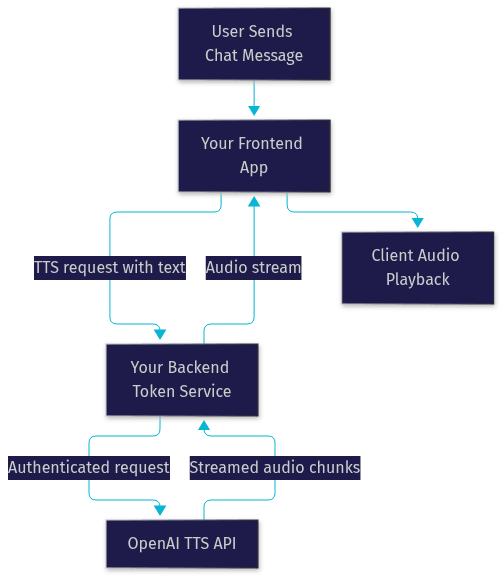
Create an OpenAI account and generate an API key from the dashboard. Treat this key like a password. It must never ship inside a client-side application, because anyone can extract it from browser bundles or mobile binaries. The standard pattern is to run a small backend service that holds the key, receives TTS requests from your frontend, forwards them to OpenAI, and returns the audio to the client.
Step 2: Construct the request
A TTS request contains the text to speak, the voice to use, the output format, and optionally the model, speed, and style instructions. Keep text segments short for conversational use, ideally a sentence or two, so streaming starts quickly and users hear the first words within a beat. For long-form narration, longer blocks are fine since total latency matters less.
Step 3: Handle the response and play audio
The response is binary audio data. In a web app, you can feed the streamed chunks into the browser's audio playback capabilities and start playing before the full clip arrives. In mobile apps, write the audio to a temporary file or play directly from memory. If you plan to replay audio later, store it in object storage rather than re-synthesizing the same text and paying twice.
Step 4: Handle errors, rate limits, and privacy
Respect rate limits by implementing retry behavior with exponential backoff when the API returns throttling responses. Log synthesis failures and fall back to text-only display so a TTS outage never breaks your core product. On privacy, disclose to users that audio is AI-generated, avoid synthesizing sensitive personal data unnecessarily, and check OpenAI's data usage terms for your jurisdiction before sending user-authored text.
If your application is a live video or voice experience, such as a support call or a virtual classroom, you can route the generated audio into a real-time room using VideoSDK's audio calling capabilities, so the AI voice reaches participants as a live stream rather than a downloaded file. VideoSDK's AI agent infrastructure handles this pattern natively, connecting LLM and TTS pipelines directly into rooms.
Optimizing Quality and Cost
Quality and cost are two dials you can turn with the same levers. Better prompts and smarter request patterns improve one while reducing the other.
For naturalness, invest in the instructions parameter. A specific direction, such as speaking warmly at a relaxed pace with slight emphasis on key numbers, consistently outperforms default delivery. Match the voice to your product's personality: a calm voice for meditation apps, an energetic one for fitness coaching. Test the same text across voices before committing, because naturalness varies by content type.
For cost, the biggest lever is caching. If your app repeatedly speaks the same phrases, such as menu prompts or standard greetings, synthesize once and store the audio. Keep conversational segments short so you never pay to synthesize text the user never hears because they interrupted or navigated away. Monitor spend through OpenAI's usage dashboard, set billing limits, and alert on unusual spikes, since a runaway loop in a voice agent can synthesize a lot of audio in a short time.
Finally, choose the output format deliberately. Uncompressed formats sound identical but cost more to transfer and store. A compressed format like Opus delivers near-transparent quality at a fraction of the bandwidth, which matters for mobile users on poor connections.
Accessibility and Legal Considerations
Voice features carry responsibility beyond the engineering. If your users include people with visual impairments, dyslexia, or situational reading constraints, TTS is a genuine accessibility feature, and you should follow WCAG guidance on audio alternatives and user control, including the ability to pause, stop, and adjust playback speed.
On the legal side, disclose that audio is AI-generated, particularly in customer-facing and support contexts where users might otherwise assume a human recorded it. Some jurisdictions are moving toward mandatory AI-content labeling. Avoid synthesizing voices that imitate identifiable real people without consent, and be transparent in your privacy policy about what text you send to third-party APIs. Handling these details early is far cheaper than retrofitting them after launch.
Real-World Example: Adding Voice to a Chatbot
Imagine a web-based customer support chatbot for a subscription software company. The bot already answers frequently asked questions in text, but analytics show that many users abandon the chat window without reading the full responses, especially on mobile.
The team adds a speaker toggle next to each bot reply. When the user enables it, the frontend sends the reply text to the backend service, which calls ChatGPT TTS with a voice chosen for its calm, professional character and an instruction to speak at a measured pace with emphasis on step numbers. The audio streams back and plays inline, starting before synthesis finishes so the user hears the first sentence almost immediately.
The user experience changes measurably. Users on mobile can listen while navigating the app's settings pages the bot is describing, instead of alternating between reading and doing. Users with visual impairments get an equivalent experience without a screen reader fighting the chat interface. Support teams report fewer repeat questions on the same topics, suggesting that spoken instructions land better than dense text.
Architecturally, the flow is simple: chatbot response text, backend TTS proxy, streamed audio, client playback. The team caches audio for the top fifty FAQ answers, cutting TTS spend significantly, and adds a graceful fallback to text-only display whenever the TTS API is unavailable. If the company later adds live video support sessions, the same voice pipeline can be extended into a VideoSDK room so the AI assistant speaks directly in a live call.
Common Pitfalls and Troubleshooting
A handful of issues account for most ChatGPT TTS integration pain. Knowing them in advance saves debugging hours.
Latency spikes usually trace back to synthesizing overly long text blocks in a single request. The remedy is splitting responses into sentence-level segments and streaming them in order. Unsupported characters, such as unusual emoji or exotic symbols, can produce odd pronunciations or errors, so sanitize input and strip decoration before synthesis. Voice selection errors typically come from requesting a voice name that has been deprecated or renamed, so verify the current voice list against the API documentation rather than hardcoding names indefinitely. Choppy playback in browsers is often a buffering issue rather than an API issue, solved by starting playback only after a small initial buffer accumulates. And silent failures where audio plays but sounds wrong are frequently instruction conflicts, where competing style directions produce muddled delivery, so keep instructions short and single-purpose.
Future Outlook for ChatGPT TTS
OpenAI's trajectory points toward richer voice control and tighter integration. The Realtime API already merges speech input and output into a single streaming session, and expect that direction to continue: higher-fidelity voices, finer emotional control, and lower latency for conversational agents. For developers, the practical move is to abstract your TTS layer behind a provider-agnostic interface now, so swapping or adding models later is a configuration change rather than a rewrite. Follow the OpenAI documentation and changelog for announcements.
Definitions Glossary
Text-to-Speech (TTS): The conversion of written text into spoken audio using software, historically via concatenated recorded samples and now via neural models that synthesize speech directly.
GPT-4o-mini-tts: OpenAI's compact speech synthesis model that generates natural conversational speech and supports natural-language style instructions.
Neural vocoder: The component of a TTS pipeline that converts an intermediate acoustic representation into an actual audio waveform.
Streaming mode: An API behavior where audio chunks are delivered as they are generated, allowing playback to begin before the full clip is complete.
SSML: Speech Synthesis Markup Language, an XML-based standard for controlling pronunciation, pauses, and prosody in traditional TTS engines, largely replaced by natural-language instructions in modern models.
Key Takeaways
- ChatGPT text to speech delivers conversational-grade voice through GPT-4o-mini-tts, with natural-language style instructions replacing legacy SSML markup.
- Streaming mode is essential for conversational apps, letting playback begin within hundreds of milliseconds while synthesis continues.
- Choose ChatGPT TTS for chatbots and AI agents, Google Cloud TTS for enterprise scale, ElevenLabs for voice cloning, and Amazon Polly for high-volume batch synthesis.
- Keep your API key server-side, cache repeated phrases, and set billing alerts to control cost and security exposure.
- For live voice and video experiences, pair your TTS pipeline with VideoSDK's real-time rooms so AI-generated speech reaches users as a live stream.
Conclusion
ChatGPT text to speech has made natural, stylable voice a standard building block rather than a premium feature. The combination of GPT-4o-mini-tts, streaming playback, and instruction-driven delivery means a working voice experience is an afternoon of integration, not a quarter of research. Start with the free tier credits on the OpenAI platform, prototype a spoken reply in your app, and measure latency and cost against your real traffic before committing to a provider. If your roadmap includes live voice agents, explore VideoSDK's AI agent docs and grab the free tier at app.videosdk.live. What are you building with ChatGPT text to speech? Drop a comment, I'd love to hear what kind of voice experience you're working on.
Free $20 Balance for AI Voice Agents & Video Calls
FAQ