


The safest apps for video calls are those with end-to-end encryption, a zero-log policy, and strong access controls, such as VideoSDK, Proton Meet, and Jitsi Meet. VideoSDK stands out for developers because it combines E2E encryption with token-based authentication and cross-platform SDKs. Use this guide to compare the top secure options and learn how to evaluate any video app's security before your next meeting.
In 2026, video calls are the default for work, healthcare, education, and staying in touch. But every call you make generates data: who joined, when, from what IP address, and sometimes far more. Popular video platforms have faced scrutiny over metadata collection, uninvited participants joining shared links, and recordings stored on servers the caller never audited. For developers and privacy-conscious teams, the question is no longer just "which app works?" but "which app is safe?" This guide breaks down what actually makes a video call app secure, reviews five of the safest options available today, and gives you a practical framework for evaluating any platform, whether you are picking a tool for your team or building one yourself with a secure video SDK.
What Makes a Video Call App "Safe"?
A safe video call app protects three things: the media itself (your voice and video), the metadata (who talked to whom and when), and the entry point (who can join and what they can do). Most platforms advertise "encryption" prominently, but encryption alone does not make an app safe. A call can be encrypted in transit while the provider still records participant lists, stores recordings indefinitely, or allows anyone with a link to join.
Genuinely safe apps for video calls combine several layers. End-to-end encryption protects the media so only the participants can decrypt it. A zero-log or data-minimisation policy ensures the provider is not building a behavioural profile from your meeting history. Strong authentication and access controls keep uninvited guests out. And compliance certifications, such as GDPR alignment or HIPAA support, signal that the provider has been held to an external standard. When you evaluate any platform, including the ones below, look for all four layers, not just the first.
End-to-End Encryption Explained
End-to-end encryption (E2EE) means your voice and video are scrambled on your device before they ever touch the network, and they can only be unscrambled on the other participant's device. The server relaying the call sees only unreadable ciphertext. This differs from transport encryption, which protects data in transit but lets the provider's server decrypt everything. With true E2EE, even a breach of the provider's infrastructure does not expose your conversation. For developers, WebRTC-based platforms like VideoSDK support E2E encryption as a configurable layer on top of the standard DTLS and SRTP transport encryption that WebRTC already mandates.
Zero-Log and Data Minimisation
Metadata is the quiet privacy leak. Even with perfect encryption, a provider can log who met whom, for how long, from which IP, and how often. A zero-log policy means the provider deliberately avoids retaining this data after a session ends. Data minimisation goes further: collect only what the feature requires, and nothing else. This matters for GDPR compliance in Europe and for any regulated industry. When comparing safe apps for video calls, read the privacy policy specifically for retention periods on metadata, chat transcripts, and recordings. The best platforms let you configure or disable retention entirely.
Authentication & Access Controls
The weakest link in most video call security is not the encryption, it is the front door. Safe platforms enforce authentication through per-meeting passwords, expiring meeting tokens, and role-based access control that separates hosts, moderators, and viewers. Waiting rooms let a host screen participants before they join. Meeting tokens that expire after a set time prevent a leaked link from granting permanent access. For developers building on a video SDK, generating short-lived tokens server-side and scoping them to a single room is the single highest-impact security practice.
Top Safe Apps for Video Calls
These five options represent the strongest privacy-focused video calling solutions in 2026, spanning a developer SDK, consumer-grade encrypted apps, and self-hosted open-source platforms. Each summary covers the security model, key features, and honest trade-offs.
VideoSDK – Secure Video Calling API & SDK
VideoSDK is the developer-focused option on this list: a real-time communication platform providing video and audio calling SDKs for React, JavaScript, React Native, Flutter, Android, iOS, Unity, and more. Security is built into the architecture. All media flows over WebRTC's mandatory encrypted transport, and VideoSDK adds end-to-end encryption for calls where the provider must be unable to decrypt content. Authentication uses short-lived, server-generated meeting tokens scoped to a specific room and participant role, so a leaked token grants access to exactly one meeting, not your whole account.
For teams that need to control their data footprint, VideoSDK supports a no-log architecture for session metadata, along with waiting rooms, role-based access control, and geo-fencing to restrict where media is processed. The Prebuilt UI Kit lets you embed a fully functional, secure video call interface with zero custom UI code, which dramatically reduces the surface for implementation mistakes. If you are building a telehealth, legal, or fintech product where video call security features are a compliance requirement rather than a nice-to-have, VideoSDK is the strongest choice here.
Pros:
- E2E encryption plus token-based authentication built in
- Broadest cross-platform SDK coverage, including Unity and IoT
- Prebuilt UI Kit for rapid, low-risk deployment
- Waiting rooms, role-based access, and geo-fencing available
Cons:
- It is an SDK, not a consumer app, so non-developers should pick a pre-built option
- Advanced security configuration requires server-side setup
Proton Meet
Proton Meet comes from Proton, the Swiss company behind Proton Mail, and carries the same privacy-first philosophy. Calls use the MLS (Messaging Layer Security) protocol for end-to-end encryption, a modern standard designed for group communication. Meetings can be protected with a password alone, no account required, which lowers the barrier for guests while keeping the door locked. Being Swiss-based, Proton operates under some of the strictest privacy laws in the world, and the company has a long, audited track record of minimal data collection.
Pros:
- MLS end-to-end encryption by default
- Password-only meeting protection, no guest accounts needed
- Strong European privacy law compliance
Cons:
- Smaller feature set than mainstream platforms
- No SDK for embedding calls into your own product
Jitsi Meet
Jitsi Meet is the veteran open-source option. All calls are encrypted by default, and because the entire codebase is public, security researchers can audit exactly how encryption and routing work. The killer feature is self-hosting: you can run Jitsi on your own infrastructure, meaning no third party ever touches your metadata at all. For organisations with the technical capacity to operate it, self-hosted Jitsi is arguably the most private video calling setup possible.
Pros:
- Fully open-source and independently auditable
- Self-hostable for complete data control
- No accounts required to join
Cons:
- Self-hosting requires real operational effort and maintenance
- E2EE for large groups can be limited compared to newer protocols
Capsulinker
Capsulinker takes a different approach: peer-to-peer WebRTC connections where media flows directly between participants rather than through a relay server, encrypted end-to-end the whole way. There are no accounts to create, and calls exist as temporary "capsules" that disappear when the meeting ends. Nothing persists, which makes it a good fit for one-off sensitive conversations where you want zero footprint.
Pros:
- Direct peer-to-peer encrypted media path
- No accounts, no stored history
- Temporary by design
Cons:
- Peer-to-peer can degrade with large groups or restrictive networks
- Fewer collaboration features like recording or transcription
SafeMeet
SafeMeet is an open-source platform that markets itself on military-grade encryption, meaning strong, standardised ciphers rather than proprietary claims. Its distinguishing privacy feature is local-only recording: if a call is recorded, the file stays on the participant's device and never touches a server. Combined with its auditable source code, this makes it a solid choice for teams that want verifiable claims rather than marketing promises.
Pros:
- Open-source with verifiable encryption
- Recordings stay local, never uploaded
- No telemetry by design
Cons:
- Smaller community and ecosystem than Jitsi
- Local-only recording means no cloud convenience
How to Evaluate a Secure Video Call App
When a new platform promises "secure video calling," run it through this five-point framework before trusting it with real conversations. First, check the encryption standard: is it true end-to-end encryption, or only transport encryption where the provider can decrypt? Look for named standards like MLS, SRTP with E2EE layers, or audited implementations, not vague phrases like "military-grade."
Second, assess auditability. Open-source projects like Jitsi and SafeMeet can be independently verified. Closed platforms should publish third-party security audits; if they do not, treat their claims as unverified. Third, review compliance certifications relevant to your context: GDPR for European users, HIPAA for healthcare, SOC 2 for enterprise. Fourth, examine the privacy policy for retention: how long are metadata, chat logs, and recordings kept, and can you control that? Fifth, consider platform support and usability, because the most secure app in the world loses to a slightly less secure one that your participants actually join.
For developers, add a sixth criterion: can you control the security posture yourself? With a secure video SDK like VideoSDK, you choose the token lifetime, the room access rules, the encryption configuration, and where the token server runs. That control is what separates building a safe app from merely using one.
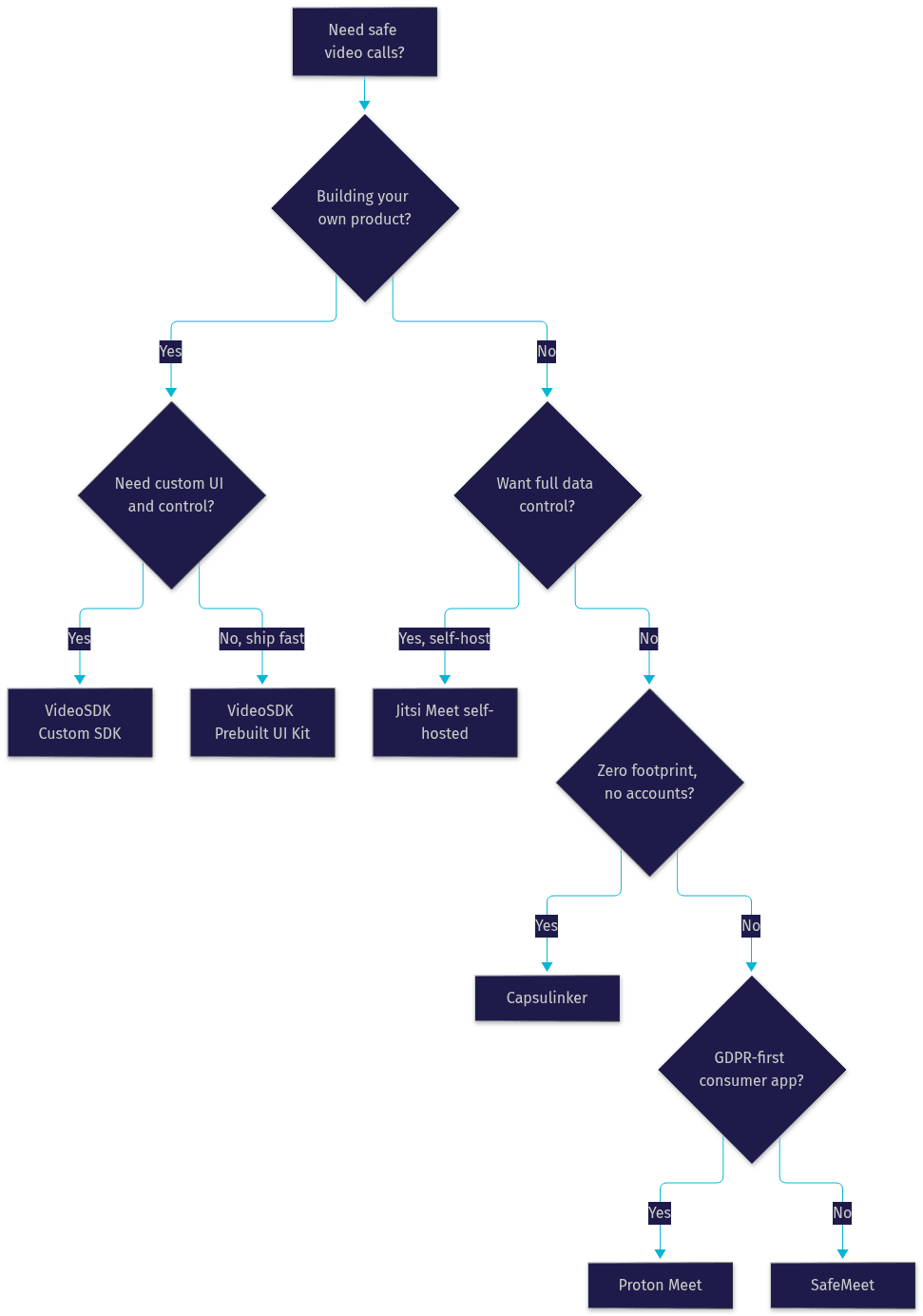
Decision Tree
The flow below helps you pick the right option based on your primary need:
Implementing VideoSDK for a Secure Video Call Experience
Building a secure video calling experience with VideoSDK follows a clear path, and the security-critical steps are the ones most tutorials skip. Start by creating a room through the REST API from your backend, which lets you set room-level rules before anyone joins. Next, generate a meeting token on your server using your API credentials. This token is what your frontend SDK presents when a participant joins, and it should be short-lived and scoped to that specific room and role. Never expose your API secret in client-side code; the token is the only credential the client should ever hold.
On the frontend, initialise the SDK for your platform of choice, whether that is the React SDK, Flutter, React Native, or another supported framework, and pass the token and room ID when the participant joins. Enable end-to-end encryption for sessions requiring provider-blind confidentiality, and configure waiting rooms plus role-based access control for meetings where entry must be screened.
Production considerations matter here. Serve your application over HTTPS, because browsers block camera and microphone access on insecure origins. Configure TURN server fallback so participants behind restrictive corporate firewalls can still connect without degrading to insecure workarounds. Set token expiry aggressively, and rotate tokens for recurring meetings rather than reusing a single long-lived credential. Finally, decide your recording and transcription retention policy explicitly through the server-side APIs rather than leaving defaults in place. The VideoSDK docs walk through each of these steps for every supported platform, and the code samples show complete reference implementations.
Common Pitfalls and How to Avoid Them
Even on a safe platform, user behaviour can undo the security model. The most common pitfall is sharing meeting links in public channels, such as open Slack communities, public calendars, or social media. A link plus no waiting room equals an open door. Always pair shared links with a waiting room or a per-meeting password.
The second pitfall is joining sensitive calls on untrusted networks. Public Wi-Fi introduces interception and session hijacking risks. End-to-end encryption protects your media, but a VPN adds defence for everything else. Third, developers often neglect token rotation: a token that never expires is a permanent credential sitting in client-side storage. Generate fresh, short-lived tokens for every session. Fourth, teams enable cloud recording by default and forget about it, silently creating a data retention liability. Disable recording unless it is needed, and when it is, store the output in a location you control. Finally, skipping pre-call device permission checks leads users to grant camera access hastily on insecure pages. Build permission prompts into a trusted, HTTPS-served flow.
Definitions Glossary
End-to-End Encryption (E2EE): A security model where media is encrypted on the sender's device and decrypted only on the recipient's device, so no server in between can read the content. VideoSDK offers E2EE as a configurable layer on top of WebRTC's standard transport encryption.
Meeting Token: A short-lived credential generated on your server that authenticates a participant's access to a specific VideoSDK room, scoped to a role and an expiry time.
Zero-Log Policy: A provider commitment to not retaining session metadata, such as participant lists and connection records, after a meeting ends. This minimises the data available in a breach and supports GDPR data-minimisation principles.
Waiting Room: A pre-entry screening area where a host reviews and admits participants before they can join a call, preventing uninvited access even when a meeting link has leaked.
WebRTC: The open standard protocol that powers real-time audio and video in browsers and apps, mandating encrypted media transport via DTLS and SRTP. VideoSDK's SDKs are built on WebRTC.
Key Takeaways
- Safe apps for video calls require four layers together: end-to-end encryption, a zero-log policy, strong authentication, and compliance alignment, not encryption alone.
- VideoSDK is the strongest option for developers building secure video products, combining E2E encryption, token-based authentication, waiting rooms, and cross-platform SDKs including a zero-code Prebuilt UI Kit.
- Proton Meet, Jitsi Meet, Capsulinker, and SafeMeet each win in specific scenarios: GDPR-first consumer use, self-hosted control, zero-footprint one-off calls, and local-only recording respectively.
- Evaluate any platform against named encryption standards, auditability, compliance certifications, retention policies, and usability before trusting it.
- In production, HTTPS, TURN fallback, aggressive token expiry, and explicit recording retention policies are what separate a genuinely safe deployment from a demo.
Conclusion
Choosing safe apps for video calls in 2026 means looking past the encryption badge on the homepage and asking harder questions: who can decrypt your media, what metadata is stored, and who can walk through the front door. The five options above answer those questions credibly, whether you need a consumer app like Proton Meet or a build-it-yourself platform like VideoSDK. If you are building a product where privacy is a requirement, start with VideoSDK's free tier, explore the VideoSDK docs, and ship a secure video experience your users can trust. What are you building with VideoSDK? Drop a comment, I'd love to hear what kind of secure video calling use case you are working on.
FAQ