


A SIP trunk service is a carrier-provided connection that links your IP PBX to the public switched telephone network over the internet, replacing legacy phone lines with virtual channels. It delivers calls using Session Initiation Protocol signaling and RTP media transport, cutting line-rental costs and scaling on demand. VideoSDK extends this same SIP trunk capability into its real-time communication platform, bridging traditional telephony with WebRTC rooms and AI voice agents through its telephony integration.
For decades, businesses rented physical ISDN or analog lines from carriers, paying per line regardless of how many calls actually happened. A SIP trunk service replaces that hardware dependency with a logical connection: your IP PBX talks to the carrier over the internet, and calls flow through virtual channels you can add or remove in minutes. The result is lower monthly spend, faster provisioning, and features legacy carriers simply cannot offer, from dynamic caller ID to real-time fraud monitoring.
This guide covers what a SIP trunk service actually is, how the architecture works, how to choose a provider, how to set up your IP PBX, and how to model costs so you do not overpay for channels you never use.
What Is a SIP Trunk Service?
A SIP trunk service is defined as a carrier offering that uses Session Initiation Protocol (SIP) to connect a business's private telephony system, typically an IP PBX, directly to the PSTN without physical phone lines. The word "trunk" comes from the legacy era, where a trunk was a bundled group of circuits between your office and the exchange. In a SIP trunk service, that bundle becomes a negotiated number of concurrent call channels delivered over your internet connection.
A SIP trunk service works by separating two functions. SIP signaling handles call setup, teardown, and feature negotiation between your PBX and the carrier's softswitch. Media transport, usually RTP over UDP, carries the actual voice packets once the call is established. The carrier side handles PSTN termination, converting between the IP world and traditional phone networks, and manages number porting so you keep your existing DIDs.
The core components are the SIP signaling layer, the media transport layer, and carrier connectivity, which includes routing rules, E911 compliance, and fraud monitoring. VideoSDK provides SIP trunk connectivity through its telephony gateway, which bridges SIP trunks from providers like Twilio, Vonage, Telnyx, and Plivo into WebRTC-based rooms, so phone callers and app users can join the same conversation.
Key Benefits of Using a SIP Trunk Service
The primary reason businesses adopt a SIP trunk service is cost reduction. Legacy carriers charge per physical line, whether or not it is in use. SIP trunk providers typically charge per concurrent channel or per minute, which means a company making 40 simultaneous calls at peak but averaging 12 pays for capacity that matches reality, not for 40 always-on circuits. International calling rates also drop sharply, since calls ride IP networks for most of their journey.
Scalability is the second major benefit. Adding channels on a SIP trunk is a billing change, not a truck roll. A retail brand running a seasonal campaign can double capacity for December and scale back in January. Multi-site businesses consolidate all locations onto one logical trunk, gaining centralized routing and resilience.
Call quality improves when the provider supports quality-of-service controls and modern codecs. With G.711 or G.729 negotiated end to end, and QoS prioritization on your network edge, voice packets get preferential treatment over bulk traffic.
Business continuity is built in. Because the trunk is logical, calls can fail over to a secondary carrier, a backup data center, or mobile numbers when your primary site goes down. No physical line means no single point of failure tied to one building.
Advanced features round out the value: E911 compliance with location reporting, flexible caller ID per outbound route, real-time fraud monitoring that flags unusual international call patterns, and number porting that preserves your established business numbers.
How a SIP Trunk Service Works: Architecture Overview
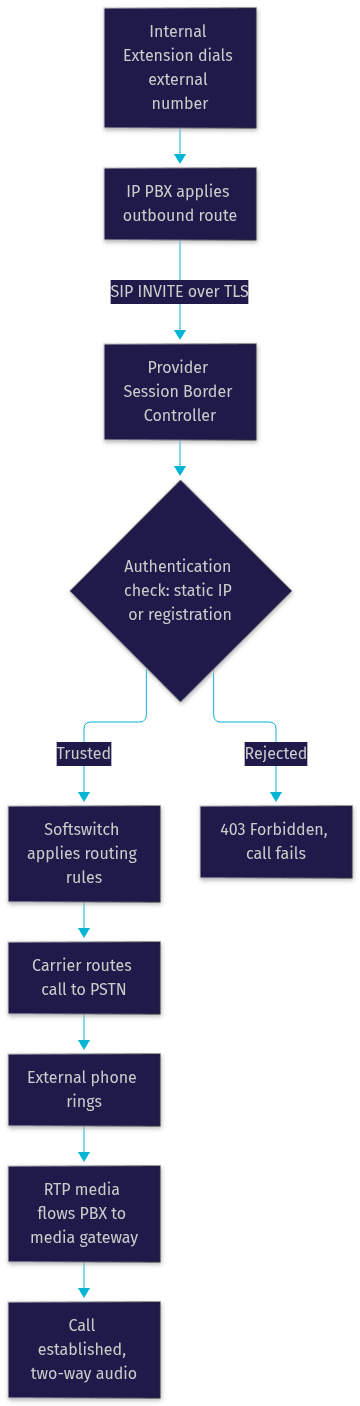
A SIP trunk service works by routing calls through three layers: your IP PBX, the SIP trunk provider's session border controller and softswitch, and the PSTN. When an internal extension dials an external number, the PBX sends a SIP invitation to the provider's edge. The provider authenticates the request, applies your routing rules, and hands the call to the PSTN. Media then flows directly between your PBX and the provider's media gateways, converted to traditional telephony signaling at the far end.
Authentication happens one of two ways. With static IP authentication, the provider whitelists your PBX's fixed public IP address, and any SIP traffic from that address is trusted. This is the more secure and common option for businesses with dedicated connectivity. With SIP registration, your PBX sends credentials, a username and password, to the provider's registrar, which suits dynamic IP environments like offices on consumer-grade broadband. Registration is more flexible but carries higher fraud risk if credentials leak, so providers pair it with TLS encryption and IP reputation checks.
The diagram below shows the full call setup sequence from an internal extension to an external PSTN number through the SIP trunk service:
Inbound calls follow the reverse path. The PSTN delivers a call to your ported DID, the provider matches it against your inbound routes, and sends the SIP invitation to your PBX, which rings the appropriate extension, ring group, or IVR. Failover paths kick in when the primary route is unreachable, redirecting to a secondary PBX site or a hosted voicemail endpoint.
Choosing the Right SIP Trunk Service Provider
Not all SIP trunk providers are equal, and the differences show up in exactly the places that hurt: uptime, audio quality, and support responsiveness when a trunk goes down at 9 a.m. on a Monday.
Start with the SLA. Look for a written commitment of 99.99 percent uptime or better, and check what compensation the SLA actually offers when it is breached. Ask about the provider's redundancy architecture: multiple session border controllers, geographically distributed media gateways, and diverse PSTN interconnects.
Codec support matters more than most buyers realize. Confirm the provider supports G.711 for maximum compatibility and G.729 for bandwidth-constrained sites, and that they allow codec renegotiation mid-call. A provider that forces transcoding adds latency and degrades quality.
Geographic coverage determines your number inventory and international rates. If you need DIDs in multiple countries, verify local number availability and regulatory compliance, since some jurisdictions require local address proof.
Pricing models split into per-channel and per-minute structures, covered in detail later in this guide. Match the model to your call pattern, not to the sticker price.
Security features should include TLS for SIP signaling, SRTP for media encryption, fraud monitoring with automatic alerts, and the option to restrict outbound international calling by route. The W3C and IETF standards for SIP security, including RFC 3261 and its TLS profile, are the baseline a competent provider should meet.
Finally, compare hosted versus carrier-direct options. Hosted SIP trunk aggregators offer simpler onboarding, consolidated billing, and friendlier support for small businesses, at a modest markup. Carrier-direct connections give better rates and tighter control for high-volume deployments, but expect more configuration responsibility on your side.
Step-by-Step Setup Guide for Your IP PBX
Setting up a SIP trunk service is a methodical process that most PBX platforms, including Asterisk, FreePBX, 3CX, and Cisco Unified Communications Manager, follow in the same logical order.
Step 1: Verify Prerequisites
Confirm you have a static public IP address, or that your provider supports SIP registration for dynamic IPs. Verify your PBX firmware is current, since older SIP stacks have known interoperability bugs. Check that your firewall allows the provider's signaling and media ports, and that your internet bandwidth supports your target concurrent call count. As a planning figure, a G.711 call consumes roughly 100 kbps in each direction, including overhead.
Step 2: Configure the Trunk Credentials
Enter the SIP trunk settings your provider supplies: the signaling server address, the transport protocol (prefer TLS), your authentication credentials or whitelisted IP, and the codec list in your preferred priority order. The PBX registers or authenticates, and the trunk status should show as online. If it does not, the most common cause is a firewall blocking the signaling port or a mismatch in the transport protocol.
Step 3: Build Inbound and Outbound Routes
Inbound routes map each DID to a destination: an extension, a ring group, an IVR, or a voicemail box. Outbound routes define which patterns, such as local, long-distance, or international, are permitted, and which trunk they use. Set caller ID per route so different departments present the right number. Apply restrictions here too, blocking international dialing from routes that do not need it, which is your first line of fraud defense.
Step 4: Set Codecs and QoS
Order your codec preference so the PBX and carrier negotiate G.711 first for quality, or G.729 first for bandwidth efficiency. Configure QoS on your network edge so voice packets are prioritized over general traffic. Without QoS, a large file transfer can starve active calls and produce jitter.
Step 5: Test and Validate
Place test calls in both directions. Check for one-way audio, which almost always indicates a network address translation or firewall issue. Verify failover by disconnecting the primary route and confirming calls reroute. Confirm E911 by checking that the registered address matches your physical location. Document every setting, because the fastest path to recovery in an outage is a current record of your trunk configuration.
Common Pitfalls and How to Avoid Them
Codec misalignment is the classic cause of one-way or failed audio. If your PBX offers G.711 only and the carrier expects G.729, or transcoding happens silently in the middle, calls break in confusing ways. The fix is to align the codec list on both sides and test after every change.
Insufficient bandwidth produces jitter and dropped words. Provision for peak concurrent calls, not average, and remember each call needs bandwidth in both directions. A quick capacity check before go-live prevents the most embarrassing failure mode.
Ignoring security is the most expensive mistake. Open SIP ports exposed to the internet are scanned constantly, and compromised trunks generate fraudulent international calls within hours. Enforce TLS, restrict administrative access, lock international routes, and enable the provider's fraud alerts.
Channel mis-sizing wastes money in both directions. Over-provisioning means paying for channels that never ring; under-provisioning means busy signals at your peak hour, which for a sales or support team is direct revenue loss. Model your concurrency honestly before committing to a plan.
Cost Modeling: Per-Channel vs Per-Minute Pricing
Per-channel pricing charges a flat monthly fee for each simultaneous call path, suited to businesses with high, steady call volume. Per-minute pricing charges only for usage, suited to low or spiky volume. The crossover point is simple arithmetic: divide the per-channel monthly fee by the per-minute rate to find the minutes per channel at which both models cost the same.
For example, imagine a support team with 10 concurrent channels at peak, averaging 6,000 outbound minutes per month. A per-channel plan at roughly 20 dollars per channel costs about 200 dollars monthly regardless of usage. A per-minute plan at 1.5 cents per minute costs about 90 dollars at current volume. At that usage, per-minute wins; but if minutes grow past roughly 13,000 per month, the per-channel plan becomes cheaper. Build a simple spreadsheet with your peak concurrency, average minutes, and growth projection, and recalculate quarterly.
Future Trends in SIP Trunk Services
SIP trunk services are converging with unified communications. The same trunk that carries calls today increasingly carries video, presence, and messaging, as platforms merge telephony into broader collaboration suites.
AI-driven call analytics is becoming a standard trunk-side feature. Providers are layering transcription, sentiment scoring, and automated quality monitoring onto the media path, giving operations teams insight without additional hardware.
The most significant shift is integration with cloud-native and WebRTC-based platforms. VideoSDK's telephony integration exemplifies this direction: SIP trunk calls, whether inbound from traditional phones or outbound via Twilio, Telnyx, or Plivo trunks, are bridged into WebRTC rooms where they can meet app users and even AI voice agents built on the VideoSDK Agent SDK. The boundary between "phone call" and "real-time session" is dissolving, and SIP trunk services are the on-ramp.
Definitions Glossary
SIP Trunk Service: A carrier offering that connects an IP PBX to the PSTN over the internet using Session Initiation Protocol, delivering virtual call channels instead of physical lines.
IP PBX: A private telephone switching system that manages extensions and call routing over an IP network, such as Asterisk, FreePBX, 3CX, or Cisco platforms.
PSTN Termination: The carrier-side process of converting IP-based calls into traditional telephony signaling so they can reach ordinary phone numbers.
Session Border Controller (SBC): The provider's edge device that authenticates SIP traffic, enforces security policy, and manages media flow between your PBX and the carrier network.
E911 Compliance: Regulatory requirements ensuring emergency calls from a SIP trunk report an accurate callback number and physical location.
Codec (G.711, G.729): The audio encoding standard that determines the bandwidth and quality of each voice call; G.711 offers higher fidelity while G.729 compresses for constrained links.
Key Takeaways
- A SIP trunk service replaces physical phone lines with virtual channels, cutting line-rental costs and letting you scale capacity on demand.
- Architecture has three layers: your IP PBX, the provider's session border controller and softswitch, and the PSTN, with authentication via static IP whitelisting or SIP registration.
- Choose providers on SLA commitments, codec support, TLS and SRTP security, geographic coverage, and fraud monitoring, not on sticker price alone.
- The most common failures, one-way audio, jitter, and toll fraud, are preventable with aligned codecs, honest bandwidth provisioning, and locked-down security.
- Model per-channel versus per-minute pricing against your real concurrency and minutes before committing, and recalculate as volume grows.
- Modern SIP trunk services now bridge into WebRTC platforms, letting phone callers join the same sessions as app users and AI voice agents through VideoSDK's telephony integration.
Conclusion
A well-chosen SIP trunk service is one of the highest-leverage infrastructure decisions a voice-dependent business can make. It cuts recurring costs, scales with demand, and opens the door to features legacy lines cannot touch. The checklist in this guide, SLA verification, codec alignment, security hardening, honest channel sizing, and cost modeling, is the difference between a trunk that just works and one that generates tickets. If you are also building real-time communication into your applications, explore how VideoSDK's telephony integration bridges SIP trunks into WebRTC rooms and AI voice agents, and get started free at app.videosdk.live. What are you building with SIP trunk services? Drop a comment, I'd love to hear about your telephony use case.
Free $20 Balance for AI Voice Agents & Video Calls
FAQ