


SIP and RTP work together by splitting a VoIP call into two separate channels: SIP handles signaling (locating the other party, negotiating codecs and ports, and setting up or tearing down the session), while RTP carries the actual audio and video packets over UDP once the session is established. SIP never transports your voice; it only sets up the conversation. VideoSDK applies this same separation in its WebRTC-based rooms and its SIP telephony integration, bridging traditional phone networks to modern real-time apps.
Every time you make a call through a softphone, a contact center, or an app that dials a real phone number, two protocols quietly do all the heavy lifting. SIP, the Session Initiation Protocol, finds the person you are calling and agrees on the terms of the conversation. RTP, the Real-time Transport Protocol, then carries the actual voice packets across the network in real time. Understanding how these two protocols divide their labor is one of the most practical pieces of knowledge a developer working on voice or video applications can have.
The confusion usually starts because both protocols are described as part of "VoIP," yet they solve completely different problems. SIP is a text-based signaling protocol, closer in spirit to HTTP. RTP is a binary media transport protocol designed for speed over reliability. When a call fails, knowing which layer broke tells you immediately where to look.
This article answers the question of how does SIP and RTP work, step by step, from the first INVITE to the final BYE, including SDP negotiation, RTP packetization, NAT traversal, and the most common failure modes you will hit in production.
What Is SIP and What Does It Do in a VoIP Call?
SIP is defined as a text-based application-layer signaling protocol that creates, modifies, and terminates multimedia sessions between endpoints. It works by exchanging messages between user agents, which are the endpoints of a call (a softphone, a mobile app, a desk phone, or an AI voice agent), usually routed through a SIP proxy that acts like a postal service for session requests.
A SIP deployment typically involves a few core roles. The user agent initiates or receives sessions. The registrar accepts registration requests so the network knows where a user is currently reachable. The proxy server forwards signaling messages between parties. Each user is identified by a SIP URI, an address that looks like an email address but identifies a communication endpoint rather than a mailbox.
SIP defines a small set of request methods that map cleanly onto the lifecycle of a call. REGISTER tells the network where you are. INVITE starts a session with another party. ACK confirms that the final response to an INVITE was received. BYE terminates an established session. CANCEL abandons a ringing call before it is answered. There are others, such as OPTIONS for capability probing, but these five cover the vast majority of real call flows.
In the SIP and RTP division of labor, SIP's part is everything that happens before and after media flows: locating the callee, exchanging session parameters, and cleanly closing the session when either party hangs up.
SIP Message Anatomy: Headers, Status Codes, and SDP
A SIP message is structured much like an HTTP message. It starts with a request line or a status line, followed by header fields, then an optional body. Headers carry routing and identity information: who is calling, who is being called, how to route replies, and how to identify this particular dialog across all its messages.
Responses use numeric status codes that follow the same families as HTTP. Provisional responses in the 100 range (such as 180 Ringing) tell the caller that progress is happening. Success responses in the 200 range confirm the session is accepted. Redirect and error responses in the 300 to 600 ranges signal everything from moved endpoints to busy lines to authentication failures.
The crucial detail is the message body. An INVITE and its 200 OK response each carry a Session Description Protocol payload, which is where the two endpoints agree on codecs, IP addresses, and UDP ports for the RTP media stream. SIP itself never specifies how audio is encoded or transported; that is entirely SDP's job inside the SIP body.
What Is RTP and Why Does It Carry the Actual Media?
RTP is defined as a transport protocol designed for delivering real-time audio and video over packet networks. It works by wrapping each chunk of encoded media in a small header that lets the receiver reconstruct the stream in the correct order, at the correct pace, even when packets arrive late, duplicated, or out of sequence.
RTP almost always runs over UDP, and this is a deliberate design choice. TCP guarantees delivery through retransmission, but retransmitting a voice packet that arrives 300 milliseconds late is worse than dropping it. Real-time conversation tolerates small amounts of loss far better than it tolerates latency. UDP sends packets with no delivery guarantees and no connection overhead, which keeps the one-way delay low enough for natural conversation.
The RTP header carries three fields that make real-time reconstruction possible. The sequence number increments by one per packet, letting the receiver detect loss and reorder packets. The timestamp reflects the sampling instant of the first byte in the payload, letting the receiver play audio at the correct pace regardless of network jitter. The payload type identifies the codec used for the payload, such as G.711 or Opus, so the receiver knows how to decode it.
RTP has a companion protocol, RTCP (RTP Control Protocol), which runs on the next-higher port and periodically exchanges quality reports between endpoints: fraction of packets lost, interarrival jitter, and round-trip time. RTCP does not carry media; it carries the measurements that let endpoints and monitoring systems understand call quality.
RTP Packet Structure and Audio Payloads
The fixed RTP header is 12 bytes. It contains a version field, flags for padding and header extensions, a marker bit used for events like the start of a talk burst, the payload type, the sequence number, the timestamp, and a synchronization source identifier that distinguishes the streams within a single session. Optional extensions can follow when an application needs extra metadata.
After the header comes the encoded media itself. For a typical narrowband voice call using G.711, the encoder produces audio in 20-millisecond frames, so roughly 50 RTP packets travel per second in each direction, each carrying a small slice of conversation. With Opus, the codec used by WebRTC and most modern systems, frame sizes can adapt from 10 to 60 milliseconds depending on network conditions, which is one reason Opus holds up better on poor connections.
SDP: The Glue Between SIP and RTP
The Session Description Protocol is where SIP and RTP actually meet. SDP is defined as a format for describing multimedia sessions, and it works by listing, in plain text, the media types a party wants to exchange, the codecs it supports for each, and the IP address and port where it expects to receive RTP.
SDP is carried inside the body of the SIP INVITE and the 200 OK response. The caller's INVITE contains an offer: here are my supported codecs, here is my address and port. The callee's 200 OK contains an answer: of your codecs, I picked this one, and here is my address and port. This offer-answer model, standardized in RFC 3264, is how both sides converge on a single codec and a pair of media endpoints before a single voice packet flows.
The most important line in any SDP description is the media line, which declares a media type (audio or video), the UDP port for RTP, the transport protocol, and an ordered list of payload types. Following lines describe each payload type's codec, sample rate, and channel configuration. Session-level lines above the media line carry the connection address and session metadata.
If the offer and answer never agree on a codec, or if the ports in the SDP do not match what firewalls actually allow, the call connects but produces silence. This is one of the most common SIP and RTP failure patterns, and it is almost always an SDP negotiation problem rather than a signaling problem.
End-to-End Call Flow: From INVITE to Media Exchange
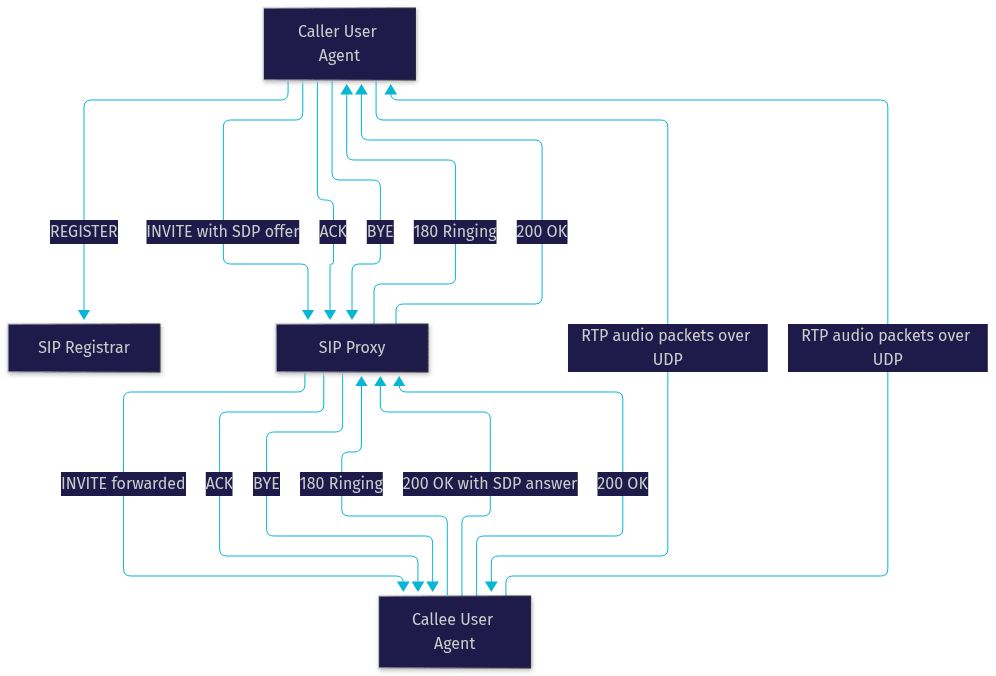
A complete SIP and RTP call follows a predictable sequence. The caller sends a REGISTER to its registrar so the network knows its current address. When the caller dials, the user agent sends an INVITE containing an SDP offer toward the callee's proxy. The proxy locates the callee and forwards the INVITE. The callee's phone rings and returns a 180 Ringing provisional response. When the callee answers, it sends a 200 OK containing its SDP answer. The caller confirms with an ACK, and at that moment both endpoints begin sending RTP packets to the addresses and ports negotiated in SDP. When either party hangs up, a BYE is sent and acknowledged, and the RTP stream stops.
NAT Traversal and Media Relays
Here is where the textbook flow collides with real networks. Most endpoints sit behind NAT, and the IP address a device writes into its SDP offer is usually a private address that the other endpoint cannot reach. RTP packets then die silently at the NAT boundary, producing the classic "call connects but no audio" complaint.
The industry's answer is ICE, a framework that gathers candidate addresses using STUN to discover the public mapping and TURN as a fallback relay when direct paths fail. Modern systems, including WebRTC-based platforms like VideoSDK's real-time communication SDKs, handle this automatically, probing multiple candidate paths and falling back to a TURN relay so media flows even through strict firewalls. Traditional SIP deployments achieve the same result with SBCs (session border controllers) that anchor media at a publicly reachable address.
RTP Media Transport in Action
Once the session is up, RTP does the daily work of moving voice. The sender's encoder produces frames every 20 milliseconds or so, wraps each in an RTP header, and sends it over UDP. The receiver's jitter buffer is the unsung hero here: it deliberately holds incoming packets for a short window, typically 30 to 100 milliseconds, so that packets arriving with variable delay can still be played out in smooth, evenly spaced order. Too small a buffer and jitter causes audible gaps; too large and the buffer adds conversational lag.
Meanwhile, RTCP reports flow every few seconds in both directions. If the receiver reports 5 percent packet loss, well-engineered endpoints respond: Opus can shift to a more error-resilient encoding, bandwidth-adaptive systems reduce bitrate, and monitoring dashboards flag the call for investigation. This feedback loop is what separates a resilient real-time system from a fragile one.
Common Issues and Troubleshooting SIP and RTP Problems
Most SIP and RTP failures fall into recognizable patterns. On the signaling side, mismatched codecs in the SDP offer and answer produce silent calls. Malformed SDP, wrong port declarations, or a proxy that rewrites headers incorrectly cause calls that never connect. Authentication failures show up as 401 and 407 responses.
On the media side, one-way audio almost always means one direction's RTP is blocked, usually by a firewall dropping UDP on the negotiated ports or by a NAT traversal failure. Choppy audio points to packet loss or a jitter buffer that is too small for the network's delay variation. Clock drift between endpoints causes slow, creeping audio skew on long calls, which endpoints correct by dropping or repeating samples at the jitter buffer.
The diagnostic habit worth building: if the call never rings, investigate SIP. If it rings and connects but sounds wrong or silent, investigate RTP and the SDP that set it up.
Security Considerations for SIP and RTP
Plain SIP and RTP are readable by anyone on the path, so production systems encrypt both layers. SIP over TLS (indicated by a SIPS URI) protects signaling, including identity and SDP contents. SRTP encrypts and authenticates the RTP media itself, so captured packets reveal nothing about the conversation. For authentication, SIP supports Digest challenge-response, and modern platforms layer token-based access control on top. VideoSDK, for example, secures sessions with server-generated meeting tokens and supports end-to-end encryption for media, applying these same principles in a WebRTC context. You can read more in the VideoSDK security and authentication docs.
Definitions Glossary
SIP (Session Initiation Protocol): A text-based signaling protocol that establishes, modifies, and terminates multimedia sessions. In VideoSDK's telephony integration, SIP is the signaling layer that bridges traditional phone networks to WebRTC rooms.
RTP (Real-time Transport Protocol): The protocol that carries actual audio and video packets over UDP, using sequence numbers and timestamps so receivers can reconstruct real-time media despite packet loss and jitter.
SDP (Session Description Protocol): The format carried inside SIP messages that negotiates codecs, IP addresses, and UDP ports, forming the offer-answer handshake that connects SIP signaling to RTP media.
RTCP (RTP Control Protocol): RTP's companion protocol that periodically exchanges quality reports such as packet loss, jitter, and round-trip time so endpoints can adapt and monitor call health.
STUN/TURN: NAT traversal helpers. STUN lets an endpoint discover its public address; TURN relays media when a direct path is impossible. VideoSDK handles this automatically for WebRTC sessions.
Key Takeaways
- SIP and RTP work by separating concerns: SIP handles signaling (finding the other party and negotiating session parameters), while RTP carries the actual real-time media over UDP.
- SDP inside the SIP INVITE and 200 OK is the glue, letting endpoints agree on codecs, addresses, and ports before any media flows.
- RTP's sequence numbers, timestamps, and payload types, combined with a jitter buffer and RTCP feedback, are what make conversation-quality audio possible on unreliable packet networks.
- NAT traversal is the number one real-world failure point, solved by STUN and TURN in modern WebRTC systems and by session border controllers in traditional SIP deployments.
- VideoSDK applies this same architecture in its WebRTC rooms and built-in SIP telephony integration, so developers get production-grade signaling and media transport without managing the protocol plumbing themselves.
Conclusion
Understanding how SIP and RTP work comes down to one mental model: signaling and media are separate planes. SIP, carrying SDP, sets up the conversation; RTP, monitored by RTCP, carries it. When you can trace a call from REGISTER through INVITE, 200 OK, and the first RTP packet, most VoIP failures become diagnosable in minutes instead of hours.
If you are building voice or video features, you do not have to implement this stack from scratch. VideoSDK's video and audio calling SDKs handle signaling, media transport, NAT traversal, and encryption across ten-plus platforms, and the telephony docs show how to bridge SIP trunk providers like Twilio and Telnyx into your rooms. Start free at app.videosdk.live and explore the code samples.
What are you building with SIP, RTP, or WebRTC? Drop a comment, I'd love to hear what kind of voice or telephony use case you are working on.
Free $20 Balance for AI Voice Agents & Video Calls
FAQ