


RTMP live streaming on Android involves capturing camera and microphone input, encoding it with hardware-accelerated codecs like H.264 through Android's MediaCodec API, and transmitting the encoded stream over a TCP-based RTMP connection to a media server. VideoSDK offers an Android SDK with RTMP output support, letting developers broadcast to YouTube, Twitch, and custom RTMP endpoints without managing the transport layer manually. This guide covers the full pipeline from capture to production-ready streaming.
Building a reliable RTMP live stream on Android is one of those tasks that sounds straightforward until you actually try it. You need to capture camera frames, encode them efficiently, packetize the output, maintain a persistent TCP connection to an RTMP server, and handle every Android lifecycle quirk along the way. Developers building mobile gaming broadcasts, webinar platforms, social streaming apps, and remote fitness classes all run into the same wall: the Android platform gives you the building blocks but not the glue.
The good news is that the ecosystem has matured significantly. Hardware encoders are faster, SDKs abstract away the painful parts, and RTMP remains the dominant ingest protocol for platforms like YouTube Live, Twitch, and Facebook Live. By the end of this guide, you will understand the full RTMP streaming pipeline on Android, how to choose between native implementation and third-party SDKs, and how to optimize for performance, security, and reliability in production.
What Is RTMP Live Stream Android?
RTMP live stream Android refers to the process of broadcasting real-time video and audio from an Android device to a remote media server using the Real-Time Messaging Protocol. RTMP was originally developed by Macromedia (later Adobe) for flash-based video delivery, but it has survived as the industry standard ingest protocol because of its low latency, wide server support, and simple packet structure.
RTMP works by establishing a persistent TCP connection to a streaming server, performing a handshake, and then sending chunked audio and video messages over that connection. On Android, this means your app captures raw media from the camera and microphone, encodes it into a compressed format like H.264 or AAC, and pushes those encoded frames to an RTMP endpoint URL.
Compared to HLS (HTTP Live Streaming), RTMP offers significantly lower latency for the ingest side, typically under three seconds end-to-end, while HLS is better suited for distribution to large audiences with higher latency tolerance. Compared to SRT (Secure Reliable Transport), RTMP is more widely supported by destination platforms but lacks built-in packet loss recovery, making SRT a better choice for unreliable networks. For most Android broadcasting scenarios targeting YouTube, Twitch, or custom media servers, RTMP remains the practical default.
VideoSDK provides RTMP output capabilities through its Android SDK, allowing developers to stream live sessions to external RTMP destinations while maintaining sub-second latency for interactive participants.
Core Components of an Android RTMP Pipeline
Every RTMP live stream on Android passes through three logical stages: media capture, encoding, and network transport. Understanding each stage helps you diagnose problems and choose the right SDK or native approach.
Camera and Audio Capture
The capture stage begins with Android's Camera2 API (or CameraX for a simpler wrapper), which provides access to raw video frames from the device camera sensor. Camera2 gives you fine-grained control over resolution, frame rate, focus, and exposure, but it requires careful surface management. For audio, Android's MediaRecorder or AudioRecord APIs capture microphone input as raw PCM samples.
A common mistake is capturing at a higher resolution than the encoder can sustain. If your encoder targets 1080p at 30fps but the device thermal-throttles after two minutes, the stream degrades. Matching capture resolution to your encoding target from the start prevents this mismatch.
Encoding with MediaCodec
Android's MediaCodec API is the backbone of hardware-accelerated video encoding on the platform. It provides access to the device's hardware H.264 (AVC) and H.265 (HEVC) encoders, which are dramatically faster and more power-efficient than software encoding.
H.264 remains the safest choice for RTMP streaming because nearly every RTMP server and player supports it. H.265 offers better compression efficiency (roughly 30 to 50 percent bitrate savings at equivalent quality), but server-side support is less universal. For audio, AAC is the standard codec paired with RTMP.
Bitrate selection depends on resolution and frame rate. For 720p at 30fps, a bitrate of 2,500 to 4,000 Kbps is typical. For 1080p at 30fps, 4,500 to 6,000 Kbps is common. Setting the bitrate too high for the available upload bandwidth causes frame drops and buffering, while setting it too low produces visible compression artifacts.
Network Transport
RTMP operates over TCP, which means the protocol guarantees ordered delivery but introduces head-of-line blocking. The connection begins with a handshake phase where the client and server exchange fixed-size protocol messages, followed by an authentication and stream-publishing sequence.
Because RTMP runs over TCP, network jitter and packet loss can cause latency spikes. For production apps, using RTMPS (RTMP over TLS) adds encryption and helps traverse certain firewall configurations. The trade-off is slightly higher CPU usage from TLS overhead, though on modern Android devices this is negligible.
Choosing the Right Android Streaming SDK
You have two main paths for implementing RTMP streaming on Android: build the pipeline natively using MediaCodec and a custom or open-source RTMP client, or use a third-party SDK that abstracts the entire pipeline.
Native implementation gives you maximum control and no licensing dependencies, but it requires deep knowledge of MediaCodec quirks, RTMP packetization, and Android lifecycle management. Open-source libraries like StreamPack and StreamCaster provide RTMP client implementations that you can integrate with your own MediaCodec encoder, reducing the transport-layer burden while keeping encoding under your control.
Third-party SDKs handle the full pipeline from capture to transport. When evaluating SDKs, consider these criteria: codec support (H.264 and H.265), adaptive bitrate switching, background service support for uninterrupted streaming, open-source versus proprietary licensing, and whether the SDK handles reconnection automatically.
The following diagram illustrates the core pipeline that any Android RTMP solution must implement, whether native or SDK-based:
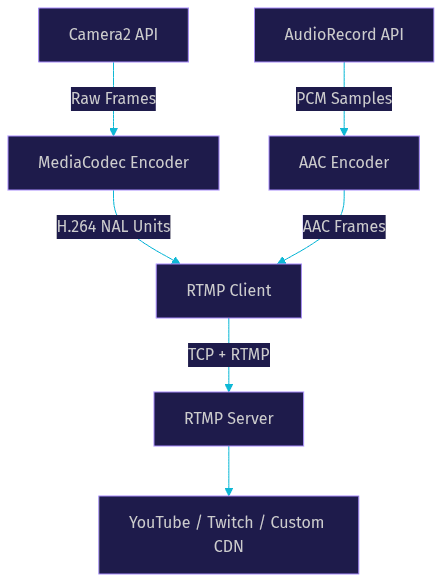
VideoSDK's Android SDK fits into this pipeline by managing all three stages for you. It handles camera capture, hardware encoding, and RTMP output to external destinations, while also providing interactive live streaming capabilities for scenarios where viewers need to participate in real time.
Setting Up a Basic RTMP Live Stream
Building an RTMP live stream on Android involves six logical steps. Each step has specific pitfalls that catch developers off guard, so understanding the intent and expected behavior of each stage is critical.
Step 1: Prepare Permissions
Your Android manifest must declare camera, microphone, and internet permissions. Starting with Android 6.0, camera and microphone permissions are runtime permissions, meaning your app must request them while the user is actively using the app. If the user denies any of these permissions, the stream cannot start. Always implement a permission rationale flow that explains why each permission is needed before requesting it, and handle the denial case gracefully with a clear message.
Step 2: Initialize Camera
Use Camera2 or CameraX to open the camera and configure it for your target resolution and frame rate. The camera output must be directed to a surface that the MediaCodec encoder can read from. This surface-based pipeline is efficient because frames pass through GPU memory without being copied to the CPU. The key decision here is selecting a camera sensor (front or back) and a capture template (preview or record) that matches your streaming use case.
Step 3: Configure Encoder
Create a MediaCodec encoder instance for H.264 video and another for AAC audio. Configure the video encoder with your target bitrate, frame rate, resolution, and key frame interval (typically two seconds). The key frame interval, also called the intra-frame period, determines how often the encoder produces a full frame that the RTMP server can use as a random access point. Set the audio encoder's sample rate to 44.1kHz and the bitrate to 128 Kbps for standard quality.
Step 4: Build the RTMP URL
The RTMP URL consists of a scheme, host, application path, and stream key. For YouTube Live, this looks like a standard RTMP endpoint with a unique stream key. For custom servers, the URL follows the same structure. Never hard-code the stream key in your app source. Instead, retrieve it from a secure backend service at runtime. If you are using RTMPS, the URL scheme changes to indicate TLS encryption.
Step 5: Start Streaming
Once the encoder produces output buffers, feed them into the RTMP client, which packetizes them into RTMP messages and sends them over the TCP connection. The RTMP handshake must complete before any media data is sent. After the handshake, the client sends a publish command to the server, and only then does media transmission begin. Monitor the connection state throughout this process and surface errors to the user if the handshake or publish command fails.
Step 6: Handle Lifecycle Events
Android's activity lifecycle is the most common source of streaming failures. When the user rotates the device, switches apps, or receives a call, the activity may be paused or destroyed. Your streaming logic must run in a foreground service that survives these transitions. The following diagram shows the recommended lifecycle flow:
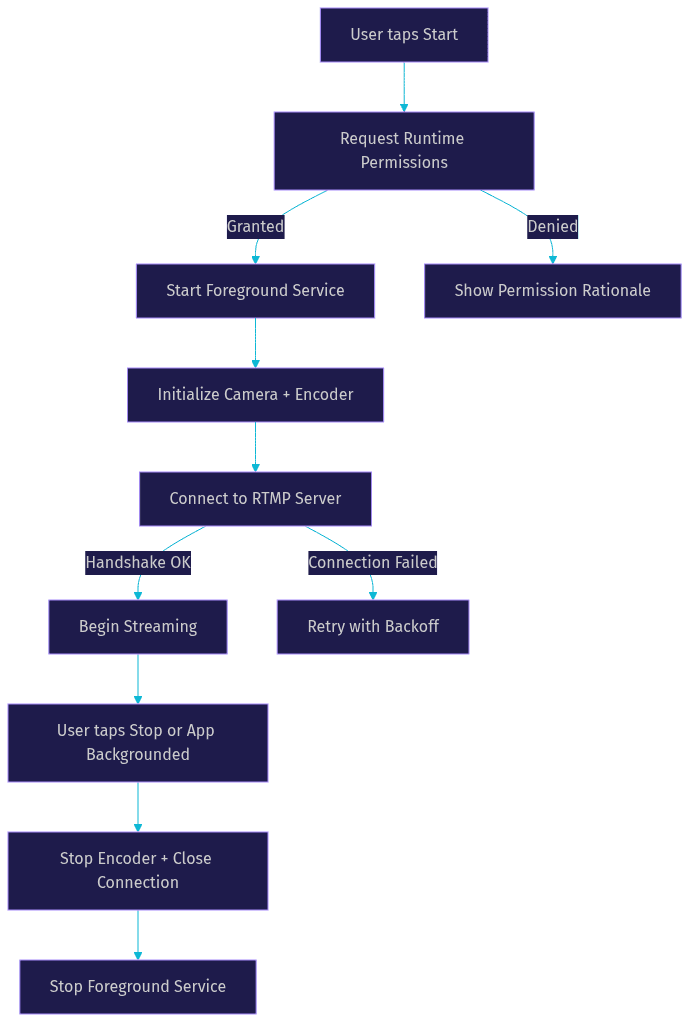
A foreground service with a persistent notification keeps the stream alive when the user backgrounds the app. Without this, Android may kill your process within seconds of backgrounding, cutting the stream abruptly.
Optimizing Performance and Reliability
Streaming video from a mobile device pushes the hardware to its limits. Thermal throttling, network fluctuations, and battery drain are real problems that affect stream quality and user experience. Here are the key optimization areas for production RTMP streaming on Android.
Adaptive bitrate streaming is the single most impactful optimization. By monitoring available upload bandwidth and device temperature, your app can dynamically adjust the encoder bitrate and resolution. When bandwidth drops, reducing the bitrate prevents frame accumulation and connection drops. When conditions improve, increasing the bitrate restores quality. This requires a feedback loop between network monitoring and the MediaCodec encoder's runtime configuration.
Frame rate throttling reduces CPU and thermal load. If the device begins to overheat, dropping from 30fps to 24fps or even 15fps can extend streaming time significantly while maintaining acceptable quality for most viewers.
Background service management ensures the stream survives app backgrounding. Android 14 and later enforce strict foreground service requirements, so your service must declare the correct service type and show a persistent notification.
Reconnection strategy is critical for mobile networks. Implement exponential backoff with jitter to avoid thundering herd problems when many clients reconnect simultaneously. Cache encoded frames during disconnection and flush them on reconnect if the server supports it, or drop them to maintain real-time latency.
Network monitoring using Android's ConnectivityManager lets your app detect network type changes (WiFi to cellular) and adjust streaming parameters proactively rather than reactively.
Here are the top five performance tips for Android RTMP streaming:
- Use hardware-encoded H.264 through MediaCodec instead of software encoding to reduce CPU usage by up to 80 percent
- Implement adaptive bitrate that responds to both bandwidth changes and device temperature
- Run all streaming logic in a foreground service to survive app lifecycle transitions
- Cache the last two seconds of encoded frames for reconnection scenarios to avoid gaps in the stream
- Use RTMPS for all production streams to encrypt the transport layer and protect stream keys
Security and Privacy Considerations
RTMP streams carry your video content and authentication credentials over the network, making security a non-negotiable aspect of any production streaming app.
RTMPS (RTMP over TLS) encrypts the entire RTMP session, including the handshake, publish command, and media payload. This prevents man-in-the-middle attacks from intercepting your stream key or injecting unauthorized content. Most modern RTMP servers, including nginx-rtmp with TLS configuration and cloud services like YouTube Live, support RTMPS endpoints.
Token-based URL signing adds an additional layer of security by generating a time-limited, signed URL on your backend server. The signed URL includes an expiration timestamp and a cryptographic signature that the RTMP server validates before allowing the publish command. This prevents unauthorized users from reusing a captured stream URL after the token expires.
Avoid hard-coded credentials in your app at all costs. Stream keys and RTMP server URLs should be fetched from a secure backend at runtime. Android's APK contents are easily inspected, and hard-coded keys will be extracted. Store credentials in Android Keystore if local persistence is needed, and use obfuscation tools like ProGuard or R8 to make static analysis harder.
Android's network security configuration lets you enforce TLS on all network connections from your app. By configuring the network security config file, you can block cleartext traffic to specific domains or globally, ensuring that even if a developer accidentally uses an RTMP URL instead of RTMPS, the connection is blocked.
Testing and Debugging Your RTMP Stream
Testing an RTMP live stream requires both local and remote infrastructure. Start with a local RTMP server on your development machine so you can iterate quickly without depending on external services.
nginx-rtmp is the most popular local RTMP server for development. Running on your development machine, it accepts RTMP connections and can save streams to disk for playback analysis. Red5 is another option that provides a full media server with additional protocol support. Both let you verify that your Android app's RTMP handshake, publish command, and media transmission work correctly before testing against production endpoints.
For real-world validation, use YouTube Live's RTMP ingest as a test destination. YouTube provides a stable RTMP endpoint and a dashboard that shows incoming bitrate, frame rate, and health indicators. This gives you a production-equivalent test without building your own CDN.
Wireshark is invaluable for debugging RTMP connection issues. By filtering for TCP traffic on the RTMP port (typically 1935), you can inspect the handshake, observe chunk sizes, and identify where the connection fails. Look for rejected publish commands, unexpected connection closes, or TCP retransmissions that indicate network problems.
Android Studio's CPU Profiler helps you identify encoding bottlenecks. If your MediaCodec encoder is dropping frames, the profiler will show high CPU usage on the encoding thread. If your RTMP client is blocking, you will see high network thread activity. Use the profiler to confirm that your encoding and network operations run on separate threads and that neither blocks the main UI thread.
A common debugging scenario: the stream works on WiFi but fails on cellular. This usually points to a carrier blocking port 1935 (the default RTMP port). Switching to RTMPS on port 443, which carriers rarely block, typically resolves this.
Real-World Use Cases
RTMP live streaming on Android powers a wide range of applications across industries.
Mobile gaming live streams are the most visible use case. Apps like gaming broadcast platforms capture the device screen alongside the front camera, encode both streams, and send them to platforms like Twitch or YouTube Gaming. The challenge here is encoding two video streams simultaneously while maintaining game performance, which requires careful thread management and hardware encoder allocation.
Remote fitness classes use RTMP to broadcast instructor video to participants in real time. The low latency of RTMP ingest ensures that participants see instructions with minimal delay, which is critical for synchronized workouts. These apps often pair RTMP output with interactive live streaming features so participants can ask questions or join the session verbally.
Corporate town halls use Android devices as mobile broadcast cameras, streaming to internal media servers via RTMP. This is popular for remote-first companies that need to broadcast from multiple locations without dedicated hardware encoders.
IoT camera feeds from Android-based edge devices use RTMP to push surveillance or monitoring video to centralized servers. These deployments prioritize reliability over latency, using reconnection strategies and frame caching to handle intermittent network connectivity.
Definitions Glossary
RTMP (Real-Time Messaging Protocol): A TCP-based protocol for streaming audio, video, and data between a client and a server, originally developed by Macromedia and now the standard ingest protocol for live streaming platforms.
MediaCodec: Android's hardware-accelerated media encoding and decoding API, providing access to the device's H.264, H.265, and AAC codecs for efficient video and audio processing.
RTMPS: RTMP over TLS encryption, which secures the entire streaming session including the handshake, authentication, and media payload transmission.
Adaptive Bitrate Streaming: A technique that dynamically adjusts video quality based on real-time network conditions and device performance to maintain a stable stream without buffering.
Foreground Service: An Android service that continues running when the user backgrounds the app, displaying a persistent notification and preventing the system from killing the process during active streaming.
Key Takeaways
- RTMP remains the dominant ingest protocol for Android live streaming, offering low latency and broad compatibility with platforms like YouTube, Twitch, and custom media servers.
- The Android RTMP pipeline consists of three stages: camera and audio capture, hardware encoding through MediaCodec, and TCP-based RTMP transport to a remote server.
- Choosing between native implementation and a third-party SDK depends on your team's expertise, with SDKs like VideoSDK's Android SDK handling the full pipeline including RTMP output to external destinations.
- Production streaming requires adaptive bitrate, foreground service management, reconnection strategies, and RTMPS encryption to handle mobile network conditions and security requirements.
- Testing with local RTMP servers like nginx-rtmp and debugging with Wireshark and Android Profiler catches issues before they reach production endpoints.
Conclusion
Building a reliable RTMP live stream on Android requires understanding the full pipeline from camera capture through hardware encoding to network transport. The platform provides powerful primitives like MediaCodec and Camera2, but assembling them into a production-ready streaming app demands careful attention to lifecycle management, network reliability, and security. Whether you choose a native implementation with open-source RTMP libraries or a full-featured SDK, the key decisions revolve around codec support, adaptive bitrate, background service handling, and RTMPS encryption. VideoSDK's Android SDK provides RTMP output alongside interactive live streaming, letting you broadcast to external platforms while maintaining real-time participant interaction. You can explore the full capabilities and code samples in the VideoSDK documentation, or sign up at app.videosdk.live/login to start building. What are you building with VideoSDK? Drop a comment below, I would love to hear what kind of Android streaming use case you are working on.
Free $20 Balance for AI Voice Agents & Video Calls
FAQ