Introduction to Node Media Server
Node Media Server (NMS) is an open-source, high-performance media server built on Node.js, designed for real-time video and audio streaming. As live streaming becomes increasingly vital for applications like gaming, e-learning, events, and surveillance in 2025, low-latency streaming is more important than ever. NMS addresses these needs by offering a modern, scalable, and easy-to-configure solution for developers who want to deliver RTMP, HLS, DASH, and HTTP-FLV streams efficiently.
Unlike legacy servers, NMS is lightweight, cross-platform, and can be easily integrated into any Node.js-based workflow. Whether you need to build a custom streaming platform, integrate with popular tools like OBS or FFmpeg, or serve video-on-demand (VOD) content, Node Media Server provides the flexibility and performance required for today’s streaming demands. Its modularity and active development make it an excellent choice for rapid prototyping and large-scale deployments alike.
Node Media Server Features & Capabilities
Node Media Server stands out due to its broad protocol and codec support, cross-platform compatibility, and extensibility. For developers looking to build interactive live streaming experiences, integrating a
Live Streaming API SDK
can further enhance real-time capabilities and scalability:- Protocols:
- RTMP/RTMPS (Live push and playback)
- HTTP-FLV, HTTP2-FLV (Low-latency live streaming)
- HLS (HTTP Live Streaming for adaptive bitrate)
- DASH (Dynamic Adaptive Streaming over HTTP)
- Codecs:
- Video: H.264 (AVC), H.265 (HEVC), VP9, AV1
- Audio: AAC, G.711
- Platform Compatibility:
- Windows, Linux, Unix, and Docker
- Extensibility:
- Event hooks, authentication, recording, static file serving
Below is a configuration snippet showcasing these features:
1const config = {
2  rtmp: {
3    port: 1935,
4    chunk_size: 60000,
5    gop_cache: true,
6    ping: 60,
7    ping_timeout: 30
8  },
9  http: {
10    port: 8000,
11    allow_origin: "*"
12  },
13  https: {
14    port: 8443,
15    key: './privatekey.pem',
16    cert: './certificate.pem'
17  },
18  trans: {
19    ffmpeg: '/usr/bin/ffmpeg',
20    tasks: [
21      {
22        app: 'live',
23        hls: true,
24        hlsFlags: '[hls_time=2:hls_list_size=3:hls_flags=delete_segments]',
25        dash: true,
26        dashFlags: '[f=dash:window_size=3:extra_window_size=5]'
27      }
28    ]
29  }
30};
31
Installation and Setup of Node Media Server
Prerequisites
Before you begin, ensure you have Node.js (v14+), npm, and FFmpeg installed on your system. For live streaming, OBS Studio or a similar RTMP encoder is recommended. If your project also requires real-time communication features, consider integrating a
Video Calling API
for seamless video and audio interactions alongside your streams.Install via npm or Docker
You can install Node Media Server using npm or Docker for flexibility in deployment.
Install with npm:
1npm install node-media-server
2
Install with Docker:
1docker pull illuspas/node-media-server:latest
2docker run --name nms -p 1935:1935 -p 8000:8000 -p 8443:8443 illuspas/node-media-server
3
This will launch NMS with default ports for RTMP, HTTP, and HTTPS exposed.
Basic Server Configuration
Set up your configuration in your Node.js project. If you want to quickly add video and audio calling features to your JavaScript applications, check out the
javascript video and audio calling sdk
for a streamlined integration process:1const NodeMediaServer = require('node-media-server');
2const config = {
3 rtmp: { port: 1935, chunk_size: 60000, gop_cache: true },
4 http: { port: 8000, allow_origin: "*" },
5 trans: { ffmpeg: '/usr/bin/ffmpeg', tasks: [{ app: 'live', hls: true, dash: true }] }
6};
7const nms = new NodeMediaServer(config);
8nms.run();
9Running and Testing the Server
Start your server and verify by pushing a test stream:
1node your-nms-script.js
2
Use OBS or FFmpeg to push a stream and visit
http://localhost:8000/live/STREAM_NAME.flv to verify playback.Streaming with Node Media Server
Pushing Streams
You can push live streams using both FFmpeg and OBS Studio. Here’s how:
Using FFmpeg:
1ffmpeg -re -i input.mp4 -c:v libx264 -c:a aac -f flv rtmp://localhost/live/stream
2
Using OBS Studio:
- Set the streaming server to
rtmp://localhost/live - Set the stream key to
stream - Start streaming
NMS will ingest the stream and make it available via multiple protocols for playback. For developers targeting mobile and cross-platform apps, exploring
webrtc android
andflutter webrtc
solutions can help you extend live streaming and real-time communication to Android and Flutter environments.Playing Streams
Node Media Server supports multiple playback protocols. Example URLs:
- RTMP:
rtmp://localhost/live/stream
- HTTP-FLV:
http://localhost:8000/live/stream.flv
- HLS:
http://localhost:8000/live/stream/index.m3u8
- DASH:
http://localhost:8000/live/stream/index.mpd
You can embed these URLs in compatible players for seamless playback. If you’re building a React-based application, the
react video call
guide provides valuable insights on integrating video calling and streaming within your React projects.Integrating with NodePlayer.js
NodePlayer.js enables browser-based playback for FLV/HLS streams. Example integration:
1<script src="https://cdn.jsdelivr.net/npm/nodeplayer.js/dist/nodeplayer.min.js"></script>
2<video id="player" controls></video>
3<script>
4  var player = new NodePlayer('player', {
5    source: 'http://localhost:8000/live/stream.flv',
6    type: 'flv'
7  });
8  player.play();
9</script>
10
With minimal code, you can achieve low-latency browser playback using NodePlayer.js and Node Media Server. For projects that require a simple way to
embed video calling sdk
, prebuilt solutions can drastically reduce development time and complexity.Advanced Node Media Server Configuration
Authentication & Notification
Enable stream authentication to protect your live streams. Example configuration:
1const config = {
2  auth: {
3    api: true,
4    api_user: 'admin',
5    api_pass: 'strongpassword',
6    play: true,
7    publish: true,
8    secret: 'supersecret'
9  }
10};
11
You can also set up notification hooks for events like publish, play, done, etc. Additionally, for audio-centric applications such as live podcasts or group discussions, integrating a
Voice SDK
can provide robust live audio room capabilities.Static File Server & Video Recording
Serve static files (like VOD assets) or record live streams automatically:
1const config = {
2  http: {
3    port: 8000,
4    mediaroot: './media',
5    webroot: './www',
6    allow_origin: "*"
7  },
8  record: {
9    app: 'live',
10    enable: true,
11    path: './media',
12    interval: 3600 // split every hour
13  }
14};
15
Event Hooks & Logging
Node Media Server enables you to hook into server events for custom logic and adjust logging levels:
1nms.on('prePublish', (id, StreamPath, args) => {
2  console.log(`[NodeEvent on prePublish] id=${id} StreamPath=${StreamPath}`);
3});
4nms.setLogLevel('info'); // options: 'fatal', 'error', 'warn', 'info', 'debug'
5
Node Media Server Performance & Scalability
To achieve low-latency and high-performance streaming in 2025, follow these best practices:
- Low-Latency Tips: Use HTTP-FLV or WebRTC for lowest latency, optimize chunk sizes, and minimize network hops. For more advanced interactive streaming, integrating a
Live Streaming API SDK
can help you deliver real-time experiences at scale. - Resource Management: Monitor CPU and RAM usage, scale horizontally using Docker or Kubernetes, and use cloud-native storage for VOD.
- Docker & Cloud: Run NMS in stateless Docker containers or deploy in cloud environments for auto-scaling.
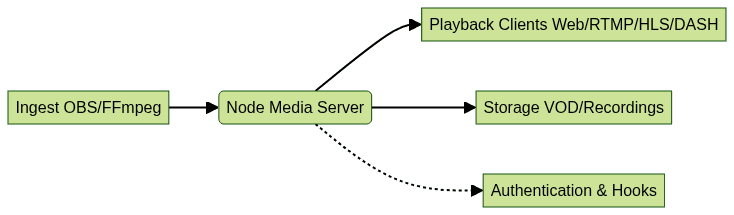
Basic Deployment Architecture
Node Media Server Use Cases & Integrations
Node Media Server powers a variety of applications:
- Live Events: Broadcast concerts, conferences, and webinars.
- Education: Virtual classrooms, online workshops.
- Surveillance: Low-latency streaming from IP cameras.
- Gaming: Esports, live tournaments.
- Video-On-Demand: Serve recorded content with adaptive bitrate.
Integrate with tools like FFmpeg for transcoding, OBS for ingest, and NodePlayer.js for browser playback to build complete streaming pipelines.
Node Media Server vs. Alternatives
Compared to Nginx RTMP, Wowza, and Red5, Node Media Server offers a modern, Node.js-native approach with robust protocol and codec support. Nginx RTMP is lightweight but lacks HLS/DASH out-of-the-box. Wowza and Red5 are enterprise-grade but can be costly and complex. NMS excels at rapid development, extensibility, and is ideal for Node.js-centric teams.
Conclusion & Next Steps
Node Media Server is a powerful, flexible solution for live and on-demand streaming in 2025. Explore the
official documentation
and experiment with advanced features to unlock the full potential of your streaming projects. If you’re ready to take your streaming solution to the next level,Try it for free
and start building with cutting-edge APIs and SDKs today.FAQ