


Medooze WebRTC is a high-performance, open-source media server built on a C++ core with Node.js and Go bindings, designed for developers who need fine-grained control over real-time video and audio processing. It supports SFU architecture, VP9 SVC, simulcast, and RTP transport-wide congestion control. For teams that prefer a managed solution, VideoSDK offers a hosted WebRTC platform with multi-platform SDKs covering the same capabilities without infrastructure overhead.
Real-time media servers sit at the core of every modern video application, from telemedicine consultations to live shopping broadcasts. In 2026, the demand for sub-second latency, adaptive bitrate streaming, and scalable conferencing has pushed developers to evaluate media server options more carefully than ever. Medooze WebRTC has emerged as a serious contender for teams that need a customizable, high-performance media server with deep control over media pipelines.
This article walks through what Medooze WebRTC is, how its architecture works, when it makes sense to choose it, and how it compares to other popular WebRTC media servers. You will also find deployment guidance, integration patterns, and production best practices drawn from real-world implementations.
What is Medooze WebRTC?
Medooze WebRTC is defined as a high-performance, open-source media server that implements the WebRTC stack on the server side, enabling selective forwarding, mixing, recording, and processing of real-time audio and video streams. It is built on a C++ core for maximum throughput and exposes its functionality through Node.js and Go bindings, giving developers flexibility in how they integrate it with their application logic.
Medooze works by acting as a Selective Forwarding Unit (SFU) that receives media streams from publishers and selectively forwards them to subscribers based on their bandwidth, codec preferences, and device capabilities. Unlike a full MCU that decodes and re-encodes every stream, an SFU forwards RTP packets directly, which dramatically reduces CPU usage and latency at scale.
Key capabilities include VP9 Scalable Video Coding (SVC), simulcast support, RTP transport-wide congestion control, MP4 multitrack recording, and PERC double encryption for secure media delivery. The server also integrates with Perfetto for system-wide tracing, making it one of the few media servers with built-in observability tooling.
For developers who want these capabilities without managing server infrastructure, VideoSDK's video calling API provides a hosted alternative with SDKs for React, Flutter, Android, iOS, and more.
Core Features Explained
Medooze WebRTC distinguishes itself through a set of media-processing capabilities that go beyond basic packet forwarding. Each feature addresses a specific challenge that developers face when building production-grade real-time video applications.
VP9 SVC and Simulcast Support
Scalable Video Coding allows a single video stream to encode multiple layers of quality, from a low-resolution base layer to a full-resolution enhancement layer. The SFU then forwards only the layers each subscriber can handle based on their available bandwidth. This means a participant on a 4G connection receives the base layer while a participant on fiber receives all layers, all from a single encode on the publisher side.
Simulcast works similarly but uses separate encodings at different resolutions rather than layered encoding. Medooze supports both approaches, giving developers flexibility depending on their codec choice and client capabilities. VP9 SVC is particularly valuable for large conferences where bandwidth heterogeneity is high, because it avoids the CPU cost of multiple simulcast encodings.
RTP Transport-Wide Congestion Control and Bitrate Estimation
Low-latency streaming depends on accurate bandwidth estimation and rapid congestion response. Medooze implements RTP transport-wide congestion control, a mechanism that uses transport-wide sequence numbers and feedback messages to estimate available bandwidth across the entire RTP flow rather than per-SSRC.
This approach gives the server a holistic view of network conditions, allowing it to adjust forwarding bitrates dynamically. When congestion is detected, the SFU can drop enhancement layers or switch to a lower simulcast encoding within milliseconds, preventing packet buildup and maintaining sub-second end-to-end latency. According to the WebRTC specification maintained by the W3C, transport-wide congestion control is the recommended approach for multi-stream scenarios.
Recording and Playback (MP4 Multitrack)
Medooze supports MP4 multitrack recording, which captures all participant audio and video tracks into a single container file while keeping them as separate tracks for post-production flexibility. This is distinct from composite recording, where all participants are mixed into a single video layout.
Multitrack recording is essential for applications like telemedicine, where legal requirements may mandate that each participant's feed be preserved independently. It also enables post-call editing, transcription, and analytics without the quality loss associated with decoding and re-encoding a composite recording.
Security Features (PERC Double Encryption and ICE-Lite)
Medooze implements PERC (Privacy-Enhanced RTP Conferencing) double encryption, which uses two layers of SRTP encryption to separate end-to-end media encryption from hop-by-hop encryption. This means the media server can forward packets without decrypting the end-to-end payload, providing a stronger security posture than standard SRTP alone.
ICE-Lite support reduces the complexity of NAT traversal for server-side deployments. By operating as an ICE-Lite endpoint, the media server responds to connectivity checks without initiating them, which simplifies firewall configuration and reduces signaling overhead. For production deployments, this pairs well with a dedicated TURN server for clients behind symmetric NATs.
When to Choose Medooze WebRTC
Medooze WebRTC shines in scenarios where you need deep control over media processing, high-scale conferencing with hundreds of participants, or custom media pipelines that go beyond what hosted services offer. If your team has C++ or Node.js expertise and needs to run infrastructure on-premise for compliance, latency, or cost reasons, Medooze gives you the building blocks to construct a media server tailored to your exact requirements.
It is also a strong choice when you need built-in VP9 SVC support, Perfetto-based observability, or PERC double encryption. These are features that not all open-source media servers provide out of the box.
However, Medooze WebRTC is not the right fit for every team. If your priority is speed-to-market and you do not want to manage server infrastructure, a hosted platform like VideoSDK may be a better fit. VideoSDK provides Prebuilt UI components, multi-platform SDKs, and managed scaling without requiring you to touch a single server configuration. For teams evaluating build-versus-buy decisions, the tradeoff is clear: Medooze gives you control, while a hosted service gives you velocity.
Architecture and Deployment Options
Deploying Medooze WebRTC requires careful planning around network topology, scaling strategy, and observability. The server can be installed on-premise from source, run as a Docker container, or deployed using pre-compiled binaries for supported platforms.
Installation Methods
Building from source gives you the most control and access to the latest features, but it requires a C++ toolchain and familiarity with native compilation. Docker containers simplify deployment by bundling dependencies, and they work well in orchestrated environments like Kubernetes. Pre-compiled binaries offer the fastest path to a running server but may lag behind the latest source commits.
Scaling Strategies
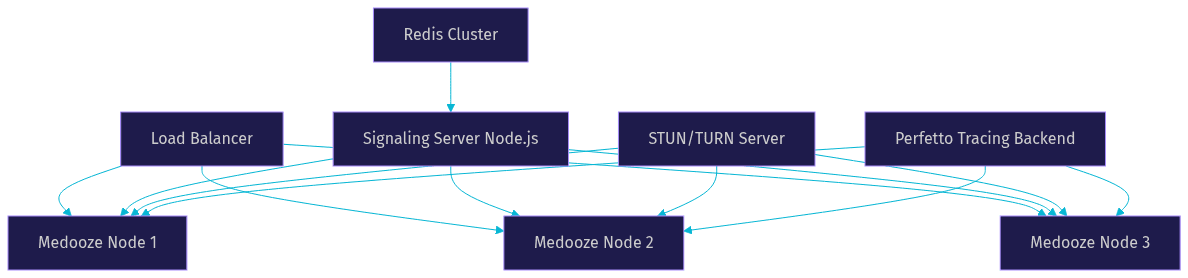
A single Medooze instance can handle a substantial number of participants, but production deployments typically use multiple nodes behind a load balancer. The signaling server assigns participants to media server nodes based on room affinity, CPU load, or geographic proximity. Horizontal scaling works well for large-scale webinars and live shopping events where audience sizes can spike unexpectedly.
Monitoring with Perfetto
Medooze integrates with Perfetto, an open-source tracing platform originally developed at Google. Perfetto captures system-wide traces that include media processing times, RTP packet flows, and congestion control decisions. This level of observability is rare among open-source media servers and is invaluable for diagnosing latency issues, packet loss, and CPU bottlenecks in production.
Basic health checks should monitor CPU utilization, memory consumption, active participant count, and RTP packet loss rates. Setting up alerts on these metrics ensures that scaling decisions can be made proactively rather than reactively.
Integrating Medooze with Your Application
Integrating Medooze WebRTC into your application involves three primary phases: signaling, transport creation, and media handling. The Medooze Media Server Client library provides the interface through which your application communicates with the server.
Signaling and Transport Creation
The signaling layer handles SDP exchange and ICE candidate negotiation between clients and the media server. Your application typically runs a signaling server in Node.js that brokers these exchanges. Once signaling is complete, the client and server establish a DTLS-SRTP transport over UDP or TCP, depending on network conditions.
Transport creation on the server side involves configuring the ICE settings, selecting codecs, and setting up congestion control parameters. The server then publishes available media tracks to subscribers through the signaling channel.
Media Handling and Reconnection
Once transports are established, media flows as RTP packets between clients and the server. The SFU forwards packets based on subscriber subscriptions, bandwidth estimates, and layer preferences. Handling reconnections gracefully is critical: if a client loses connectivity, the server should retain the participant's state for a configurable window so that reconnection does not require a full session restart.
Token security is another important consideration. Authentication tokens should be generated server-side and scoped to specific rooms and roles. Never expose server credentials to the client. For a reference implementation of token-based authentication, VideoSDK's authentication guide demonstrates the pattern that production WebRTC applications should follow.
Common Pitfalls
Native compilation is the most frequent stumbling block for new Medooze users. The C++ core depends on specific library versions, and mismatches can cause build failures that are difficult to diagnose. Using the Docker image for initial development sidesteps this issue while you learn the system.
Version mismatches between the server and the client library are another common problem. Always ensure that the client library version matches the server version, as protocol changes between versions can cause silent failures in media delivery.
Comparing Medooze to Other WebRTC Media Servers
The open-source WebRTC media server landscape includes several mature options, each with different strengths. Here is how Medooze compares to Janus, Mediasoup, and LiveKit across key dimensions.
| Feature | Medooze | Janus | Mediasoup | LiveKit |
|---|---|---|---|---|
| Core Language | C++ | C | C++ (Node.js) | Go |
| App Bindings | Node.js, Go | C, Lua, JS | Node.js | JS, Go, Rust |
| SFU Architecture | Yes | Yes | Yes | Yes |
| VP9 SVC | Built-in | Plugin-based | Limited | Yes |
| Simulcast | Yes | Yes | Yes | Yes |
| Recording | MP4 multitrack | Per-plugin | Via extras | Built-in |
| Congestion Control | Transport-wide | Per-SSRC | Transport-wide | Transport-wide |
| Observability | Perfetto tracing | Limited | Limited | Built-in metrics |
| Licensing | MIT | GPL-3.0 | ISC | Apache-2.0 |
| Best For | High-scale, custom pipelines | Plugin flexibility | Node.js-native apps | Fast time-to-market |
Medooze's unique selling points are its C++ performance ceiling, built-in VP9 SVC support, Perfetto-based tracing, and PERC double encryption. Janus excels in plugin flexibility and has the largest community. Mediasoup is ideal for teams already invested in Node.js. LiveKit offers the fastest path to production with managed cloud options and client SDKs across multiple platforms.
For teams that want the performance of a dedicated media server without the operational burden, VideoSDK provides a hosted platform with SDKs for 10+ platforms, Prebuilt UI components, and built-in recording, transcription, and interactive live streaming.
Real-World Use Cases
Telemedicine Platform
A healthcare startup building a telemedicine video calling application needs HIPAA-compliant recording, low-latency video, and reliable connectivity across varied network conditions. Medooze's MP4 multitrack recording preserves each participant's feed independently for legal compliance, while VP9 SVC ensures that patients on mobile networks receive a usable video stream. PERC double encryption adds an extra layer of security for sensitive medical consultations.
Live Shopping Event
A retail brand running a live shopping broadcast needs to handle audience spikes from hundreds to thousands of viewers while maintaining real-time interaction between the host and shoppers. Medooze's SFU architecture scales horizontally across multiple nodes, and simulcast support ensures the host's video reaches viewers at the appropriate quality for their connection. For a managed alternative, VideoSDK's Interactive Live Streaming handles the same scenario with sub-second latency and built-in audience interaction features.
Educational Virtual Classroom
An edtech platform offering virtual classrooms with breakout rooms, screen sharing, and session recording can leverage Medooze's flexible media pipeline to route participants into smaller groups dynamically. The server's congestion control ensures stable video even when students join from low-bandwidth environments.
Best Practices and Production Tips
Secure Deployment
Place Medooze behind a firewall that only exposes the necessary UDP and TCP ports for media traffic. Use TLS for all signaling communication. If clients connect from restrictive networks, deploy a TURN server alongside Medooze to relay media when direct peer connections fail. VideoSDK's approach to security, including E2E encryption and role-based access control, is a good reference for what production-grade WebRTC security looks like.
Resource Sizing
CPU is the primary bottleneck for media servers. A single Medooze node handling 100 participants with VP9 SVC typically requires 4 to 8 CPU cores, depending on the number of active senders and the complexity of layer selection. GPU resources are only necessary if you plan to do transcoding or video composition on the server side.
Logging and Tracing
Enable Perfetto tracing in production with a rolling buffer that captures the last 30 minutes of activity. This allows you to replay system behavior when a latency spike or packet loss event is reported. Supplement tracing with structured logs that capture participant join and leave events, transport state changes, and congestion control decisions.
Community and Updates
Medooze is actively maintained on GitHub. Follow the repository for release announcements and breaking changes. The VideoSDK Discord community and WebRTC GitHub discussions are valuable resources for troubleshooting deployment issues and sharing production patterns.
Definitions Glossary
SFU (Selective Forwarding Unit): A media server architecture that receives RTP packets from publishers and selectively forwards them to subscribers without decoding or re-encoding. Medooze WebRTC operates as an SFU, which reduces CPU usage compared to MCU architectures.
VP9 SVC (Scalable Video Coding): A video encoding technique that produces multiple quality layers within a single stream, allowing the SFU to forward only the layers each subscriber can handle. Medooze supports VP9 SVC natively.
RTP Transport-Wide Congestion Control: A bandwidth estimation mechanism that uses transport-wide sequence numbers to assess network conditions across an entire RTP flow. Medooze implements this for dynamic bitrate adjustment.
PERC (Privacy-Enhanced RTP Conferencing): A double-encryption standard that separates end-to-end media encryption from hop-by-hop encryption. Medooze implements PERC to allow the SFU to forward packets without accessing the end-to-end payload.
Perfetto: An open-source tracing platform that captures system-wide performance traces. Medooze integrates with Perfetto for production-grade observability of media processing and congestion control behavior.
ICE-Lite: A simplified ICE implementation where the server responds to connectivity checks but does not initiate them. Medooze uses ICE-Lite to reduce NAT traversal complexity in server deployments.
Key Takeaways
- Medooze WebRTC is a high-performance, C++-based media server with Node.js and Go bindings, designed for developers who need deep control over real-time media processing.
- Built-in VP9 SVC, simulcast, RTP transport-wide congestion control, and MP4 multitrack recording make Medooze suitable for large-scale conferencing, telemedicine, and live shopping applications.
- Perfetto integration gives Medooze a unique observability advantage over most open-source media servers, enabling detailed tracing of media flows and congestion control decisions.
- For teams that prioritize speed-to-market over infrastructure control, hosted platforms like VideoSDK offer the same core capabilities with managed scaling, multi-platform SDKs, and Prebuilt UI components.
- Production deployments require careful attention to firewall configuration, TURN server placement, CPU sizing, and version alignment between the server and client library.
Conclusion
Medooze WebRTC stands out as a powerful, customizable media server for developers who need C++-grade performance, built-in SVC, and deep observability through Perfetto tracing. Its architecture supports high-scale conferencing, secure media delivery via PERC, and flexible deployment across on-premise, Docker, and orchestrated environments. The tradeoff is operational complexity: you are responsible for scaling, monitoring, and maintaining the server infrastructure.
If you want the capabilities of a production-grade WebRTC media server without the infrastructure burden, VideoSDK offers a hosted platform with SDKs for React, Flutter, Android, iOS, and more, plus Prebuilt UI, recording, and interactive live streaming built in. You can start free with a credit on the VideoSDK signup page. What are you building with WebRTC? Drop a comment below, I would love to hear what kind of real-time media use case you are working on.
Step 5: Implement Participant View
Participant View Overview
The participant view is a crucial component of your Medooze WebRTC application. It provides a visual representation of all participants in the session, allowing users to see who is in the meeting, their video feeds, and their status. Implementing an effective participant view enhances the user experience by making interactions more intuitive and engaging.
Key Elements to Display:
- Participant names
- Video streams
- Audio status (muted/unmuted)
- Active speaker indication
Implementation Steps
HTML Structure for Participant View
Add a section to display participants’ video streams:
HTML
1<!-- index.html (extended) -->
2<!DOCTYPE html>
3<html lang="en">
4<head>
5    <meta charset="UTF-8">
6    <meta name="viewport" content="width=device-width, initial-scale=1.0">
7    <title>Medooze WebRTC Session</title>
8    <link rel="stylesheet" href="styles.css">
9</head>
10<body>
11    <div class="join-container">
12        <!-- Existing Join Screen Code -->
13    </div>
14    <div class="controls-container" id="controls" style="display:none;">
15        <!-- Existing Controls Code -->
16    </div>
17    <div class="participants-container" id="participants" style="display:none;">
18        <!-- Participant views will be dynamically added here -->
19    </div>
20    <script src="script.js"></script>
21</body>
22</html>
CSS Styling
CSS
1/* styles.css (extended) */
2.participants-container {
3    display: flex;
4    flex-wrap: wrap;
5    gap: 10px;
6    margin-top: 20px;
7    justify-content: center;
8}
9
10.participant {
11    display: flex;
12    flex-direction: column;
13    align-items: center;
14    background-color: #fff;
15    border-radius: 10px;
16    padding: 10px;
17    box-shadow: 0 0 10px rgba(0, 0, 0, 0.1);
18}
19
20.participant video {
21    width: 150px;
22    height: 100px;
23    border-radius: 5px;
24    background-color: #000;
25}
26
27.participant .name {
28    margin-top: 5px;
29    font-size: 14px;
30    font-weight: bold;
31}
JavaScript for Rendering Participant Information
Implement JavaScript to dynamically add participant views:
JavaScript
1// script.js (extended)
2document.getElementById('join-form').addEventListener('submit', function(event) {
3    event.preventDefault();
4
5    const username = document.getElementById('username').value;
6    const room = document.getElementById('room').value;
7
8    if (username && room) {
9        // Hide join screen and show controls and participants container
10        document.querySelector('.join-container').style.display = 'none';
11        document.getElementById('controls').style.display = 'flex';
12        document.getElementById('participants').style.display = 'flex';
13
14        // Initialize WebRTC connection and other functionalities here
15        initializeWebRTC(username, room);
16    } else {
17        alert('Please enter both your name and room ID.');
18    }
19});
20
21function initializeWebRTC(username, room) {
22    // Initialize WebRTC connection
23    navigator.mediaDevices.getUserMedia({ video: true, audio: true })
24        .then(stream => {
25            // Display local video stream
26            addParticipantView(username, stream, true);
27
28            // Initialize signaling and peer connections (example)
29            const peerConnection = new RTCPeerConnection(configuration);
30            stream.getTracks().forEach(track => peerConnection.addTrack(track, stream));
31
32            // Handle remote streams (example)
33            peerConnection.ontrack = event => {
34                event.streams.forEach(stream => {
35                    addParticipantView('Remote Participant', stream, false);
36                });
37            };
38
39            // Connect to signaling server and join room logic here
40
41        }).catch(error => {
42            console.error('Error accessing media devices.', error);
43        });
44}
45
46function addParticipantView(name, stream, isLocal) {
47    const participantsContainer = document.getElementById('participants');
48    const participantDiv = document.createElement('div');
49    participantDiv.className = 'participant';
50
51    const video = document.createElement('video');
52    video.srcObject = stream;
53    video.autoplay = true;
54    if (isLocal) {
55        video.muted = true; // Mute local video to avoid feedback
56    }
57
58    const nameDiv = document.createElement('div');
59    nameDiv.className = 'name';
60    nameDiv.textContent = name;
61
62    participantDiv.appendChild(video);
63    participantDiv.appendChild(nameDiv);
64    participantsContainer.appendChild(participantDiv);
65}
Optimization
For optimizing the participant view:
- Efficient DOM Manipulation: Minimize reflows and repaints by batching DOM updates.
- Media Stream Handling: Ensure streams are efficiently managed to avoid memory leaks and performance degradation.
- Responsive Design: Use CSS media queries to ensure the participant view adapts to different screen sizes and orientations.
Example of Media Stream Handling Optimization
JavaScript
1function initializeWebRTC(username, room) {
2    const localStream = await navigator.mediaDevices.getUserMedia({ video: true, audio: true });
3    addParticipantView(username, localStream, true);
4
5    const peerConnection = new RTCPeerConnection(configuration);
6    localStream.getTracks().forEach(track => peerConnection.addTrack(track, localStream));
7
8    peerConnection.ontrack = event => {
9        event.streams.forEach(stream => {
10            addParticipantView('Remote Participant', stream, false);
11        });
12    };
13
14    // Cleanup event listener to avoid memory leaks
15    window.addEventListener('beforeunload', () => {
16        peerConnection.close();
17        localStream.getTracks().forEach(track => track.stop());
18    });
19}
Common Challenges and Solutions
- Stream Synchronization: Ensure audio and video streams are synchronized.
- Solution: Use WebRTC’s built-in synchronization features and handle tracks appropriately.
- Handling Multiple Streams: Efficiently manage multiple participant streams to prevent performance issues.
- Solution: Optimize the number of streams displayed at any time and use lower resolutions if necessary.
In this part, you have implemented the participant view for your Medooze WebRTC application, allowing you to display and manage participant information and streams dynamically. Next, we will move on to running your code and ensuring everything works together seamlessly.
Step 6: Run Your Code Now
Running the Application
Once you have implemented all the necessary components for your Medooze WebRTC application, it's time to run your code and test the entire setup. Follow these steps to ensure everything is working correctly.
- Final Steps to Run the Medooze WebRTC Application
Compile the C++ Code
Ensure your C++ code, especially
main.cpp, is compiled without errors.bash
1 g++ -o media-server main.cpp -lmedoozeStart the Signaling Server
Run your Node.js signaling server.
bash
1 node server.jsOpen the HTML File
Open
index.html in your browser to load the client interface.Code Snippet for Running the Server
Make sure your server and client are properly linked and ready to communicate.
bash
1// Run the media server
2./media-server
3
4// Run the signaling server
5node server.js
Verification
To verify the application is working correctly, follow these steps:
- Open Multiple Browser Tabs:
Open
index.htmlin multiple tabs or different browsers to simulate multiple participants. - Join a Session: Use the join screen to enter a session with each participant.
- Test Controls: Verify that all control functionalities (mute, unmute, camera on/off) are working as expected.
- Check Participant View: Ensure all participants' video streams are displayed correctly.
Checklist of Key Functionalities to Test
- Join Session: Participants can join the session using the join screen.
- Stream Management: Video and audio streams are properly managed and displayed.
- Controls Functionality: Mute, unmute, and camera controls work seamlessly.
- Multiple Participants: The application handles multiple participants without issues.
Conclusion
In this article, we have walked through the process of setting up a Medooze WebRTC application from scratch. We've covered everything from initializing the project, installing dependencies, and setting up the main components, to implementing key features like the join screen, controls, and participant view. By following these steps, you can build a robust real-time communication application using Medooze WebRTC.
Free $20 Balance for AI Voice Agents & Video Calls
FAQ