


OvenMediaEngine WebRTC enables sub-second latency live streaming by allowing browsers and encoders to ingest media directly via WebRTC. It supports both a custom WebSocket-based signaling protocol and the standard WHIP protocol for ingestion. With built-in DTLS/SRTP encryption, TURN server support, and adaptive bitrate LLHLS output, OvenMediaEngine provides a complete, self-hosted solution for ultra-low-latency video delivery.
Live streaming has evolved from tolerating 10 to 30 seconds of buffering to demanding sub-second latency. Whether you are broadcasting a live sports event, hosting an interactive gaming tournament, or running a remote production, delayed video ruins the experience. This is where OvenMediaEngine WebRTC comes into play. OvenMediaEngine (OME) is an open-source, sub-second latency streaming server designed to handle the rigorous demands of modern real-time video delivery. By integrating WebRTC for media ingestion, OME allows developers to capture video from browsers or encoders and distribute it to massive audiences with imperceptible delay. In this guide, we will explore the architecture, configuration, and deployment strategies necessary to harness the full potential of OvenMediaEngine WebRTC in 2026.
What Is OvenMediaEngine WebRTC?
OvenMediaEngine WebRTC refers to the media ingestion and playback capability within the OvenMediaEngine streaming server that utilizes the WebRTC protocol. Unlike generic WebRTC servers that primarily facilitate peer-to-peer or small-room video conferencing, OME is built specifically for one-to-many broadcasting. It accepts a single WebRTC stream from a publisher and transcodes it into multiple renditions for large-scale distribution.
To achieve this, OME supports two distinct signaling methods for ingestion. The first is a self-defined signaling protocol that operates over WebSockets, providing a highly optimized path for browsers using the OvenPlayer library. The second is the WebRTC-HTTP Ingestion Protocol (WHIP), an emerging standard that allows standard encoders and browsers to publish WebRTC streams over HTTP. This dual approach makes OME incredibly flexible for both custom web applications and hardware encoder setups.
Core Architecture of OvenMediaEngine WebRTC
Understanding the architecture of OvenMediaEngine WebRTC is essential for configuring it correctly and troubleshooting issues effectively. The system is designed to take a high-quality WebRTC input, process it, and output it efficiently to thousands of viewers.
Media Flow Overview
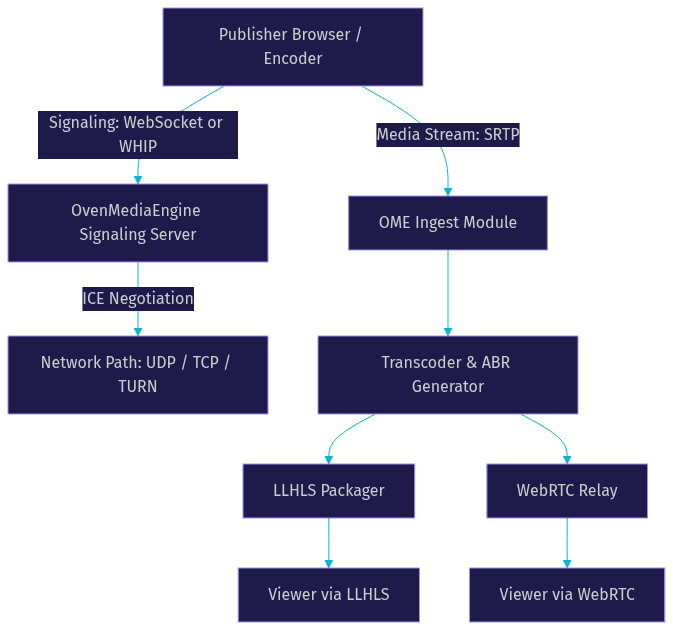
The media flow begins at the publisher's device, such as a browser or a hardware encoder. The publisher negotiates a connection with OME using either the WebSocket signaling or WHIP protocol. Once the signaling is complete, the ICE process establishes the network path. The media then flows into the OME ingest module, where it is decoded and passed to the transcoder. The transcoder generates multiple bitrate renditions (ABR), which are then packaged for output. Viewers can consume the stream either as WebRTC for the lowest possible latency or as Low-Latency HLS (LLHLS) for broader device compatibility.
Signaling and Transport Layers
OvenMediaEngine provides two signaling options to accommodate different publishing environments. The WebSocket-based custom protocol is ideal for web applications where you control the client side using OvenPlayer. The WHIP protocol offers a standardized approach, making it easier to integrate third-party encoders like OBS Studio or GStreamer.
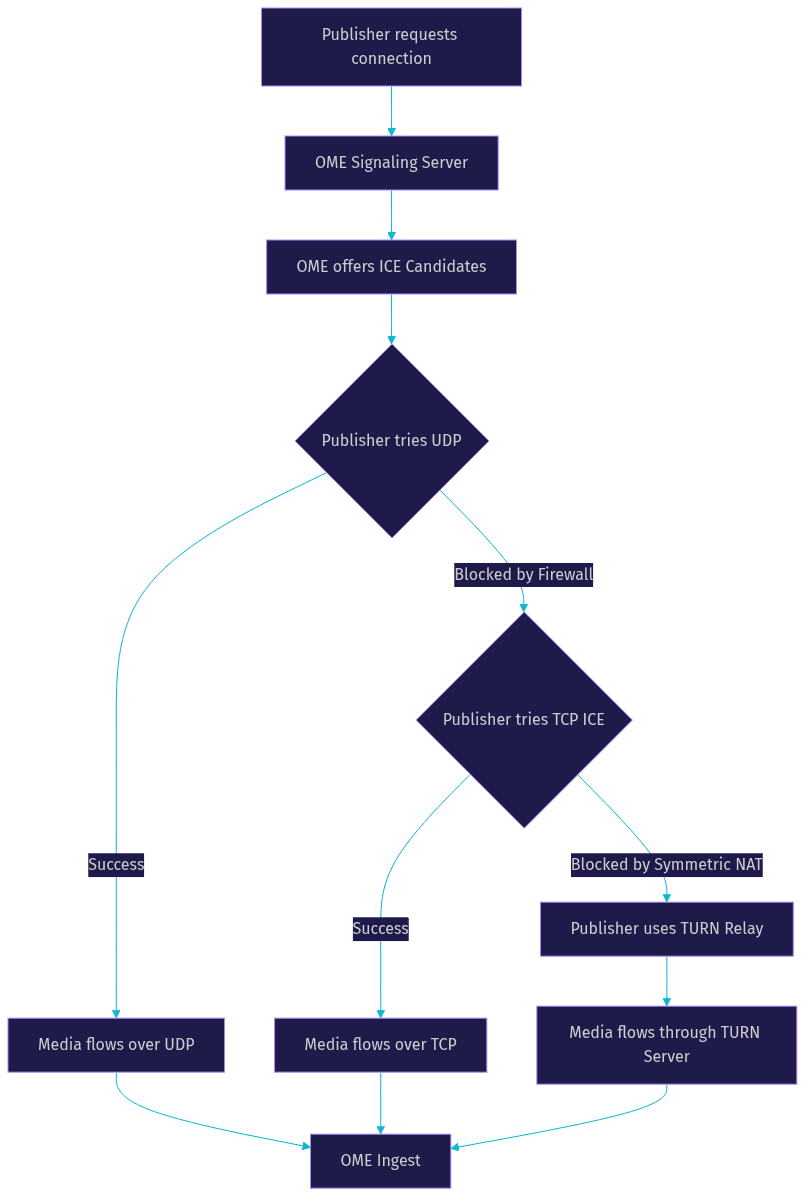
For transport, OME supports three distinct ICE candidate types. The first is standard UDP, which offers the lowest latency and is the default for most WebRTC traffic. The second is Direct TCP ICE, which is crucial when UDP is blocked by corporate firewalls. The third is TURN relay, where traffic is routed through a TURN server to bypass symmetric NATs and restrictive network policies. Having all three options built in allows OME to maintain connectivity across diverse network conditions.
Configuring WebRTC Ingest in OvenMediaEngine
Configuring WebRTC ingest in OvenMediaEngine requires careful attention to network settings, port allocations, and security policies. The configuration process involves defining signaling ports, specifying ICE candidates, and enabling TURN servers if necessary.
Setting Up Signaling Ports
The signaling port is where the initial handshake occurs before media flows. In OME, you must define a port for the WebSocket signaling server and, if you are using secure connections, a TLS port for WSS. It is critical to choose ports that are not already in use by other services on your host machine. For production deployments, you should always use the TLS port with valid SSL certificates to ensure secure signaling. If you are running OME behind a reverse proxy like Nginx, you can map the internal signaling port to a standard external port like 443.
Defining ICE Candidates
ICE candidates are the IP addresses and ports that OME offers to the publisher for sending media. The most common mistake developers make is using the wildcard address (often represented as an asterisk) in production. While this works on localhost, it causes connection failures in production because the server will advertise its internal IP to external clients, who cannot route to it.
Instead, you should explicitly define the public IP address of your server in the ICE candidate configuration. You also need to specify a range of ports for the ICE candidates. WebRTC uses a range of UDP ports for media traffic, not just a single port. A typical configuration might allocate a range of several thousand UDP ports to handle concurrent connections. Ensure these ports are open in your firewall and properly forwarded if you are using Docker.
Enabling TURN and TCP ICE
Not all networks allow UDP traffic. Corporate environments and strict firewalls often block UDP, which breaks standard WebRTC connections. OvenMediaEngine includes an embedded TURN server to handle these scenarios. When enabled, OME will relay media through the TURN server, ensuring the stream reaches the server even over restrictive networks.
Direct TCP ICE is another option for environments where UDP is blocked but TURN is unnecessary. This allows the media to flow over TCP directly to OME. You should enable TURN and TCP ICE if you expect publishers or viewers to connect from corporate networks, public Wi-Fi, or mobile networks with strict NAT policies.
Security and Error-Correction Features
Delivering real-time video over the public internet requires robust security and error correction. OvenMediaEngine WebRTC includes several built-in features to ensure streams remain secure and reliable.
All WebRTC connections in OME are encrypted using DTLS and SRTP. DTLS secures the signaling and key exchange, while SRTP encrypts the actual media packets. This means that even if a malicious actor intercepts the traffic, they cannot view or tamper with the video content. For production deployments, using valid SSL certificates for both signaling and DTLS is mandatory.
For error correction, OME supports ULPFEC (Uneven Level Protection Forward Error Correction) for video codecs. Because WebRTC uses UDP, packets can be lost during transmission. ULPFEC adds redundant data to the video stream, allowing the receiver to reconstruct lost packets without requesting retransmission. This is critical for maintaining video quality on unstable networks. For audio, OME supports in-band FEC for the Opus codec, which similarly protects the audio stream from packet loss, ensuring clear communication even under poor network conditions.
Choosing the Right Codec and Bitrate Strategy
Selecting the appropriate codec and bitrate strategy is vital for balancing quality and bandwidth. OvenMediaEngine supports several modern codecs for WebRTC ingestion and playback.
For video, VP8 is the most widely supported codec across browsers and is the default for many WebRTC implementations. H.264 offers excellent hardware acceleration support, making it ideal for mobile devices and hardware encoders. H.265 (HEVC) provides better compression efficiency but has limited browser support for WebRTC. AV1 is the newest codec, offering superior compression, but it requires significant CPU power for encoding and decoding, making it suitable only for high-end setups in 2026.
OvenMediaEngine also provides Adaptive Bitrate (ABR) streaming. For WebRTC output, OME can transcode the incoming stream into multiple resolutions and bitrates. The player then selects the appropriate rendition based on the viewer's network conditions. This same ABR functionality is available for LLHLS output, ensuring viewers on slow connections can still watch the stream without buffering.
Production-Ready Deployment Tips
Moving OvenMediaEngine WebRTC from a local test environment to a production deployment requires careful planning around deployment method, scalability, and monitoring.
Docker vs Native Installation
Docker is the recommended deployment method for most developers. It simplifies dependency management, makes updates straightforward, and ensures consistency across environments. The official OME Docker image comes pre-configured with all necessary libraries. However, Docker introduces a layer of network abstraction that can complicate WebRTC ICE candidate configuration. You must ensure the container's ports are properly mapped and that the ICE candidate IP is set to the host's public IP, not the container's internal IP.
Native installation offers slightly better performance since there is no virtualization overhead. It is preferred for high-density deployments where every CPU cycle matters. However, managing dependencies and updates on a native installation requires more operational effort.
Scaling with Origin-Edge Clustering
A single OvenMediaEngine server can only handle so many concurrent viewers. For large audiences, OME supports origin-edge clustering. In this model, one or more origin servers receive the WebRTC ingest and transcode the stream. Edge servers then pull the processed stream from the origin and distribute it to viewers.
This architecture allows you to scale horizontally by adding more edge servers as your audience grows. Viewers are routed to the nearest edge server, reducing latency and distributing the network load. For global deployments, you can combine origin-edge clustering with a CDN to cache LLHLS segments at edge locations worldwide.
Monitoring and Health Checks
In production, monitoring is non-negotiable. Key metrics to watch include end-to-end latency, packet loss rates, and ICE connection failures. OME provides a REST API that exposes real-time statistics about active streams, viewer counts, and server health. You should integrate these metrics with a monitoring system like Prometheus and Grafana to visualize trends and set up alerts. Sudden spikes in ICE failures often indicate network configuration issues or firewall changes, while increased packet loss may point to upstream network problems.
Common Pitfalls and Troubleshooting
Even with careful configuration, WebRTC can be tricky to debug. Here are some common pitfalls and how to resolve them.
The most frequent issue is using wildcard ICE candidates in production. If your stream works locally but fails when published from a remote browser, check your ICE candidate configuration. Ensure the public IP is explicitly set and the UDP port range is open on the firewall.
Mismatched ports are another common problem. The signaling port defined in the OME configuration must match the port the client is connecting to. If you are using a reverse proxy, ensure it correctly forwards WebSocket upgrade requests to the OME signaling port.
Firewall blocks often manifest as successful signaling but failed media flow. If the connection establishes but no video appears, verify that the UDP port range specified in your ICE candidates is open. If UDP is blocked, enable TCP ICE or TURN relay in the configuration.
Finally, certificate mismatches can cause silent failures. If you are using WSS for signaling, the SSL certificate must be valid and match the domain name. Browsers will refuse to establish a WebRTC connection if the signaling endpoint uses an invalid or self-signed certificate without explicit user approval.
Use Cases Showcasing OvenMediaEngine WebRTC
OvenMediaEngine WebRTC is ideal for any application where latency directly impacts user experience. In live sports betting, sub-second latency ensures that viewers do not learn of a goal from social media before seeing it on their stream. Interactive gaming tournaments rely on real-time video to allow commentators and audiences to react instantly to gameplay.
Remote production teams use OME to send high-quality video feeds from field cameras back to a central studio over standard internet connections. The WebRTC ingest allows producers to monitor feeds with minimal delay, making real-time switching and direction possible. Virtual classrooms and corporate webinars also benefit, as instructors can interact with students naturally without the awkward pauses caused by high-latency streaming.
How OvenMediaEngine WebRTC Stacks Up Against Competitors
When evaluating WebRTC servers, OvenMediaEngine is often compared to Janus, Mediasoup, and LiveKit. Each has its strengths depending on the use case.
Janus is a general-purpose WebRTC server known for its modular architecture. It is highly flexible but requires more manual configuration and does not include built-in transcoding or LLHLS packaging. Mediasoup is a powerful WebRTC router designed for selective forwarding, making it excellent for video conferencing but less suited for large-scale one-to-many broadcasting.
LiveKit is a modern platform built for real-time video applications, offering excellent developer tooling and SDKs. However, it is primarily focused on interactive rooms rather than broadcast streaming.
OvenMediaEngine stands out by combining WebRTC ingest, transcoding, ABR, and LLHLS output in a single server. Its built-in TURN server and WHIP support make it uniquely suited for broadcast workflows where sub-second latency and broad device compatibility are both required.
Getting Started Quickly – Step-by-Step Overview
Getting started with OvenMediaEngine WebRTC is straightforward if you follow a structured approach. First, obtain the official OME Docker image from the container registry. This ensures you have a clean, up-to-date environment with all dependencies pre-installed.
Next, configure the signaling ports and ICE candidates. Define the WebSocket signaling port and specify your server's public IP address in the ICE candidate settings. Allocate a range of UDP ports for media traffic and ensure they are accessible.
Start the OME container with your configuration, mapping the necessary ports for signaling, HTTP, and the UDP media range. Once the server is running, use OvenPlayer on a web page to publish a test stream via WebRTC. Configure OvenPlayer to use the WebSocket signaling URL of your OME instance. If the connection succeeds, you will see your camera feed published to the server. You can then open a second instance of OvenPlayer configured as a viewer to verify the stream plays back with sub-second latency.
Definitions Glossary
WebRTC: An open-source project that enables real-time communication of audio, video, and data directly between browsers and devices without requiring plugins.
WHIP (WebRTC-HTTP Ingestion Protocol): A standard protocol that allows clients to publish WebRTC media streams to a server using HTTP requests, simplifying integration with encoders.
ICE Candidate: A network address and port combination that a WebRTC endpoint offers to another endpoint as a potential path for media transmission.
TURN Server: A relay server that routes WebRTC media traffic when direct peer-to-peer connections fail due to network restrictions like symmetric NATs or strict firewalls.
LLHLS (Low-Latency HLS): An extension of the HTTP Live Streaming protocol that reduces buffering and latency by using partial segments and shorter playlist updates.
DTLS/SRTP: Datagram Transport Layer Security and Secure Real-time Transport Protocol, the encryption standards used to secure WebRTC signaling and media traffic.
ULPFEC: Uneven Level Protection Forward Error Correction, a technique that adds redundant data to video streams to recover lost packets without retransmission.
Key Takeaways
- OvenMediaEngine WebRTC provides sub-second latency streaming by accepting WebRTC ingest and outputting to WebRTC or LLHLS.
- OME supports both a custom WebSocket signaling protocol and the standard WHIP protocol for flexible ingestion.
- Proper ICE candidate configuration with explicit public IPs is critical for production deployments.
- Built-in DTLS/SRTP encryption and ULPFEC error correction ensure secure and reliable streams over unstable networks.
- Origin-edge clustering allows OME to scale horizontally for large audiences, making it suitable for broadcast-grade live streaming.
Conclusion
OvenMediaEngine WebRTC offers a powerful, self-hosted solution for developers who need sub-second latency live streaming without relying on third-party SaaS platforms. By combining flexible WebRTC ingestion, built-in TURN support, robust security, and scalable architecture, OME handles the demands of modern real-time video delivery. Whether you are building a live sports platform or an interactive broadcast application, OvenMediaEngine provides the tools you need. Explore the official OvenMediaEngine documentation and join the community to start streaming with ultra-low latency today.
Free $20 Balance for AI Voice Agents & Video Calls
FAQ