


A live streaming SDK for Android is a library that handles the entire broadcast pipeline on the device: camera and screen capture, audio capture, video encoding, stream packaging, and network transmission over protocols like RTMP, SRT, or WebRTC. VideoSDK's Android SDK covers this pipeline while adding interactive live streaming, adaptive bitrate, recording, and real-time viewer interaction, so you ship a broadcast feature in days instead of months. Start with the VideoSDK Android quickstart to see the full flow in action.
Mobile live video has quietly become the default interaction model for shopping, education, gaming, and events. Viewers no longer accept a 30-second delay between a host's action and what appears on their screen, and Android, with its staggering device fragmentation, is the hardest platform to get right. If you are building a broadcast feature into an Android app in 2026, the single biggest architectural decision you will make is which live streaming SDK to build on.
This guide walks through what a live streaming SDK for Android actually does, which features matter, how to evaluate the options, and how to integrate and optimize one without writing the media stack yourself.
What Is a Live Streaming SDK for Android?
A live streaming SDK for Android is defined as a software library that abstracts the entire mobile broadcasting pipeline behind a set of APIs, letting an app capture, encode, package, and transmit live audio and video to a streaming server or CDN. It works by taking raw frames from the camera (or screen capture) and raw audio from the microphone, compressing them through hardware or software encoders, packaging the compressed media into a transport-ready stream, and pushing it over the network using a streaming protocol.
Android-specific challenges make this harder than it sounds. Device manufacturers ship different hardware encoder implementations with different quirks, some devices throttle background processes aggressively, thermal limits cause encoder throttling during long broadcasts, and network conditions shift between Wi-Fi, 5G, and 4G mid-stream. A mature SDK absorbs these variations so your app does not have to.
VideoSDK provides live streaming on Android through its interactive live streaming capabilities, built on the same room-based architecture as its video calling SDKs, with sub-second latency and viewer-to-speaker promotion built in.
Why Use a Dedicated Live Streaming SDK Instead of Building From Scratch?
Building your own stack with Android's MediaCodec APIs and a hand-rolled RTMP or WebRTC layer is technically possible, and some teams have done it. In practice, the cost is brutal: months of engineering for the first version, then permanent maintenance as new Android versions, encoder bugs, and device quirks surface.
A dedicated SDK gives you a battle-tested pipeline on day one. Time-to-market drops from quarters to days. Reliability improves because the SDK vendor has already encountered the encoder bugs on popular Samsung, Xiaomi, and Pixel devices. And maintenance shifts to the vendor, whose entire business depends on keeping the stack current.
The honest trade-off: a fully custom stack gives you maximum control and zero licensing cost, which can make sense for a giant with dedicated media engineers. For everyone else, an SDK wins on every axis that matters.
Key Features to Look For in a Live Streaming SDK on Android
Evaluating a live streaming SDK comes down to a concrete feature checklist. Here is what separates a production-grade SDK from a demo-grade one.
Video Codec Support
Look for H.264/AVC as the universal baseline, since every Android device with a hardware encoder supports it. H.265/HEVC cuts bitrate roughly in half at the same quality but has spotty hardware support and licensing complexity. VP9 and AV1 offer better compression still, but hardware AV1 encoders remain rare on Android in 2026, so treat them as forward-looking options rather than defaults.
Audio Codec Support
AAC is the standard for RTMP-based workflows. Opus is the better choice for low-latency WebRTC paths because it is designed for real-time communication and handles packet loss gracefully. A good SDK supports both and picks the right one per protocol automatically.
Low-Latency Protocols (RTMP, SRT, WebRTC)
Sub-second latency matters whenever viewers react in real time: live shopping checkouts, auctions, Q&A sessions, gaming commentary. RTMP is the legacy ingest standard with 2 to 5 seconds of typical delay. SRT delivers reliable, secure transport around 1 to 3 seconds. WebRTC gets you under 500 milliseconds, which is what interactive formats actually require. VideoSDK's interactive live streaming runs on WebRTC-grade latency, and also supports RTMP output for simultaneous distribution to YouTube or Twitch.
Adaptive Bitrate & Network Awareness
The SDK should continuously measure available bandwidth and round-trip time, then adjust resolution and bitrate mid-stream without dropping the broadcast. When a viewer's connection degrades, the stream should degrade gracefully rather than freeze. This is the single biggest determinant of perceived stream quality on mobile networks.
Screen Capture & Custom Video Sources
Support for screen sharing, virtual cameras, and custom frame injection lets you broadcast game feeds, whiteboards, or composited layouts instead of just the front camera. VideoSDK's custom video track feature covers exactly this, including canvas sources and processed frames.
Simultaneous Recording & Streaming
The ability to write a local or cloud recording while broadcasting is essential for compliance, replays, and content repurposing. Confirm the SDK can record without competing with the live stream for encoder resources.
Analytics & Event Callbacks
Real-time metrics on bitrate, dropped frames, round-trip time, and viewer count let you surface quality indicators in your UI and diagnose issues as they happen. Post-session analytics feed into your operational dashboards.
Security & Access Control
Token-based authentication, end-to-end encryption, waiting rooms, and geo-fencing protect paid or private broadcasts. Never accept an SDK that only offers room-ID-level access control with no token layer.
Choosing the Right Live Streaming SDK for Android
Once you have a feature shortlist, the decision becomes an evaluation exercise across five dimensions.
Platform Compatibility
Check the minimum supported Android API level against your user base, and confirm the SDK uses hardware encoders where available with a software fallback. Ask the vendor specifically about device-specific encoder quirks they have already patched, because that list tells you how much real-world hardening has happened.
License, Pricing, and Free Tier
Open-source options like RTMP client libraries cost nothing upfront but shift all maintenance to you. Commercial SDKs charge per usage, typically per streamed minute or concurrent participant. VideoSDK offers a free tier with credits to prototype before committing. (https://videosdk.live/pricing) before finalizing your budget, and watch for hidden costs like separate recording or RTMP egress charges.
Community & Documentation
Active forums, a Discord community, updated sample apps, and a complete API reference are leading indicators of long-term health. VideoSDK maintains a 3,000+ member Discord, open-source samples on GitHub, and full Android documentation.
Performance Benchmarks
Ask every vendor for numbers, not adjectives: end-to-end latency under stable Wi-Fi and 4G, CPU usage during a 1080p broadcast, GPU load, battery drain per hour of streaming, and reconnection time after a network drop. If a vendor cannot produce these, treat that as a signal.
Support for Future Features
A roadmap covering 4K ingest, HDR, multi-camera streaming, and AI-based video processing tells you whether the SDK will keep pace with your product plans or become the thing you rip out in two years.
Integration Workflow Overview
Integrating a live streaming SDK on Android follows a consistent end-to-end flow, regardless of vendor. First, your app requests camera, microphone, and (for screen sharing) projection permissions from the user, handling denial gracefully. Next, the capture module pulls video frames from the camera or screen and audio from the microphone. The encoder then compresses each stream, the muxer packages them into the transport format, and the network layer pushes the packaged stream to the server over your chosen protocol.
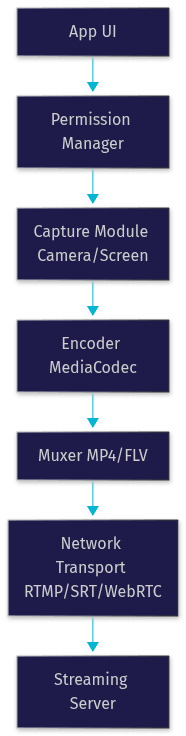
With VideoSDK, the flow adds a token authentication step in front: your backend generates a token using your API credentials, the app joins a room as a host or viewer, and the SDK handles capture, encoding, and transport internally. The diagram below shows how the pieces fit together in a VideoSDK-based broadcast.
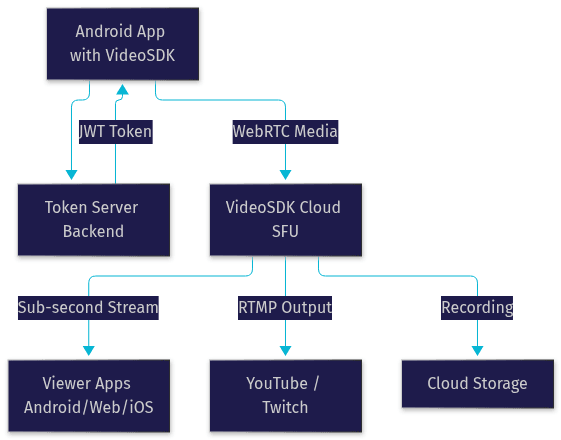
The critical detail most quickstarts gloss over: token generation must happen server-side. Embedding your API secret in the app is the single most common security mistake in mobile streaming integrations. VideoSDK's authentication guide walks through the correct pattern.
Performance Optimization Tips
Once the integration works, optimization is what separates a smooth broadcast from a choppy one.
Network Conditions
Enable adaptive bitrate from day one and configure a fallback ladder, for example 1080p down to 720p down to 480p, so the stream survives bandwidth drops. If your use case tolerates a few seconds of delay, an SRT or RTMP fallback path can rescue broadcasts when the low-latency WebRTC path becomes unusable.
Encoder Settings
Prefer hardware encoders for battery and thermal reasons, reserving software encoding for devices with broken hardware implementations. Set keyframe intervals around two seconds so viewers joining mid-stream and players recovering from packet loss can sync quickly. Match the encoder profile to your target devices: the baseline profile has the widest compatibility, while higher profiles buy compression efficiency at compatibility cost.
Power Consumption
Long broadcasts drain batteries fast. Batch frame processing where the SDK allows it, drop to a lower resolution when the app detects thermal throttling, and pause capture entirely when the app is backgrounded rather than streaming a frozen frame.
Testing Tools
Use Android Studio's Profiler to watch CPU, GPU, and network usage during test broadcasts. Wireshark reveals protocol-level behavior like retransmissions and stalls. And lean on the SDK's own quality callbacks: VideoSDK exposes real-time bitrate and connection-quality events that map directly to what viewers experience, so you can build a quality indicator into your host UI.
Common Pitfalls and How to Avoid Them
A handful of issues account for most failed Android streaming integrations. Token expiration mid-broadcast causes abrupt disconnects; mitigate by refreshing tokens before expiry and implementing automatic rejoin logic. Device-specific encoder bugs, particularly on certain mid-range MediaTek and Exynos chipsets, produce corrupted frames or crashes; test on real hardware across price tiers, not just flagship devices. Permission denial, especially when users revoke camera access mid-stream, leaves broadcasts running with no video; listen for permission-change events and pause the stream with a clear UI message instead of streaming black frames. Finally, forgetting the HTTPS and secure-transport requirements of production environments breaks things that worked perfectly in local testing.
Case Study: Building a Live Shopping App with a Live Streaming SDK
Imagine a retail startup building a live shopping feature where hosts showcase products, viewers ask questions in real time, and purchases happen without leaving the stream. Latency is the defining constraint: if a viewer's comment about a product arrives eight seconds after the host mentioned it, the conversation collapses.
The team chose an interactive live streaming approach rather than standard HLS, because sub-second latency keeps the host-viewer dialogue natural. The architecture: hosts join a VideoSDK room in speaker mode from the Android app, viewers join in view-only mode, and the SDK's role-switching lets the host promote a viewer to co-speaker for testimonials or sizing questions. Real-time chat overlay and polls run over the same connection, so no separate chat infrastructure is needed.
Two decision points shaped the build. First, simultaneous recording: every session is recorded to cloud storage for replay commerce, so the recording capability had to work without a second encoder pass. Second, RTMP output: the marketing team wanted simultaneous simulcast to YouTube for reach, which the SDK's RTMP egress handled natively. The result was a shippable feature in roughly three weeks, with the media stack entirely delegated to the SDK.
Future Trends in Android Live Streaming
Three trends will shape Android streaming over the next few years. SRT continues to mature as a reliable, secure transport for contribution feeds, with growing hardware and SDK support. AI-enhanced video processing, including on-device noise suppression, background segmentation, and automatic framing, is moving from server-side to on-device, and SDKs that expose these as toggleable features will pull ahead. And edge computing is pushing media processing closer to viewers, which compounds the value of low-latency protocols: sub-second transport only matters if the entire path, ingest to playback, is fast. Interactive formats, where viewers become participants, will keep displacing one-way broadcasts, which is precisely the gap between HLS-style streaming and what interactive SDKs like VideoSDK's ILS mode are built for.
Definitions Glossary
RTMP (Real-Time Messaging Protocol): A long-standing protocol for pushing live video from an encoder to a streaming server, typically adding 2 to 5 seconds of latency. VideoSDK supports RTMP output for simulcasting to platforms like YouTube and Twitch.
SRT (Secure Reliable Transport): A transport protocol designed for low-latency, packet-loss-resilient streaming over unpredictable networks, commonly used for contribution feeds at 1 to 3 seconds of delay.
Adaptive Bitrate Streaming: The automatic adjustment of video resolution and bitrate based on real-time bandwidth measurement, so a stream degrades gracefully instead of freezing on weak connections.
Interactive Live Streaming (ILS): A streaming mode where latency is low enough that viewers can react, chat, vote, and be promoted to active speakers in real time, as opposed to one-way HLS broadcasts with 10 to 30 seconds of delay.
Custom Video Track: A VideoSDK feature that lets developers broadcast processed or non-camera video sources, such as screen shares, canvases, or composited layouts, alongside or instead of the camera feed.
Key Takeaways
- A live streaming SDK for Android handles the full broadcast pipeline, capture, encoding, packaging, and transport, absorbing device fragmentation and network variability that would otherwise consume months of engineering.
- Sub-second latency via WebRTC-based interactive streaming is the requirement for live shopping, education, and gaming formats where viewers react in real time; RTMP and SRT remain the right tools for simulcast and contribution feeds.
- Evaluate SDKs on codec support, adaptive bitrate, custom video sources, recording, analytics, security, and published performance benchmarks, not marketing claims.
- Token-based authentication with server-side token generation is non-negotiable for secure broadcasts, and it is the step most integration guides skip.
- VideoSDK's Android SDK combines interactive live streaming, role switching, RTMP output, and cloud recording on one platform, with a free tier to prototype before committing.
Conclusion
Choosing the right live streaming SDK for Android is the decision that determines whether your broadcast feature ships in weeks or quarters, and whether it survives real devices on real networks. Match the SDK to your latency requirement, verify its performance claims, and prototype on the free tier before committing. VideoSDK's Android live streaming documentation and code samples are the fastest way to start, and you can sign up at app.videosdk.live to test with free credits. What are you building with live streaming on Android? Drop a comment, I'd love to hear what kind of broadcast use case you're working on.
Free $20 Balance for AI Voice Agents & Video Calls
FAQ