


Training a custom LLM for a chatbot involves selecting a base model, preparing a domain-specific conversational dataset, applying parameter-efficient fine-tuning such as LoRA, evaluating against chatbot-specific metrics, and deploying through a scalable inference server. VideoSDK extends this pipeline by connecting your trained model to real-time voice and video rooms through its AI Voice Agent SDK, letting your custom LLM power live conversational experiences. Start with a small dataset and a quantized base model, then iterate based on human feedback and regression testing before production deployment.
Building a chatbot that actually understands your domain is a different challenge than calling a generic API. Off-the-shelf models like GPT-4o or Claude are powerful, but they hallucinate on niche topics, miss your brand voice, and rack up token costs fast. When you train a custom LLM for chatbot use cases, you control the knowledge, the tone, and the latency.
This guide walks through the full pipeline: choosing a base model, preparing a conversational dataset, setting up a training environment, applying parameter-efficient fine-tuning, evaluating results, and deploying to production. By the end, you will have a clear mental model of every decision point and the trade-offs behind each one.
How to Train a Custom LLM for a Chatbot: End-to-End Overview
The process of training a custom LLM for a chatbot follows a linear but iterative pipeline. You start with a base model and a dataset, move through preprocessing and fine-tuning, evaluate the result, and then deploy. Each stage feeds back into the previous one when evaluation reveals gaps.
The diagram below shows the high-level flow from raw data to a live chatbot endpoint.
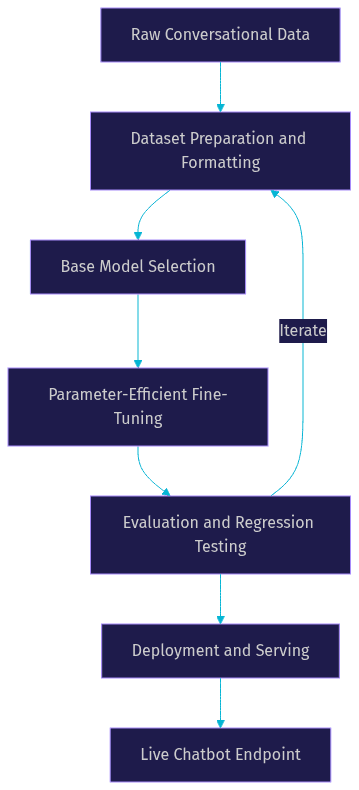
The key insight is that this is not a one-shot process. Evaluation results send you back to dataset preparation or fine-tuning configuration. Budget at least three full iterations before expecting production-quality output.
Choosing the Right Base Model to Train a Custom LLM for a Chatbot
Your base model determines the ceiling of what your chatbot can achieve. Fine-tuning shifts the model's behavior, but it cannot add fundamental reasoning capability that the base model lacks. Choose carefully.
Open-Source Options for Custom Chatbot LLMs
Open-source models give you full control over weights, training data, and deployment infrastructure. As of 2026, the most popular open-weight foundations for chatbot fine-tuning include Meta's Llama 3.1 family, Mistral's Mixtral and Mistral 7B variants, and smaller models like TinyLlama for edge deployment scenarios.
Llama 3.1 8B is a strong default for most chatbot projects because it balances reasoning capability with manageable GPU memory requirements. Mistral 7B remains relevant for lower-resource environments. If you need to run on consumer hardware or mobile devices, TinyLlama or quantized Phi variants work well, though you trade conversational quality for footprint.
Commercial and Hosted Alternatives
If you prefer not to manage training infrastructure, providers like OpenAI and Anthropic offer fine-tuning APIs for their smaller models. OpenAI allows fine-tuning of GPT-4o mini and GPT-3.5 Turbo variants through their dashboard, while Anthropic has expanded Claude customization through prompt-based approaches and system prompt engineering rather than weight-level fine-tuning.
The trade-off is control versus convenience. Hosted fine-tuning eliminates GPU management but locks you into the provider's ecosystem, pricing, and rate limits. For chatbots handling sensitive data or requiring on-premise deployment, open-source models remain the better path.
Preparing Your Dataset
Dataset quality is the single largest factor in how well your custom chatbot performs. A model fine-tuned on ten thousand high-quality, domain-relevant conversations will outperform one fine-tuned on a hundred thousand generic examples. This is where most teams underinvest.
Data Collection Strategies: Real Versus Synthetic
Real conversational data comes from existing chat logs, customer support transcripts, email threads, and live interaction records. This data carries authentic phrasing, real user confusion patterns, and domain-specific vocabulary that synthetic data struggles to replicate. The downside is that real data requires heavy cleaning, PII scrubbing, and consent verification.
Synthetic data generation uses a larger model to produce training conversations that mimic your target domain. This works well for bootstrapping when real data is scarce, but synthetic conversations tend to be too clean and lack the messy, ambiguous phrasing real users produce. A practical approach is to start with synthetic data for initial training, then blend in real data as it becomes available. Tools like the VideoSDK Python SDK can help you capture and structure real conversational audio for transcription-based datasets.
Formatting for Fine-Tuning: ChatML and JSONL
Most modern fine-tuning frameworks expect data in a structured conversation format. ChatML is the dominant format for OpenAI-compatible models, encoding each turn with explicit role labels for system, user, and assistant. JSONL is the file container, with one complete conversation per line.
Your formatting must be consistent across the entire dataset. Mixed formats, missing role tags, or inconsistent system prompts will confuse the model during training and produce unpredictable behavior at inference time. Define a single schema before you write your first training example and enforce it programmatically.
Quality Checks and Balancing
Before training, run automated checks for token length distribution, role balance, duplicate conversations, and topic coverage. Remove examples where the assistant response is empty, off-topic, or copied from the user message. Balance your dataset so no single intent dominates more than thirty percent of examples, unless your chatbot is intentionally specialized for that intent.
Setting Up the Training Environment
Your training environment determines how fast you can iterate and how reproducible your results are. Getting this right early saves days of debugging later.
Hardware Considerations: GPU Memory and VRAM
Fine-tuning an 8-billion-parameter model with LoRA typically requires 16 to 24 GB of VRAM. Full fine-tuning of the same model needs 80 GB or more. For QLoRA with 4-bit quantization, you can fit an 8B model training run on a single 16 GB GPU like an RTX 4090 or an A10G instance.
Cloud GPU pricing varies widely. As of 2026, spot instances on major cloud providers can reduce costs by sixty to seventy percent compared to on-demand pricing, though you risk interruption. For teams running multiple experiments, reserved instances or specialized GPU cloud providers often deliver better value than the major hyperscalers.
Software Stack for LLM Fine-Tuning
The standard software stack for training a custom LLM for chatbot use cases centers on Python as the runtime, PyTorch as the deep learning framework, and the Hugging Face Transformers library for model loading and tokenization. The PEFT library provides LoRA and QLoRA implementations, while bitsandbytes handles quantization. The TRL library wraps these into a training loop specifically designed for supervised fine-tuning of language models.
These libraries work together but have interdependencies that change with each release. Pin your versions explicitly and document them. A minor version bump in Transformers can silently change tokenization behavior and invalidate your previous training results.
Reproducible Environment Management
Use a virtual environment or Docker container to isolate your training dependencies. Docker is preferable because it captures system-level libraries that virtual environments miss. Store your Dockerfile and dependency manifest in version control alongside your training scripts and dataset manifests. This ensures that a training run can be reproduced months later when you need to debug a regression or retrain with new data.
Parameter-Efficient Fine-Tuning Techniques
Full fine-tuning updates every parameter in the model, which is expensive and often unnecessary for chatbot adaptation. Parameter-efficient fine-tuning techniques achieve comparable results by updating a tiny fraction of the model's weights.
LoRA and QLoRA Fundamentals
LoRA (Low-Rank Adaptation) works by freezing the original model weights and injecting small trainable rank-decomposition matrices into each transformer layer. Instead of updating billions of parameters, you train a few million. The frozen base model handles the general language understanding, while the LoRA adapters specialize the model for your chatbot domain.
QLoRA combines LoRA with quantization of the base model. The base model weights are loaded in 4-bit precision, dramatically reducing memory usage, while the LoRA adapters train in full precision. This means you can fine-tune a large model on a single consumer GPU without sacrificing adapter quality. QLoRA has become the default approach for most chatbot fine-tuning projects in 2026 because it democratizes access to capable models.
Quantization: 4-Bit NF4 for Memory Savings
The NF4 (NormalFloat 4-bit) quantization scheme, introduced with QLoRA, maps weight values to a set of sixteen optimal levels based on the normal distribution of neural network weights. This preserves more information than naive rounding to four-bit integers. The result is that a model quantized to NF4 typically loses less than one percent of its original quality while using roughly twenty-five percent of the memory footprint.
For chatbot training, this memory savings translates directly into using larger base models or larger batch sizes, both of which improve final output quality.
Choosing Rank and Learning Rate
The LoRA rank parameter controls the capacity of your adapters. A rank of 8 or 16 works well for most chatbot tasks. Higher ranks like 64 or 128 are useful when your domain is highly specialized and far from the base model's training distribution, but they increase memory usage and risk overfitting on smaller datasets.
Learning rate for LoRA training typically falls between 1e-4 and 3e-4, higher than full fine-tuning because only the adapter weights are updating. Start with 2e-4 and adjust based on loss curve behavior. If loss plateaus early, increase the rate. If it oscillates wildly, decrease it.
Training Workflow
Once your environment is ready and your dataset is formatted, the training workflow itself is the most mechanical part of the process. The decisions that matter here are about monitoring and when to stop.
Data Loading and Batching
Your training framework handles data loading, but you control batch size and sequence length. Batch size is constrained by GPU memory. With QLoRA on a 24 GB GPU, a batch size of 4 with gradient accumulation of 4 gives an effective batch size of 16, which is a reasonable starting point for chatbot fine-tuning.
Sequence length matters because chatbot conversations are longer than single prompts. Set your maximum sequence length to cover ninety-five percent of your training examples without truncation. Truncating assistant responses mid-sentence teaches the model to produce incomplete answers.
Monitoring Loss and Metrics
Watch the training loss curve closely. A healthy run shows steady decline followed by gradual flattening. If loss drops too fast in the first hundred steps, your learning rate is likely too high. If it barely moves, your learning rate is too low or your dataset is too small.
Beyond loss, monitor validation perplexity if you hold out a validation set. Perplexity measures how surprised the model is by correct answers, and lower is better. A sudden increase in validation perplexity while training loss continues to drop signals overfitting.
Checkpointing and Early Stopping
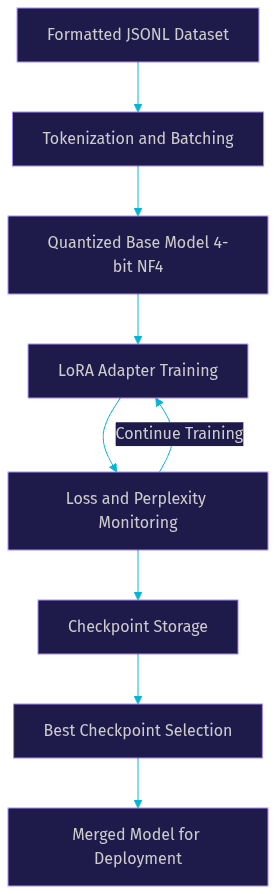
Save model checkpoints at regular intervals, typically every five hundred steps or once per epoch. Checkpoints let you roll back to the best-performing version if later training degrades quality. Implement early stopping by monitoring validation loss and halting training when it fails to improve for a set number of consecutive evaluations.
The training pipeline below shows how data flows through the system from raw input to a deployable checkpoint.
Evaluating and Iterating
Evaluation is where most chatbot projects fail silently. A model that shows low training loss can still produce unhelpful, repetitive, or unsafe responses. You need multiple evaluation layers.
Automatic Metrics: BLEU, ROUGE, and Perplexity
Automatic metrics give you a fast, cheap signal during development. BLEU measures n-gram overlap between generated responses and reference answers, which is useful for task-oriented chatbots with expected outputs. ROUGE focuses on recall and is better for open-ended conversational quality. Perplexity on a held-out validation set tells you how well the model predicts the next token in unseen conversations.
These metrics are necessary but not sufficient. A model can score well on BLEU while being unhelpful in practice because it produces safe, generic responses that happen to overlap with references. Use automatic metrics to filter out bad runs, not to declare victory.
Human-in-the-Loop Testing
The most reliable evaluation is human judgment. Have domain experts or target users interact with the chatbot across a set of representative scenarios. Rate responses on helpfulness, accuracy, tone, and safety. Track these ratings across training iterations to measure real improvement.
This is labor-intensive, so prioritize it for your final candidate models rather than every intermediate checkpoint. A practical workflow is to use automatic metrics to narrow down to two or three checkpoints, then run human evaluation on those.
Prompt-Based Regression Testing
Build a fixed set of test prompts that cover your chatbot's core intents, edge cases, and known failure modes. Run these prompts against every new model version and compare outputs side by side. This catches regressions where a new training run fixes one problem but breaks another. Store test prompts and expected behaviors in version control alongside your training code.
Deploying Your Custom Chatbot
Deployment is where your trained model meets real users. The choices you make here affect latency, cost, and scalability.
API Serving Options: FastAPI and vLLM
For serving your fine-tuned model as an API, two approaches dominate. FastAPI with Hugging Face Transformers gives you a lightweight, customizable endpoint that is easy to understand and modify. This works well for low-traffic chatbots or development environments.
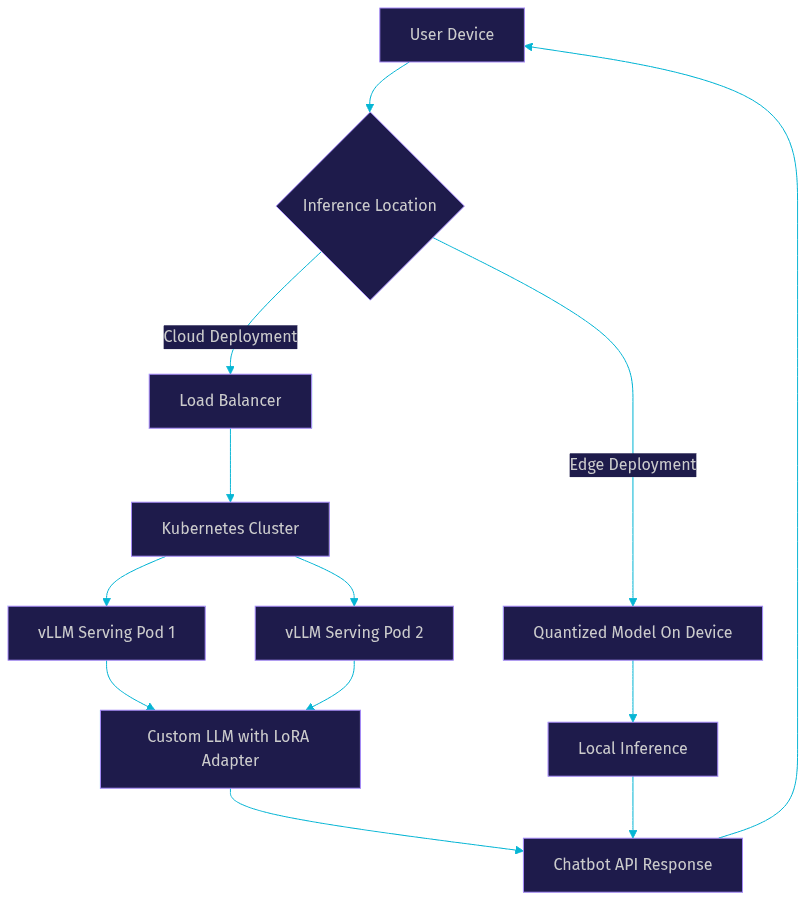
For production workloads, vLLM is the stronger choice. It implements paged attention and continuous batching, which dramatically improves throughput and reduces per-request latency. vLLM supports loading LoRA adapters directly, so you can serve multiple fine-tuned variants from a single base model deployment. This is particularly valuable if you maintain different chatbot personalities or domain variants.
Containerization and Scaling
Package your serving stack in a Docker container that includes the model weights, inference server, and all dependencies. For scaling, Kubernetes lets you horizontally scale pods based on request volume. Configure autoscaling based on GPU utilization and request queue depth rather than CPU metrics, since GPU is your bottleneck.
If your chatbot needs real-time voice interaction, VideoSDK's AI Voice Agent SDK connects your deployed LLM to live audio and video rooms. The agent pipeline handles speech-to-text, LLM inference, and text-to-speech, so your custom model becomes a conversational voice agent without additional streaming infrastructure.
The deployment architecture below contrasts edge and cloud serving patterns.
Best Practices and Common Pitfalls
Several recurring problems trip up teams training custom LLMs for chatbots. Token leakage happens when your training data includes the prompt within the target response, teaching the model to echo user input. Prevent this by strictly separating input and output during formatting and validating with automated checks.
Overfitting is the most common failure mode. If your dataset is small, the model memorizes specific responses rather than learning generalizable patterns. Signs include high training accuracy but poor performance on unseen prompts. Mitigate this with dropout, lower LoRA rank, early stopping, and a larger or more diverse dataset.
Cost control matters because GPU hours add up fast across multiple experiments. Track cost per training run and set hard budgets. Use spot instances for experimentation and reserved capacity for final runs.
Safety alignment is not optional. Even domain-specific chatbots can produce harmful outputs when prompted adversarially. Include safety examples in your training data and test against a red-teaming prompt set before deployment. VideoSDK's Conversational Graph offers a deterministic flow engine that constrains your LLM to approved conversation paths, which is valuable for compliance-sensitive chatbot deployments.
Definitions Glossary
LoRA (Low-Rank Adaptation): A parameter-efficient fine-tuning technique that freezes base model weights and trains small rank-decomposition matrices, reducing trainable parameters by over ninety percent while preserving model quality.
QLoRA: A combination of LoRA with 4-bit quantization of the base model, enabling fine-tuning of large language models on single consumer GPUs without significant quality loss.
ChatML: A structured conversation format that encodes multi-turn dialogues with explicit role labels for system, user, and assistant messages, widely used for chatbot fine-tuning datasets.
PEFT (Parameter-Efficient Fine-Tuning): A family of techniques, including LoRA and adapters, that fine-tunes large models by updating a small subset of parameters rather than all weights.
NF4 (NormalFloat 4-bit): A quantization data type that maps weight values to sixteen optimal levels based on the normal distribution of neural network weights, preserving more precision than integer quantization.
Perplexity: A metric measuring how well a language model predicts a sequence of tokens, where lower values indicate the model is less surprised by correct outputs and generally performs better.
Key Takeaways
- Dataset quality matters more than model size; invest the majority of your effort in collecting, cleaning, and formatting domain-specific conversational data before touching a training script.
- QLoRA with 4-bit NF4 quantization is the default approach for training a custom LLM for chatbot use cases in 2026, because it lets you fine-tune capable models on affordable single-GPU hardware.
- Automatic metrics like BLEU and perplexity are useful for filtering bad runs, but human-in-the-loop evaluation is the only reliable signal for conversational quality before production deployment.
- vLLM with continuous batching is the recommended serving layer for production chatbots, and it supports loading LoRA adapters directly for multi-variant deployments from a single base model.
- VideoSDK's AI Voice Agent SDK and Conversational Graph extend custom LLMs into real-time voice and video experiences, bridging the gap between a trained model and a live conversational agent.
Conclusion
Training a custom LLM for a chatbot is a multi-stage process that rewards iteration and punishes shortcuts. Start with a strong open-source base model, build a clean and balanced dataset, apply QLoRA for memory-efficient fine-tuning, evaluate with both automatic metrics and human judgment, and deploy through a scalable inference server. The teams that succeed are the ones that treat evaluation and iteration as first-class activities rather than afterthoughts. When you are ready to take your custom LLM beyond text and into real-time voice conversations, explore the VideoSDK AI Agents documentation and join the VideoSDK Discord community to connect with other developers building conversational AI. What kind of chatbot are you training? Drop a comment and share your use case.
Free $20 Balance for AI Voice Agents & Video Calls
FAQ