


A video streaming API is a programmable interface that allows developers to upload, encode, and deliver video content over the internet. VideoSDK provides a robust video streaming API that handles media processing, low-latency delivery, and real-time audience interaction through a Rooms-based architecture. You can use it to build everything from on-demand video platforms to interactive live streaming applications.
Building and maintaining video infrastructure is a notorious pain point for development teams. Managing encoding pipelines, configuring global CDN delivery, and handling live ingest often pulls engineers away from building core product features. The complexity of codec support, adaptive bitrate streaming, and cross-platform playback compatibility creates a significant maintenance burden. VideoSDK's video streaming API offers a unified solution that abstracts this complex media infrastructure. By providing a set of REST endpoints and client SDKs, VideoSDK handles the heavy lifting of media routing, processing, and secure delivery. This allows you to focus on application logic and user experience. Whether you are building an on-demand video platform, a live shopping application, or a real-time interactive streaming service, a programmable video interface eliminates the need to manage servers and codecs manually.
What Is a Video Streaming API?
A video streaming API is defined as a set of programmatic endpoints that enable applications to handle video content end-to-end. It works by accepting video uploads or live feeds, transcoding them into adaptive streaming formats, and distributing them to viewers via a content delivery network. Unlike generic storage APIs that only store binary files, a video streaming API actively processes the media for optimal playback across devices and network conditions. VideoSDK provides these capabilities through a combination of REST APIs and client SDKs, handling the complex media routing required for both on-demand and real-time communication. Developers can use these endpoints to create rooms, manage participants, start and stop recordings, and pull post-call analytics. The API manages the underlying WebRTC infrastructure, ensuring sub-second latency for interactive streams while supporting standard HLS and DASH protocols for broader broadcast scenarios.
Core Components of VideoSDK's Video Streaming API
VideoSDK uses a Rooms-based architecture where participants join a room to share media streams. The REST APIs handle room creation, participant management, and recording control. Key endpoints include Create Room, Get Room, List Rooms, and List Participants. You can also start and stop recordings programmatically, fetch recordings, and deactivate rooms. Token authentication secures every request, ensuring that only authorized clients can access your media infrastructure. The media pipeline handles the actual video processing, including encoding, transcoding, and distribution.
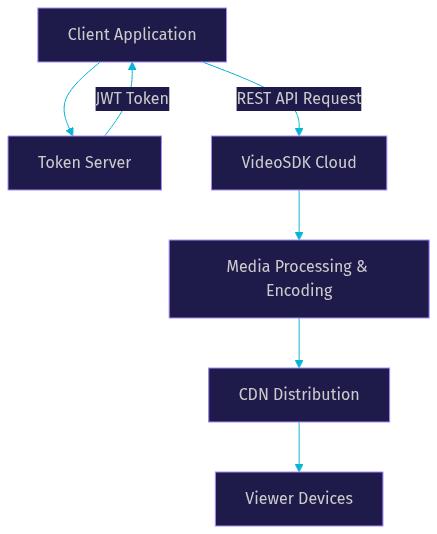
The flow begins with your client application requesting a token from your backend server. The server uses your VideoSDK API key and secret to generate a JWT token. The client then uses this token to authenticate with the VideoSDK Cloud via REST API requests or SDK connections. VideoSDK processes the media, handles the encoding, and distributes the output to viewer devices through its global CDN. The Selective Forwarding Unit (SFU) architecture allows VideoSDK to route media streams efficiently, scaling to support thousands of concurrent viewers in a single room without degrading quality.
Authentication & Security
VideoSDK uses token-based authentication to secure access to your video streaming infrastructure. You need to generate a token server-side using your API key and secret, then pass it to the SDK on the frontend. Never expose your API secret on the frontend or in client-side code. Always generate tokens server-side and use environment variables to store your credentials. VideoSDK provides a sandbox environment for testing your integration before moving to production. This separation allows you to test edge cases without impacting your live user base. For detailed steps on generating tokens, refer to the VideoSDK Authentication and Token Guide. For added security, VideoSDK supports features like end-to-end encryption, waiting rooms, and role-based access control to ensure your streams remain protected from unauthorized access.
Uploading & Encoding Video
For on-demand video content, the upload process typically involves a multipart upload to a designated endpoint. VideoSDK handles the automatic transcoding of your uploaded video into multiple resolutions and bitrates. This ensures that viewers on high-speed connections receive HD quality, while those on slower networks receive a lower resolution stream without buffering. The API supports a wide range of input formats and outputs standard adaptive streaming formats like HLS and DASH. Adaptive bitrate streaming is critical for mobile viewers who may switch between Wi-Fi and cellular networks mid-stream. When making upload requests, pay attention to rate-limit headers returned by the API. If you exceed the allowed request rate, implement an exponential backoff retry strategy to handle HTTP 429 responses gracefully. This prevents your application from overwhelming the API and ensures a smooth upload experience.
Live Streaming & Interactive Live Streaming (ILS)
On-demand video differs significantly from live streaming. Traditional HLS streaming introduces a 10 to 30 second delay, which is acceptable for broadcasting a lecture but breaks real-time interaction. VideoSDK solves this with Interactive Live Streaming (ILS), a low-latency mode built on the same SDK surface as its video calling product. ILS keeps latency under a second, allowing audience members to respond, vote, or join the stage as active participants. The API supports dynamic role switching, allowing a viewer to be promoted to a speaker using the changeMode function.
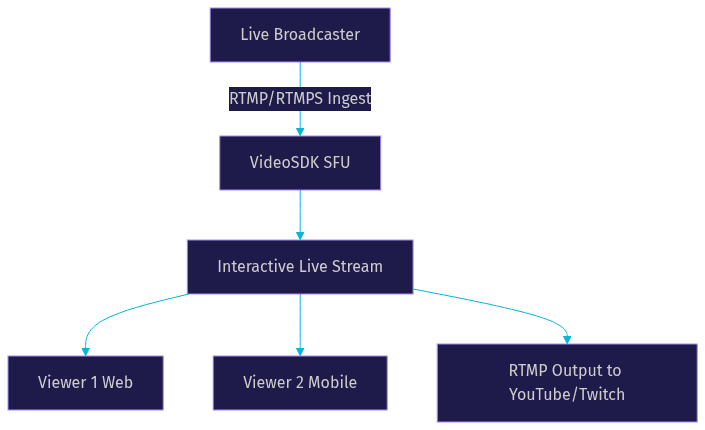
Live ingest supports RTMP and RTMPS protocols, allowing you to connect professional broadcasting software directly to VideoSDK. The VideoSDK Selective Forwarding Unit (SFU) receives the live feed and distributes it to viewers. This architecture is superior to peer-to-peer meshes for scaling, as it centralizes the bandwidth burden. You can learn more about configuring this in the VideoSDK Interactive Live Streaming Guide.
Restreaming to Multiple Platforms
VideoSDK allows you to push a live stream to multiple destinations simultaneously. This process, known as restreaming or multi-destination streaming, takes your single live ingest and forwards it to platforms like YouTube, Twitch, and Facebook Live via RTMP. You configure these RTMP destinations through the API, and VideoSDK handles the concurrent output. This is particularly useful for creators and businesses that want to maximize their reach without managing multiple encoding setups. The API manages the connection to each destination, handling reconnections and bitrate adjustments automatically. This ensures your stream stays live on all platforms even if one destination experiences a temporary network hiccup.
Managing Metadata, Captions, and Chapters
A complete video platform requires more than just the video file. VideoSDK provides API endpoints to manage metadata, captions, and chapters. You can attach custom metadata to your videos to categorize content or store external IDs. This metadata is searchable and can be used to organize your video library programmatically. The API supports the addition of closed captions and subtitle tracks, making your content accessible to a wider audience and improving SEO. Chapters can be defined to give viewers the ability to jump to specific sections of a long-form video or recording. These features are managed through standard REST API calls that accept JSON payloads, making it easy to integrate with your existing content management system.
Monitoring, Analytics, and Playback
Once your video is live or uploaded, monitoring its performance is critical. VideoSDK provides built-in analytics endpoints that deliver metrics on viewer count, geographic distribution, and playback quality. You can use these metrics to identify dropped connections or regions with poor connectivity. Real-time analytics allow you to monitor active live streams and intervene if quality drops. Metrics such as packet loss, jitter, and round-trip time are available for deep debugging. For playback, VideoSDK provides standard HLS and DASH URLs that you can plug into any compatible video player. The CDN delivery ensures low latency and high availability for viewers globally. For a complete list of available endpoints, check the VideoSDK REST API Reference.
Common Pitfalls & Production-Ready Tips
Moving from a localhost development environment to production introduces several challenges. First, HTTPS is a strict requirement for production deployments. Browsers will block camera and microphone access on non-secure origins. Second, token expiration is a common pitfall. VideoSDK tokens have a finite lifespan, and you must implement a refresh mechanism to re-authenticate participants if a session lasts longer than the token validity. Third, handle rate limits proactively. Do not wait for a 429 error to implement backoff logic. Finally, consider scaling. While VideoSDK handles the media scaling, your token server and application backend must also scale to handle the load of concurrent room creations and participant joins. Network-adaptive streaming is built into VideoSDK, but you should test your application on 3G networks to ensure the user experience degrades gracefully. Firewall traversal is another consideration. VideoSDK provides TURN server fallback to ensure media flows even in restrictive corporate networks. Ensure your application handles participant disconnection events gracefully, implementing reconnection logic if a user drops mid-stream.
Choosing the Right Video Streaming API
When evaluating a video streaming API, consider the breadth of SDKs, the availability of a prebuilt UI, latency for live streams, and security features. VideoSDK offers one of the broadest SDK coverages in the market, supporting React, React Native, Android, iOS, Flutter, Unity, and more. The VideoSDK Prebuilt UI Kit allows you to embed a working video call interface with zero custom UI code. Its Interactive Live Streaming provides sub-second latency, outperforming standard HLS streams. Security features like end-to-end encryption and role-based access control ensure your streams remain protected. Compared to building with raw WebRTC, VideoSDK abstracts the signaling, STUN/TURN server management, and codec negotiation, saving months of development time.
Getting Started in Minutes
Getting started with VideoSDK is straightforward. First, create a sandbox account on the VideoSDK platform to get your API key and secret. Next, set up a backend server to generate authentication tokens using these credentials. Your frontend application will request a token from this server. Once authenticated, you can make your first REST API request to create a room. With the room ID and your token, you can initialize the client SDK and begin streaming. The entire process, from account creation to first stream, takes only a few minutes. The sandbox environment provides full access to API features, allowing you to test your integration thoroughly before committing to a production plan.
Summary & Next Steps
A video streaming API abstracts the complexity of media infrastructure, allowing developers to build robust video applications quickly. VideoSDK provides a comprehensive suite of tools, from REST APIs for room management to client SDKs for real-time interaction. By leveraging its Rooms-based architecture, low-latency ILS, and global CDN delivery, you can build anything from simple VOD platforms to complex interactive broadcasts. To dive deeper into the implementation, explore the official VideoSDK documentation.
Definitions Glossary
Room: A VideoSDK meeting room that participants join and share media streams within, identified by a unique room ID.
Participant: A user or AI agent connected to a VideoSDK room, with their own audio and video streams.
Stream / Track: The audio or video media sent by a participant, accessible via SDK hooks and methods.
Meeting Token: A JWT that authenticates a participant's access to a VideoSDK room, generated server-side.
Interactive Live Streaming (ILS): VideoSDK's low-latency streaming mode where viewers can be promoted to active speakers.
RTMP: Real-Time Messaging Protocol, used for ingesting live video streams into VideoSDK from broadcasting software.
Key Takeaways
- A video streaming API handles upload, encoding, and delivery, abstracting complex media infrastructure from developers.
- VideoSDK uses a Rooms-based architecture secured by server-generated JWT tokens.
- Interactive Live Streaming (ILS) provides sub-second latency, enabling real-time audience interaction that standard HLS cannot support.
- VideoSDK supports multi-destination restreaming to platforms like YouTube and Twitch via RTMP output.
- The platform offers broad SDK coverage and a Prebuilt UI Kit for rapid deployment across web and mobile.
Conclusion
Building a reliable video streaming experience does not require managing your own encoding servers and CDN configurations. VideoSDK's video streaming API provides the infrastructure for both on-demand and low-latency interactive streaming, letting you focus on your application. With robust REST APIs, comprehensive SDK support, and built-in security, you can ship a production-ready video experience in minutes. Explore the VideoSDK documentation to start your integration. What are you building with VideoSDK? Drop a comment below to share your video streaming use case.
Free $20 Balance for AI Voice Agents & Video Calls
FAQ