


An HLS loader is the client-side engine inside libraries like HLS.js that fetches the M3U8 manifest, downloads video fragments over HTTP, and feeds them into the browser's MediaSource Extensions for playback. It handles adaptive bitrate switching, retries, and error recovery automatically. If you are building web video in 2026, understanding the loader is the difference between smooth playback and endless buffering spinners. VideoSDK's interactive live streaming offers a low-latency alternative when sub-second audience interaction matters more than CDN scale. Learn more about VideoSDK's streaming approach.
Web video has quietly become the default medium of the internet, and most of it reaches browsers through HTTP Live Streaming (HLS). Apple created HLS in 2009 for iOS, but today it powers everything from video-on-demand platforms to 24/7 live channels. The catch is that most desktop browsers still cannot play HLS natively. Safari can, but Chrome, Firefox, and Edge need help, and that help comes from a JavaScript library called HLS.js and, at its heart, the HLS loader.
The loader is the part of the library that does the actual work: requesting playlists, downloading media fragments, decrypting them when needed, and pushing bytes into the video pipeline. When playback stutters, fragments fail, or a live stream drops, the loader is where you debug. This guide walks through the loader's architecture, its step-by-step loading flow, error recovery, and performance tuning, so you can ship video that holds up under real network conditions.
What Is an HLS Loader?
An HLS loader is defined as the set of components responsible for retrieving and preparing HLS media over standard HTTP before handing it to the playback pipeline. It is not a single function but a coordinated group of loaders, each specialised for a different piece of the streaming puzzle.
The two most important pieces are the manifest loader and the fragment loader. The manifest loader fetches the M3U8 playlist file, which is a plain-text index describing available quality levels, segment URLs, and (for live streams) how often the playlist refreshes. The fragment loader then downloads the actual media segments, typically a few seconds of video each, referenced by that playlist. A third piece, the playlist loader, sits between them and manages level selection and live-edge updates.
In the HLS.js ecosystem, the loader is what makes browser playback possible at all. The library uses the fetch API (with XMLHttpRequest as a fallback) to pull media over HTTP, then assembles it through MediaSource Extensions (MSE), the browser API that lets JavaScript feed media data directly into a standard video element. The loader is also where adaptive bitrate decisions get executed: when bandwidth drops, it is the loader that starts pulling lower-bitrate fragments. For a deeper grounding in streaming concepts, the Apple HLS specification is the authoritative reference.
Core Components of the HLS Loader Architecture
The HLS loader architecture splits into four cooperating components, each with a clear responsibility. Understanding the division of labour is essential because most debugging starts by identifying which loader misbehaved.
Manifest Loader
The manifest loader issues the very first network request of a session: fetching the M3U8 playlist from the stream URL. Once the text arrives, it parses the playlist into a structured representation, distinguishing a master playlist (which lists multiple quality levels) from a media playlist (which lists actual segments). Parsing failures here are almost always fatal, because without a valid manifest nothing downstream can proceed. The manifest loader also validates playlist version tags and encryption headers, such as the presence of AES-128 or EXT-X-KEY declarations, so that decryption can be prepared before the first fragment arrives.
Fragment Loader
The fragment loader retrieves the media segments themselves. Each fragment is a short chunk of video and audio, usually two to six seconds, encoded in a container format the browser can decode through MSE. When a segment is encrypted, the fragment loader coordinates with the key loader to fetch the decryption key and decrypt the payload before it is appended to the source buffer. The fragment loader also manages the in-flight request queue, aborting requests for segments that are no longer needed, for example when the user seeks elsewhere in the timeline.
Fetch Loader and Network Layer
Beneath both sits the generic network layer, typically called the fetch loader. It wraps the browser's fetch API and provides three critical services: request aborting, timeout enforcement, and progress reporting. If a fragment download stalls, the network layer cancels it and triggers a retry according to the configured policy. Older browsers without a full fetch implementation fall back to XMLHttpRequest, and the loader abstracts that difference away so the rest of the system never notices.
Playlist Loader
The playlist loader manages the ongoing playlist lifecycle. For video-on-demand, it loads the media playlist once per level. For live streams, it re-fetches the playlist on a schedule derived from the playlist's target duration, sliding the window forward as new segments appear. It also executes level switches: when the adaptive bitrate controller decides a different quality is appropriate, the playlist loader switches which media playlist it is tracking.
How the HLS Loader Works: Step by Step
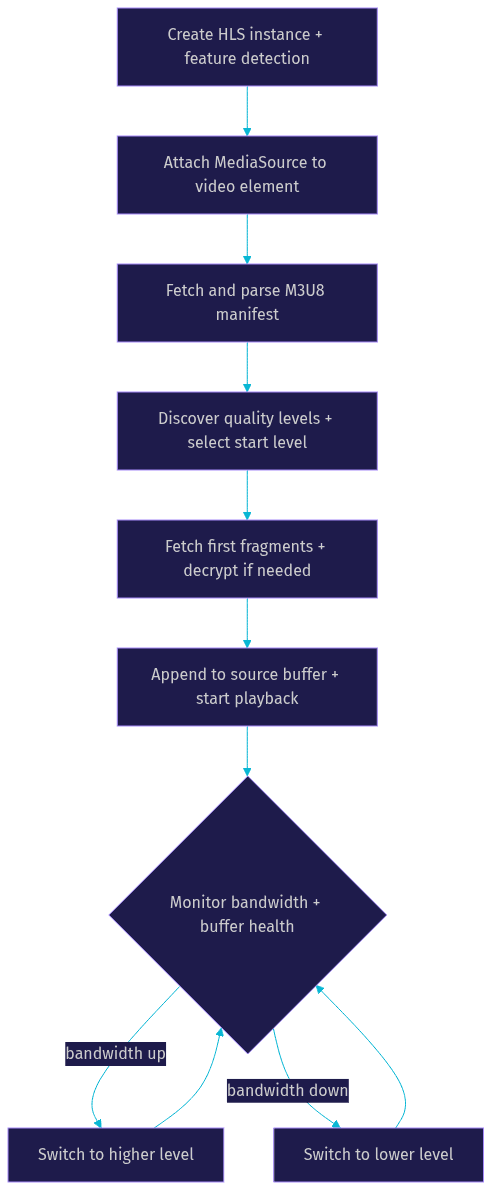
The loading flow follows a predictable sequence from initialisation to first frame. Each step maps to observable behaviour, which makes the sequence a practical debugging checklist.
Initialising the HLS Instance
Everything starts with creating the HLS object and checking whether the current browser supports MediaSource Extensions. Feature detection matters here: if MSE is unavailable, the library cannot operate, and the correct move is to fall back to a native playback path, such as letting Safari handle the stream directly. During initialisation you also apply configuration, including buffer targets, ABR thresholds, and loader timeouts. Sensible defaults exist, but production deployments almost always tune them.
Attaching MediaSource to the Video Element
Next, the loader attaches a MediaSource instance to the video element in the page. This attachment is asynchronous: the browser must acknowledge the connection before media data can be appended. Once attached, the library creates source buffers for each required track type, typically one combined buffer for muxed audio and video, or separate buffers when the stream uses demuxed tracks. This is also the stage where codec compatibility is checked, because MSE only accepts codec combinations the browser can actually decode.
Loading the Manifest
With media attached, the manifest loader requests the M3U8 URL. The response is parsed, and if it is a master playlist, the loader discovers all available quality levels along with their bandwidth estimates and resolutions. The initial level is chosen based on the configured start policy, often starting at a moderate level rather than the highest, to avoid stalling on slow connections. For live streams, the playlist loader immediately schedules the next playlist refresh.
Fetching and Appending Fragments
Fragment loading begins once a level is selected. The loader requests the first segments, decrypts them if needed, and appends them to the source buffer. Playback typically starts once the buffer holds enough data to satisfy the configured start threshold, usually around one to two segments. From that point the loader runs a continuous loop: monitor the buffer, request more fragments ahead of the playhead, and keep the buffer filled to the configured forward target without over-buffering.
Adaptive Bitrate and Level Switching
As playback runs, the loader measures throughput from completed fragment downloads and estimates sustainable bandwidth. When bandwidth consistently exceeds the current level's bitrate, it switches up; when the buffer drains faster than it fills, it switches down. Switches happen at segment boundaries, so the viewer sees a clean quality change rather than a glitch. The goal is simple: keep the buffer healthy while delivering the highest quality the connection can sustain.
Error Handling and Recovery Strategies
A production HLS loader spends as much time recovering from problems as it does streaming. HLS.js classifies errors into three categories, and each category has distinct recovery paths.
Error Types: Network, Media, and Other
Network errors cover everything at the HTTP layer: manifest requests returning 404 or 403, fragment downloads timing out, CORS misconfiguration blocking cross-origin requests, and manifest parse failures. Media errors cover the playback pipeline: unsupported codecs, corrupted segment data that fails to append to the source buffer, and buffer stalls where playback halts despite data being present. Other errors capture the remaining cases, such as encryption key failures or internal state inconsistencies. Each error event carries a type, a detail code identifying the specific failure, and a fatal flag.
Fatal vs. Non-Fatal Errors
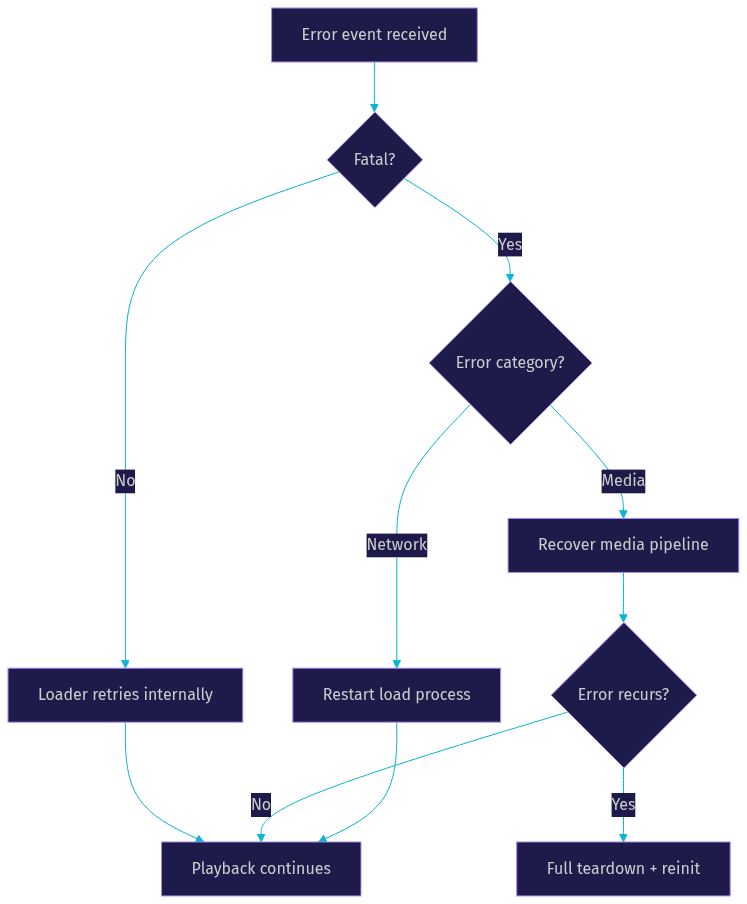
The fatal flag drives the decision flow. Non-fatal errors are ones the loader can handle internally: a single fragment retry, a brief buffer stall it can ride out, or a playlist hiccup resolved on the next refresh. Fatal errors mean the loader has exhausted its internal recovery and playback has stopped. At that point your application must intervene, because the library will not restart itself. Treating every error as fatal leads to unnecessary stream restarts; treating fatal errors as harmless leads to a frozen player.
Recovery Methods: startLoad and recoverMediaError
Two recovery methods cover most situations. Restarting the load process resumes the stream from its current position, which is the right response to fatal network errors, such as a manifest that became temporarily unreachable. Media error recovery rebuilds the MediaSource pipeline and reattaches media, which resolves append failures and codec-related stalls. A practical pattern is to attempt media recovery once, and if the same media error recurs, do a full teardown and reinitialisation, because repeated media failures usually indicate genuinely incompatible content rather than a transient glitch.
Performance Optimisation Tips
Tuning the loader is where generic implementations become production-grade players. Four areas deliver most of the gains.
Adaptive Bitrate Tuning
The ABR controller reacts to bandwidth measurements, and its sensitivity is configurable. Raising the buffer target gives the ABR more runway to ride out short dips without switching down, at the cost of higher memory use and slower startup. Capping the maximum buffer length prevents memory bloat on long viewing sessions, particularly on mobile devices where browser memory is constrained. Starting playback from a lower level and switching up quickly often beats starting high and stalling, because viewers consistently prefer fast start times over initial visual quality.
Low-Latency HLS Settings
Low-Latency HLS (LL-HLS) reduces glass-to-glass delay from the traditional 15 to 30 seconds down to roughly two to five seconds. It works through partial segments, which let the loader begin downloading a segment before it is fully published, and playlist delta updates, which refresh only the changed portion of the playlist. Enabling these features requires the origin and CDN to support LL-HLS, and the loader configuration to allow partial segment loading. The trade-off is higher request volume, so measure whether your CDN costs justify the latency reduction for your use case.
Caching and CDN Considerations
Fragment loading performance is dominated by CDN behaviour. Segments are immutable, so they cache perfectly; playlists are live and must not. Ensure your CDN sets long cache lifetimes on fragments and short ones on playlists, otherwise viewers receive stale live windows. Requesting fragments with byte-range support and consistent URLs improves CDN hit rates. If you control packaging, keeping segment durations uniform helps the loader maintain a steady request rhythm.
Network-Level Tweaks
Loader timeouts and retry counts shape resilience. Aggressive timeouts fail fast and switch levels quickly, which suits live content where falling behind the live edge is worse than a quality drop. Generous timeouts suit video-on-demand, where a slow fragment is preferable to an error. Selecting the fetch-based loader over the legacy one enables modern abort behaviour and better progress reporting, which matters on unstable mobile networks.
Browser Compatibility and Fallback Options
MediaSource Extensions are supported in every modern Chromium-based browser, Firefox, and Safari on desktop and mobile, which covers effectively the entire 2026 browser market. The remaining compatibility concerns are codec-level rather than API-level: HEVC support varies, and older Android WebViews may lack the codecs your content uses. The standard fallback strategy is layered: use native HLS playback on Safari and iOS, where the browser handles the stream directly; use the HLS.js loader everywhere MSE is available; and for environments with neither, degrade to progressive download of a single static quality file. Feature detection should happen at load time, not after a failure, so the fallback path is chosen before the user sees a broken player.
Testing and Debugging the HLS Loader
Logging and Event Listeners
The most useful debugging signal comes from subscribing to the library's event stream. Key events include manifest loading completion, fragment loading start and completion, level switching, buffer appending, and the full error event family. Enabling verbose logging during development surfaces the loader's internal decisions, such as why it chose a particular level or why a fragment was aborted, which turns guesswork into observation.
Network Inspection Tools
Chrome DevTools' network panel shows every manifest and fragment request, including timing, size, and status codes. Exporting a HAR file captures a full session for later analysis, which is invaluable when a bug cannot be reproduced on demand. For ongoing monitoring, the library exposes streaming statistics, including dropped frames and buffer levels, which can be forwarded to your analytics pipeline to catch quality regressions in production.
Common Pitfalls
Three mistakes account for most loader problems. First, CORS misconfiguration: fragments and manifests must allow cross-origin access with appropriate headers, or every request fails before playback begins. Second, ignoring fatal errors and assuming the loader will recover, leaving users on a frozen player. Third, over-buffering on long sessions by never capping the buffer target, which eventually degrades playback on memory-constrained mobile devices.
Future Trends and Alternatives
The HLS loader continues to evolve alongside the streaming ecosystem. Low-Latency HLS and CMAF (Common Media Application Format) are converging toward a single packaging format that serves both HLS and DASH from one set of segments, reducing storage and CDN costs. On the client side, dash.js and Shaka Player serve the DASH world with comparable loader architectures, and the gap between the formats keeps narrowing. Meanwhile, for use cases where the audience must interact in real time, such as live shopping or stage promotion, sub-second interactive streaming beats traditional HLS latency entirely. VideoSDK's interactive live streaming is built for exactly that scenario, letting viewers become active participants without waiting seconds for the stream to catch up.
Definitions Glossary
HLS Loader: The client-side component set that fetches manifests and media fragments over HTTP and prepares them for playback through MediaSource Extensions, powering libraries like HLS.js.
M3U8 Manifest: A plain-text playlist file that indexes available quality levels and media segments, telling the loader what to download and when to refresh for live streams.
MediaSource Extensions (MSE): The browser API that lets JavaScript append media data directly into a video element, enabling adaptive streaming in browsers without native HLS support.
Adaptive Bitrate Streaming (ABR): The technique of dynamically switching between quality levels based on measured bandwidth and buffer health, executed by the loader at segment boundaries.
Low-Latency HLS (LL-HLS): An Apple-defined extension to HLS that uses partial segments and playlist delta updates to cut live delay from tens of seconds to roughly two to five seconds.
Key Takeaways
- The HLS loader is the engine inside HLS.js that fetches the M3U8 manifest, downloads and decrypts fragments, and feeds them into MediaSource Extensions for playback in browsers without native HLS support.
- The architecture splits into manifest, playlist, fragment, and network loaders, and identifying which component failed is the first step of any debugging session.
- Error handling hinges on the fatal flag: non-fatal errors are retried internally, while fatal network and media errors require explicit recovery through load restarts or media pipeline recovery.
- Performance tuning centres on ABR thresholds, buffer caps, low-latency settings, and CDN cache policy, with fast startup generally beating high initial quality.
- For interactive use cases where seconds of latency break the experience, consider VideoSDK's interactive live streaming alongside or instead of traditional HLS delivery.
Conclusion
The HLS loader is the unsung workhorse of web video: it turns plain HTTP requests into smooth, adaptive playback across every modern browser. Master its architecture, respect its error taxonomy, and tune its buffering and ABR behaviour, and your player will survive real-world networks. When your project outgrows one-way streaming and needs viewers on stage in real time, VideoSDK's live streaming SDKs and its free tier are worth a look. What are you building with the HLS loader? Drop a comment, I'd love to hear what kind of streaming use case you're working on.
Free $20 Balance for AI Voice Agents & Video Calls
FAQ