Read Aloud Text to Speech: Ultimate Guide for Developers (2025)
Introduction
In the rapidly evolving world of technology, read aloud text to speech (TTS) has emerged as an indispensable tool for developers, educators, and businesses alike. As digital content proliferates, the demand for seamless text-to-speech conversion has never been higher. From improving accessibility for users with reading difficulties to boosting productivity and enabling innovative applications, TTS is at the heart of modern software experiences. This guide explores the latest in TTS technology, implementation strategies, and the best tools available for developers in 2025.
What is Read Aloud Text to Speech?
Read aloud text to speech is a technology that converts written text into spoken audio using computer-generated voices. At its core, TTS leverages speech synthesis algorithms to interpret and vocalize digital content, enabling users to listen to text rather than read it. The journey of TTS began with monotone, robotic voices but has evolved dramatically with advances in AI. Today’s AI voices are remarkably natural, capable of nuanced inflection, emotion, and multi-lingual fluency. This progress is largely driven by deep learning, neural networks, and vast voice datasets, making TTS an integral part of accessibility, e-learning, and digital content creation. Developers looking to add real-time audio features to their applications can also benefit from integrating a
Voice SDK
, which enables live audio interactions alongside TTS.Key Features of Modern Read Aloud Text to Speech Tools
Human-like AI Voices
Modern TTS tools utilize advanced neural networks to produce human-like AI voices. These voices sound natural, expressive, and are often indistinguishable from real human speech, enhancing user engagement and comprehension.
Multi-lingual Support
The best TTS readers offer multi-lingual capabilities, supporting dozens of languages and regional accents. This is vital for global applications, online TTS services, and cross-border accessibility.
Document and Web Page Reading
Many TTS tools function as document readers and web page readers, parsing and vocalizing content from PDFs, Word documents, web articles, and more. Chrome extensions and plugins further streamline this experience directly within browsers. For developers building browser-based solutions, using a
javascript video and audio calling sdk
can help add both TTS and real-time communication features to web applications.MP3 and Audio Export
A critical feature is the ability to export audio as MP3 or other formats. This enables content creators to generate podcasts, audiobooks, and voice-overs for commercial use, all from written text. If you’re working in Python, consider leveraging a
python video and audio calling sdk
for seamless integration of audio features, including TTS capabilities, into your applications.Proofreading and Annotation
TTS is widely used for proofreading; listening to text helps catch errors overlooked when reading. Many tools include annotation or pronunciation editor features, aiding in content review and editing workflows.
Accessibility Features
Accessibility is at the core, with features like dyslexia fonts, text highlighting, and OCR scanners to convert images to text. These tools empower users with reading difficulties or visual impairments to access digital content. For teams seeking to quickly add video and audio calling to their platforms, an
embed video calling sdk
can be a valuable addition, complementing TTS for a more accessible experience.Privacy and Security
Given the sensitive nature of some documents, TTS tools often emphasize privacy and security, with local processing, secure cloud storage, or robust user controls to protect data.
How Read Aloud Text to Speech Works (Code Snippet & Diagram)
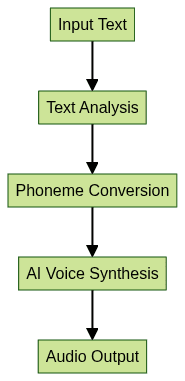
At a high level, TTS systems process input text, analyze linguistic structure, convert text to phonemes, and synthesize audio using digital signal processing or AI-based voice models. Below is a Python code snippet using
pyttsx3, a popular TTS library:1import pyttsx3
2
3engine = pyttsx3.init()
4engine.say("Read aloud text to speech demo.")
5engine.runAndWait()
6For cloud-based TTS and more lifelike voices, Google’s
gTTS (Google Text-to-Speech) can be used:1from gtts import gTTS
2
3tts = gTTS(text='Hello, this is a text-to-speech example.', lang='en')
4tts.save('output.mp3')
5If your application requires phone-based audio interactions in addition to TTS, you might explore a
phone call api
to enable voice connectivity features.TTS Process Flow Diagram
Use Cases for Read Aloud Text to Speech
Read aloud text to speech technology is transforming workflows in technology and beyond:
- Education and E-Learning: TTS apps support learners by reading study material aloud, aiding comprehension and language acquisition.
- Accessibility for Reading Difficulties: TTS readers are essential for users with dyslexia or visual impairments, providing equal access to content.
- Productivity: Developers and professionals use TTS for multitasking—listening to documentation, proofreading code comments, or reviewing specs while on the go.
- Audiobook and Content Creation: Content creators leverage AI voices to create audiobooks, podcasts, and narration at scale, reducing costs and time.
- Commercial Voice-overs and Narration: TTS is used in explainer videos, training modules, and interactive voice systems, offering customizable and scalable voice solutions.
For mobile and cross-platform development, integrating a
react native video and audio calling sdk
can bring both TTS and real-time communication features to your React Native apps.Real-life Example
A software development team integrates a TTS plugin into their documentation platform, enabling developers to listen to design documents while commuting. This improves retention, accessibility, and team productivity. Teams can further enhance collaboration by adding a
Voice SDK
for live audio discussions alongside TTS playback.Top Read Aloud Text to Speech Tools: Comparison
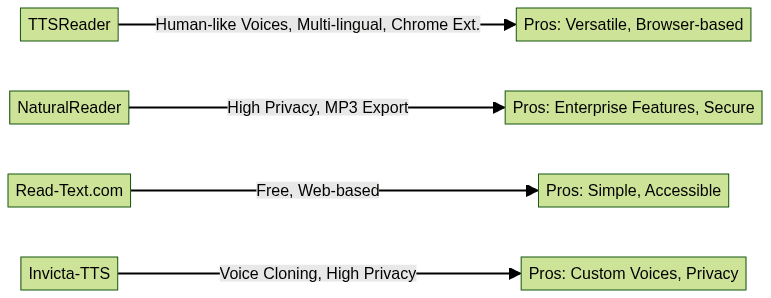
Here’s a comparison of leading TTS tools for developers and content creators in 2025:
| Feature | TTSReader | NaturalReader | Read-Text.com | Invicta-TTS |
|---|---|---|---|---|
| Human-like Voices | Yes | Yes | Yes | Yes |
| Multi-lingual | Yes | Yes | Yes | Limited |
| MP3 Export | Yes | Yes | No | Yes |
| Web/Document Reading | Yes | Yes | Yes | Yes |
| Chrome Extension | Yes | Yes | No | No |
| Privacy Options | Medium | High | Medium | High |
| Free Tier | Yes | Yes | Yes | Yes |
| Commercial Use | Yes | Yes | Limited | Yes |
Pros and Cons:
- TTSReader: Versatile, browser-based, but privacy options are medium.
- NaturalReader: Enterprise features, strong privacy, higher cost for premium.
- Read-Text.com: Free, web-based, but lacks MP3 export.
- Invicta-TTS: Voice cloning and privacy, limited language selection.
If you want to add live audio rooms or group discussions to your TTS-enabled platform, integrating a
Voice SDK
can provide scalable, real-time voice capabilities.How to Choose the Best Read Aloud Text to Speech Tool
When selecting a TTS app or online TTS platform, consider:
- Voice Quality: Are the AI voices natural and expressive?
- Languages & Accents: Does it support the languages you need?
- Export Options: Can you save audio as MP3 or WAV for reuse?
- Privacy: Does it offer on-device processing or secure cloud storage?
- Platform Compatibility: Is it available as a TTS plugin, Chrome extension, mobile app, or desktop software?
- Pricing: Does it offer a free tier, and what are the commercial use rights?
Tip: Always test tools with your own content and review their privacy policies before integrating into workflows. For those interested in exploring TTS and voice features, you can
Try it for free
to evaluate different SDKs and APIs.Implementation: Adding Read Aloud Text to Speech to Your Workflow
Developers can easily integrate TTS into web applications. Here’s a simple example using the Web Speech API in JavaScript:
1const synth = window.speechSynthesis;
2const utter = new SpeechSynthesisUtterance("This is a read aloud text to speech demo.");
3synth.speak(utter);
4
For more advanced workflows, consider using a TTS plugin or third-party API. For instance, integrating Google Cloud Text-to-Speech:
1// Pseudocode for invoking cloud TTS API
2fetch('https://cloud.google.com/text-to-speech-api', {
3  method: 'POST',
4  body: JSON.stringify({ text: 'Your text here', language: 'en-US' }),
5  headers: { 'Content-Type': 'application/json' }
6})
7.then(response => response.json())
8.then(data => {
9  // Handle and play returned audio
10});
11
If you need to enable live audio interactions or group voice features in your workflow, a
Voice SDK
can be seamlessly integrated alongside TTS to create a richer, more interactive user experience.Accessibility and the Future of Read Aloud Text to Speech
Accessibility is a guiding principle in TTS development. By making content audible, TTS technology breaks barriers for users with dyslexia, visual impairments, or other reading difficulties. Looking ahead to 2025, we can expect:
- Voice Cloning: Personalized, AI-generated voices for unique experiences.
- AI Improvements: Even more realistic, context-aware speech synthesis.
- Mobile Integration: Ubiquitous TTS in mobile apps, IoT devices, and wearables.
- Seamless Multimodal Experiences: Combining TTS with OCR scanners, pronunciation editors, and annotation for complete accessibility solutions.
Developers should embrace these trends to create inclusive, future-proof applications.
Conclusion
Read aloud text to speech technology is reshaping the way we interact with digital content. With human-like AI voices, multi-lingual support, and robust accessibility features, TTS tools empower users and developers alike. Explore the top TTS tools, experiment with integration, and harness the power of TTS to create more accessible, efficient, and engaging digital experiences in 2025.
Want to level-up your learning? Subscribe now
Subscribe to our newsletter for more tech based insights
FAQ