


Pipecat alternatives range from distributed streaming platforms like Apache Kafka and NATS to custom WebRTC pipelines built with VideoSDK. The right choice depends on whether you need high-throughput message queuing, low-latency real-time audio processing, or a full voice agent framework with built-in STT, LLM, and TTS integration. VideoSDK's AI Agent SDK offers a production-ready path for developers who need deterministic voice flows without managing infrastructure.
Building voice AI pipelines at scale exposes cracks that quickstart tutorials never mention. Pipecat, the open-source framework for real-time multimodal agents, earned its reputation by making it straightforward to chain speech-to-text, large language models, and text-to-speech into a conversational loop. But as teams move from prototype to production, the search for Pipecat alternatives begins in earnest.
Developers hit walls around scalability, cross-platform SDK support, and the complexity of orchestrating distributed agent systems. Some need high-throughput messaging backbones. Others want a managed solution that handles WebRTC, telephony, and AI pipeline orchestration in one place. By the end of this article, you will have a clear framework for evaluating seven Pipecat alternatives and knowing exactly when each one wins.
What Is Pipecat?
Pipecat is defined as an open-source Python framework for building real-time voice and multimodal AI agents. It provides a pipeline architecture where developers chain together services for speech-to-text, LLM processing, and text-to-speech, then connect the output to a real-time audio transport layer.
Pipecat works by passing audio frames through a series of processing stages, each handled by a pluggable service provider. A user speaks, the audio stream enters the pipeline, a transcription service converts speech to text, an LLM generates a response, and a TTS service converts that response back to audio for playback. The framework handles the orchestration, timing, and interruption logic that makes conversational AI feel natural.
Typical use cases include voice assistants, phone-based AI agents, virtual companions, and interactive voice response systems. Pipecat supports multiple AI providers including OpenAI, Deepgram, ElevenLabs, and Google, giving developers flexibility in choosing their STT and TTS engines. The framework runs as a Python process and connects to callers via WebRTC or phone bridges.
Why Consider Pipecat Alternatives?
Several limitations push developers to evaluate Pipecat alternatives once they move beyond prototyping.
Scalability becomes the first pain point. Pipecat runs as a single Python process per agent session, which means horizontal scaling requires external orchestration. Teams managing hundreds of concurrent voice agents need a messaging or streaming layer that Pipecat does not provide natively.
Cross-platform support presents another challenge. Pipecat is Python-centric, so teams building mobile clients in Swift, Kotlin, or Flutter must bridge the gap themselves. The framework does not ship native SDKs for iOS, Android, or web frontends.
Advanced data transformation and pipeline observability also leave room for improvement. Production voice AI systems need detailed logging, metrics, and error handling across every pipeline stage. Teams coming from data engineering backgrounds often find themselves wanting the tooling that mature streaming platforms offer.
Finally, deterministic conversation flows remain difficult. When a voice agent must follow a strict sequence of steps (loan applications, insurance intake, compliance-driven dialogs), pure LLM-driven flow control introduces unpredictability that some alternatives address more directly.
Evaluation Criteria for Choosing an Alternative
Choosing the right Pipecat alternative requires evaluating several dimensions that go beyond feature checklists.
Performance and latency top the list for voice AI. A conversational agent that takes more than 800 milliseconds to respond feels broken to users. Evaluate each alternative's ability to maintain sub-second response times under load, including the overhead introduced by message serialization and network hops.
Scalability patterns matter differently depending on your architecture. Some alternatives scale horizontally as distributed clusters (Kafka, Pulsar), while others scale vertically as lightweight single binaries (NATS). Match the scaling model to your expected concurrent session count and geographic distribution.
Ecosystem and integration support determine how quickly you can connect your existing STT, LLM, and TTS providers. A platform that requires custom adapters for every AI provider will slow development compared to one with native plugins.
Language bindings affect your team's velocity. If your backend is Python and your frontend is React Native, you need a solution that bridges both worlds without forcing you to maintain parallel implementations.
Licensing ranges from permissive (MIT, Apache 2.0) to commercial SaaS models. Open-source frameworks give you control but require infrastructure investment. Managed platforms reduce operational burden but introduce vendor lock-in and recurring costs.
Community health and documentation quality are leading indicators of long-term viability. A project with active maintainers, regular releases, and responsive issue trackers will serve you better than a technically superior tool that nobody maintains.
Top Pipecat Alternatives
Each alternative below addresses a different gap in Pipecat's capabilities, from batch processing to real-time WebRTC pipelines.
GNU Parallel
GNU Parallel is a shell tool for executing jobs in parallel on one or more computers. It excels at batch processing workloads where you need to run many independent tasks across multiple CPU cores or machines.
For voice AI, GNU Parallel shines when you need to process large volumes of pre-recorded audio files through a transcription or analysis pipeline. If your use case involves post-call analytics, batch transcription of call recordings, or training data generation, GNU Parallel gives you a simple, scriptable way to distribute that work.
Where GNU Parallel falls short is real-time conversational AI. It has no concept of streaming audio, no WebRTC transport, and no mechanism for maintaining conversational state across turns. It is a batch tool, not a real-time pipeline framework. Developers who need live voice interaction should look elsewhere, but those doing offline audio processing alongside their voice AI stack will find it invaluable.
Apache Kafka
Apache Kafka is a distributed event streaming platform capable of handling trillions of events per day. It persists streams of records in topics, supports pub-sub messaging, and provides durable storage with configurable retention.
For voice AI pipelines, Kafka works well as the backbone for high-throughput audio event distribution. If you are building a system where thousands of voice agents generate events that need to be processed, analyzed, and stored, Kafka gives you the durability and replayability that a simple in-process queue cannot match.
The trade-off is latency. Kafka adds serialization and network overhead that makes it unsuitable as the primary transport for real-time conversational audio. Most teams use Kafka alongside a real-time transport layer, not as a replacement for it. Kafka handles the event stream (transcription results, agent actions, analytics), while a separate WebRTC connection handles the live audio.
Integration considerations include Kafka's operational complexity. Running a Kafka cluster requires ZooKeeper or KRaft, broker management, and topic configuration. Teams without dedicated infrastructure engineers may find this overhead significant.
RabbitMQ
RabbitMQ is a widely deployed message broker that implements AMQP, MQTT, and STOMP protocols. It provides reliable message delivery with acknowledgments, dead-letter queues, and flexible routing.
RabbitMQ fits voice AI pipelines where reliability matters more than raw throughput. If your voice agent triggers downstream actions (database writes, notification dispatch, CRM updates) that must not be lost, RabbitMQ's delivery guarantees give you confidence that messages reach their destinations.
For low-latency audio processing, RabbitMQ introduces too much overhead. The broker's routing and acknowledgment machinery adds milliseconds that accumulate across pipeline stages. Real-time audio frames need to move through the pipeline in under 50 milliseconds per hop, and RabbitMQ's design optimizes for durability, not speed.
Teams often use RabbitMQ as a sidecar to their voice pipeline, handling the non-audio messaging (task queues, webhook delivery, event notifications) while a dedicated audio transport handles the real-time stream.
NATS
NATS is a lightweight, high-performance messaging system designed for cloud-native and distributed systems. It offers pub-sub messaging, request-reply patterns, and jetstream-based persistence with minimal operational overhead.
NATS appeals to voice AI developers who need fast inter-service communication without the weight of Kafka or RabbitMQ. A NATS server can handle millions of messages per second with sub-millisecond latency, making it suitable for coordinating distributed agent components.
In voice agent architectures, NATS works well for signaling, session coordination, and routing messages between agent workers. If you run multiple AI agent processes that need to share state, hand off sessions, or coordinate turn-taking, NATS provides the messaging fabric without imposing heavy infrastructure requirements.
The limitation is that NATS is a messaging system, not a voice AI framework. You still need a separate layer for WebRTC audio transport, STT/TTS integration, and conversation orchestration. NATS handles the plumbing, but you build the pipeline.
Pulsar
Apache Pulsar is a cloud-native distributed messaging and streaming platform with multi-tenancy, geo-replication, and a layered architecture that separates compute from storage.
Pulsar distinguishes itself from Kafka with its multi-tenant architecture, which lets multiple teams or applications share a single cluster with isolated namespaces and independent retention policies. For organizations running several voice AI products with different SLAs, Pulsar's tenant isolation simplifies resource management.
For multimodal AI pipelines, Pulsar's tiered storage model lets you keep hot data on fast SSDs while archiving older messages to object storage. This is useful for voice AI systems that need to retain conversation transcripts and audio recordings for compliance or training purposes.
The downside is operational complexity. Pulsar requires BookKeeper for storage, a separate broker tier, and careful configuration of subscription modes. Teams adopting Pulsar should expect a steeper learning curve than NATS or RabbitMQ, though the payoff is a more flexible architecture for large-scale deployments.
Custom WebRTC-based Pipelines
Building a custom WebRTC pipeline gives you maximum control over every aspect of your voice AI system. Instead of fitting your architecture into a general-purpose messaging framework, you design the pipeline around your specific latency, scalability, and feature requirements.
VideoSDK provides a production-ready foundation for this approach. The VideoSDK AI Agent SDK connects LLMs, STT, and TTS providers to VideoSDK rooms, enabling real-time voice AI interactions without building WebRTC infrastructure from scratch. You get sub-300ms latency, built-in recording, and support for providers like OpenAI Realtime, Deepgram, ElevenLabs, and Cartesia.
For teams that need deterministic conversation flows, VideoSDK's Conversational Graph layer lets you define conversation steps as a directed graph while the LLM handles only natural language generation. This is particularly valuable for compliance-driven dialogs like loan applications or insurance intake where every step must happen in order.
The following diagram shows how a VideoSDK-based voice AI pipeline processes audio through the STT, LLM, and TTS chain:
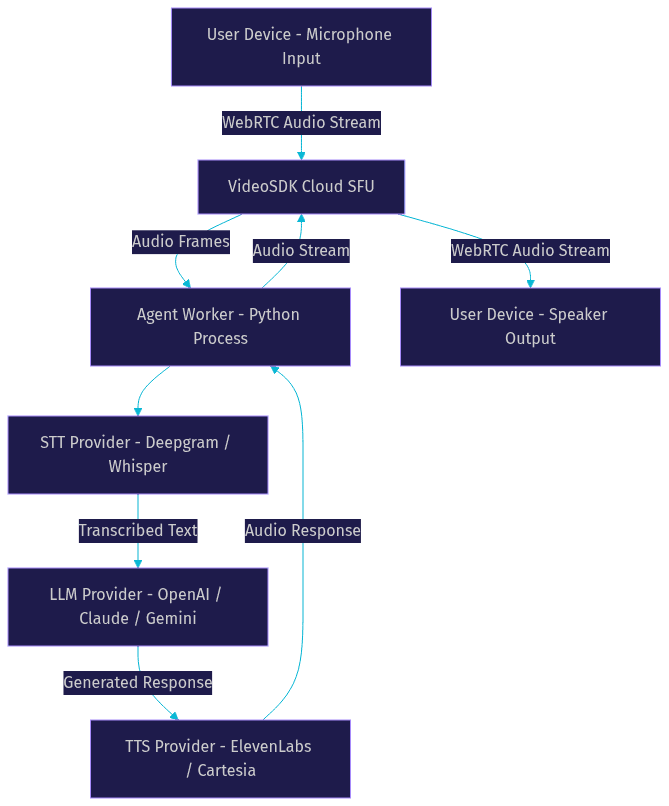
LiveKit offers another path for custom WebRTC pipelines, with an open-source real-time communication stack and agent framework. The choice between VideoSDK and LiveKit often comes down to platform coverage and managed services. VideoSDK supports 10+ platforms including Unity and IoT, ships a Prebuilt UI Kit for zero-code embedding, and includes telephony and SIP integration for phone-based AI agents.
This custom approach wins when you need full control over the audio transport, native mobile SDKs, and built-in AI pipeline orchestration in a single platform. It loses when your team wants to stay in pure Python and avoid any WebRTC complexity.
Comparison Matrix
The following table summarizes how each Pipecat alternative compares across the dimensions that matter most for voice AI development.
[LINKABLE ASSET - comparison table]
| Tool | Type | Latency Profile | Scalability | Best For |
|---|---|---|---|---|
| Pipecat | Voice AI framework | Sub-second (in-process) | Single process per session | Prototyping voice agents in Python |
| GNU Parallel | Batch processing | N/A (offline) | Multi-core, multi-machine | Batch audio transcription and analysis |
| Apache Kafka | Distributed streaming | 10-100ms (event stream) | Horizontal cluster scaling | High-throughput event backbone for agent analytics |
| RabbitMQ | Message broker | 5-50ms (with acks) | Vertical, moderate horizontal | Reliable downstream task dispatch |
| NATS | Lightweight messaging | Sub-millisecond | Horizontal, cloud-native | Inter-agent signaling and coordination |
| Apache Pulsar | Cloud-native streaming | 5-50ms | Multi-tenant horizontal | Multi-team voice AI platforms with tiered storage |
| VideoSDK | WebRTC + AI Agent SDK | Sub-300ms (real-time audio) | Cloud-managed, auto-scaling | Production voice agents with WebRTC, telephony, and deterministic flows |
The most important distinction here is between messaging platforms (Kafka, RabbitMQ, NATS, Pulsar) and full voice AI platforms (VideoSDK). Messaging platforms handle data movement between services but leave you to build the audio transport and AI pipeline yourself. VideoSDK handles both layers, which is why teams building production voice agents increasingly choose it over assembling a stack from separate tools.
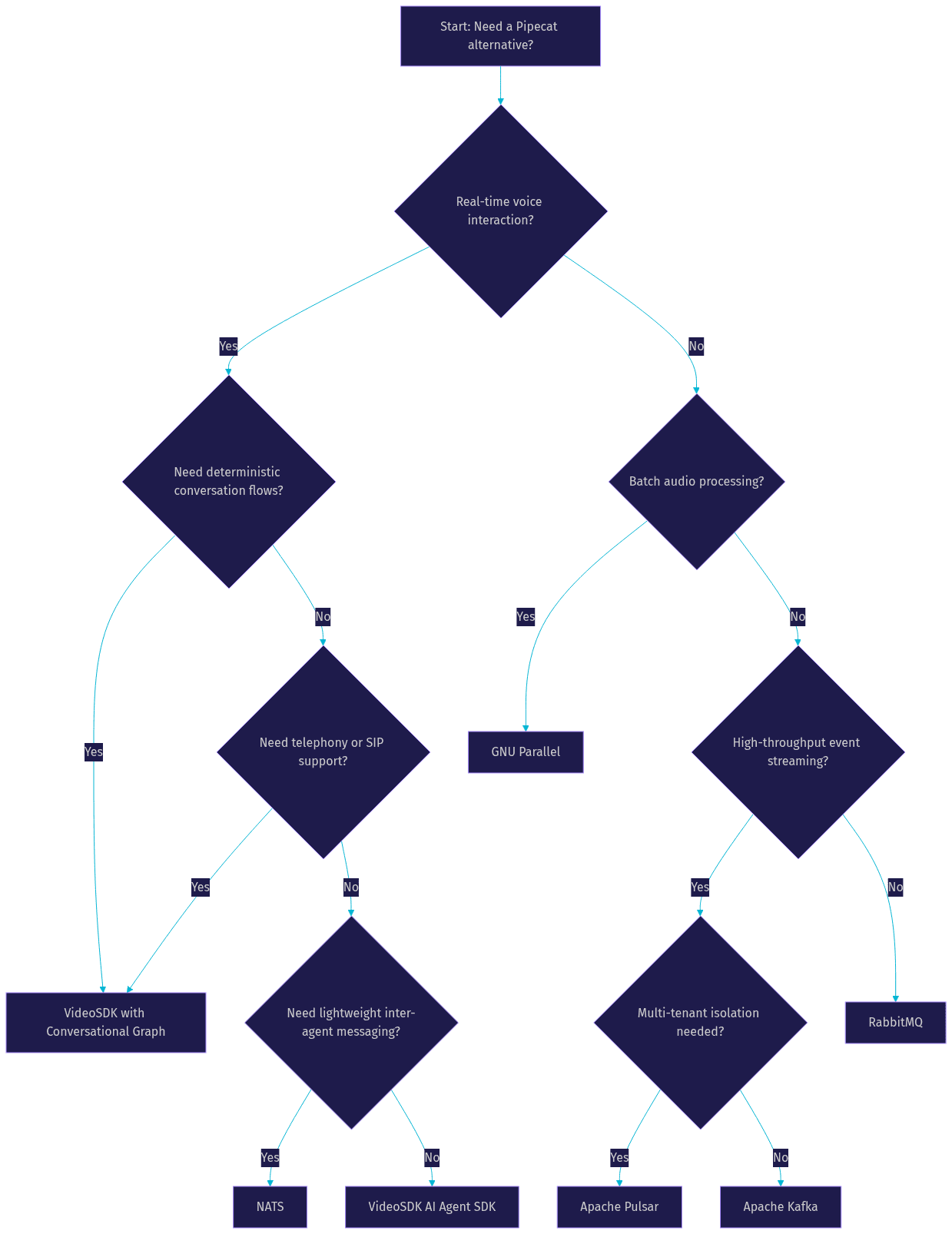
Decision Flow Diagram
The following diagram visualizes how to choose a Pipecat alternative based on your primary requirements.
Migration Considerations
Moving from Pipecat to an alternative requires careful planning across several dimensions.
Data model translation comes first. Pipecat represents conversation state as Python objects within a single process. If you are moving to a distributed messaging platform like Kafka or NATS, you need to serialize that state into messages that can traverse network boundaries. Design your message schemas early, and version them from day one.
Token handling and authentication need rethinking. Pipecat manages API keys for STT, LLM, and TTS providers within the Python process. In a distributed architecture, you need a centralized secrets management approach. If you move to VideoSDK, the platform handles token generation and provider authentication through its REST APIs, simplifying this transition.
Testing strategy should account for the new architecture's failure modes. In-process pipelines fail predictably. Distributed systems fail in partial, confusing ways. Build integration tests that simulate network partitions, provider outages, and message ordering issues. Test your reconnection logic thoroughly, especially for WebRTC audio streams.
Deployment patterns change significantly. Pipecat deploys as a Python application. Distributed alternatives require cluster management, monitoring, and alerting infrastructure. VideoSDK's Agent Cloud offers a managed deployment option that eliminates this overhead, which is worth evaluating if your team lacks dedicated platform engineering capacity.
Real-World Use Cases
Several teams have navigated the transition from Pipecat to alternative architectures, each with different outcomes.
A healthcare startup building a telemedicine voice assistant moved from Pipecat to VideoSDK after struggling with cross-platform client support. They needed native iOS and Android SDKs for their patient-facing app, which Pipecat could not provide. The switch gave them video calling capabilities alongside their voice AI pipeline, reducing their stack complexity.
A fintech company processing loan applications via phone switched from Pipecat to VideoSDK with Conversational Graph. The deterministic flow control ensured every compliance step happened in order, eliminating the occasional skipped steps they experienced with LLM-driven flow control in Pipecat.
A call analytics platform replaced Pipecat's batch transcription with GNU Parallel for processing thousands of recorded calls nightly. The switch cut their processing time by 70 percent by distributing work across a cluster of worker machines.
A social audio app adopted NATS for coordinating live voice rooms after finding Pipecat's single-process model could not handle their concurrency requirements. NATS handled session signaling across hundreds of concurrent rooms with negligible latency.
Pros and Cons Summary
Moving away from Pipecat involves trade-offs that depend on your specific requirements.
Advantages of alternatives:
- Better horizontal scalability for high-concurrency workloads
- Native cross-platform SDK support (VideoSDK, LiveKit)
- Deterministic conversation flow control (VideoSDK Conversational Graph)
- Built-in telephony and SIP integration (VideoSDK)
- Mature operational tooling and monitoring (Kafka, Pulsar, NATS)
- Reduced infrastructure burden with managed platforms (VideoSDK Agent Cloud)
Trade-offs of leaving Pipecat:
- Loss of pure Python simplicity for prototyping
- New infrastructure to learn and operate (for self-hosted alternatives)
- Potential vendor lock-in with managed platforms
- Migration effort for existing conversation logic and provider integrations
- Different mental model for pipeline orchestration
Definitions Glossary
Pipecat: An open-source Python framework for building real-time voice and multimodal AI agents by chaining STT, LLM, and TTS services in a pipeline architecture.
WebRTC: A real-time communication protocol that enables peer-to-peer audio, video, and data streaming in web browsers and mobile applications with sub-second latency.
Conversational Graph: A deterministic, graph-based conversation orchestration layer that controls conversation flow through defined nodes and transitions while the LLM handles only natural language generation.
STT (Speech-to-Text): The process of converting spoken audio into text, typically performed by services like Deepgram, OpenAI Whisper, or Google Cloud STT in voice AI pipelines.
TTS (Text-to-Speech): The process of converting generated text responses into natural-sounding audio, using providers like ElevenLabs, Cartesia, or OpenAI TTS.
Agent Worker: A Python process that runs a VideoSDK AI agent and manages its session lifecycle, including pipeline execution, turn detection, and provider communication.
Message Broker: A software component that enables reliable communication between distributed services by routing messages according to defined rules and delivery guarantees.
Key Takeaways
- Pipecat excels at prototyping voice AI agents in Python but faces scalability and cross-platform limitations in production deployments.
- Distributed messaging platforms like Kafka, NATS, and Pulsar solve specific infrastructure problems but do not replace the need for a real-time audio transport layer.
- VideoSDK combines WebRTC audio transport, AI agent pipeline orchestration, and deterministic conversation flows in a single platform, making it the strongest alternative for production voice agents.
- The right alternative depends on your primary bottleneck: batch processing (GNU Parallel), event streaming (Kafka, Pulsar), lightweight messaging (NATS), reliable task dispatch (RabbitMQ), or full-stack voice AI (VideoSDK).
- Migration requires careful planning around data model translation, authentication, testing, and deployment patterns.
Conclusion
Choosing among Pipecat alternatives comes down to understanding which wall you hit first. If scalability is your bottleneck, messaging platforms like NATS or Kafka address it directly. If cross-platform support and deterministic conversation flows are your priority, VideoSDK's AI Agent SDK with Conversational Graph offers a production-ready path that eliminates the need to assemble a stack from separate tools. Evaluate your concurrent session requirements, platform coverage needs, and conversation flow complexity before committing to a migration. Start with a single agent use case, validate the latency and reliability, then scale from there. You can sign up for a free VideoSDK account at app.videosdk.live/login and explore the code samples to see how quickly you can move from prototype to production. What are you building with voice AI? Drop a comment below, I'd love to hear what kind of voice agent use case you're working on.
Free $20 Balance for AI Voice Agents & Video Calls
FAQ