


Combining Google's Gemini Live API with Daily's WebRTC transport and the Pipecat framework gives you a complete, production-ready stack for real-time multimodal AI voice agents. Gemini Live handles bidirectional speech-to-speech streaming, Daily moves audio and video between users and your bot with sub-500ms latency, and Pipecat orchestrates the pipeline in Python. VideoSDK offers a parallel approach with its own open-source AI Agent SDK, worth comparing before you commit.
Real-time multimodal AI agents have crossed a threshold. In 2026, a user can open a web page, share their camera and screen, and hold a natural spoken conversation with an AI that sees what they see and responds in under a second. That capability used to require a research team. Now it requires three well-documented components wired together correctly.
The stack most developers converge on is Google's Gemini Live API for the multimodal brain, Daily for the WebRTC media transport, and Pipecat as the Python orchestration framework that connects them. Each piece solves a distinct problem, and the integration points between them are where most of the confusion lives. This guide walks through the full architecture, setup, bot building, deployment, and troubleshooting so you can ship a working agent instead of a weekend prototype.
What Is Gemini Multimodal Live with Daily and Pipecat?
"Gemini Multimodal Live with Daily and Pipecat" describes an integrated stack for building real-time, speech-to-speech AI agents that can also process video and screen share. The stack has three components, each with a clear role.
The Gemini Live API is Google's bidirectional streaming interface for Gemini models. Unlike a standard chat completion, where you send a prompt and wait for a full response, the Live API maintains a persistent WebSocket-style session where audio, video, and text flow in both directions. The model listens, watches, and speaks in real time.
Daily provides the WebRTC transport layer. WebRTC is the only browser-native technology that reliably captures and streams microphone audio and camera video with low latency, and Daily's managed infrastructure handles the signaling, room creation, and media routing that raw WebRTC would force you to build yourself.
Pipecat is the open-source Python framework that glues them together. It defines a pipeline of services: a transport (Daily), voice activity detection, the LLM service (Gemini Live), and optional TTS, tool calling, and storage. Pipecat handles the event loop, turn-taking, and session lifecycle so you write bot logic, not infrastructure.
A useful mental model: Daily is the nervous system carrying sensory input, Pipecat is the spinal cord routing signals, and Gemini Live is the brain. VideoSDK's own AI Agent SDK follows a strikingly similar architecture, with an Agent Worker managing sessions inside VideoSDK rooms, which makes it a strong alternative if you want the transport and orchestration layers from one vendor.
Core Architecture Overview
The end-to-end data flow is what makes this stack work. Understanding it before you build prevents most integration mistakes.
A user joins a Daily room from a browser or mobile app. Their microphone audio and camera video are captured by the Daily client SDK and sent over WebRTC to Daily's media servers, which route them to your Pipecat bot process. The Pipecat transport layer receives those media frames and pushes them into the pipeline. Voice activity detection decides when the user has finished speaking. Audio and video frames are then forwarded to the Gemini Live session as bidirectional input. Gemini processes the multimodal stream, generates a spoken response, and that audio flows back through the pipeline to the Daily room, where the user hears it in near real time.
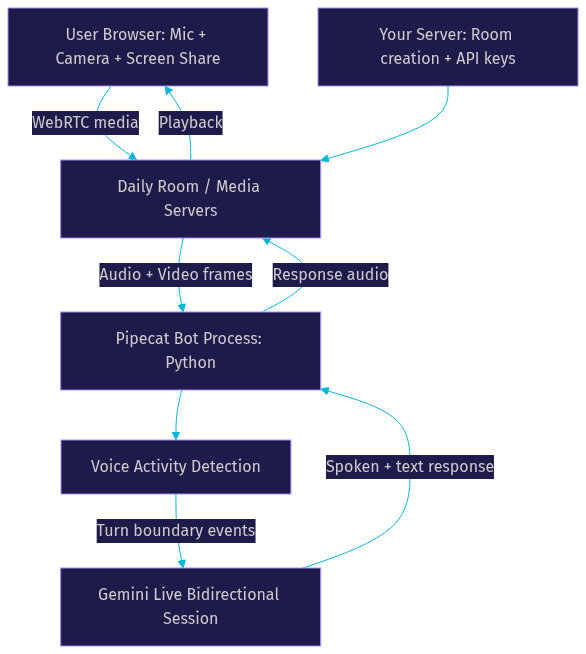
The critical property is that the Gemini Live session is persistent. The model keeps conversational and visual context across turns, so it can reference something the user showed on screen thirty seconds ago without you re-sending history.
Pipecat Server Pipeline
A Pipecat pipeline is an ordered chain of services, each consuming and emitting events. The transport service (Daily) sits at the edge, receiving and sending media. A voice activity detection service analyzes incoming audio to find speech boundaries, which drives turn-taking. The real-time video intelligence layer forwards camera and screen-share frames to the model. The LLM service, in this case Gemini Live, handles understanding and generation. Optional downstream services handle text-to-speech (unnecessary when Gemini speaks natively), tool calling, and conversation storage. You assemble these once at startup, and Pipecat's event loop keeps data flowing between them for the life of the session.
Daily WebRTC Transport
Daily is used because WebRTC is the only practical way to get sub-second audio and video between a browser and a server. Daily manages room creation through its REST API: your backend requests a room, receives a room URL, and hands that URL to both the user's client and the Pipecat bot. Daily handles NAT traversal, encryption, and adaptive bitrate. Without a managed transport like Daily, you would be running your own TURN servers and signaling infrastructure, which is a project in itself.
Setting Up the Development Environment
Getting the environment right up front saves hours of cryptic failures later.
You need Python 3.10 or newer for the Pipecat bot, and Node 18 or newer if you are building a web frontend with the Pipecat Web SDK or a framework like Next.js. You need two API keys: a Google AI Studio key with Gemini Live access, and a Daily API key for room creation. Store both as environment variables on the machine running the bot, never in frontend code.
On the operating system side, Linux and macOS work out of the box for development. On Windows, the Windows Subsystem for Linux route is strongly recommended, because several audio-processing dependencies in the Python voice stack behave unpredictably on native Windows.
For local setup, create an isolated Python virtual environment for the bot project so framework upgrades do not collide with other work. Install the Pipecat framework along with its Daily transport and Gemini Live service extras, which ship as separate optional components. Use the Pipecat CLI scaffolding tool to generate a starter bot, which produces a working project structure with sensible defaults. Verify your Daily key by creating a test room through the REST API before writing any bot logic, because transport errors are the hardest to debug from inside a pipeline.
One production note early: browsers only allow microphone and camera access on secure origins. Localhost counts as secure for development, but any deployed frontend needs HTTPS before media permissions will work.
Configuring Gemini Live in Pipecat
Configuring the Gemini Live service in Pipecat comes down to three decisions: credentials, model selection, and modality.
Credentials go into environment variables read by the bot at startup. The Gemini API key authenticates the Live session, and the Daily key authenticates room creation. Keep them in a secrets manager or environment file excluded from version control.
Model selection matters more than developers expect. Pipecat originally shipped a service class named for the multimodal live capability, which has since been deprecated in favor of a unified Gemini Live service that supports the newer Live model identifiers. If you are following older tutorials, migrate to the current service class, because the deprecated one targets retired model versions and will fail on new API keys. Check the Pipecat GitHub releases for the current class name and supported model identifiers, since these change as Google updates the model lineup.
Modality configuration tells the session which input channels to enable. Audio input is always on for a voice agent. Video input, meaning camera frames, and screen-share frames can be enabled independently. Enabling video increases token consumption and latency slightly, so enable only what your use case needs. A voice-only support agent should not pay the video tax.
Integrating Daily for Real-Time Media
Daily integration starts on your backend. Your server calls the Daily room creation endpoint with your API key, optionally specifying properties like a maximum participant count or room expiry. The response includes a room URL. You hand that URL to the user's client, which joins using the Daily web or mobile client SDK, and to the Pipecat bot, which joins as a participant through the transport service.
Transport parameters worth setting deliberately include the bot's audio sample rate, which should match what Gemini Live expects to avoid server-side resampling overhead, and whether the bot publishes video, which it typically does not need to unless you are rendering an avatar.
Turn-taking is handled by voice activity detection on the Pipecat side. The VAD service watches incoming user audio and emits an event when the user stops speaking, which the pipeline uses to signal the end of a conversational turn. Because Gemini Live is bidirectional, the model can also interrupt itself when the user starts speaking over it, producing natural, human-feeling barge-in behavior. Tuning the VAD sensitivity is one of the highest-leverage adjustments you can make: too sensitive and the bot responds to breathing and keyboard noise, too lax and users wait in awkward silence after finishing a sentence.
Building a Simple Multimodal Bot
Building the bot follows a logical sequence, and each step has a clear expected outcome.
Create a conversation database. Pipecat's scaffolding typically uses a local SQLite database to persist conversation history across sessions. Initialize it before the pipeline starts so every session can be resumed or audited. This is also what enables a user to refresh the page and continue the same conversation.
Initialize the pipeline. Assemble the transport, VAD, and Gemini Live services in order. The transport must be initialized first because every other service subscribes to its media events.
Attach voice activity detection. Wire the VAD service between the transport and the LLM service so turn boundaries are detected before frames reach the model.
Connect to Gemini Live. The LLM service opens a persistent session when the bot joins the room. Verify the session is live before routing user media, because a failed session silently drops all input.
Route responses. Spoken responses from Gemini flow back through the transport to the room automatically once the pipeline is wired. Confirm the user hears the bot before adding features.
Common pitfalls bite everyone at least once. Gemini API keys expire or get rate-limited, and the failure surfaces as a silent session drop rather than an error message, so log session lifecycle events. Missing media permissions in the browser, usually caused by a non-HTTPS origin, produce an empty audio stream that looks identical to a VAD misconfiguration. For production, plan for HTTPS everywhere, TURN server fallback for users behind restrictive firewalls (Daily provides this automatically), and a token server so API keys never touch the client.
Deploying to Pipecat Cloud
Pipecat Cloud turns your local bot into a deployed agent with minimal ceremony, and it is the fastest path from prototype to production for this stack.
The deployment flow is effectively one command from the Pipecat CLI: it packages your bot, uploads it, and provisions a running instance. Before deploying, you select a scaling profile. For voice-only agents a standard profile works, but for agents processing video or screen share, choose a compute profile with more headroom, since video frame processing is CPU-intensive and an undersized agent drops frames before dropping quality.
Secret management moves from local environment files to the platform's secrets store. Add your Gemini and Daily keys as encrypted secrets rather than baking them into the deployment package, so rotation does not require a redeploy.
Monitoring is the part developers skip and then regret. Pipecat Cloud exposes session logs and metrics, and you should watch two numbers from day one: session start latency, meaning the time from a user joining a room to the bot responding, and pipeline errors per session. A sudden rise in either usually means an upstream API change, most often a Gemini model identifier being retired.
For comparison, VideoSDK's Agent Cloud offers a similar managed deployment path for its own agent SDK, including self-hosted Docker and Kubernetes options if managed cloud is not your preference.
Performance and Latency Tips
Latency is the product. A technically correct agent that responds in two seconds feels broken.
Reduce round-trip time by keeping the bot process geographically close to your users when self-hosting, or relying on the managed cloud's regional placement. Match audio sample rates end to end, because every resampling step adds processing delay. Prefer Gemini's native speech output over a separate TTS service when possible, since routing through an external TTS adds a full network round trip per response. Use Daily's low-latency mode for the transport, which prioritizes speed over jitter buffering. Finally, keep the Gemini session warm: session establishment is expensive, so for support-style workloads, consider pre-warming sessions before users connect rather than creating them on join.
Real-World Use Cases
Three use cases show where this stack genuinely shines.
Live tutoring with screen share. A student shares their screen with a math problem, and the agent reads the problem, watches what the student types, and talks through the solution step by step. The persistent visual context of Gemini Live makes this feel like a human tutor looking over your shoulder.
Interactive sports commentary. A viewer points their camera at a game or shares a broadcast, and the agent provides live, conversational commentary, answering questions about what just happened without pausing the experience.
AI-driven customer support. A voice agent handles inbound calls or web sessions, sees any document the customer shares, and escalates to a human with full conversation context stored in the database. VideoSDK's telephony integration covers the same inbound-call pattern with SIP trunk support for carriers like Twilio and Telnyx.
Common Errors and Troubleshooting
The same handful of failures account for most debugging sessions.
An invalid or rate-limited Gemini key surfaces as a Live session that never opens or drops mid-conversation. Check the key in AI Studio, confirm quota, and log session open and close events so drops are visible. Daily room creation failure usually means an expired or mis-scoped Daily key, or a room URL that was created with an expiry already elapsed; create rooms fresh per session in production. SQLite lock errors appear when multiple bot processes share one database file, which happens if you run local and deployed instances against the same storage; give each environment its own database. Audio that exists but never triggers a response is almost always VAD sensitivity or a sample-rate mismatch between the transport and the pipeline. And remember the HTTPS rule: media permissions silently fail on insecure origins.
When to Use Daily WebRTC vs WebSocket
A decision point that confuses newcomers is why Daily WebRTC is used at all when Gemini Live itself communicates over a WebSocket. The answer is about what each connection carries.
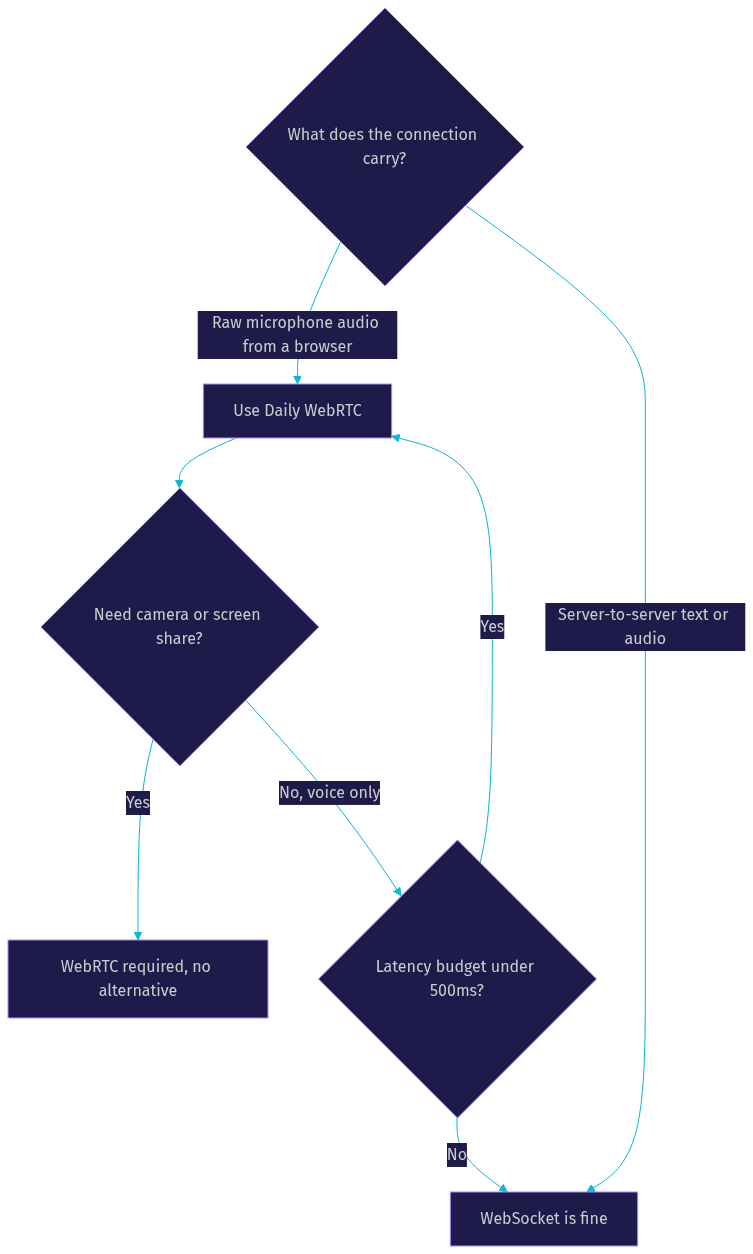
Browsers cannot stream raw microphone audio over a plain WebSocket with the reliability and timing control that conversation requires. WebRTC handles capture timing, jitter buffering, echo cancellation, and adaptive bitrate. Use WebSocket for control messages, tool results, and server-to-server traffic, and WebRTC for anything a human is listening to or speaking into.
Definitions Glossary
Gemini Live API: Google's bidirectional streaming interface for Gemini models, carrying audio, video, and text in both directions within a persistent session so the model maintains conversational and visual context in real time.
Pipecat: An open-source Python framework for building voice and multimodal AI agents, orchestrating transport, voice activity detection, LLM services, and tool calling as a composable pipeline.
Daily WebRTC transport: A managed WebRTC layer that creates rooms and routes low-latency audio and video between browser clients and server-side bot processes, handling signaling and NAT traversal.
Voice Activity Detection (VAD): The pipeline stage that analyzes incoming audio to detect speech boundaries, driving turn-taking and barge-in behavior. VideoSDK's agent pipeline includes the same capability.
Bidirectional streaming session: A persistent connection where media flows both ways simultaneously, letting a model listen and respond without a request-response cycle per turn.
Key Takeaways
- The stack divides cleanly: Gemini Live provides the multimodal brain, Daily provides the WebRTC transport, and Pipecat orchestrates the Python pipeline between them.
- Migrate from the deprecated multimodal live service class to the current unified Gemini Live service, and verify supported model identifiers against the Pipecat releases page.
- Voice activity detection tuning is the single highest-leverage adjustment for natural turn-taking and barge-in behavior.
- Production requires HTTPS, a token server for API keys, and session lifecycle logging, since Gemini session drops fail silently.
- VideoSDK's AI Agent SDK offers a comparable architecture with managed Agent Cloud deployment, SIP telephony, and deterministic Conversational Graph flows if you prefer one vendor for transport and orchestration.
Conclusion
Gemini multimodal live with Daily and Pipecat gives you a complete, production-ready path from a browser microphone to a seeing, hearing, speaking AI agent. The architecture is clean, the failure modes are learnable, and the deployment story through Pipecat Cloud is genuinely one-step. If you are evaluating alternatives, VideoSDK's AI Agent SDK implements the same pipeline pattern with built-in telephony and a free tier to start, and its Discord community is an active place to compare notes. What are you building with real-time multimodal agents? Drop a comment, I'd love to hear which use case you are tackling.
Free $20 Balance for AI Voice Agents & Video Calls
FAQ