


An outbound AI voice agent is an autonomous system that initiates phone calls to customers, conducts natural conversations using speech-to-text, large language models, and text-to-speech, and logs outcomes to business systems. Unlike inbound agents, it drives the interaction flow from initiation. You can build one using VideoSDK's AI Agent SDK combined with a SIP telephony integration.
Manual outbound calling is slow, expensive, and limited by human bandwidth. Sales and support teams spend hours dialing numbers, leaving voicemails, and facing rejections. The shift to AI-driven voice automation changes this equation entirely. An outbound AI voice agent can handle thousands of concurrent calls, qualify leads, and schedule appointments without human fatigue. Businesses care because it scales outreach while maintaining a conversational, human-like experience. By leveraging real-time voice AI, companies can run AI-powered outbound campaigns that are faster, cheaper, and more consistent than traditional call centers. In 2026, the infrastructure to build these systems is more accessible than ever, allowing developers to orchestrate complex telephony and AI pipelines without managing physical hardware. Unlike old-school IVR systems that force customers through rigid phone menus, modern AI voice agents engage in fluid, dynamic conversations.
What Is an Outbound AI Voice Agent?
An outbound AI voice agent is defined as an automated telephony system that initiates calls to customers and engages in two-way voice conversations using artificial intelligence. It works by bridging traditional telephony networks with a real-time speech pipeline.
The core components include a speech-to-text (STT) engine to transcribe caller responses, a large language model (LLM) to generate conversational replies, and a text-to-speech (TTS) engine to vocalize those replies. A telephony or SIP bridge connects the AI pipeline to standard phone networks, ensuring the agent can reach any phone number globally.
The primary difference from an inbound agent is the direction of initiation. Inbound agents wait for a customer to call in with a question or support need. Outbound agents pull from a contact database, dial the number, and drive the conversation toward a specific business goal, such as lead qualification, payment collection, or appointment confirmation. This requires the outbound AI voice agent to handle immediate rejection, voicemail detection, and abrupt hangups gracefully. Latency is also a critical factor. For an outbound call to feel natural, the round-trip time from the customer finishing a sentence to the agent starting its response must be under 500 milliseconds. VideoSDK provides the infrastructure to build both, offering an AI Voice Agent SDK that connects these components seamlessly and handles the complexities of real-time media streaming with sub-second latency.
Core Architecture of an Outbound AI Voice Agent
The architecture of an outbound AI voice agent follows a specific end-to-end flow. It starts with a contact database, moves to a scheduler that triggers the call, connects through a SIP or VoIP gateway, processes the audio through an AI pipeline, and finally sends the outcome to a CRM via webhooks.
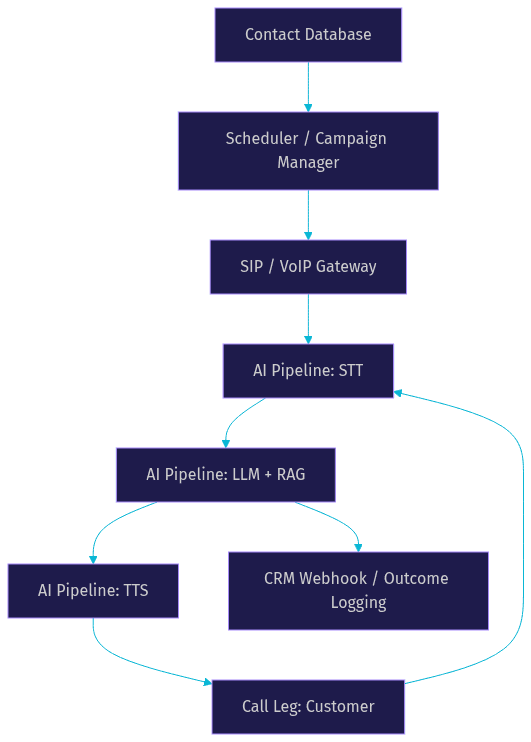
The contact database stores customer information, phone numbers, and historical context. The scheduler determines when to initiate calls based on time zones, campaign rules, and agent availability. It communicates with the VideoSDK REST API to create a room and instruct the telephony gateway to dial the target number. The SIP gateway bridges the digital AI pipeline to the physical PSTN network. Once the call connects, the AI pipeline takes over, processing audio in real-time. The Agent Worker, a Python process, manages this session lifecycle. Finally, the outcome logging layer sends call transcripts, dispositions, and extracted data back to the CRM.
Key Technical Layers
The telephony integration layer handles SIP signaling, PSTN connectivity, and VoIP protocols. This layer ensures the call connects to real phone numbers and manages the audio codecs required for clear transmission. The real-time speech pipeline manages turn detection and voice activity detection (VAD) to know when the customer starts and stops speaking. Accurate VAD is critical for outbound calls to avoid the agent speaking over the customer. The decision logic layer uses retrieval-augmented generation (RAG) to pull context from knowledge bases. When a customer asks a specific question about a product, the agent converts the query into an embedding, searches a vector database for relevant documents, and feeds that context to the LLM to generate an accurate answer. This layer also incorporates the Conversational Graph to enforce deterministic conversation flows, ensuring the agent follows business rules like verifying identity before discussing account details.
Primary Use Cases
Outbound AI voice agents excel in scenarios requiring high call volume and structured conversation flows.
Outbound Sales and Lead Qualification
An AI agent dials a list of prospects, introduces a product, and asks qualifying questions about budget and timeline. If the prospect is qualified, the agent transfers the call to a human closer or books a meeting directly. The value is immediate: sales teams only speak to warm leads, increasing conversion rates and reducing burnout. The agent can handle initial objections by referencing a knowledge base of common rebuttals. For example, if a prospect says they are too busy, the agent can offer to send a summary email and schedule a follow-up call for the next week.
Debt Collection and Payment Reminders
The agent calls customers with overdue balances, states the amount due, and offers payment plan options. It can process simple confirmations or route complex disputes to human agents. This increases recovery rates without overwhelming staff. By using a deterministic flow, the agent ensures all regulatory disclosures, such as the mini-Miranda warning in the US, are read before attempting to collect payment. The agent can also securely process payments by integrating with a PCI-compliant payment gateway.
Appointment Scheduling and Confirmations
Healthcare clinics and service businesses use AI agents to call patients 24 hours before their appointment. The agent confirms attendance or offers rescheduling options. This reduces no-shows significantly. If a patient needs to reschedule, the agent can check a calendar API and propose new times during the same call. The agent can also send an automated SMS confirmation once the new time is booked, creating a seamless omnichannel experience.
Survey and Feedback Collection
After a service interaction, the agent calls the customer to ask a few rating questions. Voice surveys often yield higher completion rates than email surveys because the interaction feels more personal. The agent can ask follow-up questions based on the customer's initial rating, gathering deeper qualitative data. If a customer gives a low score, the agent can immediately offer to connect them to a customer success manager to resolve the issue.
Multilingual Outreach
An AI voice agent can switch languages mid-call based on the customer's preference. This allows businesses to run global campaigns without hiring native speakers for every region. A single agent worker can handle English and Spanish calls back-to-back, maximizing infrastructure utilization. The agent can detect the language spoken by the customer and automatically switch its STT, LLM, and TTS models to match.
Customer Win-Back Campaigns
The agent calls customers who have recently canceled their subscriptions. It offers a special discount or asks for feedback on why they left. By addressing churn proactively, businesses can recover a significant percentage of lost revenue. The agent can offer personalized incentives based on the customer's usage history, making the win-back offer more compelling.
Building an Outbound AI Voice Agent – Step-by-Step Guidance
Building an outbound AI voice agent requires careful planning across telephony, AI models, and business logic. Here is a step-by-step guide.
Step 1: Define the Agent Persona and Prompt
Craft a conversational prompt that works for voice. Unlike text chat, voice prompts must be concise and sound natural when spoken. Define the agent's role, tone, and the specific goal of the outbound call. Include instructions for handling interruptions and silences. For example, instruct the agent to greet the customer, state the purpose of the call immediately, and ask a qualifying question. Keep the prompt focused on voice-first interactions. Avoid long paragraphs of instructions, as they can confuse the LLM and increase latency. Instead, use bullet points and clear directives.
Step 2: Choose the Speech Models
Select your STT and TTS providers. For STT, providers like OpenAI Whisper or Deepgram offer low-latency transcription. Deepgram's Nova models are particularly well-suited for conversational AI due to their speed and accuracy. For TTS, ElevenLabs or Cartesia provide highly realistic, human-like voices. Cartesia Sonic is known for its ultra-low latency, making it ideal for real-time voice agents. The choice of models directly impacts the user experience. VideoSDK's agent pipeline supports multiple AI providers, allowing you to mix and match STT and TTS engines to find the optimal balance of speed and realism.
Step 3: Set Up Telephony Connectivity
Configure your SIP trunk or VoIP gateway to connect the AI agent to the PSTN. You must ensure compliance with Do Not Call (DNC) registries and GDPR. Set up call-routing rules to transfer calls to human agents when necessary. VideoSDK's telephony integration handles the SIP bridge, allowing your Python-based AI agent to make outbound calls directly. You will need to provision a phone number, configure the SIP trunk credentials, and define routing rules that point incoming audio to your agent worker. Ensure your SIP provider supports the G.711 or Opus codecs for high-quality audio.
Step 4: Integrate Business Logic
Connect the agent to your CRM and business systems. When a call concludes, the agent should send a webhook to your CRM with the call outcome, transcript, and any extracted data like appointment times. You can also integrate calendar booking systems so the agent can schedule meetings in real time. Use function tools within the agent SDK to trigger these external API calls during the conversation. For example, if a customer agrees to a meeting, the agent calls a scheduling function, receives the available slots, and speaks them to the customer. This tight integration between the voice agent and business logic is what makes the agent truly useful.
Step 5: Test, Monitor, and Optimize
Deploy the agent in a controlled environment first. Monitor real-time latency, turn detection accuracy, and call drop rates. Listen to call recordings to identify where the agent sounds robotic or misunderstands the customer. Continuously refine the prompt and adjust VAD sensitivity to optimize the conversation flow. VideoSDK provides pipeline observability tools to help you track these metrics in real-time. Look for patterns in failed calls. If the agent consistently fails to book meetings on Tuesdays, check your calendar API for availability issues.
Common Pitfalls and How to Avoid Them
Watch out for token expiration, which can drop calls mid-conversation. Ensure your authentication tokens are refreshed regularly using a server-side token generation process. Poor audio quality often stems from aggressive audio compression on the SIP side; use high-quality codecs and ensure your media servers are geographically close to your SIP provider. Compliance oversights, like calling numbers on the DNC list, carry heavy fines; always scrub your contact lists against DNC registries before dialing. Latency spikes ruin the conversational flow; keep your AI pipeline geographically close to your telephony infrastructure to minimize round-trip times. Another common pitfall is voicemail detection. AI agents often start talking to voicemail machines, wasting resources. Implement a voicemail detection algorithm that listens for the voicemail beep and leaves a pre-recorded message instead of engaging the LLM.
Compliance, Security, and Data Privacy
Outbound calling is heavily regulated. You must comply with the Telephone Consumer Protection Act (TCPA) in the US, GDPR in Europe, and PCI DSS if processing payments over the phone.
Security starts with encryption. All media streams should be encrypted in transit using SRTP. Use token-based authentication for all API calls, and never expose API secrets on the client side. VideoSDK supports zero-retention modes where call audio is not stored after the session ends, which is critical for maintaining customer privacy.
Best practices include maintaining detailed audit trails of every call, including timestamps, consent recordings, and dispositions. Implement strict consent management to ensure you have permission to call and record. Use role-based access control to limit who can initiate campaigns or access call data. Always respect calling hour restrictions defined by TCPA to avoid regulatory penalties. Maintain an internal DNC list and ensure your agent checks it before every call. If a customer asks to be removed from your list, the agent should immediately update the CRM and terminate the call.
Scaling and Performance Considerations
Scaling an outbound AI voice agent means handling hundreds or thousands of parallel calls. A cloud-native deployment is essential. The system must load balance across multiple agent worker processes to avoid bottlenecks. VideoSDK's Agent Cloud can manage this scaling automatically, spinning up new worker instances as call volume increases.
Key metrics to monitor include the connect rate (how many calls are answered), average handling time, and cost per dial. If your connect rate is low, your contact list quality or caller ID reputation may be the issue. Ensure your phone numbers are properly registered to avoid being flagged as spam.
Cost models vary. Pay-as-you-go pricing is best for fluctuating call volumes, while subscription models suit consistent, high-volume operations. VideoSDK offers transparent pricing that scales with your usage, combining telephony and AI agent infrastructure costs into a single predictable bill. To optimize costs, consider caching TTS outputs for common phrases like greetings and disclaimers. This reduces the number of TTS API calls and lowers your overall expenses. Also, choose an LLM that balances cost and performance. A smaller, faster model may be sufficient for simple lead qualification, while a larger model may be needed for complex technical support.
Choosing the Right Vendor or DIY Stack
Deciding between a managed vendor and a DIY stack depends on your team's expertise and time-to-market needs. A DIY stack gives maximum control but requires building telephony integrations, AI pipelines, and compliance tools from scratch. Managed platforms handle the infrastructure so you can focus on the conversation logic.
| Platform | Strengths | Best For |
|---|---|---|
| VideoSDK | Open-source AI Agent SDK, built-in SIP, Conversational Graph | Developers wanting full control with managed infra |
| ElevenLabs | High-quality TTS, conversational AI features | Projects prioritizing voice realism |
| Bland AI | Quick setup for outbound calls | Rapid prototyping and simple flows |
| CloudTalk | Human call center features with AI add-ons | Blended human and AI teams |
VideoSDK is best for developers who want to build deterministic, complex outbound flows using the Conversational Graph while relying on managed telephony and media servers. It provides the flexibility of a DIY stack with the reliability of a managed platform. When evaluating vendors, consider the quality of their documentation, the availability of code samples, and the responsiveness of their developer community. VideoSDK's Discord community and comprehensive docs make it easy to troubleshoot issues and get started quickly.
Future Trends for Outbound AI Voice Agents
The future of outbound voice AI points toward real-time multimodal models that can process voice and visual inputs simultaneously. Voice cloning will allow businesses to brand their AI agents with unique, consistent voices. AI-driven sentiment analysis will let agents adjust their tone based on the customer's emotional state, de-escalating angry callers or matching the enthusiasm of interested prospects. Deeper integration with RAG and enterprise knowledge bases will make agents indistinguishable from expert human staff, capable of handling complex technical support and nuanced sales objections. We will also see tighter integration with CRM data, allowing the agent to personalize the call based on the customer's purchase history and recent interactions in real-time.
Definitions Glossary
Outbound AI Voice Agent: An autonomous system that initiates phone calls and conducts conversations using STT, LLM, and TTS technologies.
SIP (Session Initiation Protocol): The signaling protocol used to initiate, maintain, and terminate real-time voice sessions over IP networks.
VAD (Voice Activity Detection): The process of detecting the presence or absence of human speech in audio streams.
Conversational Graph: A deterministic, graph-based orchestration layer that controls conversation flow using nodes and transitions instead of relying solely on LLM judgment.
RAG (Retrieval-Augmented Generation): A technique that retrieves external data to ground an LLM's responses in factual, up-to-date information.
Key Takeaways
- An outbound AI voice agent automates high-volume calling for sales, collections, and scheduling.
- The core architecture bridges telephony (SIP) with a real-time AI pipeline (STT, LLM, TTS).
- Compliance with TCPA and GDPR is non-negotiable for outbound campaigns.
- VideoSDK provides the SDK and SIP integration needed to build and scale these agents.
- Using a Conversational Graph ensures deterministic, business-rule-driven call outcomes.
Conclusion
Outbound AI voice agents are transforming how businesses scale their outreach, replacing manual dialing with intelligent, automated conversations. By combining real-time speech models with robust telephony infrastructure, you can build a system that qualifies leads and drives revenue around the clock. Explore the VideoSDK AI Agents documentation to start building your outbound AI voice agent today. What are you building with VideoSDK? Drop a comment below.
Free $20 Balance for AI Voice Agents & Video Calls
FAQ