


An AI voice agent API is a programming interface that lets developers build applications capable of real-time spoken conversation with users by chaining speech-to-text, large language model reasoning, and text-to-speech generation into a single low-latency pipeline. VideoSDK provides an open-source AI voice agent API that connects these components through a Python-based agent SDK, supporting web, mobile, and telephony endpoints. To get started, explore the VideoSDK AI Agents documentation.
Developers are racing to add real-time spoken assistants to their applications, and the reasons are concrete. A voice interface cuts interaction time from minutes of typing to seconds of speaking. Support queues shrink when an AI agent can resolve tier-one issues over the phone. Telehealth intake, appointment booking, and lead qualification all become frictionless when a user just talks.
But building a production-grade voice agent is genuinely hard. You need streaming audio transport, sub-second latency, accurate speech recognition, intelligent conversation management, natural speech synthesis, and reliable session handling. Wiring these pieces together from scratch is a multi-month engineering effort.
This article walks you through everything you need to know about an AI voice agent API, from core architecture to deployment models, implementation steps, production best practices, and cost considerations. By the end, you will understand how the pieces fit together and how to choose the right API for your use case.
What Is an AI Voice Agent API?
An AI voice agent API is defined as a programming interface that enables developers to embed real-time, spoken conversational AI into applications by orchestrating speech-to-text transcription, large language model reasoning, and text-to-speech synthesis over a streaming audio connection. Unlike a text-only chat API, a voice agent API must handle continuous audio streams, detect when a user starts and stops speaking, manage turn-taking between human and machine, and synthesize responses fast enough to feel conversational.
The core components of any AI voice agent API are speech-to-text (STT) for transcribing incoming audio, a large language model (LLM) for generating intelligent responses, text-to-speech (TTS) for converting those responses back into spoken audio, and a session management layer that coordinates the timing and state of the entire conversation. VideoSDK provides an AI voice agent API through its open-source Python Agent SDK, which connects these components into a unified pipeline with built-in turn detection, voice activity detection, and support for multiple STT, LLM, and TTS providers including OpenAI, Deepgram, ElevenLabs, and Cartesia. You can explore the full architecture in the VideoSDK AI Agents introduction.
Here is how the end-to-end flow works:
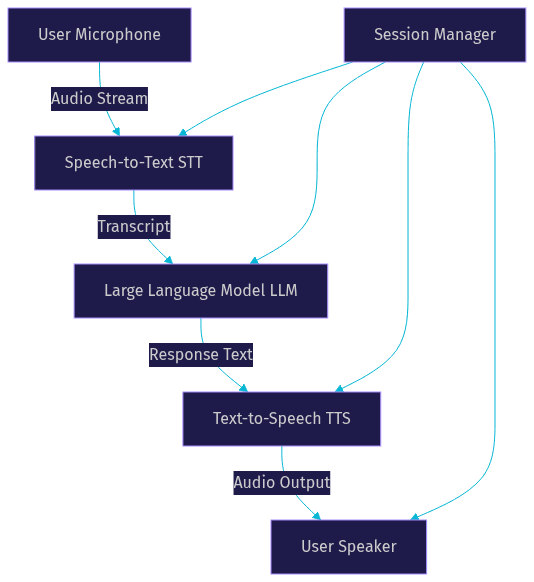
The session manager coordinates every stage, ensuring that audio flows in real time and that the agent responds within a conversational window of roughly 500 to 800 milliseconds. Anything slower than that and users perceive an awkward pause.
Core Architecture of a Real-Time Voice Agent
A real-time voice agent architecture lives or dies by its audio transport, session lifecycle, and turn detection design. Get any of these three layers wrong and the user experience degrades from conversational to frustrating.
Audio Transport Layer
The audio transport layer carries bidirectional voice data between the user and the agent. Two dominant transport protocols are used in production: WebSocket and WebRTC.
WebSocket is simpler to implement and works well for server-side voice agents where the client sends audio chunks and receives synthesized speech back over a single TCP connection. The trade-off is that WebSocket introduces more latency than WebRTC because it lacks native support for UDP-based media transport and does not handle NAT traversal automatically.
WebRTC is the preferred transport for browser-based and mobile voice agents. It provides sub-300-millisecond latency through UDP media transport, built-in echo cancellation, automatic gain control, and noise suppression at the browser level. According to the W3C WebRTC specification, these media processing features are mandatory in compliant browser implementations. VideoSDK builds its real-time communication infrastructure on WebRTC, which means voice agents running on the VideoSDK platform inherit these optimizations without additional configuration.
Streaming PCM16 audio at 24 kilohertz is the most common format because it balances voice quality with bandwidth efficiency. Some providers also support Opus encoding for lower bandwidth consumption on mobile networks.
Session Lifecycle
Every voice agent conversation has a lifecycle that begins with token generation and ends with graceful termination. The typical stages are session creation, active conversation, optional pause and resume, and session end.
Token generation happens server-side. You authenticate with your API key and secret to produce a short-lived token that the client uses to establish the session. This pattern prevents exposing credentials on the client device. VideoSDK uses this exact model, requiring server-side token generation before any agent session can begin.
During the active conversation phase, the session manager tracks conversation state, maintains context windows, and coordinates turn-taking. If the user steps away, a pause operation suspends audio processing without tearing down the connection. Resume reactivates the session. Graceful termination ensures that any pending TTS audio finishes playing, recordings are finalized, and session analytics are flushed to storage.
Tool Integration and Turn Detection
Voice agents become useful when they can act, not just talk. Tool calling lets an agent invoke external functions during a conversation, such as checking a database, booking an appointment, or looking up an order status. The agent receives the tool result mid-turn and incorporates it into its spoken response.
Turn detection is the mechanism that decides when a user has finished speaking and the agent should respond. Voice Activity Detection (VAD) monitors the audio stream for silence thresholds. When the user pauses for a configured duration, typically 300 to 500 milliseconds, the agent begins generating its response. More advanced turn detection models use semantic cues to distinguish between a mid-sentence pause and a completed thought.
Here is the session-update-tool-response loop:
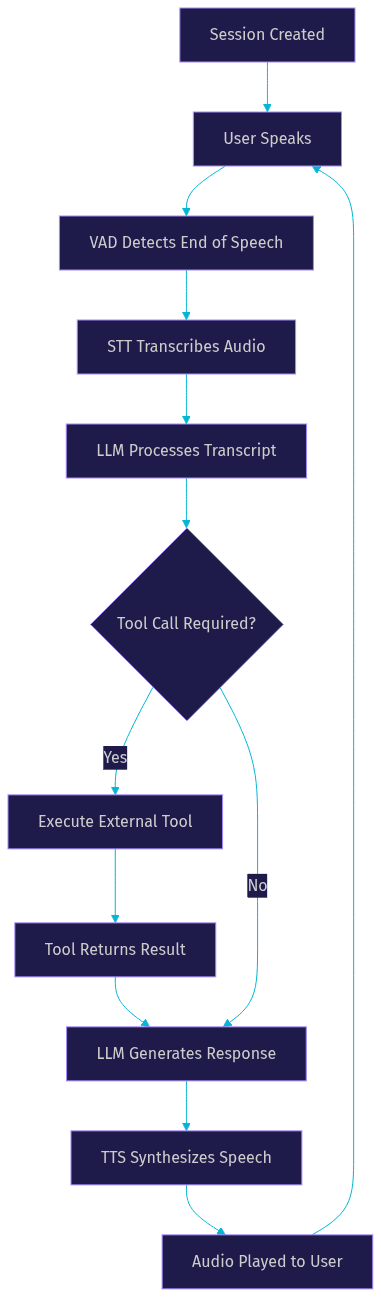
This loop repeats for every conversational turn, and the entire cycle must complete in under one second to maintain a natural conversational rhythm.
Choosing the Right Deployment Model
Your deployment model determines who controls latency, compliance, and cost. The two main options are hosted managed services and self-hosted solutions.
Hosted managed services handle infrastructure, scaling, and provider integrations for you. You send audio to an endpoint and receive responses back. This model minimizes engineering effort and gets you to production faster. The trade-off is that you depend on the provider's uptime, latency characteristics, and data residency policies. For regulated industries like healthcare or finance, you need to verify that the hosted service complies with HIPAA, GDPR, or SOC 2 requirements.
Self-hosted solutions give you full control over the pipeline. You run the STT, LLM, and TTS components on your own infrastructure, which means you can optimize for latency by colocating services, enforce strict data residency, and avoid per-minute provider fees. The cost is significantly more engineering work for scaling, monitoring, and maintaining the stack.
VideoSDK offers both options through its Agent Cloud (managed) and self-hosted deployment via Docker or Kubernetes. This flexibility means you can start with the managed path and migrate to self-hosted when compliance or cost requirements demand it. The VideoSDK AI Agents documentation covers both deployment paths in detail.
Step-by-Step Implementation Overview
Building a voice agent with an AI voice agent API involves five major steps. Each step is described here in natural language so you understand the intent and expected behavior before you touch any SDK.
1. Obtain an API Key and Set Up Authentication
Every AI voice agent API requires authentication. You register with the provider, receive an API key and secret, and use those credentials to generate short-lived tokens on your backend server. Never embed your API secret in a client application. The token generation step typically involves signing a payload that includes an expiry timestamp and optional room or session identifiers. VideoSDK follows this pattern exactly, requiring server-side token generation using your API credentials before any agent session can start. You can read the full authentication guidance in the VideoSDK AI Agents docs.
2. Create or Configure an Agent
Two configuration approaches exist: stored agents and inline configuration. A stored agent is pre-configured on the provider side with a fixed system prompt, selected STT and TTS providers, and defined tools. You reference it by ID when starting a session. Inline configuration means you pass the system prompt, provider selections, and tool definitions at session creation time, giving you full programmatic control.
Inline configuration is better for dynamic use cases where the agent's behavior changes based on user context. Stored agents are better for stable production deployments where you want reproducible behavior across sessions.
3. Connect the Client
The client connection differs depending on whether your voice agent runs in a browser, a mobile app, or over telephony. For browser-based agents, you need to request microphone permissions from the user, enable echo cancellation and noise suppression in the browser's media constraints, and establish a WebRTC or WebSocket connection to the agent endpoint. For mobile apps, the same principles apply but through platform-specific audio APIs. For telephony agents, the connection bridges SIP trunk audio into the agent pipeline through a gateway.
VideoSDK supports all three client types. Web and mobile clients connect through VideoSDK's SDKs, while telephony clients connect through the VideoSDK SIP integration.
4. Manage the Conversation
Once the session is active, the conversation management layer handles active-speaker detection, interruption handling, and session end. Active-speaker detection is critical in multi-participant scenarios where the agent needs to know who is talking. Interruption handling lets the user cut off the agent mid-sentence by speaking, which requires the agent to stop TTS playback immediately and begin processing the new input. Session end triggers cleanup, including finalizing recordings and flushing analytics.
5. Monitor and Debug
Production voice agents need observability. Log every session with timestamps, track latency at each pipeline stage (STT, LLM, TTS), and monitor for common failure modes like token expiry, network drops, and TTS provider outages. VideoSDK's agent pipeline includes built-in observability hooks that let you attach logging and analytics to each stage of the conversation flow.
How Does VideoSDK Handle AI Voice Agent API Security?
Security is the layer that most voice agent tutorials skip, and it is the layer that causes the most production incidents. VideoSDK addresses this through token-based authentication, role-based access control, and optional end-to-end encryption for media streams.
Token generation must always happen server-side. The token encodes permissions, expiry, and room scope, so even if a token is intercepted, it is time-limited and scoped to a single session. For telephony-based voice agents, VideoSDK's SIP integration supports IP whitelisting and secure SIP to prevent unauthorized call access. For web-based agents, the WebRTC transport uses DTLS and SRTP encryption by default, as specified in the W3C WebRTC security architecture.
Privacy compliance is another security dimension. If you store transcripts or recordings, you need to comply with GDPR, HIPAA, or regional data protection laws. VideoSDK lets you control recording and transcription storage, and the Conversational Graph feature includes checkpointing that can persist or purge conversation state based on your compliance requirements.
Production-Ready Best Practices
Shipping a voice agent from prototype to production requires attention to details that demos never surface. Here are the practices that matter most.
Secure token generation on the backend. Your API secret should never appear in client-side code or environment variables exposed to the browser. Generate tokens on a server endpoint and pass them to the client over HTTPS.
Use TURN servers for NAT traversal. WebRTC connections fail when users are behind restrictive firewalls or symmetric NATs. A TURN server relays media through a public intermediary, ensuring connectivity in hostile network environments. VideoSDK provides TURN infrastructure as part of its platform.
Implement reconnection logic. Mobile users switch between Wi-Fi and cellular networks constantly. Your client should detect connection drops, display a reconnecting state, and automatically re-establish the session without losing conversation context.
Apply noise suppression and voice activity detection. Background noise degrades STT accuracy and causes false turn detections. Browser-based WebRTC provides built-in noise suppression, but server-side agents may need additional processing. VideoSDK includes de-noise capabilities in its agent pipeline.
Respect privacy regulations. If you store transcripts, recordings, or conversation metadata, ensure your storage layer complies with applicable regulations. Provide users with clear consent prompts before recording, and implement data retention policies that automatically purge old sessions.
Cost and Pricing Considerations
AI voice agent API pricing models vary across providers, but most follow one of three structures: per-session billing, per-minute billing, or data-transfer billing. Some providers combine these with usage-based fees for individual pipeline components like STT minutes, LLM tokens, and TTS characters.
Per-session billing charges a flat fee each time a user connects to an agent, regardless of call duration. This model works well for short, transactional interactions like appointment booking.
Per-minute billing charges based on the duration of the active session. This is the most common model for support and telephony use cases. A typical rate might range from a few cents to several dollars per minute depending on the STT and TTS providers selected.
Data-transfer billing charges based on the volume of audio data processed, usually measured in gigabytes or audio hours. This model appears most often with self-hosted or infrastructure-focused providers.
For a quick example, consider a 5-minute customer support call using a mid-tier configuration. If the API charges per minute for session time plus per-character fees for TTS, a 5-minute call with roughly 500 words of agent speech might cost between a few cents and a dollar depending on the provider tier. Always verify current pricing with your chosen provider before budgeting.
VideoSDK's pricing includes a free tier with credits for development and testing. You can verify current pricing on the VideoSDK pricing page.
Common Pitfalls and How to Avoid Them
Echo. If the agent's TTS output feeds back into the user's microphone, the agent hears itself and creates a feedback loop. Enable echo cancellation on the client side, and for server-side agents, use headphones or separate input and output streams.
Latency spikes. A single slow LLM inference can push response time past two seconds, breaking the conversational feel. Choose an LLM provider with consistent low latency, and consider streaming TTS so audio begins playing before the full response is generated.
Mismatched audio formats. If your STT provider expects 16 kHz PCM16 but your client sends 48 kHz Opus, transcription accuracy plummets. Standardize your audio format across the entire pipeline and verify provider specifications before integration.
Tool-call timeouts. If an external tool takes too long to respond, the agent hangs in silence. Set aggressive timeouts on tool calls, and configure a fallback response so the agent can continue the conversation even when a tool fails.
Future Trends in AI Voice Agent APIs
The AI voice agent API landscape is evolving rapidly. Three trends are shaping what developers will build next.
Real-time multimodal models. OpenAI's Realtime API and Google's Gemini Live represent a shift from chained STT-LLM-TTS pipelines to single models that process audio natively. According to OpenAI's Realtime API documentation, these models reduce latency by eliminating intermediate text conversion and enable more natural prosody in generated speech. VideoSDK already supports OpenAI Realtime and Google Gemini as provider options in its agent pipeline.
Edge-deployed voice agents. Running voice agents on edge nodes closer to the user reduces round-trip latency significantly. This is particularly relevant for telephony agents serving users across multiple geographic regions. VideoSDK's geo-fencing capability lets you restrict agent sessions to specific regions for compliance and latency optimization.
Deterministic conversation flows. As voice agents move into regulated industries, the need for predictable, auditable conversation paths grows. VideoSDK's Conversational Graph addresses this by letting developers define conversation flow as a directed graph where business rules, not LLM judgment, control branching and state transitions.
Definitions Glossary
AI Voice Agent API: A programming interface that enables developers to embed real-time spoken conversational AI into applications by orchestrating speech-to-text, large language model reasoning, and text-to-speech synthesis over a streaming audio connection.
Speech-to-Text (STT): The component that transcribes incoming user audio into text in real time, enabling the LLM to process spoken input. VideoSDK supports providers including OpenAI Whisper, Deepgram, and Google STT.
Text-to-Speech (TTS): The component that converts the LLM's text response into natural-sounding spoken audio. VideoSDK integrates with providers including ElevenLabs, OpenAI TTS, and Cartesia Sonic.
Voice Activity Detection (VAD): A mechanism that monitors the audio stream to determine when a user is speaking and when they have stopped, triggering the agent's response generation.
Agent Worker: The Python process that runs a VideoSDK AI agent and manages its session lifecycle, including the STT, LLM, and TTS pipeline stages.
Conversational Graph: VideoSDK's deterministic flow engine for structured multi-turn voice conversations, where business rules control branching instead of LLM judgment.
Key Takeaways
- An AI voice agent API chains speech-to-text, large language model reasoning, and text-to-speech synthesis into a single low-latency pipeline that enables real-time spoken conversation in applications.
- WebRTC is the preferred audio transport for browser and mobile voice agents due to its sub-300-millisecond latency, built-in echo cancellation, and automatic noise suppression.
- Token-based authentication with server-side generation is non-negotiable for production voice agents, and VideoSDK enforces this pattern across all its SDKs.
- VideoSDK's open-source Python Agent SDK supports both managed (Agent Cloud) and self-hosted (Docker, Kubernetes) deployment, giving developers flexibility across compliance and cost requirements.
- Conversational Graph is VideoSDK's differentiator for regulated industries where deterministic conversation flows matter more than open-ended LLM-driven dialogue.
Conclusion
Building a production-grade voice agent requires orchestrating streaming audio, speech recognition, language model reasoning, speech synthesis, and session management into a pipeline that responds in under one second. The right AI voice agent API abstracts this complexity while giving you control over provider selection, deployment model, and conversation flow. VideoSDK's open-source Agent SDK, multi-provider support, and Conversational Graph engine give you the building blocks to ship voice agents for web, mobile, and telephony in days rather than months. Start building today with the VideoSDK AI Agents documentation, or explore code samples on the VideoSDK GitHub. What are you building with VideoSDK? Drop a comment, I would love to hear what kind of voice agent use case you are working on.
Free $20 Balance for AI Voice Agents & Video Calls
FAQ