


An AI voice agent app is a real-time application that listens to human speech, understands it with a large language model, and responds with synthesized voice, all within a single conversation pipeline. VideoSDK provides an open-source Python Agent SDK that connects STT, LLM, and TTS providers to low-latency WebRTC rooms, so your agent can talk to users on web, mobile, or even phone lines. Start with the VideoSDK AI Agents documentation to get running quickly.
Voice AI has crossed a threshold. According to Gartner, by 2026 a majority of customer service interactions are expected to be handled by conversational AI systems rather than human agents, and voice is the fastest-growing slice of that shift. Developers are searching for an "ai voice agent app" because the pieces finally fit together: real-time speech recognition is accurate enough, large language models are fast enough, and text-to-speech sounds human enough to hold a real conversation.
The hard part is no longer any single component. It is wiring them together with low latency, reliable turn-taking, and production-grade transport. That is exactly what this article covers: what an AI voice agent app is, the components that make up its pipeline, how VideoSDK's Agent SDK simplifies the plumbing, and a step-by-step walkthrough for building your first one.
What Is an AI Voice Agent App?
An AI voice agent app is defined as a software application that conducts spoken conversations with users in real time by chaining speech recognition, language understanding, and speech synthesis into a single responsive pipeline. Unlike a chatbot, which exchanges typed text with no time pressure, a voice agent must listen, think, and speak fast enough that the conversation feels natural to a human.
It also differs from a simple speech-to-text transcription tool. Transcription converts audio to text and stops there. A voice AI assistant takes that text, reasons about it with an LLM, decides on an action or reply, and vocalizes the response through a text-to-speech engine. The whole loop, from the moment a user stops speaking to the moment the agent starts replying, typically needs to complete in under a second to feel conversational.
The core sub-components of any AI voice agent app are: a speech-to-text (STT) engine that converts spoken audio into text, a large language model (LLM) that interprets intent and generates responses, a text-to-speech (TTS) engine that renders replies as natural-sounding voice, and a turn detection layer that decides when the user has finished speaking and the agent should respond. VideoSDK provides all of this as a managed pipeline through its AI Agent SDK, with the agent joining a VideoSDK room as a participant alongside human users.
Core Components of an AI Voice Agent App
Every production voice agent shares the same fundamental architecture. Understanding each component, and where latency accumulates, is the difference between an agent that feels alive and one that feels like a walkie-talkie.
Speech-to-Text (STT) Engine
The STT engine is the entry point of the conversational AI pipeline, converting raw audio into text the rest of the system can reason about. Latency here matters enormously: streaming STT providers such as Deepgram, OpenAI Whisper, and AssemblyAI return partial transcripts while the user is still speaking, which lets the LLM start reasoning before the sentence ends. Batch-style transcription, by contrast, waits for silence and adds hundreds of milliseconds to every turn. For a low-latency voice AI experience, choose a streaming STT provider and keep the audio path short, ideally capturing audio directly in the same room transport the agent uses.
Large Language Model (LLM) for Understanding
The LLM is the brain of the LLM-powered voice agent. It receives the transcribed user speech, plus conversation history and any system instructions, and generates the agent's reply. Real-time inference is the constraint: a model that takes three seconds to produce a first token will make the whole conversation feel sluggish. Providers like OpenAI, Google Gemini, Anthropic Claude, and Cerebras offer different trade-offs between reasoning depth and first-token latency, and VideoSDK's agent framework lets you swap between them without rewriting your pipeline. Prompt handling also matters: keeping the system prompt focused and trimming stale context keeps responses fast and on-topic.
Text-to-Speech (TTS) Engine
The TTS engine converts the LLM's text output back into spoken audio. Voice quality has improved dramatically, with providers like ElevenLabs, Cartesia, OpenAI TTS, and AWS Polly producing speech that most listeners cannot distinguish from a human recording. Two features matter most for an AI voice agent app: streaming synthesis, which starts speaking the first sentence while later sentences are still being generated, and multi-language speech synthesis, which lets one agent serve a global audience. Caching frequently used phrases, such as greetings and standard confirmations, further cuts response time.
Turn Detection and Voice Activity Detection (VAD)
Turn detection is the mechanism that decides when a user has finished speaking and the agent should respond, and it is the component most responsible for whether a conversation feels natural. Poor turn detection produces the two classic failure modes: the agent interrupts the user mid-sentence, or it sits in awkward silence waiting for more speech. Voice activity detection (VAD) supports this by distinguishing speech from background noise so the agent does not respond to a cough or a passing truck. VideoSDK's agent pipeline includes built-in turn detection and VAD, tuned for conversational pacing, so you get natural interruptions and smooth handoffs without hand-rolling a silence heuristic.
VideoSDK AI Agent SDK
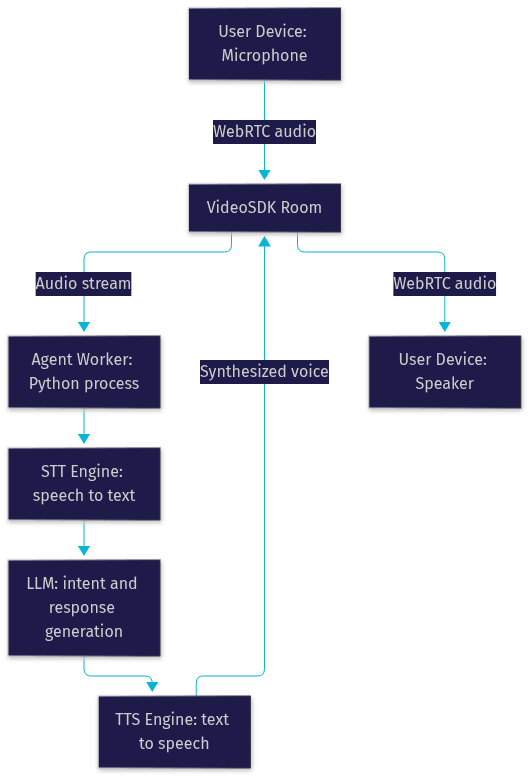
The VideoSDK AI Agent SDK ties all of these components together. It is a Python-based framework where an Agent Worker process manages sessions inside VideoSDK rooms: users connect via web, mobile, or phone, and the agent joins as a participant. You compose a pipeline by selecting your STT, LLM, and TTS providers, then customize behavior through pipeline hooks at each stage of the conversation. It also supports function tools for calling external APIs, MCP integration for connecting the agent to external tools and data sources, and features like call transfer, voicemail detection, and background audio. The SDK is open source, so you can inspect and extend every layer, and you can deploy it on VideoSDK's managed Agent Cloud or self-host it with Docker or Kubernetes.
Here is how the pieces fit together:
Benefits of Using VideoSDK for Your AI Voice Agent App
Building the transport layer for real-time voice is genuinely hard, and it is the part most teams underestimate. VideoSDK handles it for you.
Multi-platform reach. Your agent is not limited to a web page. Users can talk to it from a browser, a React Native or Flutter mobile app, or a traditional phone line through SIP integration. The same agent serves all three surfaces.
Built-in low-latency WebRTC transport. VideoSDK rooms run over WebRTC with sub-300ms transport latency, which is the foundation for natural-feeling turn-taking. You do not have to build or operate your own media servers.
Token-based authentication. VideoSDK uses JWT-based tokens generated server-side, so room access stays controlled and your API secret never touches a client device. See the authentication guide for details.
Extensible pipeline via MCP. The Model Context Protocol integration lets your agent call external tools, query databases, and act on business systems mid-conversation, turning a talker into a doer.
Security and privacy. End-to-end encryption protects media in transit, and agent memory can be encrypted at rest, which matters enormously for telehealth and financial use cases where raw audio should never be stored in plaintext.
Building Your First AI Voice Agent App with VideoSDK
This walkthrough explains the full build path in plain language. Each step describes what to do, why it matters, and what you should observe when it works. For hands-on details, follow the AI Agents quick start.
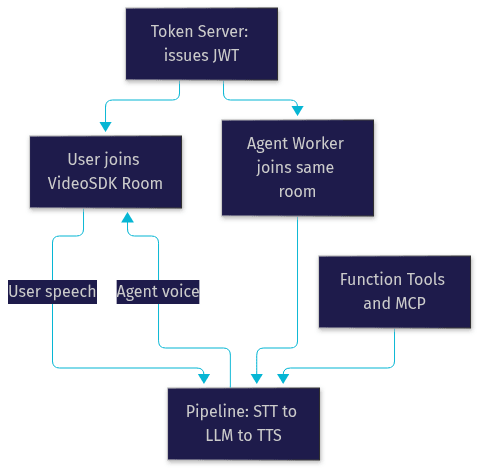
Step 1: Set Up a Token Server
VideoSDK authenticates every participant, human or AI, with a token generated server-side from your API key and secret. You need a small backend service that creates rooms and issues tokens on demand. Never embed your API secret in a client app; a leaked secret means anyone can create rooms on your account. When this step is done correctly, your frontend requests a token from your server, receives it, and uses it to join a room, all without the secret ever leaving your backend.
Step 2: Define the Agent Pipeline
Next, you compose the agent itself. You choose one STT provider, one LLM, and one TTS provider, and declare how they connect. This is also where you attach pipeline hooks: points where your own logic runs, such as validating extracted data before the LLM responds, or logging every turn for observability. A sensible starting combination is a streaming STT provider for low latency, a fast LLM for responsiveness, and a streaming TTS provider so the agent begins speaking immediately. Expect to swap providers during tuning; the framework is designed for that.
Step 3: Connect the Agent to a VideoSDK Room
The Agent Worker joins the room as a participant, just like a human user. Audio flows through the room to the agent, and the agent's synthesized voice flows back through the same room. Because everything runs over the same WebRTC transport, you avoid the latency and complexity of shuttling audio between separate systems. When this works, a user joining from a browser can hold a live conversation with the agent, and you can watch the participant list show both of them in the room.
Step 4: Test Turn-Taking and Context Persistence
Before shipping, run the agent through realistic conversations. Interrupt it mid-sentence and confirm it stops gracefully. Pause mid-thought and confirm it waits instead of jumping in. Ask a follow-up question that requires earlier context, such as referring back to something said three turns ago, and confirm the agent remembers. These behaviors are governed by turn detection settings and the context window configuration, and they are what separate a demo from a product.
Step 5: Deploy to Production
Production differs from localhost in three ways. First, all client surfaces need HTTPS, since browsers only grant microphone access on secure origins. Second, plan for TURN fallback so users behind restrictive corporate firewalls can still connect. Third, scale horizontally: run multiple Agent Workers behind a load balancer so one worker never handles too many concurrent sessions. VideoSDK's Agent Cloud handles much of this for you, or you can self-host with Docker and Kubernetes.
Real-World Use Cases
Telehealth consultations. A voice agent can handle pre-appointment intake, collecting symptoms and insurance details conversationally before a doctor joins the same room. VideoSDK's end-to-end encryption and encrypted agent memory make this viable for healthcare data.
Customer support call centers. An AI phone agent answers inbound calls through SIP integration, resolves routine issues with function tools, and transfers complex cases to a human with a warm transfer that preserves context. This is AI-driven call automation at its most practical.
Voice-driven e-commerce assistants. A virtual concierge helps shoppers find products, check order status, and complete purchases by voice, with the LLM calling your commerce APIs through function tools mid-conversation.
Internal knowledge-base lookup. Remote teams ask a voice agent to retrieve policies, documentation, or schedules during a call, with the agent querying internal systems via MCP integration and answering in seconds.
Design Considerations and Best-Practice Checklist
A great voice agent is engineered against explicit targets, not vibes. Here is the checklist experienced teams hold themselves to:
- Latency budget: keep total round-trip response under 300ms for turn-taking to feel human; measure each pipeline stage separately so you know where time goes.
- Privacy: encrypt agent memory at rest, avoid storing raw audio unless legally required, and disclose recording to users where regulations demand it.
- Multi-language support: pick a TTS provider with strong multi-language speech synthesis if you serve global users, and test each language's turn detection separately, since pacing differs across languages.
- Scalability: run Agent Workers horizontally, load-balance sessions across them, and set per-worker concurrency limits so quality does not degrade under load.
- Cost management: pay-as-you-go suits unpredictable traffic, while reserved capacity suits steady call-center volume; cache common TTS phrases to cut synthesis costs.
- Observability: log every turn with timestamps so you can diagnose slow responses after launch, using the pipeline observability hooks the SDK provides.
Common Pitfalls and How to Avoid Them
Token expiry causing silent drops. If a token expires mid-session, the agent can disconnect without an obvious error, leaving users talking to nobody. Mitigate by issuing tokens with appropriate lifetimes and implementing reconnection handling that rejoins the room automatically.
Mismatched audio sample rates. When your capture layer and your STT provider expect different sample rates, recognition quality collapses even though audio technically flows. Confirm the sample rate your STT provider expects and configure your audio pipeline to match it exactly.
Over-reliance on a single LLM for deterministic flows. An LLM alone will not reliably follow a fixed sequence, such as a compliance script or a loan application. For flows where every step must happen in order, use VideoSDK's Conversational Graph, which drives the flow deterministically while the LLM only handles natural phrasing.
Ignoring network conditions for mobile users. Mobile users on weak connections experience degraded audio that breaks turn detection. Enable network-adaptive streaming so audio quality adjusts to available bandwidth instead of dropping out entirely.
Future Trends in AI Voice Agent Apps
Three shifts are coming fast. First, real-time multimodal agents that combine voice with vision, letting an agent see a user's camera feed and comment on it during a call; VideoSDK's agent framework already supports vision and multi-modality. Second, edge-deployed inference, running STT and TTS closer to users for ultra-low latency in latency-critical scenarios. Third, wider adoption of deterministic orchestration layers like Conversational Graph for regulated industries where the conversation flow itself must be auditable. Voice-first UX standards are also emerging, and agents that master interruption handling and natural pacing will define what users consider acceptable.
Definitions Glossary
AI Voice Agent App: A real-time application that conducts spoken conversations by chaining speech recognition, language understanding, and speech synthesis into one responsive pipeline, with VideoSDK providing the transport and orchestration layer.
Agent Worker: The Python process in VideoSDK's AI Agent SDK that manages an agent's session lifecycle inside a VideoSDK room, processing user speech through the STT, LLM, and TTS pipeline.
Turn Detection: The mechanism that decides when a user has finished speaking and the agent should respond, critical for natural pacing and graceful interruptions in a voice AI assistant.
Voice Activity Detection (VAD): The technique of distinguishing actual speech from background noise or silence so a voice agent does not respond to non-speech audio.
Conversational Graph: VideoSDK's deterministic, graph-based orchestration layer that controls conversation flow through defined nodes and transitions while the LLM handles only natural language generation.
SIP Integration: The bridge that connects traditional phone networks to VideoSDK's WebRTC rooms, enabling AI phone agents that talk to callers on ordinary phone lines.
Key Takeaways
- An AI voice agent app chains STT, an LLM, and TTS into a single low-latency pipeline, and its perceived quality is dominated by turn detection and total response time.
- VideoSDK's open-source Python Agent SDK connects your choice of STT, LLM, and TTS providers to WebRTC rooms with sub-300ms transport latency, deployable on Agent Cloud or self-hosted.
- Always generate tokens server-side and never expose your API secret on client devices.
- For deterministic flows like compliance scripts and bookings, pair the LLM with Conversational Graph rather than trusting the model to follow the sequence.
- Production readiness means HTTPS, TURN fallback, horizontally scaled Agent Workers, and per-stage latency measurement.
Conclusion
Building an ai voice agent app in 2026 is less about any single AI model and more about assembling a low-latency pipeline that listens, thinks, and speaks naturally. VideoSDK gives you the transport, the agent framework, the tool integrations, and the deployment options so you can focus on your conversation experience instead of media infrastructure. Start with the AI Agents quick start, create a free account at app.videosdk.live, and ship your first talking agent. What are you building with VideoSDK? Drop a comment or join the VideoSDK Discord community, I'd love to hear what kind of voice agent use case you're working on.
Free $20 Balance for AI Voice Agents & Video Calls
FAQ