


VKYC (video KYC) is identity verification over a live, recorded video call between a customer and a trained official of a bank or other regulated entity. RBI calls it V-CIP and treats a compliant call as equal to face-to-face identification. VideoSDK provides the video calling, recording and location controls that teams build VKYC flows on.
On 28 November 2025, the Reserve Bank of India issued new KYC Directions by type of regulated entity. For commercial banks, they repeal the earlier KYC instructions, including the 2016 Master Direction most VKYC flows were built on. The video KYC rules now sit in paragraphs 26 and 27.
This guide explains what VKYC is, walks through the process, compares it with eKYC and physical KYC, and shows where VideoSDK fits.
What is VKYC (video KYC)?
VKYC is defined as customer identification carried out over a live, consent-based audio and video call with an authorised official of a regulated entity.
VKYC works by pairing that call with identity data the entity has already fetched, such as an Aadhaar e-KYC response or a DigiLocker document. The official checks the person on camera against that data, and the whole interaction is recorded.
RBI's name for it is V-CIP, the Video based Customer Identification Process. The Commercial Banks KYC Directions, 2025 define it as an alternative method of identifying a customer using facial recognition and customer due diligence. A V-CIP that meets the prescribed standards counts the same as face-to-face identification.
Paragraph 26 allows V-CIP for three jobs:
- Onboarding new individual customers, including proprietors, authorised signatories and beneficial owners of business customers
- Converting accounts opened through Aadhaar OTP based e-KYC
- Updating KYC, including periodic updation
For a developer, VKYC is a regulated video call with evidence attached: a recording, a live photo, GPS coordinates and a timestamp.
Video KYC under SEBI and IRDAI
SEBI's circular of 24 April 2020 lets registered intermediaries run KYC through their own app, including live video. For insurers, an IRDAI circular dated 21 September 2020 permits a Video Based Identification Process (VBIP).
The mechanics look alike, but each regulator writes its own rules, so work from the one that governs your licence. VideoSDK's SEBI video KYC guide for stockbrokers covers the securities side.
VKYC rules under RBI's 2025 KYC Directions
RBI's VKYC rules sit in paragraphs 26 and 27 of its KYC Directions, 2025, issued on 28 November 2025 as separate Directions by type of regulated entity.
RBI first added V-CIP to the 2016 KYC Master Direction through a circular dated 9 January 2020. Paragraph 80 of the new commercial bank Directions repeals the earlier KYC instructions for those banks. The NBFC version uses the same V-CIP paragraph numbers.
| Requirement | Paragraph | What it means for the video layer |
|---|---|---|
| Infrastructure in the entity's own premises and secured network, with any technology outsourcing following RBI guidelines | 27(1)(i) | Review your video provider against RBI's outsourcing rules |
| All data, including the recording, moves to entity-owned servers once the call ends | 27(1)(i) | Send recordings to your own bucket |
| End-to-end encryption of data between the customer's device and the V-CIP hosting point, with consent recorded in an alteration-proof way | 27(1)(ii) | Check the full media and signalling path in your security review |
| Connections from IP addresses outside India, or spoofed IPs, can be blocked | 27(1)(iii) | Needs geo-IP filtering |
| Recordings carry live GPS coordinates and a date and time stamp | 27(1)(iv) | The app must write location into the recording |
| Video clear enough to identify the customer beyond doubt | 27(1)(iv) | Bandwidth handling becomes a compliance issue |
| Face liveness or spoof detection, plus face matching | 27(1)(v) | Usually a separate identity vendor |
| Security testing by CERT-In empanelled auditors | 27(1)(viii) | The whole V-CIP stack is in scope |
| A dropped call means a fresh session, and pauses should not create multiple video files | 27(2)(ii) | Reconnect logic must respect the one-file rule |
| Data and recordings stored in India, with an activity log that includes the official's credentials | 27(3) | Use an Indian storage region and log agent actions |
This table summarises the rules and is not legal advice, so read the full paragraph for your entity type.
Much of paragraph 27 lands on the video stack, not only on the identity checks.
The VKYC process step by step
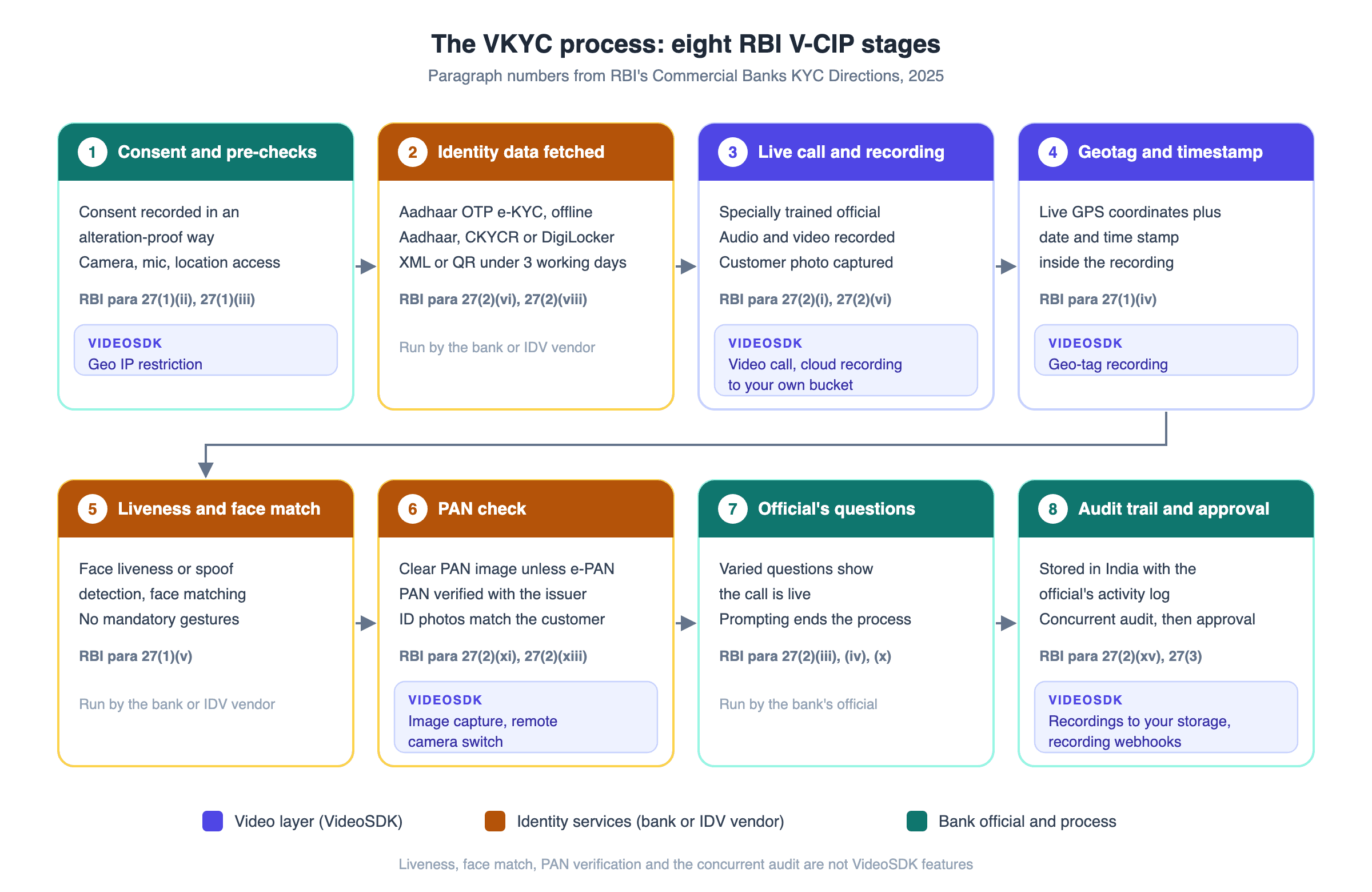
A compliant VKYC session runs in eight stages, and each stage maps to a clause in paragraph 27 of RBI's KYC Directions.
- Consent and pre-checks. The customer agrees to the call, and the bank records that consent in an alteration-proof way. The app confirms camera, microphone and location access and an Indian IP address.
- Identity data fetched. The bank uses Aadhaar OTP e-KYC, offline Aadhaar verification, CKYCR records or an equivalent e-document such as a DigiLocker file. An Aadhaar XML file or Secure QR code must be no older than three working days.
- Live call with a trained official. A specially trained official joins and recording starts. The official captures a photograph of the customer.
- Geotag and timestamp. The recording carries the customer's live GPS coordinates and a date and time stamp.
- Liveness and face match. The application runs face liveness or spoof detection and face matching. Gestures such as blinking are not mandatory, and the check must not exclude people with special needs.
- PAN check. The official captures a clear image of the PAN card unless the customer provides an e-PAN. The bank verifies PAN with the issuing authority, and the ID photos must match the person on camera.
- Questions from the official. The official varies the order or type of questions to show the call is live, and confirms the current address and financial profile. If anyone is seen prompting the customer, the bank rejects the account opening.
- Audit trail and approval. Data and recordings are stored in India with the official's activity log. The account becomes operational only after a concurrent audit.
In rare cases where the process cannot finish in one go, the video step must happen within three working days of fetching the identity data.
The video layer carries stages 3 and 4 and supports stages 1, 6 and 8. Identity services connected to the call run stages 2, 5 and 6.
VKYC vs eKYC vs Physical KYC
VKYC removes the branch visit without the account limits RBI places on accounts opened through Aadhaar OTP e-KYC.
| VKYC (V-CIP) | Aadhaar OTP eKYC, non-face-to-face | Physical KYC | |
|---|---|---|---|
| How identity is established | Recorded call with a trained official | OTP authentication against Aadhaar | In person, with original documents |
| What the customer needs | Camera device, stable connection, PAN card or e-PAN | Mobile number linked to Aadhaar | A branch visit or an official's visit |
| RBI standing | On par with face-to-face | Allowed, with paragraph 25 limits | Documents checked in person |
| Account limits | None specific to the method | Deposits up to ₹1 lakh, credits up to ₹2 lakh a financial year, term loans up to ₹60,000 a year, fuller identification within a year | None specific to the method |
| Main cost drivers | Official's time, video, recording, storage | Authentication fees | Staff time, travel, paperwork |
| Published success figures | About 90% call success at Groww, vendor-published | None set by RBI | None set by RBI |
The limits row decides most product designs. OTP eKYC suits low-limit products and fast sign-ups, VKYC suits products that need full KYC from day one, and physical KYC serves customers without a camera or usable connection.
For a use-case breakdown, see VideoSDK's video KYC vs eKYC vs physical KYC comparison.
Why VKYC calls fail?
Most VKYC failures fall into three groups: an RBI rule forces a restart or rejection, the device blocks access, or the network cannot carry clear video.
Restarts and rejections written into RBI's rules
- Call drop. A dropped or disconnected call means a fresh session.
- Prompting. Anyone seen prompting the customer ends the account opening.
- IP outside India. Connections from foreign or spoofed IP addresses can be blocked by design.
- Stale Aadhaar file. An offline Aadhaar XML file or QR code older than three working days is not accepted.
- Printed documents. A printed copy of an e-document, including an e-PAN, is not valid.
- Liveness or face mismatch. A failed liveness check, or an ID photo that does not match the person on camera, fails verification.
Device and network failures
- Camera or microphone blocked. Browsers throw a NotAllowedError when the user or a policy denies access, according to MDN's getUserMedia reference.
- Location blocked. The Geolocation API returns PERMISSION_DENIED, leaving the recording without the required GPS coordinates.
- Low bandwidth. Video must identify the customer beyond doubt, so a starved connection can sink a session even when audio holds.
- Restricted networks. Some corporate and bank firewalls block UDP media. VideoSDK's firewall setup guide lists the domains to allow.
- Waiting for an official. Customers who wait too long may leave. RBI sets no wait-time benchmark, so track your own queue abandonment.
VideoSDK's video KYC success rate optimization guide breaks this funnel down stage by stage.
VKYC success rates in practice
RBI's Directions and the SEBI and IRDAI circulars set no success-rate figure, so published numbers come from companies describing their own flows.
Groww built Video KYC for its lending flow on VideoSDK. The Groww case study reports about 90% call success and credits adaptive bitrate for customers on low bandwidth.
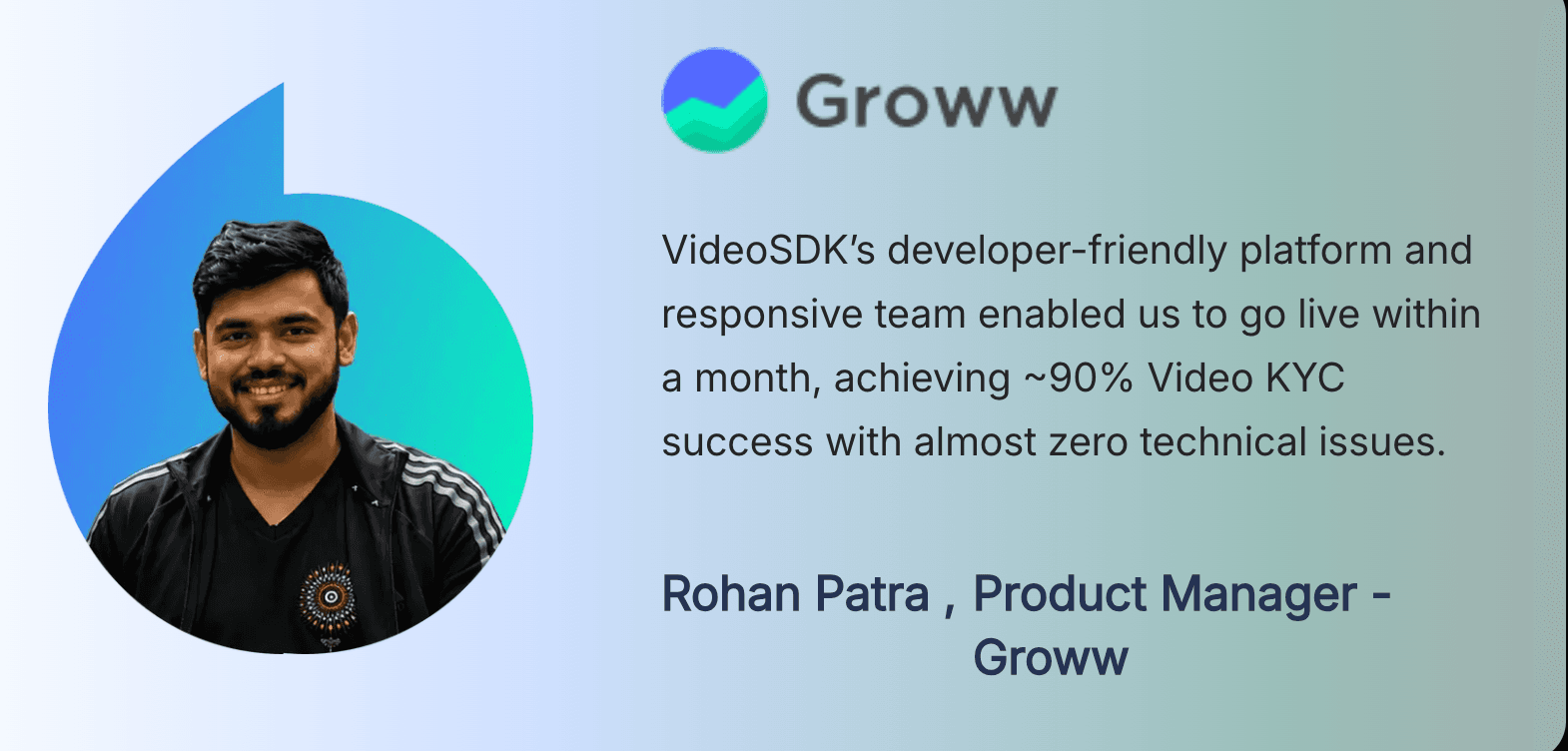
The same case study reports recordings delivered in under 10 seconds and a 45-second VKYC completion time. These are vendor-published customer figures, not independent benchmarks, so track your own numbers.
Among insurers, ICICI Prudential Life Insurance is listed as a technology partner on VideoSDK's partners page.
The video technology behind VKYC
VideoSDK covers the video layer of VKYC: the live call, recording, geo-tagging, geo-IP controls and network handling.
Recording, encryption and storage in your cloud
VideoSDK recording can capture a whole meeting, one participant or one audio or video track. Track recording starts a new file whenever a track changes state, such as after a mute. Given RBI's one-file rule, whole-meeting recording is the simpler fit for VKYC.
Recordings can go to your own AWS S3, Azure Blob, Google Cloud Storage or S3-compatible bucket, set per API key in cloud storage configuration. A bucket in an Indian region, such as AWS ap-south-1, keeps files in India.
Recording encryption encrypts each recording with its own AES-256 key and wraps that key with your RSA public key before upload. VideoSDK stores only the public key. Encryption and transcription processing cannot both run on the same API key.
For the audit trail, recording webhooks report recording state changes with the meeting and session IDs. VideoSDK's CERT-In page states that transmissions are encrypted with TLS and SRTP, and no video or audio is stored unless you configure it.
Geotagging and location controls
VideoSDK's geo-tag recording guide is written for vKYC. It uses a custom recording template, and your app publishes the customer's latitude and longitude over PubSub after reading them from the device.
Geo IP restriction allows or denies a connection based on the user's IP address, and the docs suggest it for VPN or proxy restrictions. Geo-fencing keeps connections on servers in a chosen region. Both list India as a region.
The VideoSDK pricing page lists geo-fencing, geo-restriction, and VPN detection and IP restriction as add-ons on Pay-As-You-Go, with custom pricing on Enterprise. Contact sales for a quote.
Handling low bandwidth and restricted networks
The onQualityLimitation event fires when media quality is limited by CPU, bandwidth or congestion, and again when the limit clears. Your app can use it to ask the customer to switch networks before the official loses a clear view.
For locked-down networks, VideoSDK's cloud proxy tries UDP first and falls back to TCP by default.
Photo capture and agent controls
The React SDK's image capture feature returns a camera frame as a base64 image. The docs name Video KYC as a use case, such as a customer holding up an ID document.
An official can also switch the customer's camera between front and back, which helps when showing the PAN card. For the operator side, see how to build a video KYC agent dashboard.
What VideoSDK does not do
VideoSDK does not perform liveness detection, face matching, Aadhaar or PAN verification, or the concurrent audit. Those belong to the bank or identity vendors, covered in liveness detection for Android and iOS video KYC. The CERT-In audit of V-CIP infrastructure is also the bank's obligation.
To try the video layer, start with the React quickstart. New accounts get $20 free credit, as the VideoSDK pricing page shows.
Definitions glossary
V-CIP: RBI's Video based Customer Identification Process, its formal name for VKYC. VideoSDK supplies the video, recording and location controls a V-CIP application runs on.
Liveness check: A test that the person on camera is physically present, not a photo or replay. VideoSDK leaves this check to the bank or an identity vendor.
CKYCR: The Central KYC Records Registry, which stores and returns customers' KYC records. A V-CIP can use CKYCR records fetched with the customer's KYC identifier.
Equivalent e-document: A digitally signed electronic document from the issuing authority, including DigiLocker documents. RBI accepts it in V-CIP, but not as a printout.
Geotagging: Adding the customer's live GPS coordinates and a timestamp to the V-CIP recording. VideoSDK's geo-tag recording guide does this with a custom template.
Key takeaways
- VKYC is identity verification over a live, recorded video call, and RBI treats a compliant V-CIP as equal to face-to-face identification.
- RBI's V-CIP rules now sit in paragraphs 26 and 27 of the KYC Directions, 2025, issued on 28 November 2025.
- Much of paragraph 27 lands on the video stack: data location, IP blocking, geotagged recordings, clear video and the one-file rule.
- Published VKYC success rates come from companies, not regulators, such as Groww's vendor-published 90%.
- VideoSDK provides the video layer, while identity checks come from the bank or its vendors.
Conclusion
VKYC turns a branch visit into a regulated video call, and RBI's 2025 KYC Directions spell out what that call must prove. Much of the engineering sits in the video layer: where recordings go, how location is captured, which connections are refused and how calls survive weak networks.
VideoSDK handles that layer, so your team can focus on identity checks and the official's workflow. Read the React quickstart, then sign up for VideoSDK with $20 free credit to test a VKYC call.
What kind of VKYC flow are you building?
Frequently asked questions
What is VKYC?
VKYC is video KYC, a way to verify a customer's identity over a live, recorded video call with a trained official. In India, RBI calls it V-CIP and treats a compliant call as equal to face-to-face identification. Banks, NBFCs, insurers and stockbrokers use it to onboard customers remotely.
Is VKYC mandatory for opening a bank account?
No, VKYC is not mandatory. RBI's KYC Directions say a bank may undertake V-CIP, alongside routes such as Aadhaar-based e-KYC, digital KYC and in-person verification. VKYC avoids a branch visit without the limits placed on OTP e-KYC accounts.
What documents do you need for VKYC?
For VKYC, the bank needs identity data it can fetch digitally, such as Aadhaar e-KYC, an offline Aadhaar file, a CKYCR record or a DigiLocker document. You also need your PAN card or an e-PAN, plus a device with camera and location access.
What happens if a VKYC call disconnects?
If a VKYC call drops or disconnects, RBI requires the bank to start a fresh session. Pauses that do not create multiple video files do not need a restart. VideoSDK's onQualityLimitation event helps apps spot bandwidth problems early.
Does VideoSDK provide liveness detection for VKYC?
No, VideoSDK provides the video layer of VKYC, not liveness detection. It covers the live call, recording to your own storage, recording encryption, geo-tagging and geo-IP restriction. Liveness detection and face matching come from the bank or an identity vendor.