



Virtual front desk software lets visitors check in, get help, or talk to a receptionist through a kiosk, tablet, or web page, while the receptionist works from somewhere else. It combines self-service check-in, host notifications, and a live video call to a remote agent, so one person (or one team) can cover several lobbies at once.
This guide explains what a virtual front desk is, how it works step by step, what it costs compared with a staffed desk, and what to look for when you choose or build one. The second half is for product teams: how the live video part is put together, and where an embedded video SDK such as VideoSDK fits.
What is virtual front desk software?
Virtual front desk software is a system that handles front-desk work without a person stationed at the desk the whole time. A visitor uses a screen in the lobby (or their own phone) to sign in, check in to a booking, or ask for help. The software records the visit, tells the right person, and, when the visitor needs a human, connects them to a remote receptionist on a live video call.
The term gets used for two different products, which is why search results can be confusing:
- On-site virtual front desk: a kiosk or tablet at a physical entrance (hotel lobby, office reception, clinic waiting room) that handles walk-in visitors, with a remote agent on video for anything the screen can't solve. This guide is about this kind.
- Virtual receptionist (phone): a remote person or AI voice agent that answers your business phone line, books appointments, and takes messages. It handles callers, not people standing in your lobby.
Many businesses end up with both, but they solve different problems. If people physically arrive at your door, you need the first kind.
Virtual front desk vs Traditional front desk vs Virtual receptionist
| Traditional front desk | Virtual front desk | Phone virtual receptionist | |
|---|---|---|---|
| Who it serves | Walk-in visitors and callers | Walk-in visitors at a kiosk or tablet | Callers only |
| Where staff sit | At the desk | Anywhere; one agent can cover many sites | Remote call centre or AI |
| Hours | Limited by shifts | Self-service 24/7; agents on a schedule | Often 24/7 |
| Handles physical tasks (keys, parcels, ID checks) | Yes | Partly, through kiosk hardware or on-site staff | No |
| Main cost | Wages for every hour the desk is open | Software, hardware, and shared agent time | Per-minute or per-call fees |
| Personal touch | Highest | Face-to-face on video when needed | Voice only |
How does a virtual front desk work?
The visitor sees one simple screen. Behind it, a few systems hand the visit from one step to the next. Here is the typical flow in a hotel or office lobby:
- Arrival. The visitor walks up to a kiosk or tablet, or scans a QR code with their own phone. The screen offers a few clear choices: check in, I have an appointment, deliveries, or talk to reception.
- Self-service check-in. The visitor enters a name or booking reference, signs any forms (NDA, registration card, consent), and may scan an ID or take a photo. Pre-registered guests skip most of this. Our guide to hotel self check-in systems covers this step for hotels in detail.
- Verification and rules. The software checks the booking or invitation, applies site rules (watchlists, required documents, hours), and decides whether the visitor can go straight through.
- Host notification. If someone is expecting the visitor, the software alerts them by email, SMS, Slack, or Microsoft Teams.
- Escalation to a remote agent. If the visitor taps "talk to reception", or the check-in hits a problem, the request goes into a queue. Available agents get an alert, and the first to accept joins a live video call with the kiosk.
- Resolution. The agent sees the visitor's context (site, booking, the step they got stuck on), solves the issue, and can complete actions remotely, such as finishing check-in, issuing a key card, unlocking a door, or printing a badge.
- Fallback and logging. If nobody answers within a set time, the kiosk offers another route: a callback, a phone number, or directions to on-site help. Every visit and call outcome is logged for reporting, security, and compliance.
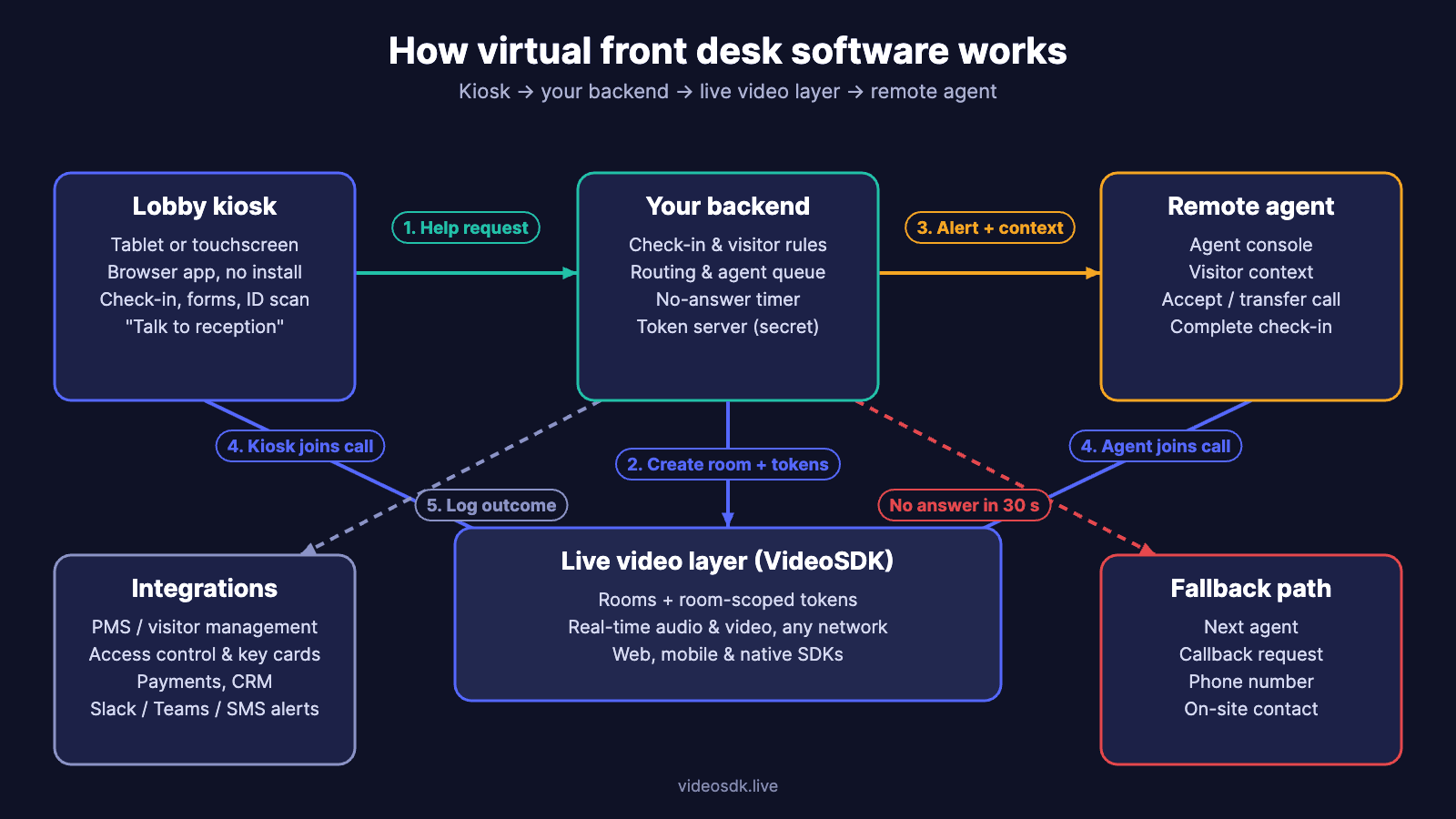
The five building blocks of virtual front desk software
Whether you buy a finished product or build your own, every virtual front desk is made of the same five parts:
- Kiosk or visitor app. The screen the visitor touches. Usually a browser app running in kiosk mode on a tablet or an all-in-one touchscreen, sometimes with a card dispenser, badge printer, or ID scanner attached.
- Check-in and visitor logic. Bookings, invitations, forms, ID checks, and the rules for who can enter. In a hotel this connects to the property management system (PMS); in an office, to visitor management and the employee directory.
- Routing, queue, and alerts. Decides which agent or host should get each request, keeps a queue when everyone is busy, and sends alerts. This is where most of the operational quality lives.
- Live video layer. The real-time audio and video call between the kiosk and the agent. It has to connect within seconds, survive weak hotel Wi-Fi, and work in a browser without an app install.
- Integrations and records. Access control (door locks, key encoders), payments, CRM or PMS updates, and the visit log that security and compliance teams rely on.
Types of virtual front desk setups
How much human help you keep is the biggest design choice. Most sites fall into one of four models:
| Setup | How it works | Best for |
|---|---|---|
| Self-service only | Kiosk handles check-in and host alerts; no live agent | Low-traffic offices, pre-registered visitors, deliveries |
| Remote-staffed | Kiosk plus a remote agent on video for every exception | Hotels at night, multi-site offices, clinics without a receptionist |
| Hybrid by shift | Staff at the desk in peak hours, virtual desk off-peak | Hotels and offices with clear busy and quiet periods |
| AI-first with human escalation | An AI voice or chat agent answers common questions and hands off to a person on video | High-volume sites with repetitive questions |
For most businesses, remote-staffed or hybrid is the safe starting point. Fully unmanned works only when almost every visitor is expected and nothing physical needs handling. For hotels, our guide to automated front desk systems walks through the workflow, failure tests, and costs.
Who uses a virtual front desk?
- Hotels and short-stay rentals: overnight check-in, late arrivals, and small properties that can't justify a 24-hour desk. Remote agents handle ID checks, payment questions, and key issues through the kiosk.
- Corporate and hybrid offices: satellite offices and secondary entrances with no receptionist, where visitors still need to be signed in and met.
- Healthcare clinics: patient check-in and intake forms, with a remote coordinator for insurance or scheduling questions. Video and records must meet privacy rules such as HIPAA.
- Coworking spaces and apartment buildings: guest sign-in, tours, and parcel handling outside staffed hours.
- Multi-location businesses: banks, car rental counters, retail, and service centres where one central team can serve many branches.
- Manufacturing and logistics sites: contractor and driver sign-in with safety briefings and document checks at the gate.
Two hotel examples built on VideoSDK: Aavgo and Macrotech
Aavgo pairs a lobby kiosk with remote front desk agents. The kiosk handles check-in, check-out, walk-ins, card or cash payment, and room keys, and guests can also check in on their own phone. When they need a person, they reach an agent by video or phone; the live video runs on VideoSDK, and Aavgo's agents work from call centres in India and the Philippines. On its website, Aavgo says it serves hotels in 28 states and lists compatibility with 22 property management systems and 17 door-lock brands. One hotel group using it, WNW Hospitality, has reported payroll savings (see the cost section below).
Macrotech sells an always-on video kiosk for hotel lobbies: a 17-inch touchscreen with an HD camera and far-field microphones for the call, plus a card terminal, cash recycler, ID scanner with face verification, and key dispenser. Remote agents answer guests on screen, over a video layer built on VideoSDK.
Both follow the pattern described above: self-service for routine arrivals, a remote agent on live video for exceptions, and integrations with door locks, key encoders, and the PMS doing much of the work behind the screen. Both also built their own kiosk, check-in, and agent workflows and used VideoSDK for the live calls rather than running their own media servers: the "build your workflow on a video SDK" route covered below.
Benefits and drawbacks of a virtual front desk
Benefits
- Coverage without a seat for every hour. Self-service runs around the clock, and remote agents are only busy when someone needs them.
- One team, many sites. A central team can cover quiet hours at several properties instead of one person waiting at each desk.
- Faster routine arrivals. Pre-registered and repeat visitors check in without queuing.
- Consistent records. Every visit, signature, and call outcome is logged the same way at every site.
- Multilingual help. Calls can route to an agent who speaks the visitor's language, which a single on-site receptionist rarely can.
Drawbacks
- Less personal. Some visitors, especially older guests or VIPs, prefer a person in the room.
- Depends on hardware and connectivity. A frozen tablet or dead Wi-Fi leaves visitors stranded unless there is a fallback.
- Physical tasks still need a plan. Lost keys, luggage, medical emergencies, and deliveries need on-site staff or hardware that the remote agent can control.
- Missed calls hurt trust. If a visitor taps "talk to reception" and nobody answers, the whole system feels broken.
How much does a virtual front desk cost?
Start with what a staffed desk costs. The US Bureau of Labor Statistics puts the median receptionist wage at $18.27 an hour ($38,010 a year) as of May 2025. Keeping one desk open 24 hours a day, 7 days a week is 8,760 hours a year, which is about $160,000 in wages alone at that rate, before overtime, benefits, sick cover, and turnover.
A virtual front desk changes the maths because agents are shared. If one remote agent can cover the quiet overnight hours at four properties, each property pays for a quarter of that agent instead of a whole person sitting at an empty desk. The agent still has to be paid for time between calls, so the saving depends on call volume and how many sites share the team.
Vendor-reported results give a sense of scale. In a 2022 Aavgo press release, WNW Hospitality's CEO reported "no less than 30% savings on payroll" across its hotels. Treat figures like this as a starting point for your own model, not a guarantee.
To compare fairly, add up both sides at the same opening hours and service level:
| Cost line | Staffed desk | Virtual front desk |
|---|---|---|
| People | Every hour the desk is open | Share of a remote team's hours, plus any on-site staff kept |
| Software | PMS or visitor log | Virtual front desk licence, or your own build plus SDK usage |
| Hardware | Desk, PC, phone | Kiosk or tablet, stand, card encoder, printer, network |
| Setup | Hiring and training | Installation, integration, agent training |
| Service risk | Sick days and no-shows | Missed calls and outages, which need a fallback |
Track completed check-ins and unanswered requests alongside dollars. A cheaper desk is no saving if guests can't reach anyone.
What to look for in virtual front desk software
Use this checklist whether you are buying a finished product or scoping your own:
- No app for visitors. Guests should join from the kiosk or a QR code in the browser, with no download or account.
- Fast, reliable calls on poor networks. Ask how quickly a call connects and what happens when bandwidth drops. Video should degrade to audio rather than fail.
- A no-answer path. A timeout, a second agent, a callback, or a phone number. Test this before anything else.
- Smart routing and a queue. Route by site, language, or skill, and show agents who is waiting and why.
- Context for the agent. The agent should see the site, booking, and the step the visitor got stuck on before saying hello.
- Integrations. PMS or visitor management, access control and key encoders, payments, and Slack or Teams alerts.
- Security and compliance. Encrypted calls, role-based access, clear retention rules, consent for any recording, and HIPAA or GDPR support where it applies. See our guide to encryption in video calls.
- Accessibility. Kiosks mounted at a reachable height, large touch targets, captions, and multiple languages.
- Reporting. Visits, call volume, answer time, missed requests, and outcomes per site.
- Offline behaviour. What the kiosk shows when the internet is down, and how visitors still get help.
Building virtual front desk software: buy, build on an SDK, or build it all?
If your goal is to run reception at your own sites, a finished product is usually the fastest route. Options include Aavgo and Macrotech for hotel kiosks with remote agents, Envoy Virtual Front Desk for workplaces, Virtual Front Desk for tablet-based video reception, and Archie for digital reception workflows. Check each one's integrations, staffing model, and video quality against your sites.
If you are building a front-desk product (for hotels, clinics, offices, or your own customers), a finished service can leave too little room for your booking flow, agent queue, and integrations. Here are the realistic routes:
| Route | When it makes sense | Costs to examine |
|---|---|---|
| Buy finished reception software | You need to run reception, with little custom product work | Licence, hardware, staffing, integration fit |
| Build your workflow on a video SDK | You own the visitor journey and need calls inside it | SDK usage, integration, support, agent coverage |
| Connect an existing staff calling tool | Staff already answer there and guests can join without an account | Licences, kiosk handoff, missed-call recovery |
| Build the media layer yourself | Control of media servers or deployment is a product requirement | Specialist engineers, infrastructure, 24/7 incident response |
For most product teams, the second route is the sensible start, and it is the one Aavgo and Macrotech took. You keep control of check-in, routing, and integrations, which is where your product stands out, without assigning engineers to run real-time media servers. Building the media layer means handling WebRTC signalling, TURN servers for strict hotel and hospital networks, scaling, and on-call support yourself. As a rough illustration: if maintaining in-house calling infrastructure takes 20 engineering hours a month at a fully loaded $100 an hour, that's $2,000 a month before servers, which an SDK fee has to beat. Compare that against VideoSDK's pricing for your expected call minutes. For a wider look at the trade-offs, see our guide to building or buying a video calling API.
How to build the video layer of a virtual front desk with VideoSDK
VideoSDK provides the live-call layer: rooms, access tokens, and client SDKs for web, React, React Native, iOS, Android, and Flutter. Your application still owns the visitor journey, the queue, and what happens after the call. Here is how the pieces connect.
The call flow
- The visitor taps Talk to reception. The kiosk sends a help request to your server with its site ID and any visit reference.
- Your server picks an eligible agent (by site, language, or availability) and creates a VideoSDK room for this request.
- Your server signs two short-lived tokens, one for the kiosk and one for the agent, each limited to that room. The API secret never leaves your server.
- The kiosk joins the room straight away and shows a "connecting you to reception" screen. The agent's console rings with the visitor's context.
- If the agent doesn't accept within your timeout, your server offers the call to the next agent or switches the kiosk to its fallback.
- When the call ends, your app records the outcome (checked in, key issued, unresolved) and returns the kiosk to its home screen.
Production details that matter at a front desk
- Camera and microphone permission. Browsers only allow camera access on HTTPS and after the user grants permission. Grant it once in the kiosk's browser settings, and if the call runs inside an iframe, add an
allow="camera; microphone"permissions policy (MDN). - The no-answer timer. Start a timer on your server when the room is created. If no agent has joined in, say, 30 seconds, ring the next agent, then fall back to a callback form or a phone number.
- Weak networks. Hotel lobbies and clinics often have congested Wi-Fi. Test on the real network, and prefer a wired connection or dedicated SSID for kiosks.
- Recording and data. Only record with clear consent and a retention policy. Keep identity documents, payments, and room keys in your own systems, not in the call.
- Compliance. For clinics, check the requirements in our guide to HIPAA-compliant video APIs.
- Measure everything. Log time to answer, call length, missed requests, and outcome per site. These numbers tell you how many agents you need.
Start with one site and one task
The best first release is narrow: one property, one task, such as "help me finish check-in." Make the kiosk-to-agent-to-check-in handoff work end to end, including the missed call. After a few weeks you'll have real data on call volume, answer times, and resolution rates, which tells you how many agents you need and what the desk is really worth. Then add sites, languages, and integrations.
If you're building virtual front desk software and want the video layer handled, you can start building with VideoSDK for free or talk to our team about your architecture.
Frequently asked questions
What is virtual front desk software?
Virtual front desk software lets visitors check in and get help through a kiosk, tablet, or web page while the receptionist works remotely. It combines self-service check-in, host notifications, and live video calls to a remote agent.
How does a virtual front desk work?
A visitor checks in on a lobby screen. The software verifies the booking or invitation and alerts the host. If the visitor needs help, it routes a live video call to an available remote agent, who resolves the issue and completes any actions remotely.
What is the difference between a virtual front desk and a virtual receptionist?
A virtual front desk serves people who physically arrive, through a kiosk or tablet with a remote agent on video. A virtual receptionist usually answers phone calls remotely, either a person or an AI voice agent.
How much does a virtual front desk cost?
Costs include software licences or SDK usage, kiosk hardware, setup, and remote agent time. Compare that with a staffed desk: 24/7 coverage is 8,760 hours a year, about $160,000 in wages at the US median receptionist rate of $18.27 an hour.
Can a virtual front desk run with no staff at all?
Only when almost every visitor is pre-registered and nothing physical needs handling. Most sites keep remote agents available, plus an on-site contact for emergencies, keys, and deliveries.
Do visitors need to install an app?
No. Good virtual front desk software runs in the kiosk's browser or opens from a QR code. The browser needs HTTPS and camera and microphone permission.
Is a virtual front desk secure?
It can be. Look for encrypted calls, short-lived access tokens, role-based access for agents, consent before recording, clear data retention, and HIPAA or GDPR support where it applies.
Which businesses use a virtual front desk?
Hotels, short-stay rentals, corporate and hybrid offices, healthcare clinics, coworking spaces, apartment buildings, multi-location retail and banking, and manufacturing or logistics sites.
Can I build my own virtual front desk software?
Yes. Most teams build the check-in flow, queue, and integrations themselves and use a video SDK such as VideoSDK for the live calls, rather than running their own real-time media servers.
Should every front-desk interaction be a video call?
No. Routine arrivals work better as self-service. Live video is most useful for exceptions: a booking problem, a payment question, or a visitor who is confused or needs reassurance.