


An automated front desk system connects guest registration, reservation checks, payments and room access through software. In hotels, it supports mobile or kiosk check-in, with staff handling exceptions. In offices, the same term usually means visitor sign-in and package tracking; this guide covers hotels.
Guests are open to it. In a Mews-commissioned survey of 2,000 US travellers, 70% said they were likely to use an app or kiosk instead of a front desk.
The risk is what happens when it fails. A Cornell study of two hotel brands found that failed kiosk check-ins made guests less willing to return. So choose a system by testing failed steps as well as routine arrivals.
This guide is for hotel operators and the teams building hospitality software. It covers what to automate, when to offer live video help, which system should control each action, and what the setup costs. Live video help here means a conversation with a human receptionist.
What does an automated front desk system include?
An automated front desk system combines a guest interface with the services needed to complete reception tasks. The interface might be a mobile webpage, a guest app or a reception kiosk.
Automated check-in is one part of that system. Mews describes automated check-in as digital registration, payment and room assignment before or at arrival. Broader reception workflows also cover assistance, stay changes and departure.
These related terms overlap, so define which one you are buying or building:
| Term | What it covers | Typical example |
|---|---|---|
| Automated check-in | Registration, payment and room assignment | Mobile pre-arrival form |
| Automated front desk system | Check-in plus access, assistance and exceptions | Kiosk with room keys and a help button |
| Hotel reception automation | All routine reception work, including stay changes and check-out | Unstaffed night reception |
| Hotel automation | Hotel operations beyond reception | Housekeeping, pricing and reporting tools |
| Hospitality automation | Hotels, restaurants and other venues | Booking, ordering and messaging tools |
These are working definitions, not an industry standard. To evaluate a system, separate five responsibilities and name the source of truth for each:
| Responsibility | Question it answers | Usual source of truth |
|---|---|---|
| Reservation state | Is this booking valid for this guest? | PMS |
| Guest checks | Are the required details and reviews complete? | Registration or identity service |
| Payment state | Is the payment authorised? | Payment provider |
| Room readiness and access | Is the room ready, and was a key issued? | PMS and access system |
| Assistance | Who owns the open problem? | Support or case system |
How should automated hotel check-in work?
Automated hotel check-in should move the guest through six confirmed states, with a recovery path at every step. We recommend this architecture for new builds; vendor products vary.
- Find the reservation. Retrieve the booking and confirm the property, stay dates and eligible guest. Handle ambiguous matches without exposing other reservations.
- Collect required details. Ask only for what your property's approved process requires. Explain why you need sensitive information.
- Confirm prerequisites. Check the identity review, payment authorisation and room readiness through their responsible services.
- Complete the arrival transaction. Update the property management system (PMS) using its documented workflow. Record whether the update succeeded.
- Issue permitted access. Request a key from the access system only after the required checks pass. Confirm the result before telling the guest access is ready.
- Offer assistance. Keep help reachable throughout. Pass a short case summary to the person resolving the issue.
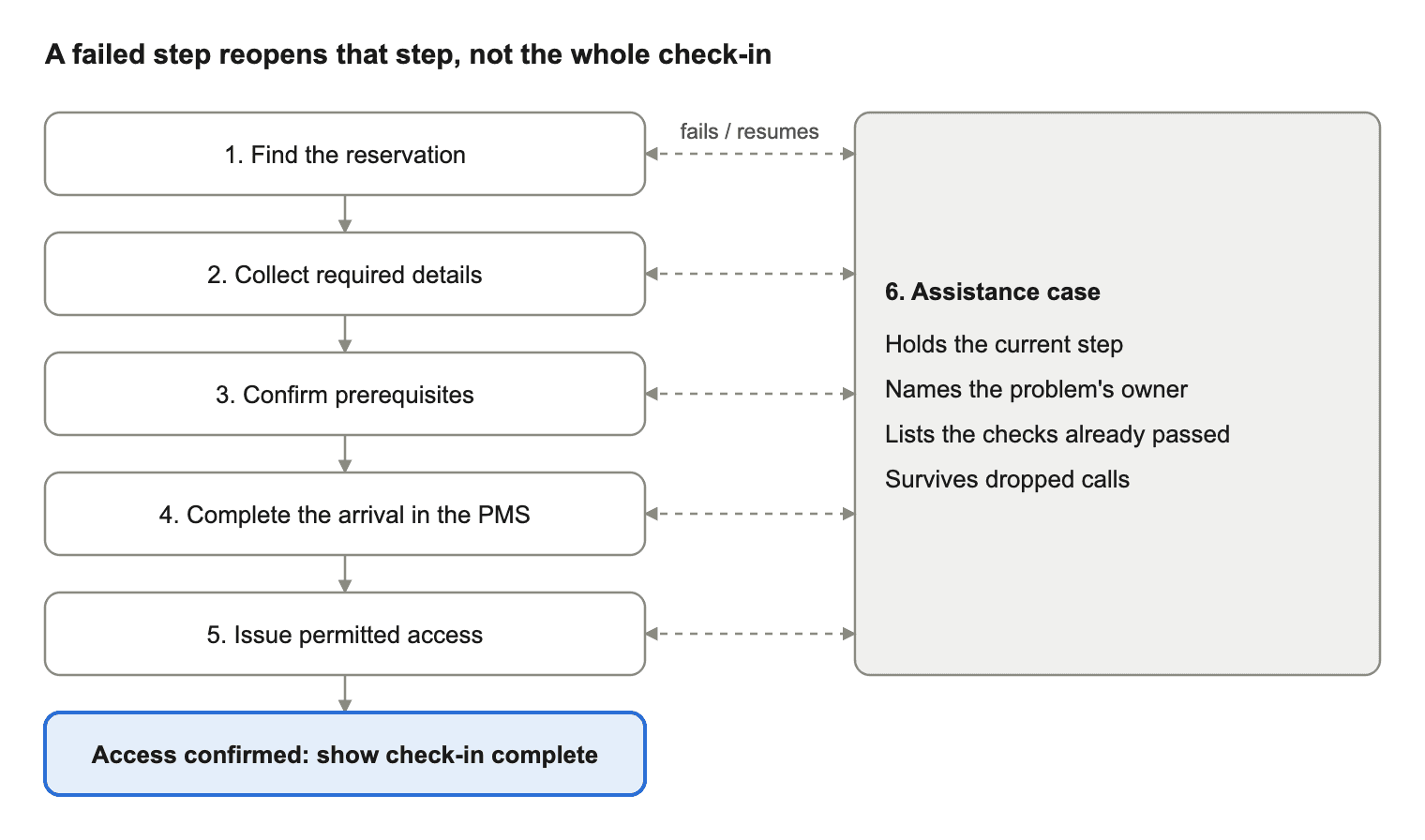
Every step connects to the same assistance case, so a failure reopens that step instead of restarting check-in.
A PMS is the software that manages property records such as reservations and room status. Your integration must respect that PMS's supported operations and permissions.
Three rules prevent false "check-in complete" messages:
- Payment is not access. A successful payment does not prove the room is ready or a key was issued.
- A call is not completion. A connected support call does not complete check-in. Only confirmed system updates do.
- Failure is not restart. A failed step should reopen that step, not the whole check-in.
Where does hotel reception automation fail?
The weak points in hotel reception automation are the hand-offs between systems, and a normal-arrival demo will not show you those. Guests also feel the failures: the Cornell study (Liu and Piccoli, 2010) linked failed kiosk check-ins to lower intent to return. It also found kiosks did not improve perceived check-in speed.
A staffed path still matters. In the Mews survey, 70% of travellers said they would likely self-check-in. Yet Mews data in the same report shows kiosks handled 30% of reservations at US kiosk-enabled hotels. These are different measures, but they suggest stated interest can run ahead of actual use.
Ask the supplier or your engineering team to demonstrate these cases in your actual integration environment:
| Failure to test | What should happen |
|---|---|
| Reservation search returns several matches | Guest sees no other booking's details and can reach staff |
| Reservation changes or is cancelled mid-flow | Eligibility is rechecked before the arrival completes |
| Identity review is rejected or unclear | Case moves to an authorised person, and the document stays out of support notes |
| Payment is declined or times out | Status is checked before any retry, so no second charge occurs |
| PMS update fails | Guest is not told check-in is complete, and the case records the failure |
| Room is not ready | Guest gets a next step and a time, with no key issued |
| Key issuance is not confirmed | Status shows "access pending", and only that step reopens |
| Key is issued but the door fails | Case goes to the named on-site responder |
| Video call drops | Case survives, and the guest can reconnect without restarting |
| No receptionist answers | Guest sees a fallback route and an expected wait |
| Camera or microphone is unavailable | Guest can get the same help by voice, text or in person |
| Guest leaves a shared kiosk | Next guest cannot reopen the session or see personal details |
Set acceptance thresholds before the pilot. Define what counts as a completed arrival, how long guests may wait, and who can approve exceptions.
Also test keyboard navigation, readable instructions and the assistance options your guests need. These are usability checks, not an accessibility certification.
For privacy and security, document which service receives each data field, who can view it and when it is deleted. Keep payment details and identity documents out of general support notes. Enable recording only if you need it, after reviewing notice, permissions, retention and access with the responsible teams.
When does self-service need a live video agent?
Self-service needs a live video agent when a guest needs explanation, reassurance or guided interaction. Use a simpler channel when it solves the task. Video cannot repair a faulty door or make an unavailable room ready.
Use this table as a starting policy, then test it against your property's requirements:
| Guest problem | Start with | Why |
|---|---|---|
| Wi-Fi, parking or breakfast question | FAQ, chat or AI voice agent | Configured answers solve it |
| Reservation not found | Live video or voice | Staff can ask questions and use judgement |
| Confusion over a required document | Live video | Visual guidance helps |
| Payment declined | Secure retry, then a person | Card details stay in the payment flow |
| Key issued but door will not open | Voice, then on-site responder | The fault may need physical attention |
| Guest cannot or prefers not to use a camera | Voice, text or in person | Help must never require video |
An AI voice agent can answer configured questions or start approved workflows. A human receptionist can exercise judgement within hotel policy. Specify the hand-off between them instead of calling both an "agent". For the AI side, see conversational AI for hotels.
Design the hand-off around the unfinished task
A good escalation preserves progress and shows the unresolved step. Treat the support conversation and the arrival transaction as connected but separate records.
Give the authorised receptionist only what they need: property, case reference, current step, error category and completed checks. Restrict sensitive details to the tools that require them.
Here is how that works when key issuance goes wrong:
- A guest completes registration, but the access service does not confirm the key.
- The application records "access pending" and offers help instead of restarting check-in.
- The receptionist opens the case, checks the access result and follows the property's recovery policy.
- If the fault needs physical attention, the receptionist contacts the on-site responder.
- The application shows completion only after the access service confirms the key.
If the call disconnects, the case stays open. The system must not treat the dropped call as a failed payment or cancelled reservation.
Your implementation needs:
- A case reference that survives reconnects and channel changes.
- A clear owner for each unresolved action.
- A way to inspect an action's result before retrying it.
- A guest-facing outcome, including when no one answers.
Design repeat requests to avoid duplicate actions. Engineers call this idempotency: retrying an operation should not create an additional transaction. Use each provider's documented mechanism where available.
Should you buy a system or build on an SDK?
Buy a complete product if you run hotels and lack a team to build and operate these workflows. Build on an SDK if you already own the hospitality application and want control over its assistance experience.
| Option | Type | What it provides | Fits when |
|---|---|---|---|
| Mews Kiosk | Platform product | Self check-in and check-out, payments and key cutter integration | You use or will adopt Mews |
| Hotelinking DeskForce | Front desk software | Pre-check-in, lobby kiosks, digital keys and PMS document upload | You want to keep your PMS and add check-in |
| Roommatik QR Phone | Video reception service | QR code that opens a video call in the phone's browser | You need a video link to staff, with no app |
| Virtual Front Desk | Remote reception service | Live receptionists over video, including check-in help | You want to outsource staffing |
| VideoSDK | Developer SDK | Audio and video APIs embedded in your own app | You build and run the hospitality software |
Details come from each vendor's own pages, checked on 30 October 2026. Confirm integrations for your exact PMS and locks.
Where VideoSDK fits
VideoSDK handles the call. Your application handles the arrival case and the PMS, payment, identity and lock integrations.
| Responsibility | Proposed owner |
|---|---|
| Live audio and video session | VideoSDK communication layer |
| Guest screen, case context, queue and agent assignment | Your application and service operations |
| Reservation and room-status changes | PMS through an authorised integration |
| Payment authorisation and refunds | Payment provider and approved business workflow |
| Identity decision | Your selected verification process and authorised reviewer |
| Key issuance and physical recovery | Access provider and hotel operations |
For session access, VideoSDK's authentication documentation recommends generating tokens on your backend and using short expiry periods in production. Version 2 token payloads can bind a token to a specific room and participant.
Those permissions cover the call only. They do not let a receptionist refund a payment, approve an identity check or unlock a door. Your backend must verify that authority separately.
What does an automated front desk system cost?
An automated front desk system has no single price, because cost depends on scope. In the example below, video usage costs $4.80 a month, while the same calls take 10 hours of receptionist time. Staffing, integrations and hardware are likely to shape your budget more than call minutes.
For planning, use:
Monthly operating cost = platform fees + integration maintenance + hardware support + communication usage + staffed assistance + fallback operations
Treat implementation and hardware purchases separately, or state the period over which you spread them. Request quotes that separate each of these lines. Ask for kiosk quotes by key type, since card dispensing and access codes need different hardware.
Here is the communication line for an assumed 1,000 arrivals a month, with 10% needing a six-minute video call:
| Item | Calculation | Result |
|---|---|---|
| Assisted arrivals | 1,000 × 10% | 100 calls |
| Receptionist talk time | 100 × 6 minutes | 600 minutes (10 hours) |
| Participant-minutes | 600 × 2 participants | 1,200 |
| Video at HD (720p) | 1,200 × $0.004 | $4.80 a month |
| Video at Full HD (1080p) | 1,200 × $0.008 | $9.60 a month |
| Optional HD meeting recording | 600 × $0.015 | $9.00 a month |
Rates are VideoSDK's list prices, checked on 30 October 2026. Recording storage is extra, at $0.003 per stored minute a month. The arrival numbers are assumptions, not a forecast, so replace them with your own.
When comparing suppliers, ask which unit each one bills and what else it charges for. Estimate staffing separately, because a communication service does not tell you how many receptionists you need at peak arrivals.
How should you pilot hotel reception automation?
Pilot hotel reception automation on one bounded guest journey, compared with a documented baseline. Keep a staffed fallback available while you learn where guests need help.
- Define eligibility. Choose the property, arrival types and operating hours included.
- Name the owners. Assign responsibility for reservation, payment, access and assistance failures.
- Run the failure tests. Complete the tests above before expanding guest access.
- Measure outcomes. Record completion, abandonment, assistance demand and successful recovery using agreed definitions.
- Review exceptions. Fix the most consequential failed hand-offs before adding more automation.
Useful measures include:
- Unassisted and assisted completion rates.
- Median and 95th-percentile time to reach a person.
- Access failures.
- Repeated contacts per arrival.
Measure arrival time from a defined starting event to confirmed access, not just the check-in form. Segment results by mobile, kiosk, operating hours and failure type.
Do not read a lower assistance rate alone as success. Guests may have completed the journey, abandoned it or failed to find help.
Key takeaways
- Evaluate an automated front desk system across registration, payment, room readiness, access and assistance.
- Offer human video help where conversation can resolve the task, with another channel and an on-site fallback.
- Keep call permissions separate from permission to change hotel records or issue room access.
- Test failures and measure completed arrivals before expanding the rollout.
Glossary
- PMS: Property management system holding operational records such as reservations and room status.
- Payment authorisation: Approval to reserve an amount under a payment provider's process, which is different from collecting the funds.
- Idempotency: A design property that stops a repeated request from creating an additional effect.
- Participant-minute: One participant connected for one minute.
- Exception workflow: The assigned steps for resolving a case that cannot finish through the standard automated path.
Plan your live assistance layer
If you are building a hotel app and need human video assistance inside it, book a VideoSDK demo. Bring your guest journey, target devices and failure scenarios so the discussion can test the communication layer against your requirements.
Frequently asked questions
Is an automated front desk system the same as a virtual receptionist?
No. A virtual receptionist is one way to provide assistance, using either a remote person or AI. An automated front desk system also covers registration, payment, room readiness and access.
Can a hotel add automation without replacing its PMS?
Yes, if the PMS exposes the operations you need and grants the right access. Check reservation lookup, arrival updates, room status, authentication and change notifications for your exact product. Ask for a demonstration, because "API available" does not prove compatibility.
Can several hotels share a remote reception team?
Yes, but verify property-specific permissions, staffing coverage and simultaneous demand first. Each case should identify the property and its operating policy. Each property also needs a named route for physical intervention.
Should automation cover check-out as well as check-in?
Treat check-out as a separate workflow with its own acceptance tests. Define who confirms departure, settles charges, issues receipts and updates access expiry. A successful check-in pilot does not prove departure automation is ready.