


A hotel self check in system lets guests find their reservation, verify their ID, pay and get a room key without queuing at the front desk. Most arrivals go through without trouble. The ones that don't are where the guest experience is won or lost.
A failed ID scan or a declined card can leave a guest stuck at a kiosk, sometimes at midnight with nobody on site. This guide is for teams that build or run check-in software. It covers how these systems work, where they stall, and how to add live video help that returns the guest to self-service.
What is a hotel self check in system?
A hotel self check in system is software, often paired with a kiosk, that completes arrival tasks normally handled by a front desk agent. It connects to the property management system (PMS), a payment gateway, door locks and an ID verification service.
Guests are ready for it. In a 2025 survey commissioned by Mews, 70% of 2,000 American travelers said they were likely to check in by app or kiosk. Among Gen Z, the figure was 82%. That measures what travelers say they would do, not actual use, and Mews sells kiosks.
How a contactless check in hotel flow works
A typical flow has six steps, whether the guest uses a kiosk or a phone. Treat it as a reference: some checks and PMS updates happen throughout, not only at the end.
- Pre-arrival message. The hotel sends a check-in link by SMS or email before the stay.
- Reservation lookup. The guest enters a booking number or scans a QR code.
- ID verification. The guest scans a passport or government ID. Phone flows often add a selfie.
- Payment. The guest settles the balance or places a card hold.
- Room and key. The system assigns a room and issues a key card, PIN or mobile key.
- PMS write-back. The completed check-in updates the guest record for housekeeping, night audit and the front desk.
Step 6 is why property management system integration matters so much. Stayntouch, a PMS vendor, warns that one-way connections leave partial records that staff must reconcile by hand. Good PMS integrations use two-way APIs and webhooks, so updates arrive in real time.
For your own build, decide which system owns reservation, payment, room-ready and access status. Define what must be confirmed before a key is released, how retries avoid duplicate charges, and how a failed update is reconciled. What you can automate depends on the APIs and events your PMS and connected services expose.
Kiosk, mobile or both
| Type | Where the guest checks in | Best for | Watch out for |
|---|---|---|---|
| Kiosk | Touchscreen in the lobby | Physical key cards, guests without the app, walk-ins | Hardware cost, and a single point of failure |
| Mobile or web | The guest's own phone | Skipping the lobby, mobile keys, accessibility | Guests who don't open the link before arrival |
| Hybrid | Either one | Most properties, since each covers the other's outages | Keeping two flows in sync with the PMS |
Cost differs sharply between them. Stayntouch puts kiosk hardware at $5,000 to $15,000 per unit, or $150 to $600 a month to lease. It also says some legacy PMS platforms charge up to $10,000 for a single new integration.
Where self check-in breaks, and where live video fits
The benefits of hotel check-in automation are real. Mews reports that kiosks cut check-in time by a third and that kiosk guests are three times more likely to buy an upsell. Those are Mews's own results, not industry averages, and they don't show cause and effect.
The gap is the exceptions. A hotel self check in system follows rules, so anything outside those rules stops the flow. Stayntouch's guide tells hotels to escalate payment declines to staff immediately, while the guest is still present. That works only if someone is available.
A remote agent on live video fills that gap. The guest stays at the kiosk or on their phone while the agent guides them. Where authorized, the agent uses connected hotel systems to resolve the issue. Physical faults, unavailable rooms and cases outside the agent's permissions still need a defined handoff to local staff.
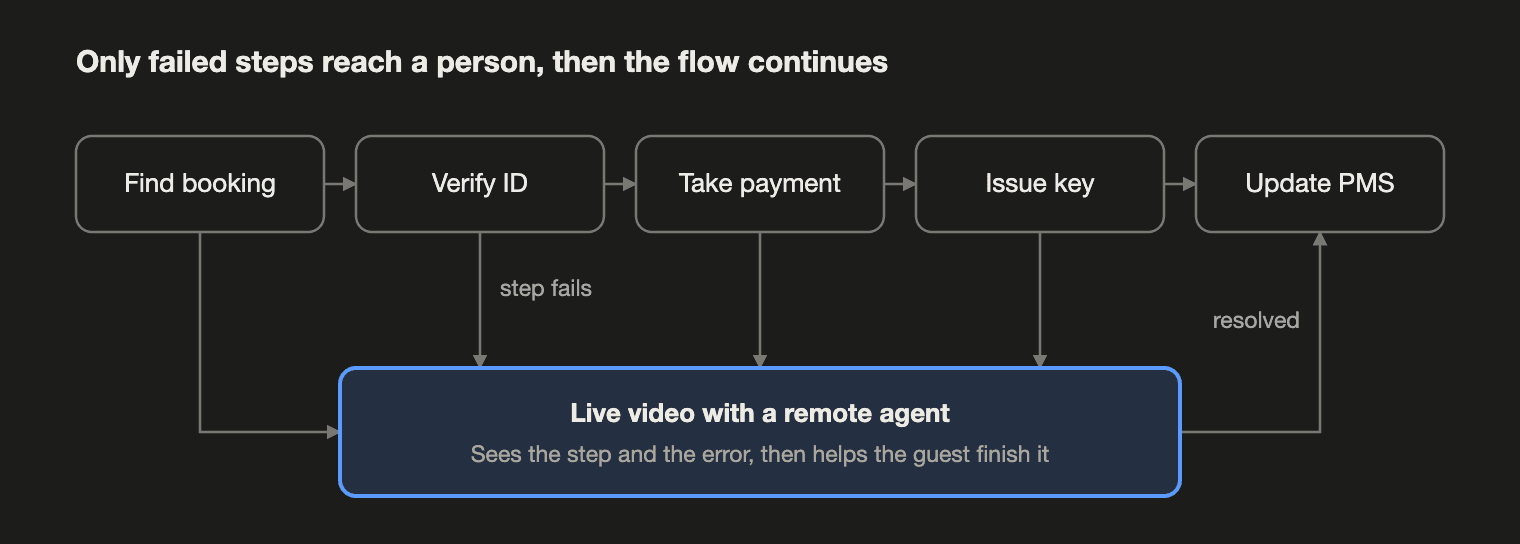
| Exception | Why the flow stops | What the agent can do on video | What stays outside the call |
|---|---|---|---|
| ID scan fails | Glare, a worn document or an unsupported format | Guide a rescan and start your approved review process | A video conversation alone doesn't verify identity or permit a bypass |
| Card declined | The bank rejects it at the last step | Explain the error and guide a retry or an approved alternative | The agent can't override the issuer's decision |
| Key not issued | Jammed encoder or a sync error | Check status and request an approved alternative, such as a PIN or mobile key | Needs compatible lock hardware; a physical jam may need local staff |
| Reservation not found | Third-party booking or a misspelled name | Search the PMS or booking tools and confirm the match | Verify identity and booking ownership before linking records |
| Guest wants help | Language, accessibility or a first-time user | Talk them through the flow step by step | Language and accessibility cover depend on agent staffing |
This also changes staffing. friendlyway, which sells video check-in, notes that one remote team can support several properties from a single location. That makes overnight cover possible at properties that can't justify a full night desk.
One limit applies. Rules on verifying a guest's identity vary by country and region. Confirm what is allowed where each property operates before you rely on remote review.
How to add live video to your check-in system
You don't need to replace your check-in software or PMS. Video is a layer that activates when the existing flow can't continue. If you build or run a hotel self check in system, the integration comes down to five decisions:
- Set the triggers. Start a call on specific failures, such as a second failed ID scan, plus a visible "Talk to someone" button.
- Pass the context. Send the reservation ID, current step and error to the agent, so the guest doesn't have to explain it again.
- Route the call. Connect it to the next available agent, and decide what happens when nobody answers.
- Give the agent control. Let them act in the PMS and return the guest to the correct step, not back to the start.
- Plan a fallback. On a weak connection, drop to audio or a phone line so the guest still reaches someone.
Decide on recording early. IDs and payment details can appear on camera, so check consent and retention rules before you turn it on.
Track three numbers from launch: the share of check-ins completed without help, time to reach an agent, and the share of video calls that end with a guest checked in.
Test these failure cases before launch
| Test case | What a pass looks like | Owner |
|---|---|---|
| No agent accepts the call | The guest gets the configured backup route, and their progress is saved | Operations and app team |
| Video drops after payment | On reconnect, the flow checks payment status and doesn't charge again | App and payments team |
| Room not ready or key fails | No access is promised that can't be delivered; local staff get an actionable alert | PMS, access and hotel operations |
| Guest walks away from a kiosk | The next guest can't see or reuse the previous session | Kiosk and app team |
Where VideoSDK fits
VideoSDK provides the video layer. It doesn't replace your PMS, your payment gateway or your ID verification service.
- Kiosk and mobile clients. SDKs cover React, JavaScript, Android, iOS, Flutter and React Native, so the same call can run on a kiosk and in a guest app.
- Agent context. PubSub messaging can carry the reservation ID and error state alongside the call.
- Device checks. Pre-call setup checks camera and microphone permissions and lists available devices.
- Event logging. Webhooks send events such as session started, session ended and participant joined to your backend.
- Phone fallback. SIP Connect lets a SIP-compatible device or softphone join the same room.
- Monitoring. Session-level logs surface issues such as jitter and microphone failures, which helps you debug a kiosk you can't physically reach.
Running a check-in platform or kiosk product? Book a hospitality solutions demo to see how live video can fit your check-in flow.
Frequently asked questions
What does a self check in hotel system need to connect to?
At minimum, it connects to the PMS, a payment gateway, door locks and an ID verification service. The PMS stays the system of record, so the connection should run both ways.
Is a kiosk required for hotel contactless check in?
No. Guests can check in on their own phones using a web link or app, and open the door with a mobile key. A kiosk is still useful for physical key cards and for guests who arrive without completing the online flow.
What happens if the video call drops halfway through check-in?
The flow should save the guest's progress and return them to the same step. Before retrying, it should check payment and key status in the connected systems, so the guest is never charged twice or issued a second key.
Does live video replace front desk staff?
Not necessarily. Routine arrivals move to self-service, and on-site staff can spend more time with guests who need them. Video adds cover for hours or properties where nobody is at the desk.
Can video be added to an existing hotel self check in system?
Yes, if you can change the software on the kiosk or in the app. You add a video SDK to the client and trigger calls from the flow. The PMS, payment and ID services stay as they are.