



A telehealth video platform is defined as the full stack behind a virtual consult: scheduling, identity, encrypted media, recording, storage, and an audit trail. The video call is one layer of six.
Telehealth reached 5.51 percent of US medical claim lines in the first quarter of 2026, up 10.1 percent from the quarter before, according to FAIR Health's Quarterly Telehealth Regional Tracker.
That volume runs on software somebody had to assemble. Teams building it usually start at the video call, which is the part vendors sell, and meet the other five layers later: appointment-to-room binding, token minting, recording custody, EHR write-back, and audit logging. Then they meet the patient who cannot find the "allow camera" button.
This guide covers the architecture of a telehealth video platform, what WebRTC does and does not give you, five UX patterns that decide whether the patient connects at all, the compliance controls that gate a US launch, where AI fits, and a worked cost model for 2,000 consultations a month.
What is a telehealth video platform?
A telehealth video platform is the system that carries a clinical encounter from a booked appointment to a signed note, with video as the transport in the middle.
It is defined as a stack that authenticates a patient and a clinician, places them in a private session, encrypts the media between them, optionally records the encounter into storage the provider controls, and writes evidence of all of it into an audit log.
A telehealth video platform works by separating the parts that must stay under your control from the parts you can rent. Identity, scheduling, clinical records, and audit belong to you, because they are where protected health information lives and where regulators look. Media transport is infrastructure, and almost nobody builds it twice.
That split is the reason most healthcare teams do not write their own signaling servers. VideoSDK provides the media layer through its video calling API and SDKs, with recordings uploaded directly to your own cloud storage bucket rather than held on VideoSDK's side.
Telehealth video solutions fall into two groups
Video solutions for telehealth split into finished platforms and embeddable APIs, and the choice is mostly about who owns the patient experience.
Finished platforms such as Doxy.me, SimplePractice, or Zoom for Healthcare ship a working consult room, a patient link, and a BAA on day one. You configure them. You do not change how they look, where they store recordings, or how they behave when the patient's connection drops.
Embeddable APIs, including VideoSDK, Daily, LiveKit, and Amazon Chime SDK, hand you the media layer and leave the rest of the product to you. You get control over the waiting room, the branding, the EHR write-back, and the storage bucket, and you take on the work of building them.
If you are choosing a vendor rather than designing a system, the ranked breakdown in Top 10 Video Conferencing Telemedicine APIs compares ten providers against healthcare-specific criteria. The rest of this article assumes you have decided to build.
Telehealth video platform architecture, layer by layer
A working telehealth video platform has six layers, and only one of them is the video call.
Teams that treat the SDK integration as the project ship a demo quickly and then spend two quarters on the other five. Mapping them first makes the build predictable, and makes it obvious which layers a vendor can absorb.
Layer 1: Identity and scheduling
Every session starts with a booking, and the booking is what proves the patient belongs in the room.
Your scheduling system holds the appointment record: which patient, which clinician, what time, which service. Nothing about that belongs in the video vendor. The room is created because an appointment exists, not the other way around.
Practical rule: one room per appointment, created server side at booking time or shortly before the visit. Reusable room IDs are the most common way a stranger ends up in a consult.
Layer 2: Server-side token minting
Tokens are where access control actually happens, and they must be minted on your server.
A meeting token is a short-lived credential that says which room a participant may join and what they may do in it. Your API key and secret generate it, which is why neither can ever ship in a web bundle or a mobile binary.
Scope tokens by role. A clinician token may start a recording; a patient token may not. Give tokens the shortest lifetime the appointment allows, so a leaked link expires before it is useful. VideoSDK's REST API reference covers room creation and token validation endpoints.
Layer 3: Media transport
The media layer routes encrypted audio and video between participants and adapts to whatever network the patient is on.
Nearly every production telehealth platform routes media through a Selective Forwarding Unit rather than connecting devices directly. An SFU receives each participant's streams and forwards them, which keeps upload bandwidth flat as participants are added and makes server-side recording possible.
The tradeoff is that an SFU terminates encryption to forward media, so the call is encrypted hop by hop rather than end to end. That is a compliance decision, not just an architecture one, and the compliance section below returns to it.
Layer 4: Recording and storage custody
Recording is where a telehealth video platform stops being a video problem and becomes a records problem.
A recorded consult is a clinical record. It inherits retention schedules, access controls, patient access rights, and breach exposure. The single most important architectural decision here is whose bucket it lands in.
VideoSDK writes recordings directly to your cloud storage and documents that it holds write-only access and deletes its copy immediately. Keeping recordings in infrastructure you already have under a BAA removes an entire category of vendor risk, and it usually costs less than paying the platform to store them.
Layer 5: Clinical system integration
The consult has to leave the video platform and land in the chart, or clinicians will keep two systems open.
In practice this means writing an encounter record, the visit note, and any recording reference back to the EHR, usually over HL7 FHIR resources such as Encounter, DocumentReference, and Appointment. Build this as a server-side job triggered by session webhooks rather than anything the browser does.
Layer 6: Audit and observability
An audit log that was assembled after an incident is not an audit log.
Subscribe to session webhooks and append every join, leave, recording start, recording stop, and permission change to storage that your application cannot rewrite. Keep the clinical audit trail separate from your application logs, because the two have different retention rules and very different readers.
One layer that is easy to skip: call quality telemetry. Without per-session stats you cannot tell a clinician complaining about "bad video" whether the cause was their Wi-Fi, the patient's phone, or your configuration.
WebRTC for telehealth: What it solves and What it does not
WebRTC gives you encrypted, plugin-free media in a browser, and nothing above the media layer.
That distinction matters because WebRTC telehealth projects are often scoped as if the standard were a product. It is a browser API and a set of IETF protocols. It solves transport. It has no opinion about patients, appointments, or HIPAA.
What WebRTC solves
WebRTC solves the four hardest problems in moving real-time media between two devices on the open internet.
Capture and transport without an install. WebRTC 1.0 is a W3C Recommendation implemented in Chrome, Safari, Firefox, and Edge. A patient joins from the browser they already have, which is the single largest determinant of whether they connect at all.
Connectivity through NAT and firewalls. ICE candidate gathering, with STUN for address discovery and TURN relay as fallback, is what makes a call work from a hospital guest network or a mobile carrier.
Encryption that is not optional. WebRTC media is carried over SRTP with keys negotiated by DTLS. There is no unencrypted mode to misconfigure, which is a genuine advantage of WebRTC healthcare deployments over older video stacks.
Adaptation to bad networks. Congestion control and simulcast let the sender drop resolution and bitrate instead of dropping the call, which matters when the patient is on rural LTE.
What WebRTC does not give you
WebRTC deliberately leaves out everything that would make it a telehealth product.
Signaling is undefined. The specification does not say how two peers exchange session descriptions. You build that, or your vendor does.
There is no media server. Direct peer connections work for a two-person consult on good networks and degrade badly beyond that. Group consults, recording, and reliable relay all require an SFU and TURN infrastructure that somebody has to run and scale.
There is no identity layer. WebRTC has no concept of a patient, a clinician, or permission to join. Authorization is entirely yours.
There is no recording. Capturing a consult means a server-side component that subscribes to streams, composites them, and writes a file.
There is no compliance. The WebRTC security architecture covers protocol-level threats. It does not sign a BAA, retain audit logs, or restrict where media is processed.
| Layer | WebRTC provides | You still need | Supplied by VideoSDK |
|---|---|---|---|
| Media encryption | SRTP with DTLS key exchange | Nothing at protocol level | Yes, plus TLS on signaling |
| NAT traversal | ICE and STUN | TURN relay servers at scale | Yes, managed |
| Signaling | Nothing, undefined by spec | A signaling service | Yes, managed |
| Media routing | Peer to peer only | An SFU for groups and recording | Yes, managed |
| Recording | Nothing | Server-side capture and compositing | Yes, to your bucket |
| Identity and access | Nothing | Token minting, role scoping | Token API, you mint |
| Scheduling and rooms | Nothing | Appointment to room mapping | Room API, you map |
| Audit trail | Nothing | Append-only event log | Webhooks, you store |
| BAA and compliance | Nothing | Signed agreements, controls | HIPAA add-on and BAA |
| EHR write-back | Nothing | FHIR integration | No, you build |
WebRTC telemedicine builds fail on the right-hand columns, not the left. The protocol work is finished and standardized; the product work is not.
WebRTC services for healthcare are sold precisely to close that gap, and the honest question when evaluating one is how many rows of that table it actually covers.
Telehealth UX patterns that decide whether the patient connects
UX for telehealth is not general video conferencing UX, because the user is often elderly, anxious, on a phone, and using the product once.
A patient in a Zoom meeting who cannot get their camera working asks a colleague. A patient waiting for a psychiatry appointment closes the tab. Telemedicine UX has to assume no second attempt and no IT support, which changes what you build.
These five patterns address the points where sessions actually fail. VideoSDK documents the underlying behaviour in its user experience guidelines and pre-call setup guide.
Pattern 1: Browser-first join with no download
The patient should reach the consult from a link, in the browser they already have, with no account and no app.
Every install step is a place to lose a first-time patient, and mobile app stores are a hard stop for someone joining from a hospital waiting room five minutes before their appointment. WebRTC runs natively in current Safari, Chrome, Firefox, and Edge, so the download is not technically necessary.
Reserve the native app for patients in ongoing care programmes who benefit from notifications and background reconnection. Never make it the only door.

Pattern 2: A pre-call check that tests real devices
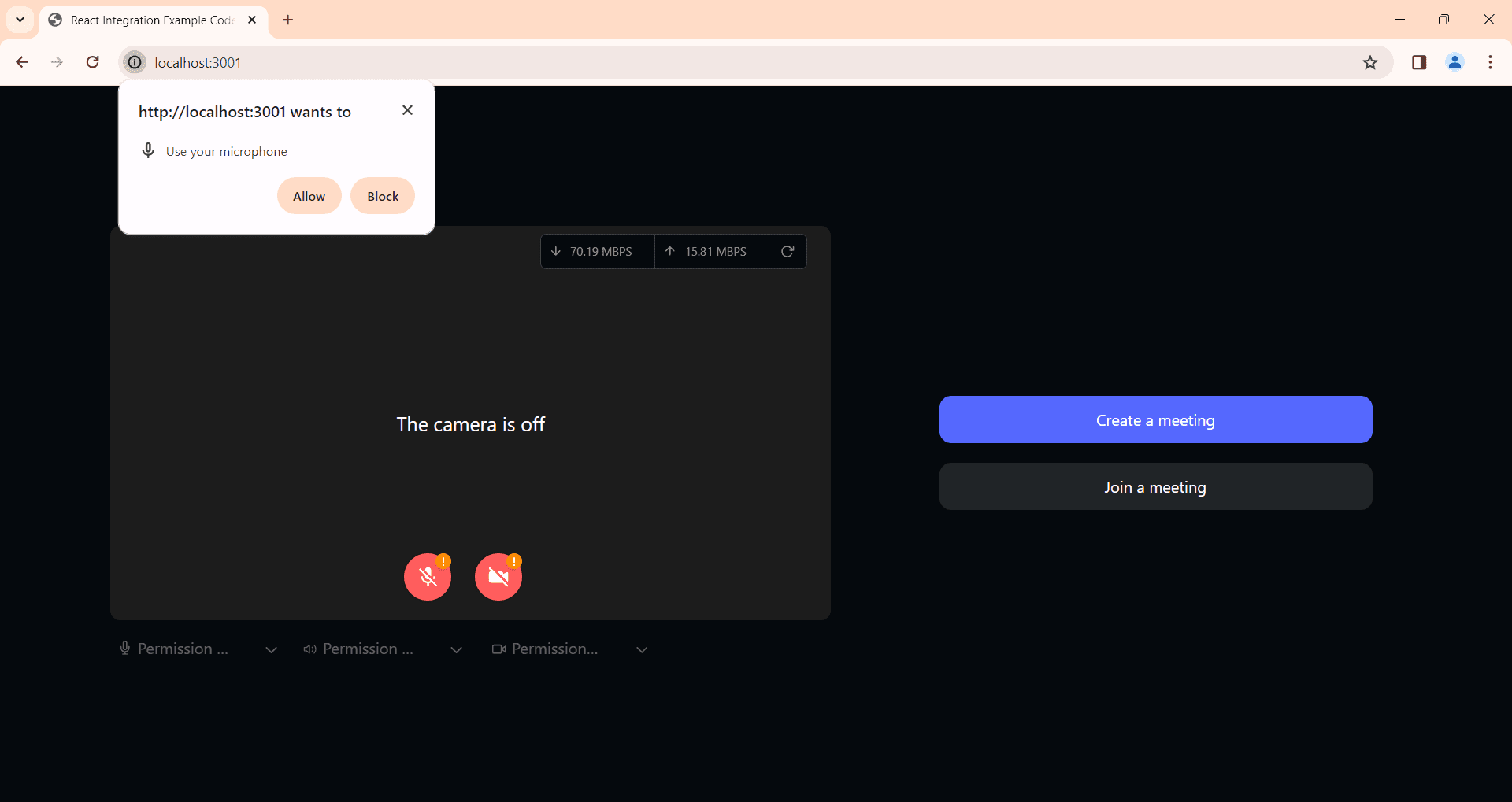
A pre-call screen that only asks for permission is not a test. It has to actually exercise the camera, microphone, and speaker.
The useful sequence is: request permissions, enumerate devices, show a live camera preview, record two seconds of microphone audio and play it back, play a test tone through the selected speaker, and check upstream bandwidth. Each step catches a distinct failure that would otherwise surface in front of a clinician.
VideoSDK's precall guide covers the permission check and device selection flow, including using checkPermissions() from the useMediaDevice hook to detect what has been granted before the patient is in the room.
Pattern 3: A permission-denied path that says what to click
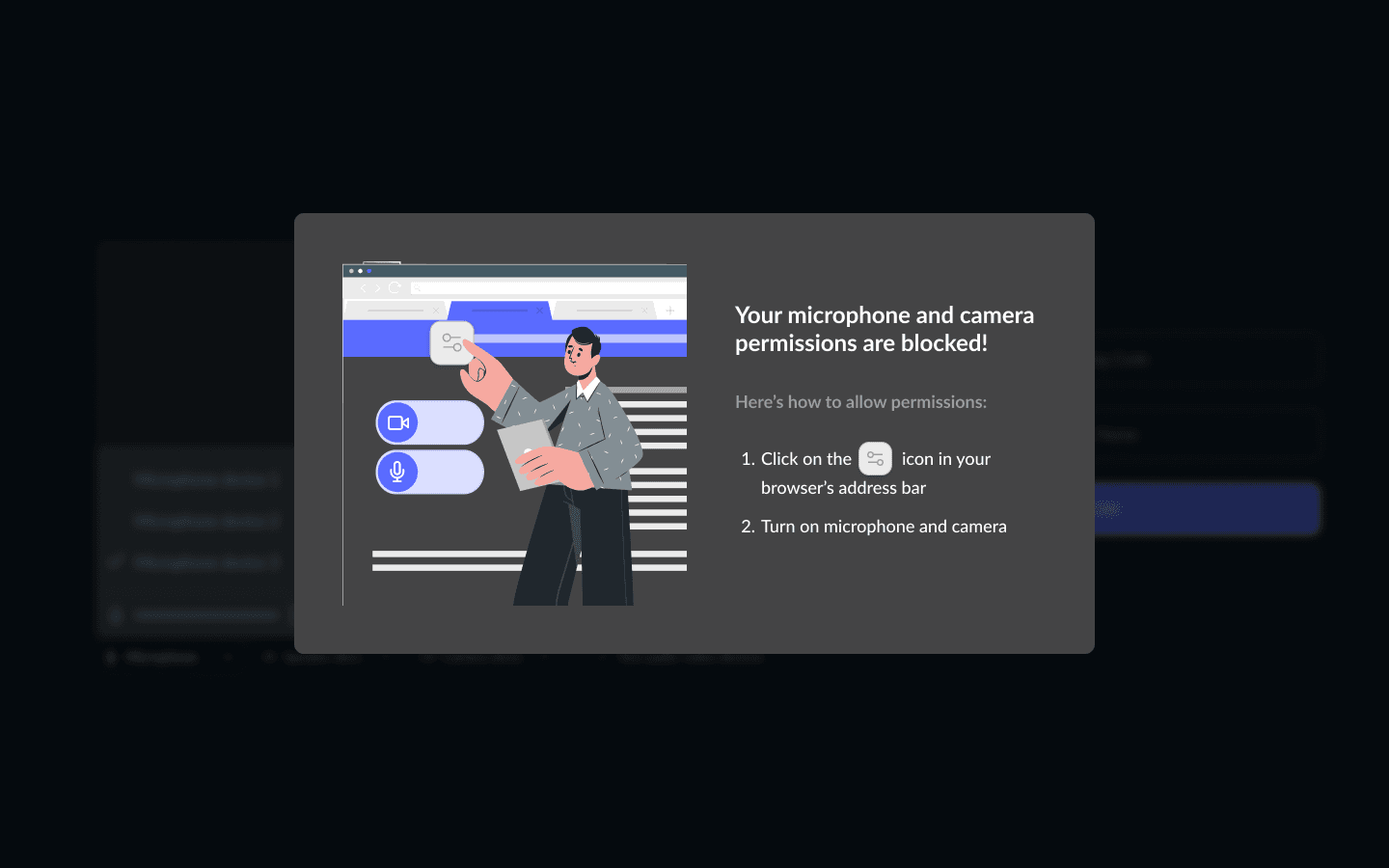
Browsers show the camera permission prompt once, and a patient who dismisses it is stuck with no visible way back.
Detect the denied state explicitly and replace the video tile with instructions specific to that browser: where the padlock icon is, which toggle to flip, and that the page needs a reload afterwards. Generic text saying "please enable camera access" leaves the patient exactly where they were.
This is the highest-yield telehealth UX fix available, because it converts an abandoned appointment into a completed one with no infrastructure change.
Pattern 4: Visible connection quality and a deliberate audio-only fallback
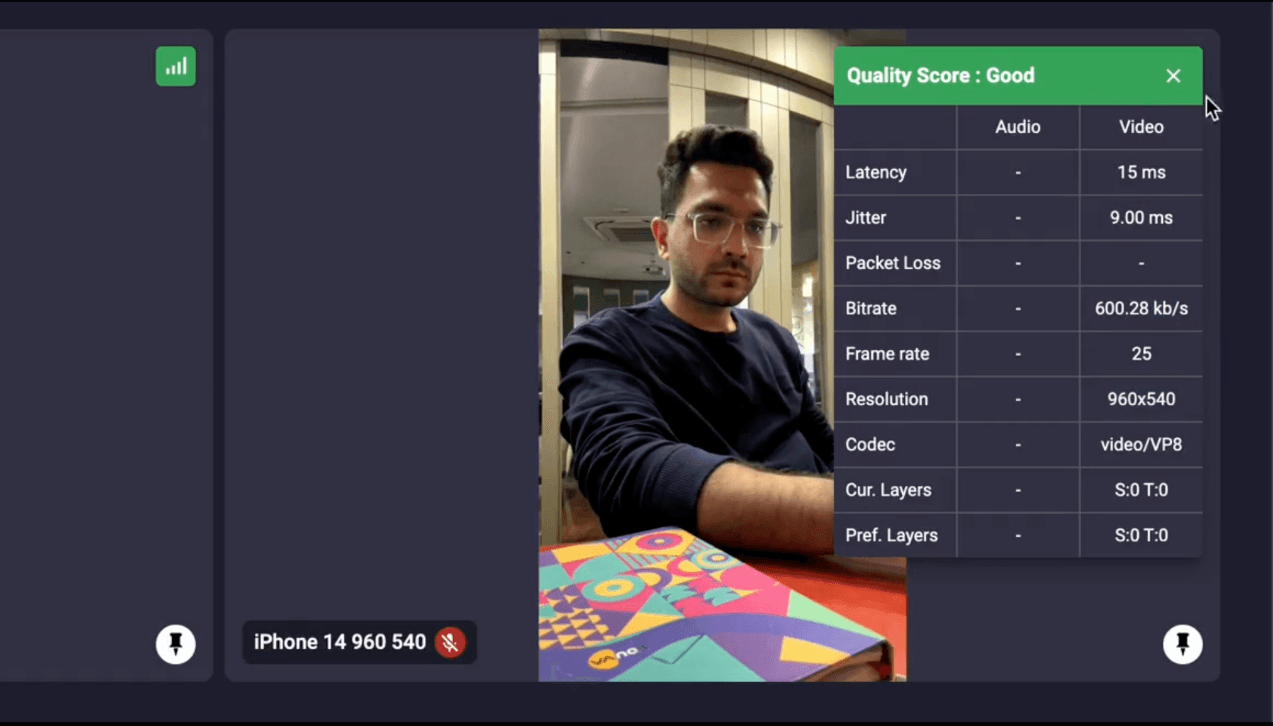
Show the patient their connection state before it fails, and give the clinician a one-tap way to drop video.
VideoSDK exposes per-stream statistics through getVideoStats(), getAudioStats(), and getShareStats(), which is enough to render a three-state indicator rather than leaving both sides guessing why the picture froze.
The fallback matters clinically as well as technically. HHS has published guidance on audio-only telehealth under the HIPAA Rules, and for many consult types finishing the appointment on voice is a better outcome than rescheduling. Voice costs $0.001 per participant minute against $0.004 for HD video, so the fallback is also cheaper.
Pattern 5: Rejoin that returns to the same appointment
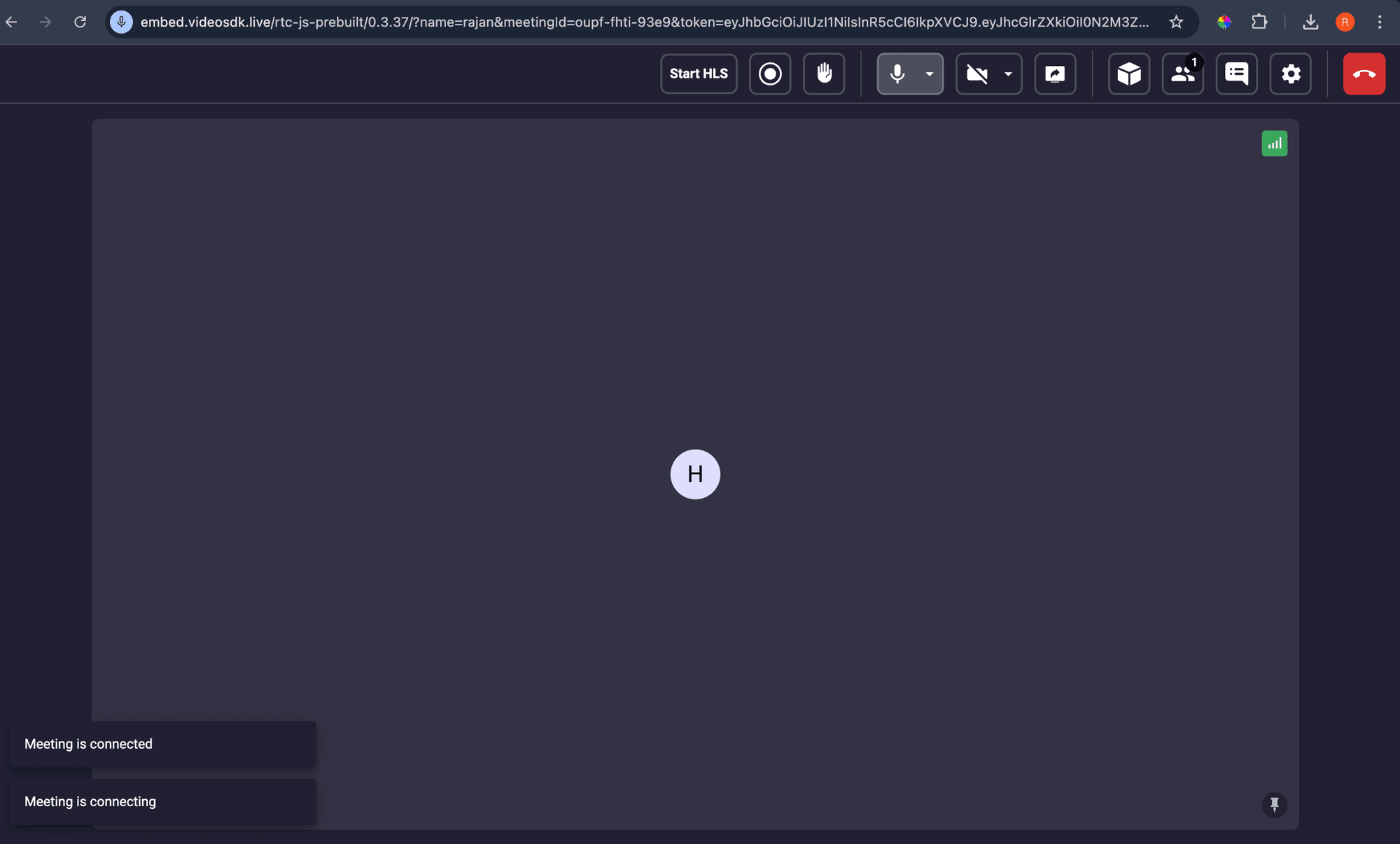
A dropped patient should be able to return to the same consult from the same link, without a new invitation.
Because the room is bound to the appointment rather than to a session, a rejoin is just a fresh token against the existing room. Keep the clinician informed with join and leave events so they know whether to wait or to call.
Pair this with device switching mid-call. A patient whose Bluetooth headset disconnects needs to change audio output without leaving, and the SDK supports switching devices inside an active session.
Compliance controls for a telehealth video platform
A US telehealth video platform needs a signed BAA covering the exact features you use, and the BAA is a gate, not a checkbox.
This section is a summary. The full treatment, including the 45 CFR 164.312 safeguard mapping, what a BAA does and does not cover, recording rules, and GDPR alongside HIPAA, is in HIPAA Compliant Video Conferencing API.
The controls that decide whether you can launch:
- A BAA with every vendor that touches PHI. That includes the video vendor, the storage provider, the transcription vendor, and any model provider in an AI pipeline. HHS ended its COVID-era telehealth enforcement discretion on May 11, 2023, with a 90-day transition period, so the pre-2023 flexibility no longer applies.
- Encryption in transit and at rest. VideoSDK documents TLS for signaling and SRTP for media, with encryption at rest where storage supports it.
- Recording custody in your own bucket. VideoSDK uploads recordings directly to customer storage and states it holds write-only access, which keeps the retained clinical record inside your existing controls.
- Role-scoped, short-lived tokens. Access control lives in the token, minted server side, never in the client.
- An append-only audit trail. Built from session webhooks, retained separately from application logs.
- Region pinning where residency applies. Geo-fencing keeps media processing inside a chosen region.
Two things are worth knowing before you design around them.
Hop-by-hop is not end-to-end. An SFU decrypts and re-encrypts to forward media. That is normal, it is what makes recording and group consults possible, and HIPAA does not require end-to-end encryption. VideoSDK does offer E2EE, but enabling it disables recording and transcription, so it is a real tradeoff rather than a free upgrade.
HIPAA coverage is a paid add-on. VideoSDK sells HIPAA compliance and the BAA as an add-on to Enterprise and Pay-As-You-Go plans, enabled from the dashboard under Billing then Add-ons. Pricing is custom, so budget it as a line item you have to ask for rather than a rate you can read off the page.
AI in telehealth: what actually runs inside the call
AI telehealth features today are mostly documentation, captions, and intake, and each one changes your compliance surface.
The clinically useful applications are narrow and real. Ambient documentation turns the consult audio into a draft note so the clinician is not typing through the appointment. Live captions make consults accessible to deaf and hard-of-hearing patients. Voice agents handle intake and triage before a clinician joins.
VideoSDK prices these as metered features: real-time transcription at $0.020 per minute, post-call transcription at $0.004 per minute, and prompt-based summaries at $0.005 per request. Its AI voice agent SDK connects speech-to-text, an LLM, and text-to-speech into a room for the intake case.
The constraint nobody mentions until integration
Enabling VideoSDK's HIPAA add-on turns off its own AI features.
The HIPAA compliance documentation lists live transcription, closed captions, post-call transcription, AI-generated summaries, and live streaming over HLS and RTMP-out as unavailable in HIPAA mode. Enabling end-to-end encryption removes recording and transcription for the same reason: a service that cannot read the media cannot transcribe it.
This is a coherent design rather than a gap. It does mean the architecture for a compliant AI telehealth workflow looks different from the demo:
- Record the consult to your own storage bucket, under your own BAA.
- Run transcription and summarization in your own pipeline against that recording.
- Hold a BAA with every model vendor in that pipeline, including the speech-to-text and LLM providers.
- Write the draft note back to the EHR for clinician review, and keep it flagged as a draft until a human signs it.
Budget for this properly. Real-time transcription across every consult costs 2.5 times the HD video itself in the model below, which is the kind of number that should be decided deliberately rather than discovered on an invoice.
What a telehealth call costs
A 30-minute two-party HD telehealth consult costs about $0.24 in media on VideoSDK, before recording, storage, or transcription.
The unit that matters is the participant minute. A 30-minute call with two people is 60 participant minutes, not 30. Recording is billed differently, per recorded minute of output, so it does not double with participant count.
Rate card
| Item | Unit | Price |
|---|---|---|
| Voice | Per participant minute | $0.001 |
| Video HD 720p | Per participant minute | $0.004 |
| Video Full HD 1080p | Per participant minute | $0.008 |
| Composite recording HD | Per recorded minute | $0.015 |
| Composite recording Full HD | Per recorded minute | $0.030 |
| Recording storage | Per minute per month | $0.003 |
| Post-call transcription | Per minute | $0.004 |
| Real-time transcription | Per minute | $0.020 |
| Prompt-based summary | Per request | $0.005 |
| HIPAA compliance and BAA | Add-on | Custom |
New accounts start with $20 in free credit, which is enough for testing and includes all the required features.
Worked example: 2,000 consultations a month
Assume a behavioural health group running 2,000 telehealth appointments a month, 30 minutes each, one patient and one clinician, with 60 percent of sessions recorded for the record.
That is 120,000 participant minutes, 60,000 session minutes, and 36,000 recorded minutes.
| Line item | Calculation | Monthly cost |
|---|---|---|
| HD video | 120,000 participant min at $0.004 | $480.00 |
| Composite recording, HD | 36,000 recorded min at $0.015 | $540.00 |
| Recording storage, first month | 36,000 min at $0.003 | $108.00 |
| Post-call transcription | 36,000 min at $0.004 | $144.00 |
| Visit summaries | 1,200 requests at $0.005 | $6.00 |
| Total | $1,278.00 |
That is $0.64 per completed consultation. Three things in that table are worth arguing about before you build.
Recording costs more than the calls. At $540 against $480, capturing the consult is the larger line. Recording only what a retention policy actually requires is the fastest cost reduction available, and it reduces breach exposure at the same time.
Storage compounds, and the rate card only shows month one. At 36,000 new minutes a month, the storage line reaches $1,296 a month by month twelve, twelve times the first month, and it keeps climbing for as long as your retention schedule runs. Writing recordings to your own bucket, which HIPAA mode requires anyway, moves this onto object storage you already negotiate.
Resolution is the biggest single lever. Running the same month at Full HD costs $960 for video and $1,080 for recording, exactly double, at $1.02 per consult. Some specialties need the detail. A follow-up medication review does not.
What the same month costs in HIPAA mode
| Line item | Monthly cost |
|---|---|
| HD video | $480.00 |
| Composite recording, HD | $540.00 |
| Transcription and summaries | Not available in HIPAA mode |
| VideoSDK storage | Not applicable, recordings go to your bucket |
| HIPAA add-on and BAA | Custom pricing |
| Media subtotal | $1,020.00 |
Media works out at $0.51 per consult, plus the add-on, plus your own storage and your own AI pipeline. The comparison that matters is not $1,278 against $1,020, it is $1,278 against $1,020 plus the cost of building and holding BAAs for the pipeline you now run yourself.
Costs that are not on the rate card
- Concurrency headroom. Free plans allow 50 concurrent hosts, Pay-As-You-Go 500, with capacity packs at $20 a month per 100 hosts. Concurrent recordings are capped at 1 on free and 10 on Pay-As-You-Go, which binds earlier than most teams expect for a clinic with overlapping appointment slots.
- Per-room limits. 100 participants and 15 active speakers per room, published in the usage quota documentation. Fine for consults, relevant for group therapy or teaching rounds.
- The four layers the SDK does not build for you. Scheduling, EHR write-back, audit storage, and the patient-facing UX are engineering time, and they are most of the build.
Healthcare teams building on VideoSDK
Two published healthcare deployments show what changes after a migration, and both are vendor-published testimonials rather than independent benchmarks.
Coala Saude is a Brazil-based telehealth platform dedicated to bringing accessible healthcare to schools to support the well-being of the next generation.
After moving off Jitsi to VideoSDK, Brazilian school-telehealth platform Coala Saúde built a working AI transcription prototype in 4–5 days, using automatic cloud recording and raw-audio export to Google Cloud to produce structured medical records in about 1 minute.
The results were 45% less documentation time for doctors (down from about 12.9 minutes per session), medical records with 50%+ more detail, and over 10,000 consultations handled in 2025 through a fully automated workflow.
Talk Your Heart Out, an online therapy platform, migrated from Twilio.
The TYHO case study reports an 88 percent referral rate, 96 percent of clients finding the platform easy to use, and 70 percent repeat clients.
Read both as customer statements. The useful signal is not the percentages, it is that both teams cited support responsiveness and call reliability rather than features, which is consistent with where telehealth deployments actually break.
Glossary
Room: A VideoSDK session that participants join and share media within, identified by a unique room ID. In telehealth, bind one room to one appointment rather than reusing IDs.
Meeting token: A short-lived JWT, minted on your server from your API key and secret, that authorizes a participant to join a specific room with a specific role.
SFU (Selective Forwarding Unit): A media server that receives each participant's streams and forwards them to others. It keeps upload bandwidth flat as participants are added and makes server-side recording possible, at the cost of terminating encryption to forward.
TURN relay: A server that relays media when a direct peer connection cannot be established through NAT or a firewall, specified in RFC 8656. It is what makes calls work from hospital guest networks.
BAA (Business Associate Agreement): The contract under which a vendor handling protected health information accepts HIPAA obligations. Without one covering the specific features you use, those features are not compliant regardless of their encryption.
PHI (Protected Health Information): Individually identifiable health information covered by HIPAA. A recorded consult, its transcript, and the appointment metadata around it are all PHI.
Key takeaways
- A telehealth video platform is six layers, and the video call is one of them; identity, tokens, recording custody, EHR integration, and audit are where the build time goes.
- WebRTC solves encrypted transport, NAT traversal, and browser-native capture, and supplies no signaling, no media server, no identity, no recording, and no compliance.
- Telehealth UX has to assume a first-time user with no IT support, which makes browser-first joining, a real device test, and a permission-denied recovery path higher value than any in-call feature.
- Recording usually costs more than the calls themselves, and storage compounds every month against a retention schedule that healthcare sets, not you.
- Enabling VideoSDK's HIPAA add-on disables its built-in transcription, captions, and summaries, so a compliant AI workflow runs in your own pipeline against recordings in your own bucket.
Conclusion
Building a telehealth video platform is mostly a records and access-control project wearing a video interface. Get the room-to-appointment binding, server-side tokens, and recording custody right, and the media layer is a vendor decision you can make on price and reliability. Get them wrong and no amount of video quality helps.
Start with the VideoSDK quickstart and $20 in free credit at VideoSDK, and read the HIPAA guide before you scope the compliance work.
What is blocking your telehealth build right now, the compliance review or the patient onboarding flow? Drop a comment, the answer is rarely the video.
Frequently asked questions
What is a telehealth video platform?
A telehealth video platform is the system that carries a clinical encounter from a booked appointment to a signed note. It authenticates the patient and clinician, places them in a private encrypted session, optionally records the consult into provider-controlled storage, and writes an audit trail. The video call is one layer of six.
Is WebRTC HIPAA compliant?
WebRTC is not compliant or non-compliant by itself, because HIPAA applies to organizations and their vendors, not to protocols. WebRTC mandates SRTP encryption for media, which satisfies the transmission security expectation, but compliance also requires a signed BAA, access controls, audit logging, and retention policies that the protocol does not provide.
How much does it cost to build a telehealth video platform?
Media costs are predictable and small. On VideoSDK, 2,000 thirty-minute two-party consults a month cost $480 in HD video, $540 in composite recording, and $108 in first-month storage, about $0.64 per consult with transcription included. The larger cost is engineering time for scheduling, EHR integration, audit logging, and patient onboarding.
Do patients need to install an app for telehealth video calls?
No. WebRTC runs natively in current versions of Chrome, Safari, Firefox, and Edge, so patients can join a consult from a link with no download and no account. Native apps are worth building for patients in ongoing care programmes who benefit from push notifications, but they should never be the only way in.
Can I record telehealth consultations?
Yes, and a recorded consult becomes a clinical record subject to retention schedules and patient access rights. VideoSDK uploads recordings directly to your own cloud storage bucket and states that it holds write-only access and deletes its copy immediately, which keeps the retained record inside the controls you already operate.
Does VideoSDK sign a BAA for telehealth?
Yes. VideoSDK offers HIPAA compliance and a Business Associate Agreement as a paid add-on to Enterprise and Pay-As-You-Go plans, enabled from the dashboard under Billing then Add-ons. Pricing is custom rather than published, so treat it as a line item to request during procurement.
Can I use AI transcription in a HIPAA-compliant telehealth call?
Not through VideoSDK's built-in features. VideoSDK's HIPAA documentation lists live transcription, closed captions, post-call transcription, and AI-generated summaries as unavailable in HIPAA mode. A compliant workflow records to your own bucket and runs transcription in your own pipeline, with a BAA held with every model vendor in that chain.
What is the difference between telehealth and telemedicine?
Telemedicine refers specifically to remote clinical services delivered by a licensed clinician, such as a diagnosis or a prescription. Telehealth is the broader category, covering clinical care plus remote monitoring, patient education, and administrative interactions. Most video platform requirements are identical across both.