


A complete rearchitecture of the VideoSDK AI voice pipeline.
We've been building AI voice agents for a while now. And the more we built, the more we ran into the same wall: the pipeline was in the way.
You couldn't swap a voice. You couldn't intercept what the LLM sees. You couldn't mix a custom STT with a realtime model. And when something broke in production, there was nothing to look at - no traces, no metrics, no logs.
So we rebuilt everything.
Today we're releasing Prism: Agents V1.0.0, a stable, production-ready rearchitecture of the VideoSDK Agents framework. It is not backward compatible with v0.x.
Full release notes and migration guide →
What was broken in v0.x
The old framework had two pipeline classes: CascadingPipeline for STT → LLM → TTS chains, and RealtimePipeline for speech-to-speech models. Every new capability we wanted to add was fighting the architecture.
Hybrid mode : running a custom STT into a realtime LLM was impossible. The two pipelines had no way to talk to each other. If you didn't like the voice of your realtime model, you were stuck with it. If you wanted to clean or normalize a transcript before inference, there was no hook to do it. And observability was completely absent.
Adding features meant breaking things. So instead of patching it, we redesigned from scratch.
Agent V1 architecture
The Agent Session orchestrates the entire workflow, combining the Agent with a Pipeline for real-time communication. The unified Pipeline automatically detects the best mode based on the components you provide whether that's a full cascade STT-LLM-TTS setup, a realtime speech-to-speech model, or a hybrid of both.
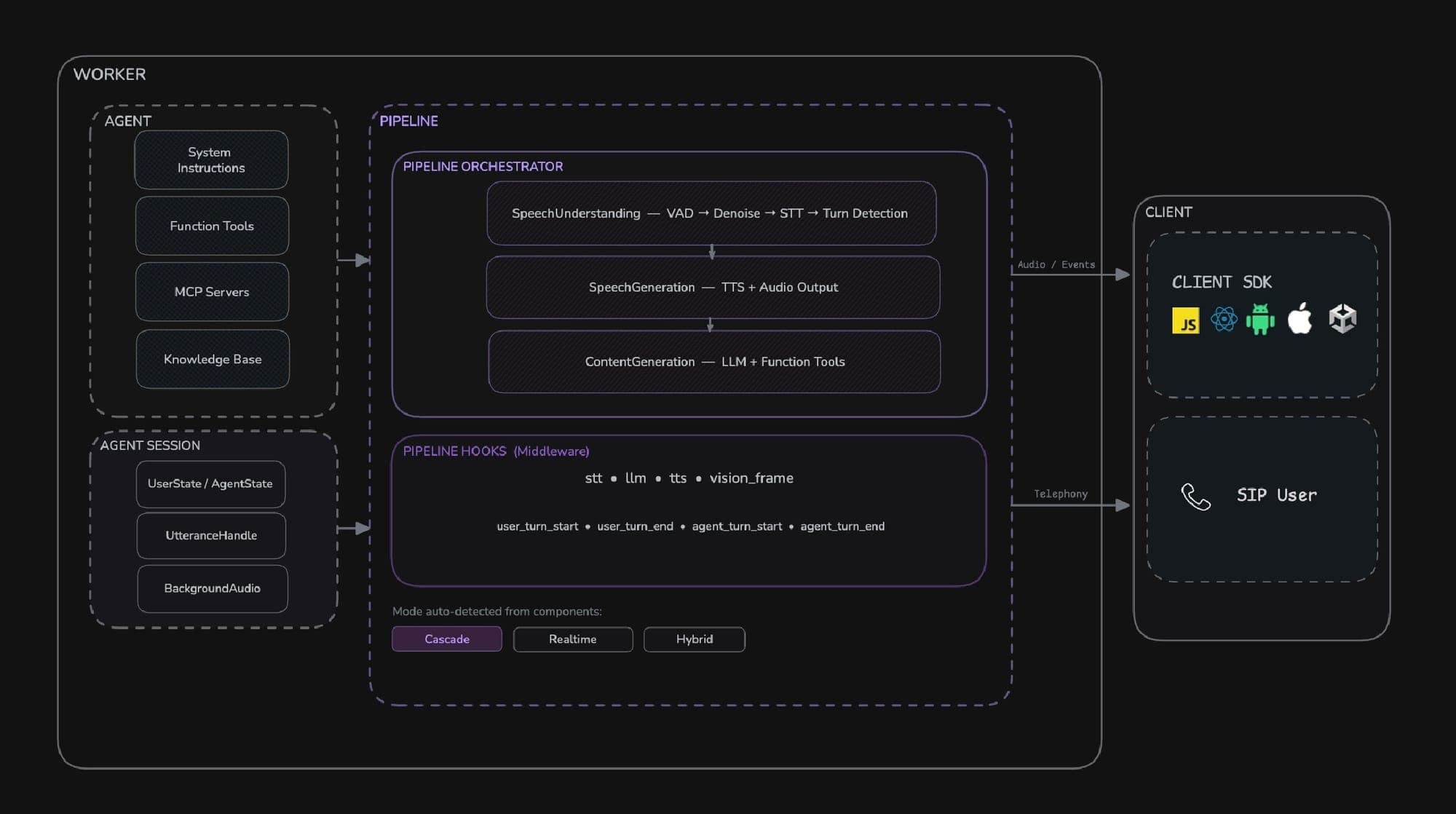
- Agent - This is the base class for defining your agent's identity and behavior. Here, you can configure custom instructions, manage its state, and register function tools.
- Pipeline - This unified component manages the real-time flow of audio and data between the user and the AI models. It auto-detects the optimal mode based on the components you provide:
- Cascade Mode - Provide STT, LLM, TTS, VAD, and Turn Detector for maximum flexibility and control over each processing stage.
- Realtime Mode - Provide a realtime model (e.g., OpenAI Realtime, Google Gemini Live, AWS Nova Sonic) for lowest-latency speech-to-speech processing.
- Hybrid Mode - Combine a realtime model with an external STT (for knowledge base support) or external TTS (for custom voice support).
- Agent Session - This component brings together the agent and pipeline to manage the agent's lifecycle within a VideoSDK meeting.
- Pipeline Hooks - A middleware system for intercepting and processing data at any stage of the pipeline. Use hooks for custom STT/TTS processing, observing or modifying LLM output, lifecycle events, and more.
One Pipeline Class
The core change in V1 is the replacement of CascadingPipeline and RealtimePipeline with a single Pipeline class.
#Before
from videosdk.agents import CascadingPipeline, RealtimePipeline

pipeline = CascadingPipeline(stt=..., llm=..., tts=..., vad=..., turn_detector=...)
pipeline = RealtimePipeline(llm=OpenAIRealtime(...))
#After
from videosdk.agents import Pipeline

pipeline = Pipeline(stt=..., llm=..., tts=..., vad=..., turn_detector=...)
pipeline = Pipeline(llm=OpenAIRealtime(...))
Pass any combination of components. The PipelineOrchestrator analyzes what you've given it and automatically selects the correct execution mode : cascade, realtime, or hybrid. You never configure it directly. You just pass components.
Three Modes, One Interface
Cascade Mode - full control over every stage.
pipeline = Pipeline(
    stt=DeepgramSTT(),
    llm=GoogleLLM(),
    tts=CartesiaTTS(),
    vad=SileroVAD(),
    turn_detector=TurnDetector(),
)
Realtime Mode - lowest latency, single model for the full voice pipeline.
pipeline = Pipeline(
    llm=GeminiRealtime(
        model="gemini-3.1-flash-live-preview",
        config=GeminiLiveConfig(voice="Leda", response_modalities=["AUDIO"]),
    )
)
Supported realtime models: OpenAIRealtime, GeminiRealtime, AWSNovaSonic, AzureVoiceLive
Hybrid : this is what was impossible before.
# Bring your own STT, use a realtime LLM
pipeline = Pipeline(stt=DeepgramSTT(), llm=OpenAIRealtime(...))

# Use a realtime LLM, bring your own voice
pipeline = Pipeline(llm=OpenAIRealtime(...), tts=ElevenLabsTTS(...))
You are no longer bounded by what the model provider gives you. Don't like the default voice? Swap it. Want your own transcription layer feeding a realtime model? Done.
Flexible Agent Composition
V1 also unlocks the ability to run partial pipelines for specific use cases.
Pipeline(stt=...)                     # Transcription agent
Pipeline(llm=...)                     # Text chatbot
Pipeline(stt=..., llm=..., tts=...)   # Voice + chat
Pipeline(stt=..., llm=..., tts=..., vad=..., turn_detector=...)      # Full voice agent
Pipeline(llm=OpenAIRealtime(...))     # Realtime voice agent
Same class, same structure, different capabilities depending on what you pass in.
Pipeline Hooks
ConversationalFlow is removed. In its place is @pipeline.on(...) : a decorator-based hooks system that lets you intercept and transform data at any stage, without subclassing anything.
@pipeline.on("stt")
async def on_transcript(text: str) -> str:
    return text.strip()                        # normalize before LLM

@pipeline.on("tts")
async def on_tts(text: str) -> str:
    return text.replace("SDK", "S D K")       # fix pronunciation

@pipeline.on("llm")
async def on_llm(messages):
    yield "Transferring you now."              # bypass LLM entirely
Hooks are available at every stage: stt, tts, llm, vision_frame, user_turn_start, user_turn_end, agent_turn_start, agent_turn_end. You can intercept raw audio streams at the stt and tts hooks — this is audio-level control, not just text.
Hooks walkthrough →
Observability, Built In
Every V1 pipeline ships with per-component metrics, structured logging, and OpenTelemetry tracing across cascade, realtime, and hybrid modes. No extra setup. Configure custom endpoints via RoomOptions.
This was the biggest missing piece in v0.x. When something breaks in production, you now have something to look at.
Docs MCP Server
Query VideoSDK documentation directly from your AI agent. The MCP server gives instant access to SDK references, implementation guides, and even source-level details inside your workflow. No manual searching, no context switching. Built for MCP-compatible agents like Claude, Cursor, or your own.
{
    "mcpServers": {
        "videosdkAgentDocs": {
            "serverUrl": "https://mcp.videosdk.live/mcp"
        }
    }
}
Explore the mcp-server docs ->
Agent Skills
Extend your agent with reusable capabilities. Define tools, actions, and behaviors once, and plug them into any pipeline. From API calls to complex workflows, Agent Skills let your agents do more than just respond - they can act, integrate, and automate.
Explore the agents-skills ->
Latency
The pipeline stages in V1 run concurrently. STT, LLM, and TTS never block each other. TTS audio streams to the room as soon as the first chunk is generated not after full synthesis. In realtime mode, raw audio is routed directly to the model with zero transcription overhead.
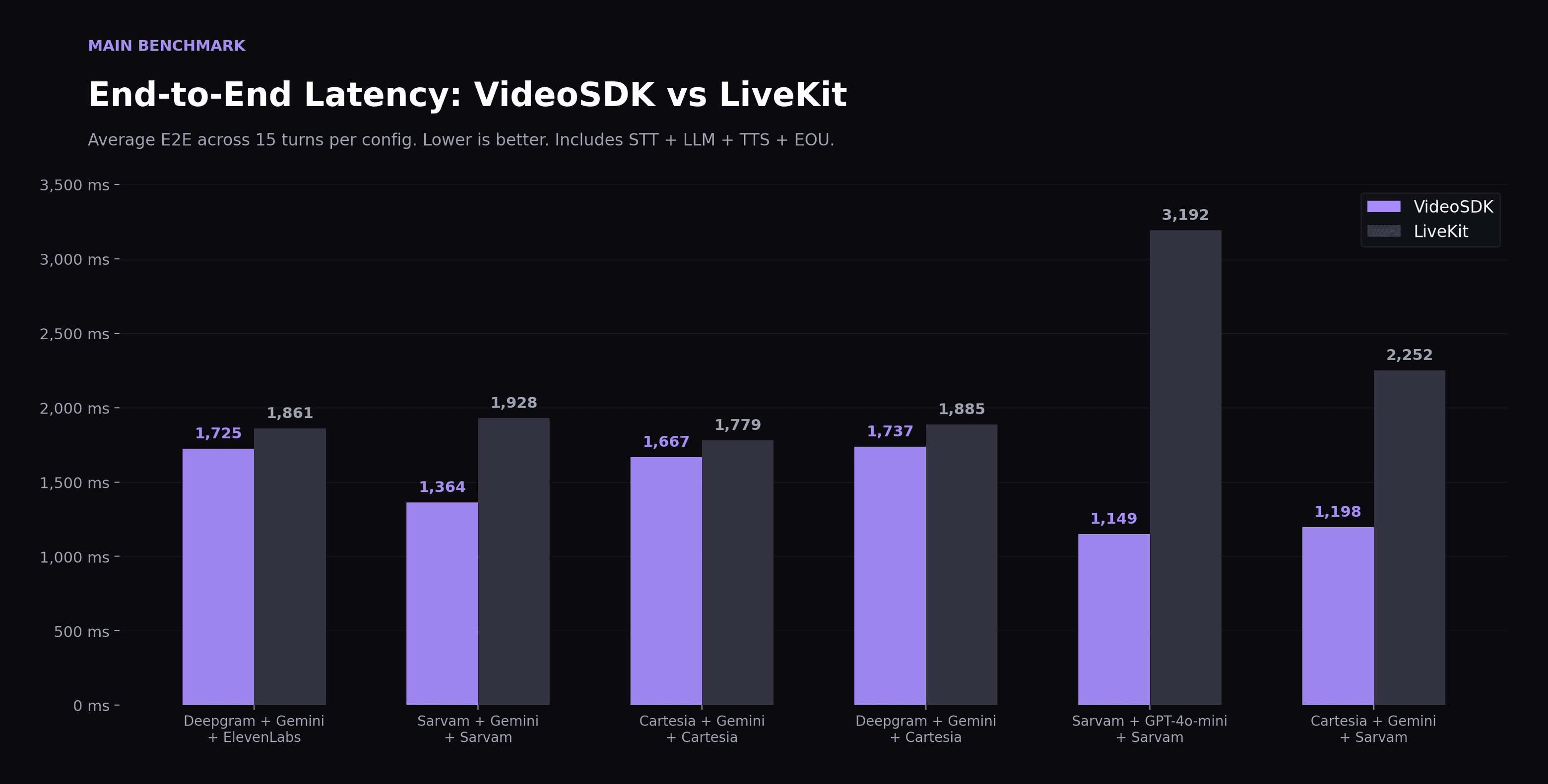
Interruptions are detected at the earliest possible point in the pipeline. In-flight LLM and TTS generation is cancelled immediately on user speech. Avatar audio flushes cleanly on interrupt with no residual artifacts.
We benchmarked V1 against the fastest pipelines in the industry. The numbers are in the release notes.
22 Production Ready Templates
We've shipped 22 production-ready agent templates covering the most common real-world use cases. Your logic. Your pipeline. These are the starting points.
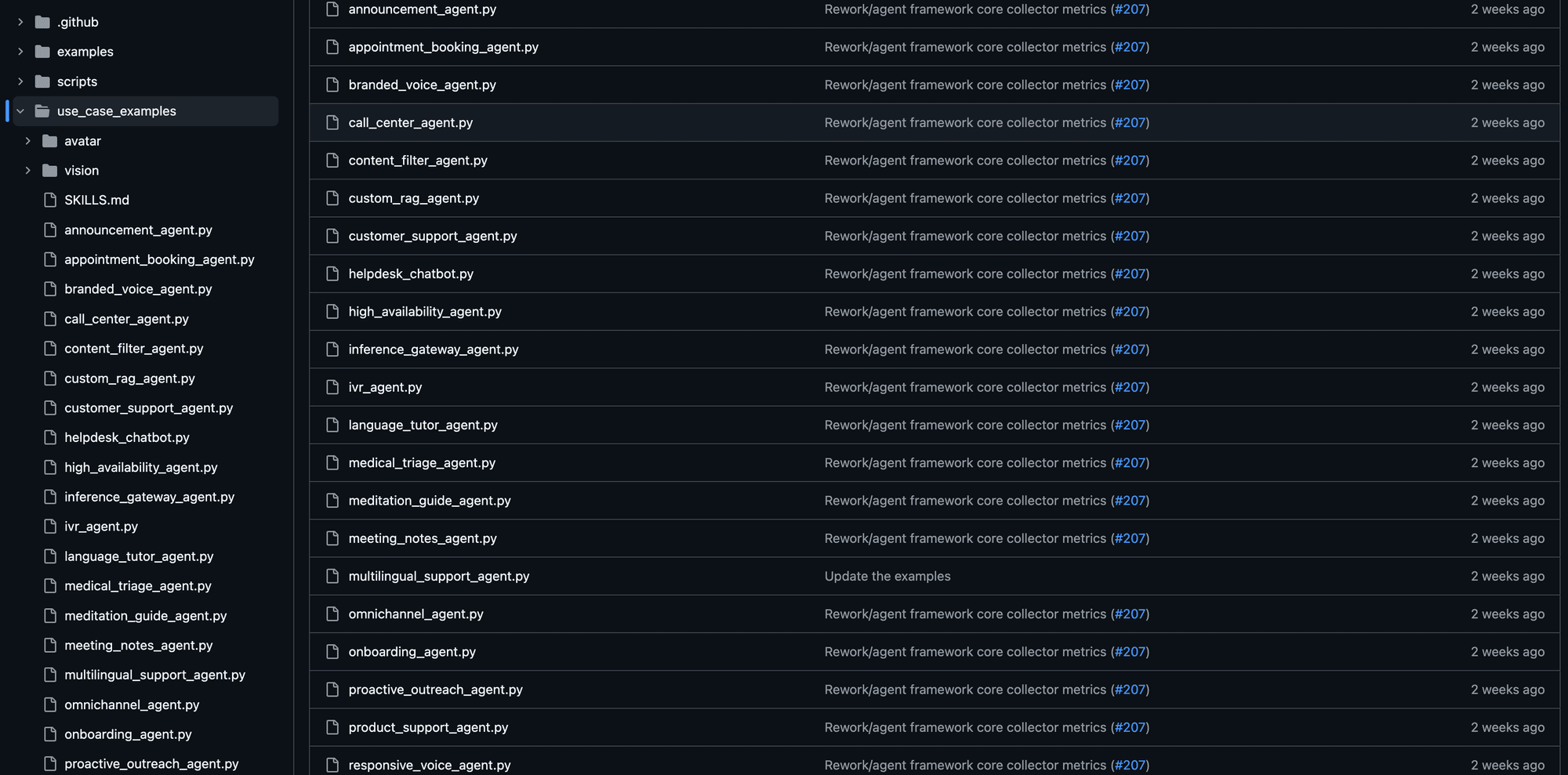
Browse all examples →
Breaking Changes
| v0.x | V1.0.0 |
|---|---|
CascadingPipeline | Pipeline |
RealtimePipeline | Pipeline |
ConversationalFlow | @pipeline.on(...) hooks |
Function tools, agent lifecycle, AgentSession, WorkerJob, fallback providers, MCP tools, knowledge base, VAD, and turn detection all continue to work as before.
Full migration guide →
Resources
- Learn how to deploy your agents.
- Follow the docs to start building your AI Voice Agents today
- Contact our sales team to explore solutions tailored to your needs.
- 👉 Share your thoughts, roadblocks, or success stories in the comments or join our Discord community ↗. We’re excited to learn from your journey and help you build even better AI-powered communication tools!