


Video encoding is defined as the process of compressing raw video frames into a smaller stream using a codec such as H.264, VP8, or AV1. Transcoding decodes an encoded stream and encodes it again in a different format or size.
One minute of raw 1080p video at 30 frames per second is about 5.6 GB. No phone connection carries that. Video encoding shrinks it, and the settings you give the encoder decide how sharp, smooth, and responsive the result looks.
This guide explains video encoding for developers who build apps with video. It separates encoding, transcoding, and codecs, compares the main video encoding formats, and weighs hardware against software encoders. It then shows what changes when video must be encoded in real time, using the presets in the VideoSDK JavaScript SDK.
What is video encoding?
Video encoding compresses raw frames into a stream a network can carry, mostly by storing what changes between frames instead of every pixel.
Video encoding is defined as converting uncompressed video frames into a compressed bitstream that follows a codec standard. It works by predicting each frame from frames already coded, then storing only the difference and discarding detail viewers are unlikely to notice. VideoSDK's video codecs guide describes a codec as storing "each frame largely as the changes from the one before."
The savings are large. Uncompressed 1080p at 30 fps with 8-bit 4:2:0 color is 1920 x 1080 pixels x 12 bits x 30 frames, or about 746 Mbps. VideoSDK's balanced 1080p preset sends the same resolution at 2,200 kbps, roughly 340 times less data.
Encoders mix three kinds of frames:
- I-frame (keyframe): coded on its own, so a decoder can start from it.
- P-frame: predicted from earlier frames.
- B-frame: predicted from earlier and later frames, which saves bits but forces the encoder to wait for a future frame.
That is the video encoding definition in practice: a trade between size, picture quality, delay, and the computing power spent describing each frame.
Encoding vs Transcoding vs Codec
Encoding creates a compressed stream, transcoding converts one compressed stream into another, and a codec is the standard both follow.
| Term | Input | Output | Where it happens | Example |
|---|---|---|---|---|
| Encoding | Raw frames from a camera or screen | A compressed stream in one codec | On the sending device, or in a live encoder | A laptop browser encodes its webcam as VP8 for a video call |
| Transcoding | An already encoded stream or file | The same content in another codec, resolution, or bitrate | On a server or in a media pipeline | A 1080p H.264 upload becomes 720p and 360p versions for streaming |
| Codec | Not a process: a specification, plus the software or hardware that implements it | Rules for how to encode and decode | Inside every encoder and player | H.264, H.265, VP9, AV1 |
Encoding vs transcoding comes down to the input. An encoder starts from raw pictures, while a transcoder must decode first, so every transcode costs compute and loses a little quality. AWS describes video transcoding as converting video from one format to another by adjusting resolution, encoding, and bitrate.
A codec is also not a container. A container such as MP4 or WebM is the wrapper that holds encoded video, audio, and timing data, while the codec decides how pictures are compressed. For workflows and pipeline examples, see VideoSDK's transcoding vs encoding guide.
Where encoding and transcoding happen in a VideoSDK app
In a VideoSDK video call, encoding happens on each participant's device, and server-side processing enters only when you broadcast or export.
- HLS: the Server SDK HLS reference renders the room into a grid, spotlight, or sidebar layout for a large audience. You choose a quality of low, med, high, or ultra, and the docs state there is no separate resolution option.
- RTMP: the RTMP reference pushes the composed room to destinations such as YouTube or Twitch.
- Finished files: the Transcodings reference turns completed recordings and HLS streams into downloadable MP4 files.
The docs do not describe a configurable rendition ladder or per-rendition bitrates for HLS output, so plan around the quality presets rather than custom encoder settings.
Video encoding formats: Codecs and Containers
A video encoding format pairs a codec, which compresses the pictures, with a container, which packages them for storage or delivery.
| Codec | First published | Common containers | Where you meet it |
|---|---|---|---|
| H.264 / AVC | ITU-T, May 2003 | MP4, MPEG-TS | The broad-compatibility default, and mandatory in WebRTC browsers |
| H.265 / HEVC | ITU-T, April 2013 | MP4 | Streaming where bandwidth matters, since ITU said it needs about half the bitrate of H.264 |
| VP9 | Google, June 2013 | WebM | Web browsers and WebRTC |
| AV1 | AOMedia, June 2018 | MP4 | Browsers and streaming apps, and allowed in Apple's HLS authoring spec |
Container rules are stricter than people assume. The WebM container guidelines say WebM video should be VP8 or VP9 and audio should be Vorbis or Opus. For streaming, RFC 8216 lets HLS carry segments as MPEG-2 transport streams or fragmented MP4.
The HEVC figure comes from ITU's January 2013 announcement, which said HEVC needs only half the bit rate of H.264. Real savings depend on content and encoder. The trade-offs between the two are covered in H.264 vs H.265, and containers get more space in video quality, bandwidth, codecs and containers.
Hardware vs software video encoders
A hardware video encoder is a dedicated block on a chip that compresses video without loading the CPU, while a software encoder runs on the CPU.
The common hardware encoders are NVIDIA NVENC on GPUs, Apple VideoToolbox on Apple devices, and Android MediaCodec, which gives apps access to the phone's codec components. The best-known software video encoder is x264 for H.264. Its presets run from ultrafast to placebo, with medium as the default, and slower presets spend more CPU time to find smaller encodings.
Hardware encoders have the same dial. NVIDIA's NVENC application note for Video Codec SDK 13.0 gives H.264 speeds on Ada GPUs in constant-bitrate mode. One NVENC engine reaches 910 fps with the fastest P1 preset and 247 fps with the highest-quality P7 preset. The same note says offloading encoding leaves CPU cores free for other work.
Quality is harder to generalize. A March 2022 test by Chips and Cheese scored encoders with Netflix's VMAF metric at 1080p and 4 to 10 Mbps. On a game clip, NVIDIA's Turing NVENC matched or beat x264's faster preset. AMD's encoder scored significantly worse. That is one test on one content type with 2022 hardware, so measure your own content.
In a video call app, you do not call NVENC or x264 directly. The browser or mobile OS supplies the encoder, and you control codec, resolution, and bitrate through the SDK. If you were looking for a video encoder to buy, such as a box that takes HDMI and streams to YouTube, that is a separate product category for broadcasters.
How real-time encoding differs from file encoding
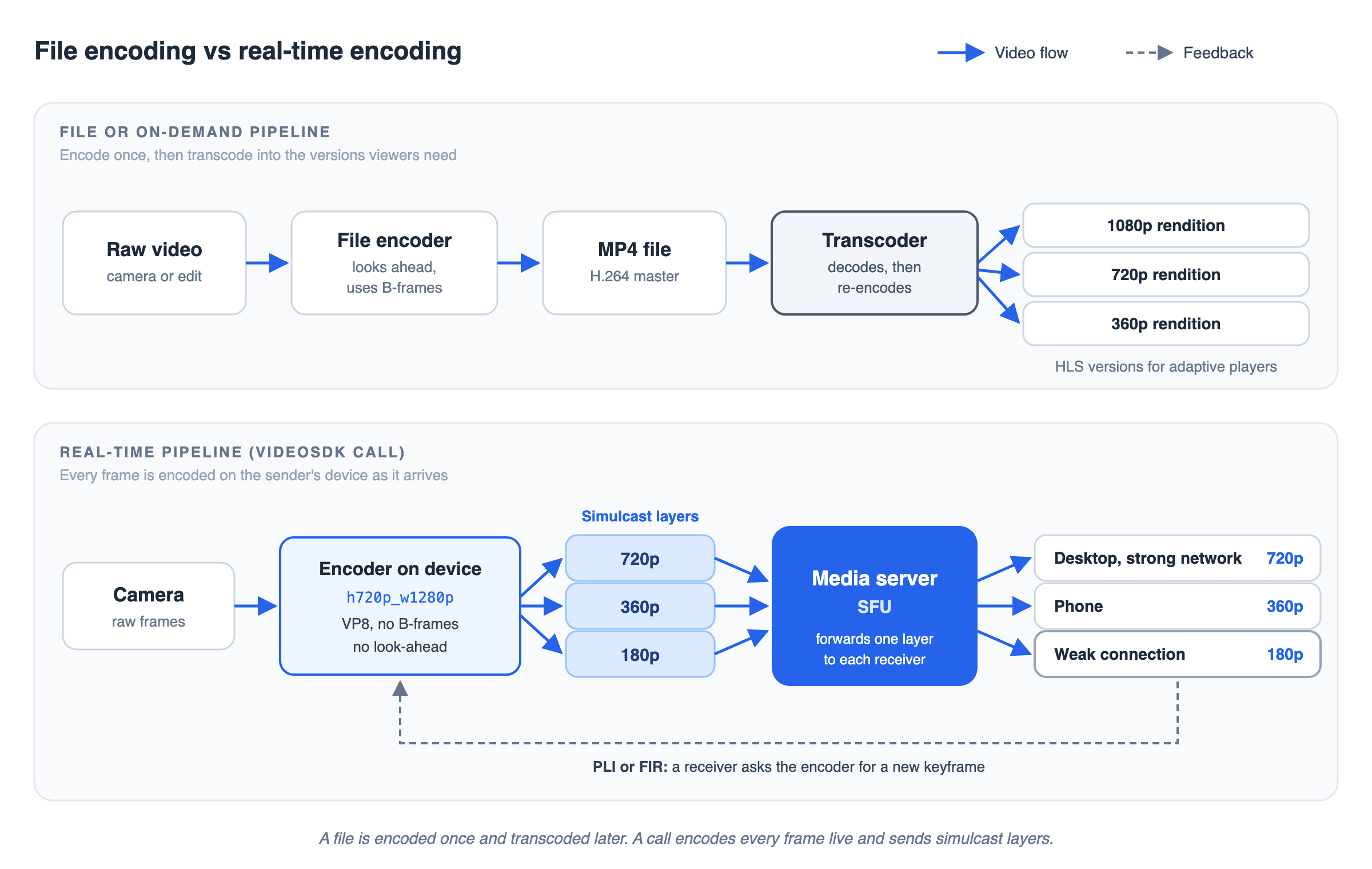
Real-time video encoding must finish every frame before the next one is due, so it gives up the look-ahead that file encoders use to save bits.
The diagram below puts the two pipelines side by side. In the top lane, a file is encoded once and a transcoder later turns it into HLS versions. In the bottom lane, a VideoSDK call encodes each frame on the device and sends three simulcast layers. The media server forwards one layer to each receiver, and a receiver can ask for a new keyframe.
| File or on-demand encoding | Real-time encoding | |
|---|---|---|
| Time per frame | Can run slower than real time for better results | Must keep pace with the camera |
| B-frames | Common, because waiting for future frames costs nothing | Avoided, because waiting adds delay |
| Keyframes | Placed on a fixed schedule | Also sent when a receiver asks for one |
| Versions | Made later by transcoding | Often encoded at the same time (simulcast) |
| Bitrate | Planned for the whole file | Adjusted continuously to the network |
No waiting for future frames
RFC 7742 requires WebRTC browsers to implement VP8 and H.264 Constrained Baseline. Constrained Baseline is built on the H.264 Baseline profile, which allows only I and P slices, so the mandatory H.264 profile has no B-frames. Apple's VideoToolbox documentation explains the cost: to encode B-frames, an encoder must reorder frames, which means holding them back.
The same documentation notes that an offline encoder may work slower than real time to produce a better result. A live encoder has no such option, so it searches less and accepts slightly larger frames.
Keyframes on request, and several versions at once
A file encoder places keyframes on a schedule. In a call, receivers also ask for them. A Picture Loss Indication, defined in RFC 4585, reports lost pictures, and the sender may respond with an intra picture. A Full Intra Request in RFC 5104 asks for a decoder refresh point at the earliest opportunity, such as when a new participant needs a starting frame.
Real-time senders also encode more than one version. RFC 8853 calls sending several differently encoded versions of the same source simulcast. The media server forwards whichever version each receiver can handle, as explained in what is simulcast.
How VideoSDK configures the video encoder
In the VideoSDK JavaScript SDK, you choose encoder settings when you create a camera track, by passing a named preset as encoderConfig. The optimize video track guide lists 18 presets. The common 16:9 ones are below.
| Preset | Resolution | Frame rate | Bitrate: bandwidth optimized / balanced / high quality |
|---|---|---|---|
| h180p_w320p | 320 x 180 | 15 fps | 100 / 150 / 250 kbps |
| h360p_w640p | 640 x 360 | 20 fps | 200 / 400 / 600 kbps |
| h540p_w960p | 960 x 540 | 25 fps | 350 / 550 / 800 kbps |
| h720p_w1280p (default) | 1280 x 720 | 30 fps | 1,000 / 1,500 / 2,000 kbps |
| h1080p_w1920p | 1920 x 1080 | 30 fps | 1,600 / 2,200 / 2,700 kbps |
Four more options decide how the encoder behaves when the network gets worse:
- bitrateMode picks the bitrate column: bandwidth_optimized, balanced (the default), or high_quality.
- optimizationMode decides what to give up first. The default, motion, lowers resolution to protect frame rate. The text and detail modes lower frame rate to keep resolution sharp, which suits slides and code.
- multiStream turns simulcast on, and it is on by default for camera tracks. A 720p camera sends 720p, 360p, and 180p layers, and maxLayer set to 2 keeps only the highest and lowest.
- codec selects VP8 (the default), H.264, VP9, or AV1. VideoSDK does not support multiStream with VP9 or AV1, so those codecs send one layer.
The SDK reference also notes that for calls of four people or fewer, turning multiStream off is regarded as best practice. If a receiver cannot decode the chosen codec, the video codecs guide says VideoSDK switches the stream to VP8.
Encoding settings that affect quality
Six settings decide most of the quality any video encoder produces: bitrate, resolution, frame rate, GOP length, profile, and rate control.
- Bitrate. The number of bits per second the encoder may spend. More bits keep more detail, with diminishing returns. See what is bitrate.
- Resolution. At a fixed bitrate, more pixels means fewer bits per pixel, so a lower resolution can look cleaner on a weak connection.
- Frame rate. Higher frame rates look smoother but need more bits. VideoSDK's presets use 15 fps at the smallest sizes and 30 fps from 720p up.
- GOP length (keyframe interval). The distance between keyframes. Apple's HLS authoring specification says keyframes should appear every two seconds. Longer gaps save bits but slow recovery after loss.
- Profile. A profile limits which coding tools an encoder may use. H.264 Baseline allows only I and P slices, while Main adds B slices, which improve compression but add delay.
- Rate control. Constant bitrate (CBR) holds a steady rate, which suits live links. Variable bitrate (VBR) spends more on complex scenes. The x264 help text describes CRF as quality-based VBR, which targets a quality level instead of a size.
For viewers on mixed networks, you encode several versions and let the player switch between them, which is adaptive bitrate streaming.
Definitions glossary
Codec: The standard for compressing and decompressing video, such as H.264, VP8, VP9 or AV1, plus the encoders that implement it. VideoSDK's JavaScript SDK uses VP8 by default.
Container: The format that wraps encoded video, audio and timing data, such as MP4 or WebM. It compresses nothing, so it cannot change picture quality.
Transcoding: Decoding an encoded stream and encoding it again in another codec, resolution or bitrate. VideoSDK's Server SDK Transcodings API turns finished recordings and HLS streams into MP4 files.
Keyframe (I-frame): A frame coded without reference to other frames, so a decoder can start from it. In a video call, a receiver can prompt one with a PLI or FIR message.
Simulcast: Sending several differently encoded versions of one video at once, as RFC 8853 describes. VideoSDK's multiStream option sends 720p, 360p and 180p layers from a 720p camera.
Key takeaways
- Video encoding turns raw frames into a compressed stream, and transcoding decodes and re-encodes an existing stream into another format or size.
- A codec such as H.264, VP9, or AV1 compresses the pictures, while a container such as MP4 or WebM packages them.
- Hardware encoders save CPU and software encoders offer finer control, but quality depends on the encoder, the preset, and the content.
- Real-time encoding avoids B-frames, sends keyframes on request, and often encodes simulcast layers, which VideoSDK's JavaScript SDK controls through encoderConfig, bitrateMode, and multiStream.
Conclusion
Video encoding is a set of trade-offs between size, quality, delay, and compute, and the right trade depends on whether video is a file or a live conversation. File pipelines can look ahead and transcode later. Real-time apps must encode every frame as it arrives.
To try real-time encoding yourself, start with the JavaScript quickstart and sign up at VideoSDK with a $20 free credit.
Frequently asked questions
What is the difference between encoding and transcoding?
The difference is the input. Encoding compresses raw frames from a camera or screen into a codec such as H.264. Transcoding takes a stream that is already encoded, decodes it, and encodes it again in another codec, resolution, or bitrate.
Is MP4 a codec or a container?
MP4 is a container, not a codec. It wraps encoded video, audio, and timing data, and the video inside is usually H.264, H.265, or AV1. WebM is also a container, typically holding VP8 or VP9 video.
What is the difference between H.264 and H.265?
H.265, also called HEVC, is the successor to H.264. ITU said at its 2013 launch that it needs about half the bitrate of H.264, though real savings depend on the content and the encoder. WebRTC browsers are only required to support H.264 and VP8.
Why don't video calls use B-frames?
Video calls avoid B-frames because a B-frame depends on a later frame, so the encoder must wait before sending it. WebRTC's mandatory H.264 profile, Constrained Baseline, allows only I and P slices, which keeps delay down.
Does video encoding reduce quality?
Yes, the lossy video encoding used for streaming and calls discards detail to save bits. At a sensible bitrate most viewers do not notice. Each transcode removes a little more, which is why pipelines try to encode as few times as possible.
Which video codec does VideoSDK use?
VideoSDK's JavaScript SDK uses VP8 by default and also supports H.264, VP9, and AV1 through the codec option. Simulcast works with VP8 and H.264. If a receiver cannot decode the chosen codec, VideoSDK switches the stream to VP8.