


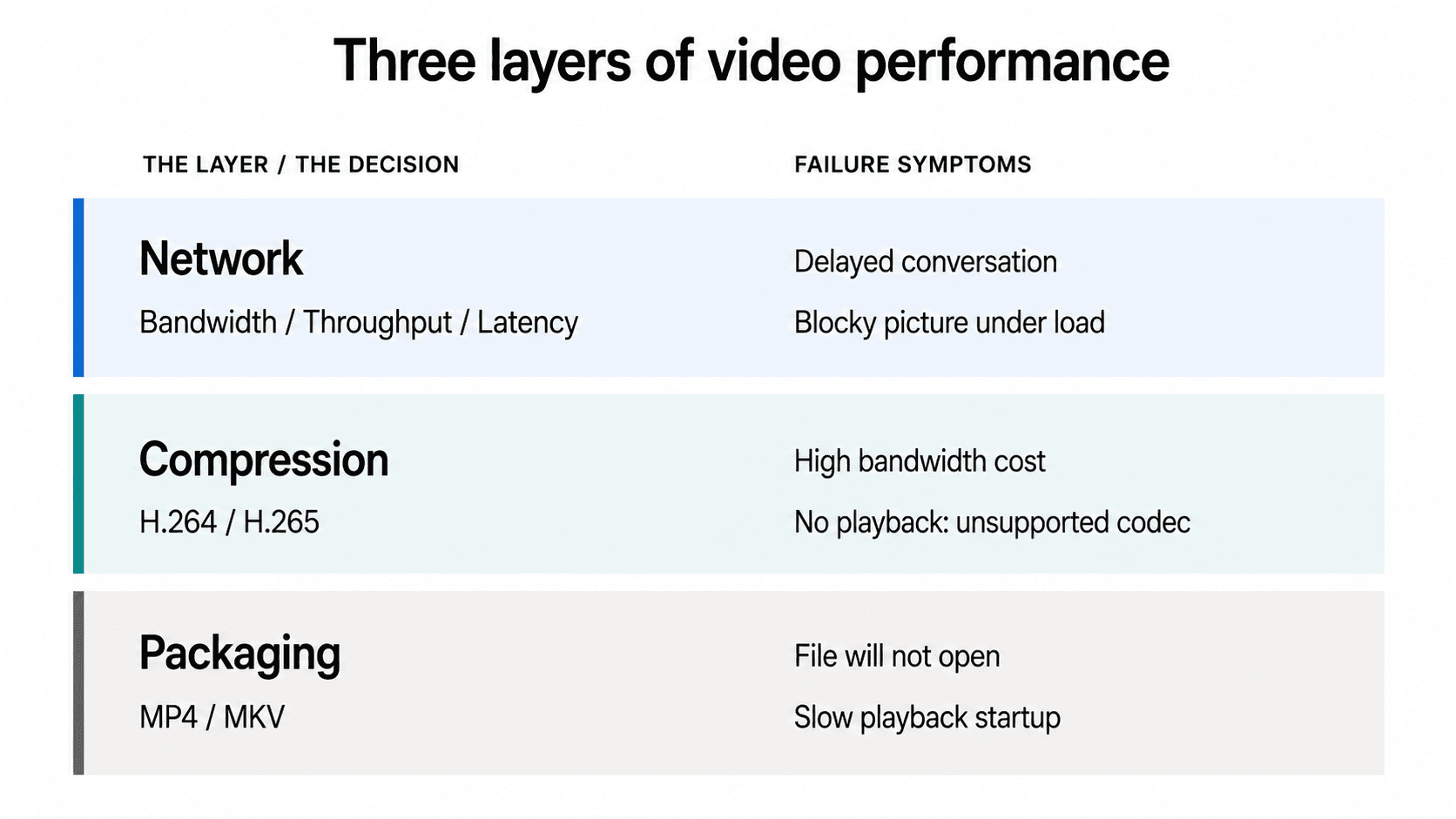
Fix the network layer when the call is delayed or the picture is blocky under load. Fix the codec layer when quality is fine but bitrate is too expensive to sustain. Fix the container layer only when a file will not play or will not start fast enough. VideoSDK exposes all three, throughgetStats()for the network,createCameraVideoTrack()for the codec, and MP4 recording output for the container.
A user on a 500 Mbps connection reports a laggy video call. Support tells them to upgrade their internet. It does not help, because bandwidth was never the problem.
That failure repeats across every layer of a video stack, and it happens because three separate technical decisions get discussed with the same vague word: quality. Bandwidth, throughput, and latency describe the network. H.264 and H.265 describe compression. MKV and MP4 describe packaging. They fail differently, and they respond to different fixes.
This guide separates the three layers, gives the numbers that matter at each one, and ends with a table that maps a symptom to the layer that actually causes it.
The three layers that decide video quality
Video performance is defined as the combined result of three independent decisions: how much data the network can move and how fast, how efficiently the picture is compressed, and how the compressed result is packaged for delivery.
Those decisions are not substitutes for one another. Doubling your bandwidth cannot compensate for a codec your receiver cannot decode, and no container choice will recover detail that the encoder already discarded.
| Layer | The decision | Measured in | Controls | Fails as |
|---|---|---|---|---|
| Network | bandwidth, throughput, latency | Mbps, ms | Delay, sustainable bitrate | Talking over each other, blocky picture |
| Compression | H.264, H.265, VP9, AV1 | bits per pixel | Picture at a given bitrate | Excess bandwidth cost, or no playback at all |
| Packaging | MP4, MKV, WebM, fMP4 | none | Compatibility, startup, seeking | File will not open or will not start |
VideoSDK exposes a control point at each layer: round-trip time, jitter, and per-stream bitrate through the WebRTC getStats() API for the network layer; a codec parameter on createCameraVideoTrack() accepting VP8, H264, VP9, or AV1 for the compression layer; and MP4 output from the recording Composer for the packaging layer.
Layer 1: bandwidth vs latency (and throughput)
Bandwidth, throughput, and latency are three different properties of the same connection, and only one of them is capacity. For the full treatment of this layer, see Bandwidth vs Latency.
What each one actually measures
Bandwidth is defined as the maximum data rate a link is rated to carry, measured in bits per second. It is a ceiling, not an observation. Bandwidth works by setting the physical or provisioned limit on how fast bits can be pushed onto the medium.
Throughput is defined as the data rate actually achieved over a link during a measurement window, also in bits per second. Throughput works by dividing bytes successfully delivered by elapsed time, so it is always at or below bandwidth.
Latency is defined as the time between sending data and its arrival, measured in milliseconds. Latency works by accumulating four delays along the path: propagation (distance), transmission (pushing bits onto the wire), processing (per-hop handling), and queuing (waiting behind other traffic).
A fourth term is worth knowing because it is what your encoder actually competes for. Goodput is throughput minus protocol overhead and retransmissions, which is the payload that was genuinely useful.
| Factor | Bandwidth | Throughput | Latency |
|---|---|---|---|
| Measures | Rated capacity | Delivered rate | Delay |
| Unit | bps, Mbps | bps, Mbps | ms |
| Observed or rated | Rated | Observed | Observed |
| Main limiter | Link and plan | Congestion, loss | Distance, queuing |
| More capacity helps? | n/a | Yes | Barely |
| Closer server helps? | No | Slightly | Substantially |
| In video, controls | The ceiling | Resolution and frame rate | Conversational feel |
| Symptom when bad | Hard cap on quality | Blurry, blocky, frozen | People interrupting each other |
Why more bandwidth does not fix a laggy call
Because latency is dominated by distance and queuing, and neither responds to capacity.
Light in fibre travels at roughly 200,000 km per second, so a 5,000 km path costs about 25 ms one way regardless of what you pay your provider. A 1 Gbps link and a 100 Mbps link over the same route have nearly identical round-trip time.
There is exactly one place where capacity touches delay: transmission delay, which is packet size divided by link rate. On a 100 Mbps link a 1,500-byte packet takes 0.12 ms to serialise. Going to 1 Gbps saves you 0.108 ms. Against 25 ms of propagation, that is noise.
The number users actually experience is glass-to-glass latency, the delay from light hitting the sender's camera to that image appearing on the receiver's screen:
glass-to-glass = capture + encode + packetize + network transit
               + jitter buffer + decode + render
Network transit is frequently the smaller half. A jitter buffer alone can add 30 to 200 ms. This is why a 20 ms ping result does not mean a 20 ms video call.
How the three connect: the bandwidth-delay product
The bandwidth-delay product (BDP) is the amount of data in flight on a link at any instant, and it is the mechanism behind "high bandwidth, low throughput" on long routes:
BDP (bits) = bandwidth (bits/sec) x RTT (seconds)
A 100 Mbps link at 80 ms RTT holds 8,000,000 bits, about 1 MB, in flight. For a windowed protocol like TCP that sets a hard ceiling:
max throughput = window size / RTT
With a 64 KB window at 80 ms RTT, maximum throughput is about 6.5 Mbps no matter how fast the link is rated. Window scaling exists precisely to lift that ceiling.
The consequence for video delivery is direct. On high-latency paths, TCP-based protocols like HLS and DASH lose throughput to the round-trip ceiling, while UDP-based WebRTC does not, because it never waits for an acknowledgment. Protocol choice is a throughput decision as much as a latency one.
Latency budgets by use case
| Use case | Target glass-to-glass | Typical transport |
|---|---|---|
| Video conferencing, interactive calls | Under 300 ms | WebRTC |
| Live auctions, telehealth, betting | Under 500 ms | WebRTC |
| Interactive live streaming with audience | Under 1 s | WebRTC |
| One-way broadcast, live sports | 2 to 6 s | HLS, DASH |
| VOD playback | Not applicable | HLS, DASH |
The 300 ms threshold is not arbitrary. Above roughly 300 ms round-trip, speakers begin colliding, because each waits for a response that has not arrived. Below about 150 ms, most people cannot detect the delay at all.
VideoSDK's HLS output runs at standard 5 to 6 second latency, which is the right tool for the bottom two rows and the wrong one for the top three.
Throughput requirements by resolution
Approximate H.264 encoder bitrates at 30 fps, with practical provisioning targets:
| Resolution | Video bitrate | Provision at least |
|---|---|---|
| 360p | 0.6 to 1.0 Mbps | 1.5 Mbps |
| 720p | 1.5 to 2.5 Mbps | 3 Mbps |
| 1080p | 3.0 to 4.5 Mbps | 6 Mbps |
| 4K | 15 to 25 Mbps | 30 Mbps |
Provision above the encoder bitrate, never at it. The headroom absorbs audio, retransmissions, protocol overhead, and burst variance. Provisioning exactly at the encoder target guarantees degradation the first time the network hiccups.
Multi-party calls multiply this on the receive side. An SFU forwards one stream per other participant, so an eight-person 720p call needs roughly 7 x 1.5 Mbps, about 10.5 Mbps downstream. Simulcast exists to keep that within reach, and it becomes important again in the codec section below.
Layer 2: H.264 vs H.265, the compression decision
The codec decides how many bits it takes to represent a given picture, which makes it the only layer that changes what a fixed amount of bandwidth can buy you. For the full treatment, see H.264 vs H.265.
What each codec is
H.264 is defined as a block-oriented video compression standard published in 2003 as ITU-T H.264 and ISO/IEC 14496-10, also called AVC. H.264 works by dividing frames into 16x16 macroblocks, predicting each from neighbouring blocks or from a previous frame, and coding only the prediction error.
H.265 is defined as its 2013 successor, published as ITU-T H.265 and ISO/IEC 23008-2, known as HEVC. H.265 works by replacing fixed macroblocks with a quadtree of Coding Tree Units spanning 64x64 down to 8x8, so flat regions cost far fewer blocks while detailed regions keep fine granularity.
| Factor | H.264 | H.265 | Better choice depends on |
|---|---|---|---|
| Bitrate at equal quality | Baseline | Roughly half (design target) | Resolution and content |
| Encode cost | Lower | Substantially higher | Whether encoding is live or offline |
| Hardware decode reach | Effectively universal | Newer devices only | Which devices you must serve |
| Browser playback | All major browsers | Safari 13+, Chrome 107+, Firefox 137+ | Whether the target is the open web |
| WebRTC | Mandatory to implement (RFC 7742) | Optional, Chrome and Safari | Whether the path is real-time |
| Licensing | One main pool | Multiple pools | Distribution scale |
| Best for | Real-time, reach, live encode | 4K VOD, storage, known endpoints |
Why the 50% figure is a target, not a measurement
HEVC's stated design goal was roughly 50% bitrate reduction at equivalent subjective quality against H.264. That is the standard's objective, published by the standards bodies. It is not a number you should plan capacity against without testing.
What you measure depends on four things:
- Resolution. Gains are largest at 4K and above, where large uniform regions suit big CTUs.
- Content. High-motion footage compresses worse in both codecs, narrowing the gap.
- Preset. The tools that create HEVC's advantage are the expensive ones. Real-time presets skip them, so a live HEVC encode saves far less than an offline one.
- Profile. H.264 Constrained Baseline and H.264 High Profile are not the same baseline. Any comparison that does not name the profile is under-specified.
This is also why H.265 is not automatically the right answer for live video. Encoder time lands directly in the glass-to-glass budget, so a codec that costs 40 ms more to encode has spent a meaningful fraction of a 300 ms conversational budget before a packet leaves the machine.
Codec support is negotiated, not assumed
For anything real-time, do not branch on a user-agent string. Ask the browser:
const caps = RTCRtpSender.getCapabilities("video");
const mimeTypes = caps.codecs.map((c) => c.mimeType);

console.log(mimeTypes);
// e.g. ["video/VP8", "video/H264", "video/VP9", "video/AV1"]
H.265 availability in WebRTC depends on OS version, GPU, and SoC, so it varies between two machines running the same browser build.
Layer 3: MKV vs MP4, the packaging decision
A container never touches the picture, which is why the single most common statement about this comparison is also the wrong one. For the full treatment, see MKV vs MP4.
What a container does and does not do
A container is defined as a file format that packages already-compressed audio, video, subtitle, and metadata streams into one file with an index describing their timing. A container works by storing each stream as timestamped chunks plus a table telling the player where each chunk begins.
It does not compress. It does not decide quality. It decides what can travel together, what can read the result, and how quickly playback can start.
| Factor | MKV | MP4 | Recommended for |
|---|---|---|---|
| Determines quality | No | No | Neither. The codec does. |
| Codec flexibility | Effectively any | H.264, H.265, AV1, VP9 | MKV for unusual combinations |
| Subtitle formats | SRT, ASS/SSA, PGS, VobSub | Limited (TTML, tx3g) | MKV for styled subtitles |
| Browser playback | None native | Universal | MP4 for anything on the web |
| HLS and DASH | Not used | fMP4 / CMAF standard | MP4 for adaptive streaming |
| Truncation recovery | Good (EBML clusters) | Poor unless fragmented | MKV for long recordings |
| Best for | Recording, archiving | Delivery, streaming, editing |
Why "MKV is higher quality than MP4" is wrong
Because containers do not compress, so a container cannot have a quality. When someone observes that an MKV looked better, one of three things is true:
- The files hold different encodes. The MKV was made at a higher bitrate or from a better source. That is the encoder's work, not Matroska's.
- The audio differed. The MKV carried FLAC or PCM, the MP4 carried lossy AAC. That is an audio codec difference, and MP4 is not actually limited here: it carries ALAC, and FLAC-in-MP4 is a specified encapsulation shipped in Firefox 51+ and Chrome 62+.
- The conversion re-encoded. Transcoding loses quality. Remuxing with
ffmpeg -c copychanges the wrapper and leaves the video bit-identical.
The same reasoning kills the file-size claim. MKV files are usually larger because of what gets put in them (lossless audio, several languages, subtitle tracks), not because of the format.
The container detail that does affect performance
Containers cannot change the picture, but one container decision changes startup time.
In a progressive MP4, the moov index is written after the media data, because its size is not known until encoding ends. A player streaming that file over HTTP cannot begin until it has fetched the end of the file. Moving the index to the front fixes it:
ffmpeg -i input.mkv -c copy -movflags +faststart output.mp4
-c copy stream-copies video and audio, so this is a repackage rather than a re-encode.
Adaptive streaming goes further and uses fragmented MP4, where media is split into self-contained fragments each carrying its own index. HLS and DASH converged on fMP4 through CMAF, which is why the same segments can serve both protocols.
How the three layers interact
Each layer constrains the others without being able to substitute for them.
Codec choice is a throughput lever, never a latency lever
Switching from H.264 to H.265 lowers the bitrate needed for a given picture, which relaxes your throughput requirement. It does nothing to propagation delay, queuing delay, or jitter, and in a live encode it actively increases glass-to-glass latency by spending more time in the encoder.
So a more efficient codec helps the blocky-picture failure and hurts the delayed-conversation failure. Choosing one because you read that it is "better" without knowing which failure you have is how teams make a call worse while believing they upgraded it.
The tradeoff no competing page mentions: codec choice can cost you simulcast
Here is where the layers collide in a way that shows up in production.
Multi-party calls rely on simulcast, where the sender publishes several resolution layers at once and the SFU forwards whichever layer each receiver can afford. It is the main defence against one participant on a weak connection dragging quality down for everyone.
In the VideoSDK JavaScript SDK, createCameraVideoTrack() accepts a codec parameter with VP8 (default), H264, VP9, and AV1, and a multiStream parameter that controls simulcast. VP9 and AV1 do not support multiStream. Pass one of them with simulcast enabled and the SDK falls back to VP8 and emits an error event.
That turns an apparently simple codec upgrade into a real tradeoff. Choosing the more efficient codec lowers the bitrate of a single stream and simultaneously removes per-receiver adaptability, which is a throughput regression at the SFU for every participant who needed a lower layer.
The decision rule that falls out of it:
- Group calls with mixed network conditions: keep VP8 with
multiStream: true. Adaptivity beats per-stream efficiency once receivers differ. - One-to-one calls on known-good hardware: VP9 or H264 without simulcast is reasonable, because there is no fan-out to adapt for.
- Recording and VOD output: efficiency wins outright, because nothing is adapting in real time.
Container choice never changes the picture, but it does gate delivery
The container cannot improve quality and cannot reduce latency across the network. It can prevent playback entirely (MKV in a browser), and it can delay the first frame (a progressive MP4 with a trailing index). Treat it as a compatibility and startup decision, never a quality one.
What matters most for real-time video quality?
For real-time video, latency matters most, then packet loss and jitter, then throughput, then codec efficiency, and the container barely matters at all.
That ordering comes from how users perceive failure. People tolerate a surprising amount of visual degradation and almost no conversational delay, which is why real-time systems sacrifice resolution to protect timing rather than the reverse.
Use this to map a symptom to the layer that causes it:
| Symptom | Layer | Likely cause | What actually fixes it |
|---|---|---|---|
| Speakers talking over each other | Network | Distance, queuing, oversized jitter buffer | Closer media server, adaptive jitter buffer |
| Picture soft or blocky under load | Network | Throughput below encoder target | Lower bitrate, drop a simulcast layer |
| Audio choppy, video fine | Network | Jitter and packet loss | Reduce loss, tune buffer, check Wi-Fi |
| Quality fine but bandwidth cost too high | Compression | Codec inefficiency | More efficient codec, check simulcast impact |
| Some participants see nothing | Compression | Receiver cannot decode the negotiated codec | Fall back to H.264 or VP8 |
| Fast connection, still laggy | Network | Distance or bufferbloat, not capacity | Move the server, not the plan |
| Recording will not open | Packaging | Container or codec not supported by the player | Remux with -c copy |
| Playback slow to start | Packaging | moov index at end of file | Remux with +faststart |
Definitions glossary
Bandwidth: The maximum data rate a link is rated to carry, in bits per second. A ceiling, not a measurement.
Throughput: The data rate actually delivered over a window, in bits per second. Always at or below bandwidth.
Goodput: Throughput minus protocol overhead and retransmissions. The payload your encoder actually competes for.
Latency: The delay between sending and receiving, in milliseconds. In video the number that matters is glass-to-glass, from camera sensor to remote screen.
Codec: The compression algorithm (H.264, H.265, VP9, AV1) that decides how many bits a given picture costs. This is where quality is decided.
Container: The file format (MP4, MKV, WebM) that packages compressed streams with an index. It never affects quality.
Simulcast: Publishing several resolution layers of the same stream at once so a selective forwarding unit can send each receiver the layer it can afford. In VideoSDK this is themultiStreamparameter oncreateCameraVideoTrack().
Key takeaways
- Diagnose the layer before applying a fix. Delay is a network problem, blockiness under load is a throughput problem, bandwidth cost is a codec problem, and a file that will not play is a container problem.
- Bandwidth is a rated ceiling, throughput is what you actually get, and latency is unrelated to both. More capacity does not reduce delay, because propagation and queuing dominate it.
- H.265 targets roughly half the bitrate of H.264 at equal perceptual quality, but that is a design objective, and live encoding gives back part of the saving as encoder latency.
- Containers never determine quality. An MKV and an MP4 holding the same stream at the same bitrate are visually identical, and the only real performance effect is startup time.
- In VideoSDK, codec choice and simulcast are coupled:
VP9andAV1do not supportmultiStream, so the more efficient codec costs you per-receiver adaptation in group calls.
Build on infrastructure that exposes all three layers
The through-line of this guide is that video failures are layer-specific, and the fix only works if the diagnosis was right. That needs numbers from the live session, not a speed test and a guess.
VideoSDK gives you a control point at each layer: round-trip time, jitter, packet loss, and per-stream bitrate through the WebRTC getStats() API for the network; a codec parameter on createCameraVideoTrack() accepting VP8, H264, VP9, or AV1 for compression; and MP4 output from the recording Composer for packaging.
Those are the three dials. createCameraVideoTrack() carries the compression ones: encoderConfig for resolution, bitrateMode for the quality-versus-bandwidth trade, optimizationMode to tune for motion or detail, and multiStream with maxLayer for how many simulcast layers you publish. The measurement code earlier in this guide is the other half.
One coupling is worth knowing before you touch any of them: VP9 and AV1 do not support multiStream in the JavaScript SDK, so the more efficient codec costs you per-receiver bitrate adaptation. That is a compression-layer decision with a network-layer consequence, which is exactly the kind of interaction a single-topic comparison page will never surface.
Read the layer you care about in depth
- Bandwidth vs Latency covers the network layer: the four components of latency, the bandwidth-delay product, jitter, and why a speed test does not predict call quality.
- H.264 vs H.265 covers compression: what the 50% figure really means, browser and WebRTC support, licensing, and encode cost.
- MKV vs MP4 covers packaging: why containers never affect quality, what the
moovatom does to startup time, and when each one wins.
Start building free with $20 in credit!
Which layer has cost you the most debugging time? Drop a comment with the symptom and what actually fixed it.
Frequently Asked Questions
Is bandwidth the same as throughput?
No. Bandwidth is the maximum rate a link is rated to carry; throughput is the rate actually achieved during a measurement window. Throughput is always at or below bandwidth, and the gap widens under congestion, packet loss, and protocol overhead. Encoders should be configured against measured throughput, never against the number on the internet plan.
Does higher bandwidth reduce latency?
Barely. Extra capacity reduces transmission delay, the time to push bits onto the wire, but not propagation, processing, or queuing delay. On a 5,000 km route, propagation alone costs about 25 ms each way regardless of capacity, so a tenfold bandwidth increase can change latency by a fraction of a millisecond.
Is H.265 better than H.264?
H.265 is more efficient, not universally better. It targets equivalent perceptual quality at roughly half the bitrate, which wins for 4K storage and bandwidth-constrained delivery. H.264 wins for real-time video, because it is mandatory to implement in WebRTC under RFC 7742 and its faster encoder consumes less of the latency budget.
Is MKV better quality than MP4?
No. Both are containers and neither compresses video, so neither can affect the picture. Quality is set by the codec and bitrate inside the file. An MKV and an MP4 holding the same H.264 stream at the same bitrate are visually identical, and converting between them with ffmpeg -c copy changes nothing about the video.
How do codec choice and network latency interact?
Codec choice affects throughput, not network latency, but it does affect end-to-end latency through encoder time. A more efficient codec lowers the bitrate needed for a given picture, which helps when throughput is the constraint. In live encoding it also spends longer in the encoder, which adds directly to glass-to-glass delay.
What matters most for real-time video quality?
Latency first, then packet loss and jitter, then throughput, then codec efficiency, and the container last. Users tolerate significant visual degradation and almost no conversational delay, so real-time systems are built to sacrifice resolution in order to protect timing.
Can I change the video codec in VideoSDK?
Yes. VideoSDK's createCameraVideoTrack() accepts a codec parameter supporting VP8 (the default), H264, VP9, and AV1 in the JavaScript SDK, alongside encoderConfig, bitrateMode, and multiStream. One constraint matters in group calls: VP9 and AV1 do not support multiStream, so selecting them disables simulcast and removes per-receiver bitrate adaptation.