


Encoding is the first-time compression of raw, uncompressed media (camera frames, microphone audio) into a coded format such as H.264 or AV1. Transcoding is the secondary process of decoding an already-encoded file, changing its codec, bitrate, resolution, or container, and re-encoding it into a new output. The main distinction is input: encoding starts from raw media, while transcoding starts from an already-compressed stream, which is why transcoding always involves decode and re-encode steps and carries a risk of generation loss. VideoSDK's interactive live streaming and recording pipelines handle both stages for you, so you can focus on your application instead of media plumbing. Transcoding vs Encoding decisions ultimately come down to where your media originates and where it needs to play.
Every streaming developer hits the same fork in the road eventually. You have media on one side, a player on the other, and a decision to make: do you encode it once from the source, or transcode it into new renditions? Getting this wrong costs you either quality, CPU budget, or playback compatibility, sometimes all three.
This article breaks down transcoding vs encoding from a developer's perspective: what each process actually does, when each is required, how they differ in quality and cost, and how to choose between them with a concrete decision framework. By the end, you'll know exactly which operation your pipeline needs and why.
Transcoding vs Encoding: Key Differences Explained
The core difference between transcoding and encoding is the starting point of the media. Encoding takes raw, uncompressed frames and samples and compresses them into a coded format for the first time. Transcoding takes media that has already been encoded, decodes it back to an intermediate form, applies transformations such as a new codec, lower bitrate, or different resolution, and then re-encodes it into the output format.
In practice, encoding happens once at the point of capture or contribution, while transcoding happens repeatedly downstream. A live stream is encoded once by the broadcaster's software, then transcoded by the platform into multiple adaptive-bitrate renditions. An uploaded video is encoded once by the creator's device, then transcoded by the service into playback-optimized versions. Understanding this one-to-many relationship is the key to designing an efficient media pipeline.
What Is Encoding?
Encoding is defined as the process of compressing raw audio and video media into a coded format using a codec. Raw media is enormous: uncompressed 1080p video at 30 frames per second consumes roughly 1.5 gigabits per second, far beyond what any network or storage system can handle practically. An encoder analyzes the frames, removes spatial redundancy (within a frame) and temporal redundancy (between frames), and produces a compressed bitstream wrapped in a container such as MP4 or fragmented MP4.
Encoding works by applying a codec's compression algorithm to raw frames, trading computational effort for smaller file sizes. Modern codecs like H.264, HEVC (H.265), VP9, and AV1 each offer different points on the quality-per-bit curve, with AV1 delivering the best compression efficiency at the highest encode cost. The encoder you choose and the settings you apply (bitrate, resolution, frame rate, rate control mode) determine nearly everything about the output's quality and size.
Typical encoding scenarios include a camera or capture card producing a live contribution feed, a recording application writing archival masters, and a production tool exporting a finished edit. In each case, the input is raw media and the output is the first compressed representation.
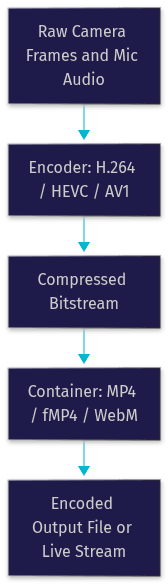
Common Encoding Workflows
Batch encoding handles offline assets: a studio exports a master file, and the encoding job runs to completion with maximum quality settings, often using slower encoder presets because latency does not matter. Real-time encoding handles live contribution: a broadcaster's software encodes camera input on the fly with strict latency and CPU budgets, accepting slightly lower compression efficiency to keep the stream moving. Both workflows produce the same thing, a first-generation compressed stream, but their constraints differ sharply.
What Is Transcoding?
Transcoding is defined as the process of converting an already-encoded media file or stream into a different codec, bitrate, resolution, frame rate, or container. Because the input is already compressed, transcoding always involves three stages: decode the input back to raw frames, process those frames (resize, filter, change parameters), and re-encode them into the new format.
Transcoding is required whenever the existing encoding does not match what the target player or network can handle. The most common driver is adaptive bitrate streaming: to deliver HLS or DASH effectively, a platform needs the same content in multiple renditions, for example 1080p at 5 Mbps, 720p at 3 Mbps, and 480p at 1 Mbps, so every viewer gets a smooth stream regardless of their bandwidth. Other drivers include codec compatibility (converting HEVC to H.264 for older browsers), file-size reduction for mobile delivery, and migrating legacy archives to modern formats.
Transcoding vs. Transmuxing
Transmuxing (also called remuxing) is the process of changing a media file's container format without touching the encoded video or audio bitstreams themselves. Because the compressed data is copied rather than decoded and re-encoded, transmuxing is dramatically faster and cheaper than transcoding, often completing in seconds for files that would take minutes to transcode, and it introduces zero quality loss.
The catch is that transmuxing only works when the codec inside is already compatible with the target. Converting an MP4 containing H.264 and AAC into an HLS delivery of the same codecs is a transmux job. Converting that same file to HEVC or to a lower bitrate requires full transcoding. A well-designed pipeline always checks whether transmuxing suffices before paying the transcoding cost.
Side-by-Side Comparison Table
The table below compares encoding and transcoding across the criteria developers care about most. [LINKABLE ASSET — comparison table]
| Criterion | Encoding | Transcoding |
|---|---|---|
| Input | Raw, uncompressed media | Already-encoded file or stream |
| Purpose | First-time compression for storage or delivery | Format conversion, adaptive renditions, size reduction |
| Process | Compress raw frames once | Decode, process, re-encode |
| Quality impact | Baseline quality set here | Risk of generation loss on each pass |
| CPU cost | High but paid once | High, multiplied by number of output renditions |
| Typical use | Capture, contribution, archival masters | Platform ingest, ABR ladders, legacy migration |
| Speed constraint | Real-time for live, offline for archival | Often parallelized across renditions |
| Best for | New content creation | Repurposing existing content |
The most important row is quality impact: encoding establishes the quality ceiling, and every subsequent transcode can only preserve or degrade it, never improve it. That single fact should shape your entire pipeline design.
When to Choose Encoding Over Transcoding
Choose encoding when your media originates in raw form and you control the capture settings. This is the natural fit for new content creation, live contribution feeds, and archival master generation, because you get to set the quality baseline exactly once with full knowledge of the downstream requirements.
Scenarios where encoding is the right call:
- Live contribution feeds: the broadcaster's software encodes camera input once, at the highest quality the uplink allows, and the platform handles everything downstream.
- Archival masters: encode a high-bitrate, high-resolution master that preserves maximum detail for future re-encoding.
- Studio production: export finished edits directly in the delivery codec when the target format is known, avoiding an unnecessary transcode later.
- Edge capture devices: encode at the source where raw media exists, because shipping uncompressed media is never practical.
The decision checklist: is your input raw media? Do you control codec and bitrate selection at capture time? Is there a single known delivery target? If you answered yes to all three, encode once and skip transcoding entirely.
When to Choose Transcoding Over Encoding
Choose transcoding when the media already exists in encoded form and the current encoding does not fit the delivery target. This is the default reality for platforms handling user-generated content, because you cannot control how users encode their uploads.
Scenarios where transcoding is the right call:
- User-generated uploads: normalize arbitrary input codecs, resolutions, and bitrates into a consistent delivery format.
- Adaptive bitrate ladders: generate multiple renditions so HLS and DASH players can switch quality as network conditions change.
- Legacy format migration: convert old archives (MPEG-2, VP6, early WMV) into modern codecs for web and mobile playback.
- Codec compatibility: down-convert HEVC or AV1 content to H.264 for devices and browsers that lack hardware or software support.
- Bandwidth-constrained delivery: reduce bitrate and resolution for mobile networks without re-shooting or re-capturing anything.
The decision checklist: is your input already compressed? Do you need multiple output renditions? Must you support players with incompatible codec support? Any yes means transcoding belongs in your pipeline.
Impact on Quality and File Size
Every transcode pass risks generation loss: decoding a lossy-compressed stream and re-encoding it compounds the artifacts of both codecs. A second-generation H.264 transcode at a similar bitrate is usually visually acceptable; a fourth-generation one at a lower bitrate is often visibly degraded, with blocking, banding, and softened detail. The mitigation is simple in principle: always transcode from the highest-quality source available, ideally the original encode or master, and never chain transcodes when you can plan a single conversion.
File size is governed primarily by bitrate, and the bitrate-resolution trade-off is central to rendition design. Halving resolution allows roughly a quarter of the pixel data, but perceptual quality does not scale linearly, so a 720p rendition at 3 Mbps can look better than a starved 1080p rendition at 3 Mbps. Modern codecs shift this curve: AV1 delivers meaningfully better quality per bit than H.264, and HEVC and VVC (H.266) sit between them, though their encode-time costs are substantially higher. For objective comparisons of speech and audio processing quality, independent leaderboards such as Artificial Analysis provide vendor-neutral benchmarks worth consulting before committing to a codec strategy.
The emerging trade-off in 2026 is encode cost versus delivery savings: AV1 and VVC reduce bandwidth and storage dramatically, but their encoding CPU cost can be several times higher than H.264, which matters enormously for live transcoding and much less for offline batch jobs.
Cloud-Native Services and Tooling
Managed media services abstract the encode-versus-transcode decision behind higher-level APIs. AWS Elemental MediaConvert, Azure Media Services, Mux, and Transloadit all accept an input file or live feed, inspect its properties, and automatically produce the appropriate output ladder, choosing codecs, renditions, and packaging without you writing per-job logic.
These services shine for teams without media engineering expertise, but they charge per minute of output and per rendition, so costs scale with your ladder size. For real-time interactive use cases, a different category of infrastructure applies: VideoSDK's interactive live streaming handles live ingest, adaptive delivery, and recording natively, including RTMP output to YouTube or Twitch, so the encode and transcode stages are managed as part of the room pipeline rather than bolted on separately. When evaluating services, compare output rendition pricing, codec support (especially AV1 and HEVC), latency characteristics, and how much control you retain over the encoding ladder.
Best-Practice Checklist for Developers
A disciplined pipeline avoids most quality and cost problems before they start. Follow this checklist when designing your media workflow:
- Start from the best source: always transcode from the original or highest-bitrate encode, never from an intermediate rendition.
- Choose the codec deliberately: H.264 for maximum compatibility, HEVC or AV1 where bandwidth savings justify the encode cost.
- Prefer transmuxing when possible: if only the container needs to change, skip the decode-re-encode cycle entirely.
- Avoid unnecessary transcoding: if the input already matches your delivery target, pass it through.
- Right-size your ABR ladder: three to five renditions usually covers real-world network conditions without wasting CPU.
- Monitor CPU and cost: transcoding is often the largest compute line item in a media platform; measure per-rendition cost.
- Test playback across devices: verify codec support and smooth ABR switching on the actual devices your users have.
Quick Recap
Encoding compresses raw media into a codec for the first time; transcoding decodes existing compressed media, transforms it, and re-encodes it for compatibility, adaptive streaming, or size reduction, with transmuxing as a cheaper container-only alternative when codecs already match.
Definitions Glossary
Encoding: The first-time compression of raw, uncompressed audio and video into a coded format using a codec such as H.264 or AV1, producing the baseline compressed representation of the media.
Transcoding: The process of decoding an already-encoded file or stream, applying transformations like new codec, bitrate, or resolution, and re-encoding it into one or more new outputs.
Transmuxing (Remuxing): Changing only a media file's container format while copying the compressed bitstreams unchanged, which is fast and lossless but only works when the codecs are already compatible with the target.
Codec: A compression algorithm (H.264, HEVC, VP9, AV1, VVC) that defines how raw frames are compressed into a bitstream and how they are decoded back for playback.
Adaptive Bitrate (ABR) Streaming: A delivery technique, used in HLS and DASH, where the same content is transcoded into multiple renditions so players can switch quality in real time as network bandwidth changes.
Generation Loss: The cumulative quality degradation that occurs when lossy-compressed media is decoded and re-encoded multiple times, compounding artifacts at each pass.
Key Takeaways
- Encoding starts from raw media and sets the quality baseline; transcoding starts from already-compressed media and can only preserve or degrade that baseline.
- Transcoding always involves a decode-process-re-encode cycle, which is why it costs more CPU and risks generation loss compared to a single encode.
- Transmuxing is the fast, lossless alternative when only the container needs to change and the codecs already match the target.
- Adaptive bitrate streaming for HLS and DASH is the single biggest driver of transcoding in modern media pipelines.
- VideoSDK's interactive live streaming and recording pipelines manage encoding and transcoding stages natively, including RTMP output, so you can deliver multi-rendition streams without building the media infrastructure yourself.
Conclusion
The transcoding vs encoding decision comes down to one question: where does your media originate? Raw media gets encoded once, at capture, with settings you control. Existing compressed media gets transcoded whenever the delivery target demands different codecs, bitrates, or resolutions. Build your pipeline around that rule, prefer transmuxing when codecs already match, and always transcode from the best available source to protect quality.
If you're building live streaming or video applications, VideoSDK's documentation covers ingest, adaptive delivery, and recording end to end, and you can start free at app.videosdk.live. What are you building, and where does encoding or transcoding fit into your pipeline? Drop a comment, I'd love to hear what kind of media workflow you're working on.
Free $20 Balance for AI Voice Agents & Video Calls
FAQ