


WebTransport is a browser API built on HTTP/3 and QUIC that provides multiplexed, bidirectional communication with reliable streams and unreliable datagrams. Unlike WebSockets over TCP, WebTransport eliminates head-of-line blocking and supports multiple independent streams over a single connection. Developers using VideoSDK for real-time applications should understand WebTransport as the transport landscape evolves toward HTTP/3.
Low-latency, bidirectional communication is the backbone of modern web applications, from multiplayer gaming to live video streaming. For years, WebSockets over TCP has been the go-to solution for real-time data exchange in the browser. But TCP's head-of-line blocking problem and lack of native multiplexing have created bottlenecks as applications demand lower latency and higher throughput.
WebTransport is a browser API that leverages HTTP/3 and QUIC to provide multiplexed streams, unreliable datagrams, and built-in encryption over a single connection. It addresses the fundamental limitations of TCP-based transports by running over UDP with QUIC's congestion control and security features.
In this article, you will learn what WebTransport is, how it relates to QUIC and HTTP/3, why it outperforms WebSockets for certain use cases, how to establish connections, and what the current browser support landscape looks like. We will also cover server-side requirements, security considerations, and a practical migration path from WebSockets.
What Is WebTransport?
WebTransport is defined as a web platform API that enables bidirectional, multiplexed communication between a browser client and a server over HTTP/3 and QUIC. It provides two communication paradigms: reliable, ordered streams (similar to WebSockets but multiplexed) and unreliable, unordered datagrams (similar to UDP but with congestion control and encryption).
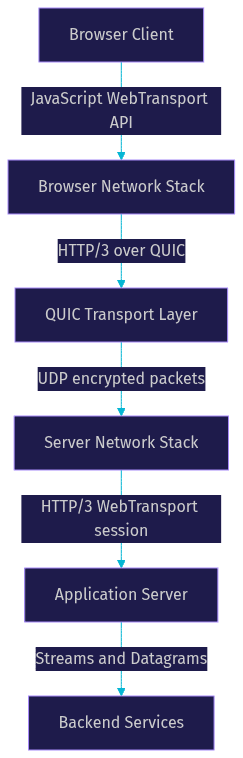
WebTransport works by establishing a QUIC connection to an HTTP/3 server, negotiating a WebTransport session within that connection, and then opening one or more streams or sending datagrams through that session. Each stream is independent, meaning a blocked or lost packet on one stream does not stall data on other streams.
The W3C WebTransport specification defines the API surface that browsers expose to JavaScript. The IETF defines the protocol semantics in a separate draft that describes how WebTransport sessions are negotiated over HTTP/3.
VideoSDK provides real-time communication through its video calling SDK which uses WebRTC as its transport layer. While WebTransport and WebRTC serve different purposes (WebTransport is a general-purpose data transport, WebRTC is optimized for media), understanding WebTransport helps developers evaluate the evolving transport landscape for real-time applications.
Here is a high-level architecture of how WebTransport fits between the browser and server:
Core Components of WebTransport
The WebTransport API centers around a transport object that represents the connection to the server. Once connected, developers can create bidirectional streams, unidirectional streams, and send datagrams through this object.
Bidirectional streams allow both the client and server to send data simultaneously over the same stream. Unidirectional streams are one-way data channels, useful for scenarios like server-sent events or client-to-server telemetry. Datagrams are individual, unreliable messages that do not guarantee delivery or ordering, making them ideal for time-sensitive data where a dropped packet is preferable to a delayed one.
The security model requires TLS 1.3 encryption, which QUIC provides by default. The browser enforces origin-based permission checks, meaning a WebTransport connection can only be established to servers that the page's origin is authorized to access.
How WebTransport Relates to QUIC and HTTP/3
QUIC is a transport layer protocol that runs over UDP and provides features that TCP lacks: stream multiplexing without head-of-line blocking, connection migration across network changes, and built-in TLS 1.3 encryption. HTTP/3 is the application protocol that runs on top of QUIC, replacing HTTP/2's TCP dependency.
WebTransport inherits QUIC's benefits directly. Because QUIC multiplexes streams at the transport level, a packet loss affecting one stream does not block other streams on the same connection. This is fundamentally different from TCP, where a single lost packet stalls all data on the connection until retransmission succeeds.
Connection migration is another QUIC feature that WebTransport benefits from. When a device switches from Wi-Fi to cellular, QUIC can maintain the connection using connection IDs rather than IP addresses, avoiding the need to re-establish the session.
Why Use WebTransport Over WebSockets?
WebSockets have served developers well for over a decade, but they carry inherent limitations from their TCP foundation. WebTransport addresses these limitations while adding new capabilities that TCP-based protocols cannot match.
The most significant advantage is the elimination of head-of-line blocking. In a WebSocket connection, all data flows through a single ordered TCP stream. If one packet is lost, every subsequent packet waits in the receiver's buffer until the lost packet is retransmitted and received. For real-time applications, this can cause latency spikes of hundreds of milliseconds. WebTransport's multiplexed streams mean that a lost packet on one stream only affects that stream, leaving other streams unaffected.
Unreliable datagrams are another capability WebSockets cannot offer. For applications like cloud gaming or live video, a stale frame that arrives late is useless. WebTransport datagrams let developers send time-sensitive data without waiting for retransmission, reducing perceived latency.
Multiplexing multiple independent streams over a single connection is a third advantage. With WebSockets, developers who need independent data channels typically open multiple WebSocket connections, each consuming separate TCP connections with separate congestion controllers and handshake overhead. WebTransport provides multiple streams over one QUIC connection with a single congestion controller, reducing overhead and improving fairness.
According to the IETF QUIC specification (RFC 9000), QUIC's stream multiplexing and congestion control are designed to avoid the head-of-line blocking problems that affect HTTP/2 over TCP. Performance testing by the QUIC working group and independent developers has demonstrated that QUIC reduces connection setup latency by one to two round trips compared to TCP with TLS, which directly benefits WebTransport session establishment.
Use-Case Scenarios
WebTransport shines in scenarios where low latency, multiplexed communication, or unreliable data delivery is critical.
Cloud gaming and remote desktop applications benefit from unreliable datagrams for sending game state updates or screen frames. A dropped frame is less disruptive than a delayed one, and WebTransport's low-latency transport over QUIC keeps interaction responsive.
Live video streaming with low-latency chat can use WebTransport to multiplex the video data stream and the chat stream over a single connection. The video stream gets reliable delivery, while the chat stream can use datagrams for near-instant message delivery. Developers building live streaming experiences with VideoSDK's interactive live streaming can evaluate WebTransport as a complementary transport for non-media data.
Real-time collaborative editing tools, like shared documents or whiteboards, can use WebTransport's bidirectional streams to sync state changes. Multiple users' edits flow through independent streams, so one user's network issues do not block others.
IoT telemetry applications often deal with packet loss on constrained networks. WebTransport datagrams are well-suited for sensor data where occasional loss is acceptable and retransmission would only add latency.
Browser Support and Compatibility
As of 2026, WebTransport browser support has improved significantly but is not yet universal across all major browsers.
Chrome has supported WebTransport since version 97, with full reliable stream and datagram support available since version 119. Edge, being Chromium-based, mirrors Chrome's support timeline. Firefox has experimental support behind a feature flag, with full implementation expected in upcoming releases. Safari has WebTransport on its roadmap but has not shipped a stable implementation yet.
For production applications, developers should use feature detection to check whether the WebTransport API is available in the current browser before attempting to use it. The standard approach is to check for the presence of the WebTransport constructor in the browser's global scope.
When WebTransport is not available, the recommended fallback is WebSockets. This means maintaining two code paths: one for WebTransport and one for WebSockets. While this adds complexity, it ensures that all users can access the application regardless of browser support.
Polyfills for WebTransport are limited because the protocol depends on QUIC support in the browser's network stack, which cannot be polyfilled in JavaScript. The fallback to WebSockets remains the most practical approach for unsupported browsers.
Developers should also note that WebTransport requires HTTPS. Browsers block WebTransport connections to non-secure origins, similar to other modern web APIs like WebRTC and service workers.
How to Establish a WebTransport Connection
Establishing a WebTransport connection involves several steps, each of which must be handled correctly to avoid common pitfalls.
First, construct a secure URL using the WebTransport scheme. The URL must point to an HTTPS endpoint that supports HTTP/3 and WebTransport. The scheme uses a specific prefix that indicates WebTransport over HTTP/3.
Second, instantiate the transport object by passing the URL to the WebTransport constructor. This initiates the QUIC handshake and HTTP/3 connection setup. The constructor returns immediately, but the connection is not yet ready for data exchange.
Third, wait for the transport object's ready promise to resolve. This promise resolves when the QUIC connection and WebTransport session negotiation complete successfully. If the connection fails, the promise rejects with an error indicating the failure reason.
Fourth, once the connection is ready, open bidirectional or unidirectional streams for reliable data transfer, or send datagrams for unreliable data transfer. Each stream provides its own read and write interfaces for sending and receiving data.
Finally, close the connection gracefully when done by calling the transport object's close method. This sends a close signal to the server and cleans up the QUIC connection.
Common pitfalls include mixed-content restrictions (attempting to connect from an HTTP page to an HTTPS WebTransport endpoint), missing TLS certificates on the server, and incorrect server-side QUIC configuration. Developers should also handle connection drops gracefully by listening for connection state changes and implementing reconnection logic.
Here is the connection lifecycle visualized:
Managing Streams and Datagrams
Choosing between reliable streams and unreliable datagrams depends on the application's data delivery requirements.
Use reliable, ordered streams when every byte must arrive in order, such as file transfers, chat messages, or state synchronization where data integrity matters more than latency. Each stream provides flow control, meaning the sender and receiver negotiate how much data can be in flight at once, preventing one side from overwhelming the other.
Use unreliable datagrams when timeliness matters more than completeness, such as game state updates, sensor readings, or live video frames. Datagrams do not provide flow control or delivery guarantees, so the application must handle lost or out-of-order messages.
Back-pressure handling is built into the streams API. When the receiver cannot keep up with the sender, the stream's write mechanism applies back-pressure automatically, pausing the sender until the receiver catches up. Developers should respect this back-pressure rather than forcing data through, as ignoring it can lead to increased memory usage and degraded performance.
Server-Side Requirements
WebTransport requires an HTTP/3-enabled server that supports the WebTransport protocol extension. Not all web servers support this out of the box.
Several server options exist for developers. In the Go ecosystem, the standard library's HTTP/3 package and community-maintained QUIC libraries provide WebTransport server support. In the Node.js ecosystem, community-maintained QUIC packages enable HTTP/3 and WebTransport, though support is less mature than in Go. Caddy, a modern web server, supports HTTP/3 natively and can be configured to support WebTransport.
TLS certificate requirements are strict. The server must present a valid TLS 1.3 certificate that the browser trusts. Self-signed certificates do not work in production because browsers reject them for WebTransport connections. Developers need certificates from a trusted certificate authority, such as Let's Encrypt, for both development and production environments.
The WebTransport handshake involves negotiating the session within an HTTP/3 connection. The server must respond to the WebTransport connection request with the appropriate HTTP/3 frames to establish the session. Once the session is established, the server can accept incoming streams and datagrams from the client and send data back.
Server-side performance matters because WebTransport applications often involve high-frequency, small-payload communication. Servers should be tuned for low-latency UDP handling, and developers should monitor QUIC connection metrics to identify congestion or packet loss issues.
Security and Privacy Considerations
WebTransport's security model is designed to prevent the attacks that older transport APIs are vulnerable to.
The origin-based permission model ensures that a web page can only establish WebTransport connections to servers that the page's origin is authorized to access. This prevents cross-origin attacks where a malicious page attempts to connect to a server on behalf of the user.
Built-in TLS 1.3 encryption is mandatory. Unlike WebSockets, which can optionally use unencrypted connections, WebTransport always encrypts traffic. This protects data in transit from eavesdropping and tampering.
DDoS mitigation is a concern because WebTransport uses UDP, which can be amplified in reflection attacks. The QUIC protocol includes built-in protections against amplification attacks by limiting the amount of data a server sends before the client proves its address. Server operators should also implement rate limiting and connection tracking at the network level.
Cross-site tracking prevention is handled by the browser's origin model. WebTransport connections are tied to the page's origin, and browsers may impose limits on the number of concurrent connections to prevent tracking across sites.
Migration Path from WebSockets
Migrating from WebSockets to WebTransport should be done incrementally, not as a big-bang rewrite.
Start by assessing feature gaps. WebSockets provide a single reliable, ordered stream, which maps directly to a single WebTransport bidirectional stream. If your application uses WebSockets for simple message passing, the migration is straightforward conceptually. If your application uses multiple WebSocket connections for different data channels, WebTransport's multiplexed streams can replace them with a single connection.
Next, implement feature detection in your client code. Check whether WebTransport is available, and if so, use it. If not, fall back to WebSockets. This dual-path approach ensures that all users continue to have access while early adopters benefit from WebTransport's performance improvements.
Roll out incrementally. Start with a small percentage of users on supported browsers, monitor performance metrics and error rates, and gradually increase the rollout as confidence grows. Use A/B testing to compare latency and reliability between WebTransport and WebSocket connections.
Test thoroughly. WebTransport's unreliable datagrams introduce a new communication paradigm that your application may not have handled before. Test packet loss scenarios, connection drops, and network transitions to ensure your application degrades gracefully.
For developers building real-time video and audio applications, VideoSDK's video calling SDK handles transport complexity internally using WebRTC, which already provides reliable and unreliable channels. WebTransport can complement this for non-media data like chat messages or signaling, but VideoSDK's SDKs abstract away the transport layer so developers can focus on application logic.
Definitions Glossary
WebTransport: A browser API that enables bidirectional, multiplexed communication over HTTP/3 and QUIC, supporting both reliable streams and unreliable datagrams.
QUIC: A transport layer protocol defined in RFC 9000 that runs over UDP, providing stream multiplexing, connection migration, and built-in TLS 1.3 encryption.
HTTP/3: The third major version of HTTP, which runs over QUIC instead of TCP, eliminating head-of-line blocking at the transport layer.
Datagrams: Unreliable, unordered messages sent through WebTransport that do not guarantee delivery or ordering, suitable for time-sensitive data.
Head-of-line blocking: A performance issue in TCP where a lost packet delays all subsequent packets until retransmission, affecting all data on the connection.
Bidirectional stream: A WebTransport stream that allows both client and server to send data simultaneously over the same logical channel.
Key Takeaways
- WebTransport is a browser API built on HTTP/3 and QUIC that provides multiplexed, bidirectional communication with both reliable streams and unreliable datagrams.
- Unlike WebSockets, WebTransport eliminates head-of-line blocking by running over QUIC's UDP-based transport with independent stream multiplexing.
- Browser support as of 2026 includes Chrome and Edge with full support, Firefox with experimental support, and Safari with planned support, requiring feature detection and WebSocket fallback.
- WebTransport datagrams enable low-latency communication for use cases like cloud gaming, live streaming, and IoT telemetry where occasional packet loss is acceptable.
- Developers building real-time video and audio applications can use VideoSDK's multi-platform SDKs which handle transport complexity through WebRTC, while evaluating WebTransport for complementary non-media data channels.
Conclusion
WebTransport represents a significant step forward in browser-based real-time communication. By leveraging HTTP/3 and QUIC, it solves the head-of-line blocking problem that has plagued TCP-based transports like WebSockets, adds support for unreliable datagrams, and enables multiplexed streams over a single connection. As browser support expands through 2026, WebTransport will become an increasingly viable choice for developers building low-latency web applications.
To get started, review the MDN WebTransport documentation and experiment with an HTTP/3-enabled server like Caddy or a Go-based QUIC implementation. For production-grade real-time video and audio, explore VideoSDK's documentation to see how WebRTC-based SDKs handle transport complexity while you evaluate WebTransport for your data channel needs.
What are you building with WebTransport? Drop a comment below and share your use case, whether it is cloud gaming, live streaming, or something entirely new. You can also join the VideoSDK Discord community to discuss real-time communication architecture with fellow developers.
Free $20 Balance for AI Voice Agents & Video Calls
FAQ