


Node.js WebTransport is a modern networking API built on HTTP/3 and QUIC, designed to replace WebSockets for low-latency, real-time communication. It supports multiple bidirectional and unidirectional streams, as well as unreliable datagrams, enabling developers to build highly responsive applications. While native Node.js support is still evolving, developers can use polyfills to start building today.
Low-latency transport is the backbone of modern real-time applications. Whether you are building a multiplayer game, a live streaming platform, or a collaborative editing tool, the speed at which data travels between client and server dictates the user experience. For years, WebSockets have been the go-to solution for persistent connections, but they come with limitations like head-of-line blocking and a reliance on TCP. Node.js WebTransport emerges as the next-generation alternative, leveraging HTTP/3 and QUIC to provide faster, more reliable, and more flexible data transmission.
In this article, you will learn what WebTransport is, how it compares to WebSockets, and how to set up a Node.js WebTransport environment to build cutting-edge real-time features. We will cover everything from establishing sessions to managing streams and datagrams, giving you a complete picture of this powerful API.
Understanding Node.js WebTransport
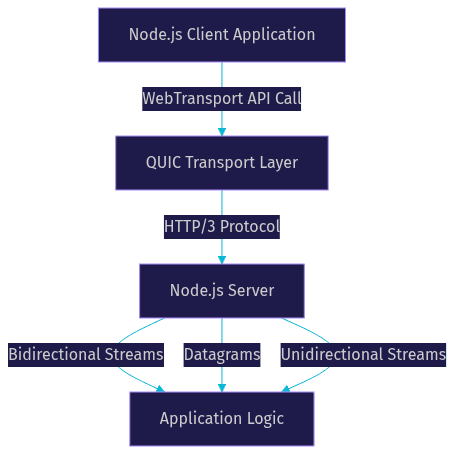
WebTransport is defined as a web API for low-latency, bidirectional client-server messaging. It works by using HTTP/3 as its transport protocol, which in turn runs over QUIC, a UDP-based multiplexed transport layer. This architecture allows WebTransport to open multiple independent streams over a single connection without suffering from head-of-line blocking. If one stream experiences packet loss, other streams continue flowing uninterrupted.
In the Node.js ecosystem, native support for WebTransport is currently under development. Developers can integrate the API using polyfills such as the at-moq web-transport package or the at-libp2p webtransport package. These libraries provide the interface to create WebTransport servers and clients in Node.js, bridging the gap until native support lands in Node.js core. The polyfill handles the complex QUIC handshake and stream management, exposing a familiar API to JavaScript developers.
Key capabilities of Node.js WebTransport include the ability to create multiple bidirectional and unidirectional streams, send datagrams for unreliable messaging, and choose between reliable and unreliable delivery modes. This makes it highly suitable for network-adaptive streaming scenarios where different types of data require different delivery guarantees. For instance, a video call might use reliable streams for chat messages and unreliable datagrams for real-time audio packets.
When to Choose WebTransport Over WebSockets
WebSockets have served the web well, but they are limited by their TCP foundation. TCP guarantees ordered delivery, which means if one packet is lost, all subsequent packets are held up until it is retransmitted. This is known as head-of-line blocking. WebTransport, running over QUIC, solves this by multiplexing independent streams. If one stream experiences packet loss, other streams continue flowing uninterrupted.
You should choose Node.js WebTransport over WebSockets for use cases like real-time gaming, where datagrams provide low-overhead state updates, or live streaming and large-file sync, where multiple streams can transfer chunks independently. For applications like VideoSDK's Interactive Live Streaming, minimizing latency is critical, and modern transport protocols play a key role in achieving sub-second delays.
Here is a quick decision checklist for developers:
- Use WebTransport if you need multiple independent streams over a single connection.
- Use WebTransport if you need unreliable datagram delivery for high-frequency, low-importance updates.
- Use WebSockets if you need broad compatibility with older browsers and infrastructure that does not support QUIC.
- Use WebTransport if you are building a new application from scratch and want to future-proof your transport layer.
Setting Up a Node.js WebTransport Environment
Setting up a Node.js WebTransport environment requires a few specific prerequisites. Because WebTransport relies on HTTP/3 and QUIC, you need a Node.js version that supports these protocols or a polyfill that handles the translation. You also need TLS certificates, as WebTransport mandates a secure context.
To begin, you will need to install a polyfill like the at-moq web-transport package using your preferred package manager. This library provides the necessary classes and methods to instantiate a WebTransport server in Node.js. You cannot run WebTransport over plain HTTP; it requires HTTPS with valid TLS certificates. You can use tools like Let's Encrypt to generate certificates for your domain or create self-signed certificates for local development.
When configuring your server, ensure that your certificates are correctly referenced and that your server listens on a port capable of accepting QUIC traffic. Browser compatibility is also crucial. As of 2026, Chrome and Firefox support WebTransport, but you should verify the latest compatibility tables. The server must also support ALPN (Application-Layer Protocol Negotiation) to negotiate the HTTP/3 protocol correctly during the TLS handshake.
Establishing a WebTransport Session
A WebTransport session begins when a client creates a new instance of the WebTransport class, passing the server URL. This initiates the connection establishment process, which involves a TLS handshake and HTTP/3 negotiation over QUIC. The client and server exchange cryptographic keys and agree on the transport parameters before any application data is sent.
The session lifecycle involves several key events. The ready event fires when the connection is successfully established and ready to send or receive data. The closed event indicates the session has terminated, either intentionally or due to an error. Error handling is managed through the WebTransportError interface, which provides details about connection failures, stream errors, or protocol violations.
Common pitfalls include missing HTTPS configuration or attempting to connect from a non-secure context. Browsers will block WebTransport connections that do not meet strict security requirements. To mitigate this, always ensure your server has a valid certificate and your client application is served over HTTPS. Another common issue is firewall blocking UDP traffic, which QUIC relies on. Ensure your network infrastructure allows UDP on the designated port.
Working with Streams and Datagrams
WebTransport offers two primary data transmission mechanisms: streams and datagrams. Streams can be bidirectional or unidirectional. Bidirectional streams allow both client and server to send data simultaneously, making them ideal for chat applications or collaborative editing. Unidirectional streams are useful for one-way data pushes, like server-sent events or logging.
Datagrams provide unreliable, low-overhead messaging. Unlike streams, datagrams do not guarantee delivery or order. This makes them perfect for real-time telemetry, game state updates, or any scenario where receiving the latest data is more important than receiving every packet. For example, in a live streaming application using VideoSDK, datagrams could be used to send rapid cursor positions or reaction emojis without congesting the main video stream.
Managing back-pressure and flow control is critical when working with Node.js streams. WebTransport integrates with the native Web Streams API, allowing you to use ReadableStream and WritableStream to pipe data efficiently. This ensures your application does not consume excessive memory when data arrives faster than it can be processed. You should always listen for the backpressure signals and pause data generation when the stream is not ready to accept more data.
Integrating WebTransport with Existing Node.js APIs
One of the strengths of WebTransport is its interoperability with existing Node.js APIs. The WebTransport API is designed to work seamlessly with the native Web Streams API. This means you can use ReadableStream and WritableStream to handle data flow, just as you would with any other stream-based interface in Node.js. You can pipe data from a file system stream directly into a WebTransport stream, or vice versa.
For developers building peer-to-peer applications, libraries like the at-libp2p webtransport package combine WebTransport with libp2p's networking stack. This allows you to establish secure, low-latency connections between peers without relying on a centralized server. While VideoSDK handles the complexities of real-time communication through its Video Calling API, understanding the underlying transport protocols like WebTransport can help you appreciate the performance optimizations involved in production-grade RTC infrastructure.
Monitoring, Debugging, and Performance Tips
Monitoring a WebTransport connection requires tools capable of inspecting QUIC traffic. Chrome's net-internals and Wireshark are invaluable for analyzing packet flow and identifying connection issues. In Wireshark, you can filter for UDP traffic and inspect the QUIC packets to see stream IDs and packet types. Key metrics to watch include round-trip time (RTT), packet loss, and stream latency.
For performance optimization, implement strategies for graceful reconnection. If a WebTransport session drops, your application should attempt to reconnect automatically. Additionally, consider a fallback to WebSockets for environments where QUIC is blocked or unsupported. This network-adaptive approach ensures your application remains functional across various network conditions. Using congestion control algorithms like BBR can also help optimize throughput on high-latency connections.
Future Outlook for Node.js WebTransport
The future of Node.js WebTransport is promising. Native support in Node.js core is on the roadmap, which will eliminate the need for polyfills and improve performance. The IETF WEBTRANS working group continues to refine the standard, ensuring interoperability and security. Developers can contribute to the spec or participate in community discussions to shape the future of this powerful API. As real-time applications become more demanding, the adoption of WebTransport is expected to grow significantly.
Definitions Glossary
WebTransport: A web API for low-latency, bidirectional client-server messaging over HTTP/3 and QUIC.
QUIC: A UDP-based, multiplexed transport layer protocol that forms the foundation of HTTP/3.
Datagrams: Unreliable, unordered messages sent over WebTransport, suitable for high-frequency data where latest state matters most.
Head-of-line blocking: A performance issue in TCP where a lost packet delays all subsequent packets, which WebTransport avoids by using independent streams.
Polyfill: A library that provides modern functionality to older environments, such as the at-moq web-transport package for Node.js.
Key Takeaways
- Node.js WebTransport leverages HTTP/3 and QUIC to provide low-latency, multiplexed communication.
- It supports bidirectional streams, unidirectional streams, and unreliable datagrams for versatile data transmission.
- WebTransport eliminates head-of-line blocking, making it superior to WebSockets for real-time gaming and live streaming.
- Setting up a Node.js WebTransport environment requires TLS certificates and a polyfill like the at-moq web-transport package.
- Integrating WebTransport with the Web Streams API allows for efficient back-pressure management and flow control.
Conclusion
Node.js WebTransport represents a significant leap forward for real-time communication, offering the speed and flexibility needed for modern applications. By understanding its architecture, setting up the right environment, and leveraging streams and datagrams, you can build highly responsive experiences. While native support is still on the horizon, polyfills make it possible to start experimenting today. Try the polyfill, contribute to the spec, and join the community to be part of the future of low-latency transport. What are you building with WebTransport? Drop a comment and check out VideoSDK for more real-time communication solutions.
Free $20 Balance for AI Voice Agents & Video Calls
FAQ