



A WebSocket server in Python is a long-lived, bidirectional message endpoint built on the WebSocket protocol, typically using an asyncio-based library such as websockets or aiohttp. Python's async ecosystem makes it well suited for real-time communication like chat, live dashboards, and collaborative editing. This guide walks through library selection, connection handling, security, and production deployment, and shows how VideoSDK builds on the same real-time principles for full video and audio calling.
Real-time features have become table stakes for modern applications. Live chat, collaborative editing, multiplayer games, stock tickers, and notification systems all depend on the server pushing data to clients the instant it exists, without the client asking first. HTTP was never designed for that. Its request-response cycle forces developers into workarounds like polling, which wastes bandwidth and adds latency.
The WebSocket protocol, standardized in RFC 6455 by the IETF, solves this by upgrading an initial HTTP handshake into a persistent, full-duplex connection. Once established, both sides can send messages at any time with minimal framing overhead. For Python developers, building a websocket server in Python has become one of the most common ways to add real-time communication to an application, and the ecosystem around it is mature enough that a production-grade server is achievable in a single afternoon of work.
This guide covers the full journey: choosing a library, understanding the server architecture, handling many concurrent clients, securing the connection with TLS, and deploying behind a reverse proxy. By the end, you will understand every layer of a production WebSocket server in Python and be ready to either build your own or evaluate managed real-time platforms.
What Is a WebSocket Server in Python and How Does It Work?
A WebSocket server in Python is defined as a Python process that accepts WebSocket connections, completes the protocol handshake, and then exchanges framed messages with connected clients over a single persistent TCP connection. It works by listening on a host and port, receiving an HTTP upgrade request from a client, negotiating the protocol switch, and then handing each accepted connection to a handler function that runs for the lifetime of that connection.
The WebSocket protocol itself is transport-agnostic on top of TCP. Messages are framed with a small header that indicates whether the payload is text or binary, whether it is a fragment of a larger message, and whether the connection is being closed. Ping and pong control frames keep the connection alive through intermediaries like proxies and load balancers that would otherwise time out idle sockets.
Python's role is to manage many of these long-lived connections efficiently. Because a WebSocket server holds thousands of open sockets at once, the threading model of classic Python web servers breaks down quickly. That is why the modern Python WebSocket stack is built on asyncio, the standard library's event loop, which lets a single process juggle tens of thousands of concurrent connections using cooperative multitasking instead of one OS thread per client.
Choosing the Right Python Library for a WebSocket Server
The library you choose for your websocket server in Python shapes everything downstream: concurrency model, deployment story, and how easily you can add features like authentication and rooms. The good news is that the top options are all actively maintained and well documented, so the decision comes down to fit rather than quality.
Overview of Popular Libraries
websockets is the de facto standard for pure WebSocket work in Python. It is asyncio-native, has no dependencies beyond the standard library, implements the protocol faithfully including compression extensions, and its documentation doubles as an excellent tutorial on the protocol itself. For a dedicated WebSocket server, this is the default recommendation.
aiohttp provides WebSocket support as part of a broader asynchronous HTTP client and server framework. Choose it when your WebSocket endpoint lives alongside REST routes in the same application and you want one process, one port, and one dependency. The trade-off is a larger API surface to learn.
simple-websocket is a lightweight, dependency-free option that offers both threading and asyncio modes. It is a good fit when you need to add WebSocket support to an existing synchronous application without pulling in a full async framework.
websocket-server is an older, thread-based package. It is simple to understand for beginners, but the one-thread-per-connection model caps practical concurrency in the low hundreds, so treat it as a learning tool rather than a production choice.
Criteria for Selection
Evaluate candidates against four criteria. First, dependency footprint: fewer dependencies means smaller container images and a smaller security surface. The websockets library wins here outright. Second, concurrency model: asyncio scales to far more concurrent connections than threading, but if your message handlers call blocking libraries that you cannot refactor, a threaded model may actually be simpler to keep correct.
Third, performance and scalability: for most applications any of the async libraries will handle thousands of connections comfortably, and your bottleneck will be application logic, not the protocol layer. Fourth, community support and documentation: the websockets and aiohttp projects both have extensive docs, active issue trackers, and years of production use, which matters when you hit an edge case like a proxy that mangles upgrade headers.
Setting Up a Basic WebSocket Server with Python
Building your first websocket server in Python involves three phases: preparing the environment, understanding the core components, and visualizing how messages flow. The process is deliberately simple, because the protocol library absorbs the hard parts of framing and handshakes.
Installation and Environment Preparation
Start with a dedicated virtual environment so the WebSocket library and its dependencies stay isolated from other projects. Create the environment with Python's built-in tooling, activate it, and then install your chosen library from the Python Package Index using pip. For the websockets library, this is a single package installation with no transitive dependencies. Verify the installation by checking the installed version, and confirm your Python version is 3.8 or newer, since modern asyncio features in these libraries assume at least that baseline. Keep a requirements file from the start so deployment environments can reproduce the exact versions.
Core Components Explained
Every WebSocket server in Python has three core components. The first is server initialization: you specify the host interface to bind, the port to listen on, and optionally TLS certificate material. Binding to localhost restricts access to the same machine, which is useful during development, while binding to all interfaces exposes the server to your network.
The second component is the connection handler. When a client completes the handshake, the library invokes your handler with an object representing the connection. The handler typically runs a loop that waits for incoming messages, processes each one, and sends replies. When the handler returns or raises, the library closes the socket and cleans up. This lifecycle means per-connection state, like a username or subscription list, naturally lives in local variables of the handler.
The third component is the message flow. Incoming messages arrive as complete text or binary payloads after the library reassembles fragments. Outgoing messages are sent through the connection object and are automatically framed. Errors, disconnects, and protocol violations surface as exceptions you should catch so one misbehaving client cannot crash the whole server.
Diagram of Server Architecture
The architecture of a websocket server in Python follows a clear path from client connection through handler logic to response delivery:
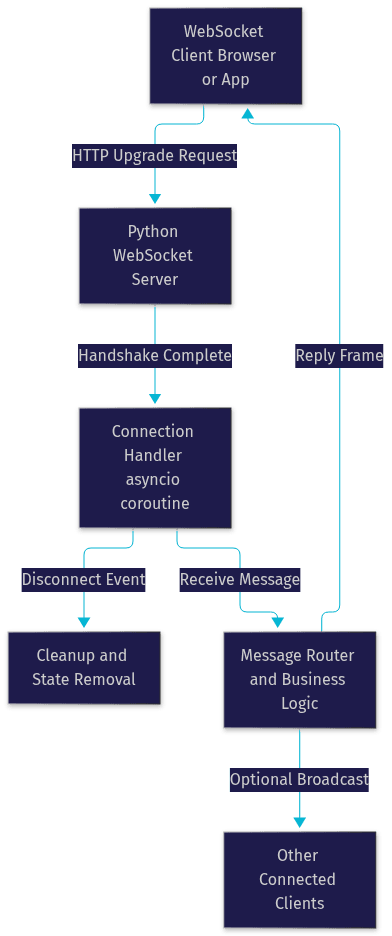
The key insight from this diagram is that each client gets its own handler coroutine, while shared state like the client registry lives at module or application level. This separation keeps per-connection logic simple and makes broadcast features possible.
Handling Multiple Clients and Broadcast Messaging
A single-connection server is a demo. A real websocket server in Python must track many simultaneous clients, route messages between them, and survive clients that vanish without warning. This is where the architecture earns its keep.
Managing Client Connections
Maintain a registry of active connections, typically a dictionary that maps a client identifier to the connection object. The identifier can be a session token, a username, or a generated unique ID assigned during the handshake. When a handler starts, it registers the connection; when the handler exits, whether cleanly or through an exception, it removes the connection from the registry.
Disconnect handling deserves special attention. Networks drop, laptops sleep, and mobile apps get killed by the operating system. The WebSocket close handshake is a courtesy, not a guarantee, so your server must treat any handler exit as a potential disconnect and always deregister the client. A common pattern is a try-finally structure in the handler that guarantees cleanup runs regardless of how the connection ends.
Heartbeats also matter at scale. Intermediaries like NAT gateways and cloud load balancers silently drop idle TCP connections after 30 to 60 seconds. The websockets library supports protocol-level ping frames, and enabling keepalive pings at a 20-second interval prevents most silent drops in production.
Broadcasting to All or Specific Rooms
Broadcasting means iterating your connection registry and sending the same message to each client. Because sends are async, a naive loop that awaits each send sequentially lets one slow client delay everyone behind it. The standard fix is to gather all send operations and run them concurrently, so a slow client only delays its own message.
Rooms and channels add selective routing. Instead of one global registry, maintain a mapping of room name to a set of connections. A chat application might have rooms per conversation; a live dashboard might have rooms per data feed. When a message arrives, the router looks up the target room and broadcasts only to its members. This pattern, sometimes called pub-sub, is the foundation of most real-time application logic, and it is exactly the model that managed platforms generalize. VideoSDK, for example, applies the same room-based concept to full audio and video calling, where participants join a room and the platform handles media routing, presence, and reconnection for you.
Adding Security and SSL/TLS to Your WebSocket Server
An unencrypted websocket server in Python sends every message in plaintext across the network. Browsers also refuse WebSocket connections from HTTPS pages to non-TLS endpoints, so security here is not optional for any public deployment.
Why Encryption Matters
Without TLS, anyone on the network path between client and server can read and modify messages, a classic man-in-the-middle exposure. Session tokens, chat content, and application data all travel in the clear. TLS also gives clients cryptographic proof of server identity through the certificate chain, which prevents spoofed endpoints from harvesting credentials. For applications handling user accounts or any personal data, encryption is a baseline requirement, not an enhancement.
Configuring SSL in Python
Configuring TLS for a websocket server in Python means supplying a certificate and private key to the server at initialization time. The websockets library accepts certificate and key file paths as startup parameters and handles the TLS handshake before the WebSocket upgrade.
For local development, generate a self-signed certificate with OpenSSL's certificate creation command, which produces a certificate and key pair valid for local testing. Browsers will warn about self-signed certificates, but command-line and Python test clients can be configured to skip verification for development only.
For production, obtain a certificate from a real certificate authority such as Let's Encrypt, which issues free certificates through an automated domain-validation process. A common and recommended pattern is to terminate TLS at a reverse proxy like Nginx and run plain WebSocket traffic on localhost between the proxy and your Python process. This centralizes certificate renewal and keeps your application code free of certificate management. Never disable certificate verification in production clients, and always keep the private key file readable only by the service account running the server.
Deploying a Production-Ready WebSocket Server
Deployment is where a working websocket server in Python becomes a reliable one. The three concerns are getting traffic to the server, keeping the process alive, and eventually scaling past one machine.
Running Behind a Reverse Proxy
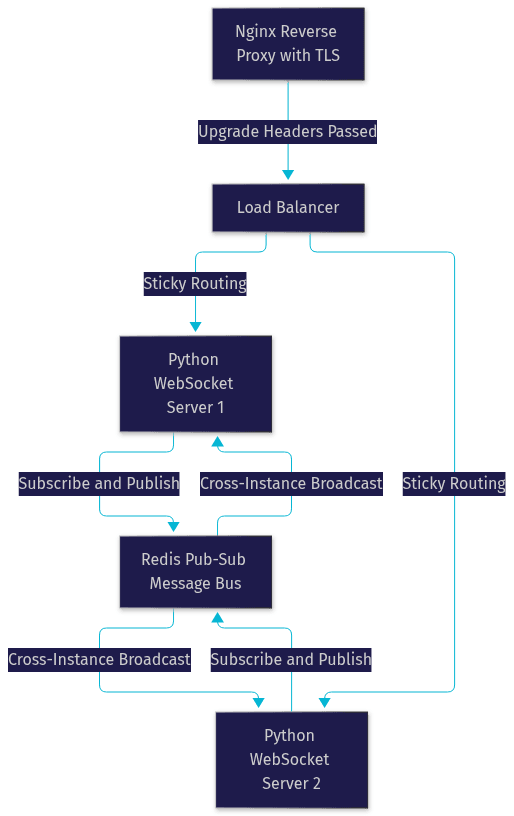
Nginx and HAProxy both proxy WebSocket traffic well, but they must be explicitly configured for it. The proxy must pass the Upgrade and Connection headers from the client's handshake request through to the backend, because these headers are what trigger the protocol switch. Without them, the handshake fails and clients see a connection error.
Set a generous read timeout on the proxy path, since WebSocket connections are long-lived by design and a default 60-second proxy timeout will kill healthy idle connections. Terminating TLS at the proxy is the standard arrangement: clients connect over HTTPS and WSS, the proxy decrypts, and your Python server receives plain traffic on a private interface. This also lets you serve your web frontend and WebSocket endpoint from the same origin, avoiding cross-origin complications.
Process Management
A WebSocket server should run as a supervised service, not in a terminal window. On Linux, a systemd unit provides automatic startup on boot, restart on crash, and structured logging. Supervisor offers similar supervision with simpler configuration. Docker is equally popular: package the server with its dependencies in an image, and let the container runtime's restart policy handle recovery. Whichever route you take, configure log rotation and health checks, because a WebSocket server that is up but unable to accept connections is a failure mode that simple process supervision will not catch on its own.
Scaling Horizontally
One asyncio process can hold tens of thousands of connections, but eventually you need more machines. The challenge is that WebSocket state is connection-bound: a client connected to server A cannot receive a message published on server B. The standard solution is a shared message bus, most commonly Redis pub-sub, where each server instance subscribes to the channels its clients care about and forwards messages across instances. A load balancer with sticky routing or consistent hashing distributes new connections across the pool. This is also the point where many teams evaluate managed real-time platforms, since VideoSDK and similar services handle media routing, presence, and scaling as part of the infrastructure.
Common Pitfalls and Performance Tips for a WebSocket Server in Python
Most production incidents in a websocket server in Python trace back to a handful of recurring mistakes. The biggest is blocking the event loop: a single synchronous call that takes seconds, such as a blocking database driver or a heavy CPU computation inside a handler, freezes every connection on that process. Keep handlers async end to end, and offload CPU-heavy work to a process pool or a separate worker service.
Second, always close connections explicitly and deregister clients in cleanup logic. Leaked connections accumulate in your registry, consume file descriptors, and cause ghost broadcasts to dead sockets that raise errors mid-loop.
Third, monitor what matters: connection count, message throughput, send queue depth, and end-to-end latency. A growing send queue on a specific client means that client is not reading fast enough, and the correct response is usually to disconnect it rather than let memory balloon. Set a maximum message size at the protocol layer to prevent a single client from exhausting server memory with one giant frame. Finally, test reconnection behavior deliberately, because clients will reconnect after network blips, and duplicate registrations from the same logical user are a classic source of confusing bugs.
Definitions Glossary
WebSocket: A standardized protocol, defined in RFC 6455, that upgrades an HTTP connection into a persistent, full-duplex message channel between client and server.
asyncio: Python's standard library event loop and concurrency framework, which enables a single process to manage thousands of concurrent connections through cooperative multitasking.
Connection handler: The coroutine or function a WebSocket library invokes for each accepted client connection, responsible for receiving, processing, and sending messages for that connection's lifetime.
Broadcast: Sending the same message to multiple connected clients at once, either to all clients or to a subset grouped into rooms or channels.
WSS: The secure WebSocket scheme, meaning WebSocket traffic carried over TLS, analogous to HTTPS for HTTP.
Room: A logical grouping of WebSocket connections used for selective message routing, the same concept VideoSDK uses to group participants in video and audio calls.
Key Takeaways
- A WebSocket server in Python is best built on an asyncio-based library such as websockets or aiohttp, because the event loop model scales to tens of thousands of concurrent connections on a single process.
- Each client connection gets its own handler coroutine, while shared state like the client registry and room mappings live at application level, enabling broadcast and selective routing.
- TLS is mandatory for public deployments, and the cleanest pattern is terminating encryption at a reverse proxy like Nginx while the Python process handles plain traffic on a private interface.
- Horizontal scaling requires a shared message bus such as Redis pub-sub, because connection state is bound to the server instance each client is attached to.
- When your real-time needs grow beyond text messages into audio, video, and presence, room-based platforms like VideoSDK extend the same architecture with media routing, reconnection handling, and recording built in.
Conclusion
Building a websocket server in Python is a well-trodden path: pick an asyncio-based library, wire up connection handlers with a client registry, add rooms for selective broadcast, secure the endpoint with TLS, and deploy behind a reverse proxy with proper process supervision. Each layer is individually simple, and the ecosystem's maturity means you spend your time on application logic rather than protocol plumbing. Experiment with different libraries and deployment strategies to find the fit for your workload, and when your project grows into real-time audio and video, explore how VideoSDK's video calling SDK applies the same room-based model to full multimedia communication. What are you building with real-time Python? Drop a comment, I'd love to hear what kind of WebSocket use case you're working on.
Free $20 Balance for AI Voice Agents & Video Calls
FAQ