


WebRTC in Firefox is fully supported through the same three core APIs developers use everywhere: getUserMedia for media capture, RTCPeerConnection for peer-to-peer transport, and RTCDataChannel for arbitrary data. Firefox implements these on its Gecko media stack with mandatory encryption, a distinctive diagnostic page at about:webrtc, and some codec and SDP differences worth knowing before you ship. If you need a managed alternative to raw browser APIs, VideoSDK's video calling SDKs wrap the entire WebRTC layer for you.
Firefox has shipped WebRTC since 2013, and it remains one of the few browsers where you can inspect the entire ICE state machine, codec negotiation, and per-frame statistics without external tooling. Yet most WebRTC tutorials are written against Chrome and quietly assume Chromium behavior. That assumption bites teams in production: a call that works flawlessly in Chrome can fail ICE negotiation in Firefox because of a single SDP attribute or a codec preference mismatch.
This guide covers how WebRTC in Firefox actually works in 2026: the architecture behind it, the core APIs and their Firefox-specific behavior, the diagnostic tooling that puts Firefox ahead of every other browser for debugging, interoperability with Chrome and Edge, and the practical steps to tune performance and harden a production deployment.
What Is WebRTC in Firefox and How Does It Work?
WebRTC in Firefox is defined as Mozilla's implementation of the W3C WebRTC API specification inside the Gecko browser engine, providing real-time peer-to-peer audio, video, and data exchange without plugins. Firefox works by exposing the standard JavaScript API surface to web pages while delegating media capture, encoding, and transport to its native media stack, then negotiating connections through the ICE framework described in the IETF RTCWeb specifications.
Firefox's implementation is notable for two reasons. First, it is an independent implementation: Mozilla wrote its own media pipeline rather than adopting Chromium's, which means Firefox behaves differently in codec selection, SDP generation, and statistics reporting. Second, Firefox exposes more of its internals to developers than any other browser, through the about:webrtc diagnostic page and unusually detailed connection logging.
For teams that would rather not manage these browser-level differences themselves, a managed SDK like VideoSDK abstracts signaling, ICE, TURN fallback, and codec negotiation across every supported browser, including Firefox.
Browser Engine Integration
Inside Gecko, WebRTC sits across two layers. The JavaScript-facing API layer handles page interactions, permissions, and SDP offer/answer exchange. Beneath it, the media stack handles device capture through the operating system's media frameworks, encoding and decoding through bundled codecs, and transport through a bundled network stack that implements ICE, STUN, TURN, DTLS, and SRTP. The two layers communicate through an internal bridge, which is why Firefox's statistics and logging are richer than what a pure JavaScript shim could ever provide.
Key Milestones in Firefox WebRTC
Firefox enabled getUserMedia and RTCPeerConnection by default in 2013, added multi-stream support and the about:webrtc page in the mid-2010s, shipped AV1 decode support for WebRTC in Firefox 133, and has since continued refining simulcast, echo cancellation, and TURN configuration. As of 2026, Firefox maintains full support for the modern WebRTC 1.0 API surface, including insertable streams for processed video, which arrived later than in Chrome but is now available.
WebRTC in Firefox: Core APIs
Firefox implements the three pillars of the WebRTC API set, and each has behavior details that differ from Chromium-based browsers in ways that matter in production.
getUserMedia in Firefox
getUserMedia in Firefox requests access to the camera and microphone through a permission prompt tied to the page's origin. Firefox's permission model is stricter than Chrome's in one visible way: the prompt appears only once per origin per session by default, and denial is remembered until the user explicitly resets it from the site permissions panel. Firefox also supports the newer enumerateDevices API for device listing, though device labels are hidden until the user grants media access, matching the specification's privacy requirement. Screen capture through getDisplayMedia is supported on all desktop platforms, with Firefox showing its own picker UI rather than the operating system's.
RTCPeerConnection in Firefox
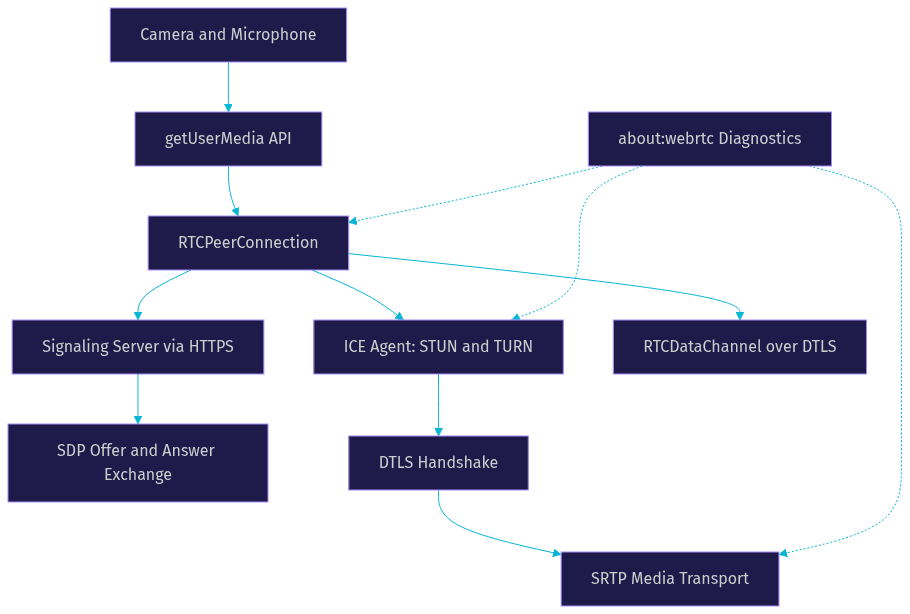
RTCPeerConnection in Firefox manages the full connection lifecycle: offer and answer creation, ICE candidate gathering, DTLS handshake, and SRTP media transport. Firefox's ICE implementation is mature and exposes complete trickle-ICE support, meaning you can add remote candidates before or after setting the remote description without ordering issues. Codec negotiation follows the browser's internal preference order, which historically favored VP8 over VP9 for hardware-compatibility reasons, a difference from Chrome that occasionally surprises developers who assume VP9 everywhere. Firefox also supports the modern setCodecPreferences mechanism for guiding negotiation, and its getStats implementation returns a rich, spec-compliant statistics tree covering candidate pairs, transport, and per-track inbound and outbound metrics.
RTCDataChannel in Firefox
RTCDataChannel in Firefox supports both reliable ordered and unreliable unordered delivery modes over SCTP, with full binary transfer support. Firefox's implementation is interoperable with Chrome and Safari, and it handles large messages well, though developers should still chunk messages above roughly 16 KB to stay within SCTP limits across all browsers.
Firefox-Specific Enhancements
Firefox ships tooling that no other browser matches, and knowing it changes how you debug real-time applications.
The about:webrtc Diagnostic Page
The about:webrtc page is Firefox's built-in WebRTC dashboard, accessible by typing that address in the URL bar. It lists every active and recent RTCPeerConnection with its ICE state, SDP offer and answer text, negotiated codec list, and a full statistics table per connection. It also includes an ICE restart button per connection, letting you force a fresh ICE negotiation on a live call without touching your application code. For troubleshooting a call that works in Chrome but fails in Firefox, this single page usually answers the question faster than any external packet capture.
Detailed TURN and ICE UI
Firefox's diagnostic page also renders every ICE candidate pair with its local and remote candidate types, including host, server-reflexive, and relayed candidates. This makes it trivial to confirm whether your TURN server is actually being used: if the selected candidate pair shows a relayed candidate on either side, TURN is in play. Firefox additionally lets you configure STUN and TURN servers through its connection settings UI, a feature aimed at users behind restrictive firewalls rather than developers, but useful for testing.
Security Controls
All WebRTC media in Firefox is encrypted by default: DTLS secures the key exchange and SRTP secures the media, with no option to disable encryption. Data channels use DTLS directly. Firefox also applies its site-permission sandbox to media devices, so a page cannot silently enumerate or capture media without an explicit grant, and camera and microphone indicators appear in the browser chrome whenever a device is live.
Compatibility and Interoperability
WebRTC in Firefox is interoperable with Chrome, Edge, and Safari at the protocol level, because ICE, DTLS, SRTP, and SDP are standardized. The friction lives in the details.
Codec Support Differences
Firefox supports Opus for audio and VP8, VP9, H.264, and AV1 for video, giving it a codec profile close to Chrome's. The practical difference is preference order: Chrome has historically preferred VP9 and later AV1 for send, while Firefox's default preference leaned toward VP8 for broad compatibility. With setCodecPreferences now supported in Firefox, you can align both sides explicitly. AV1 is available for decode and, on capable hardware, encode, but expect higher CPU use at scale.
SDP Edge Cases
Firefox generates SDP that is spec-compliant but not identical to Chrome's. Notable differences include how Firefox orders media sections, its handling of the direction attribute for inactive tracks, and its stricter rejection of malformed SDP lines that Chrome tolerates. The classic failure mode is a server-side SDP munging layer written against Chrome's SDP shape, which then breaks Firefox sessions. The safe rule: never modify SDP after creating an offer or answer, and if you must transform SDP, do it against the specification rather than against one browser's output.
Data Channel Compatibility
RTCDataChannel interoperates reliably across Firefox, Chrome, Edge, and Safari. The main cross-browser pitfall is message size: SCTP implementations differ in maximum message size, so keeping individual messages under 16 KB, or implementing chunking, avoids silent failures on large transfers.
Debugging and Performance Tuning
Diagnosing WebRTC in Firefox follows a repeatable process: inspect the connection state, read the statistics, then correlate with network conditions.
Using about:webrtc Step by Step
Start by opening about:webrtc while your application has an active call. Locate the connection in the list and check its ICE state first: a connection stuck in checking usually means a TURN configuration problem, while failed means no candidate pair succeeded at all. Next, read the selected candidate pair to confirm the network path, then scan the negotiated codec list to verify the browser actually negotiated the codec you intended. Finally, open the statistics table and look at the inbound and outbound RTP sections for frame rate, bitrate, and packet loss trends over the session. If you need a fresh negotiation, use the ICE restart button and watch the candidate pairs regenerate.
Console Logging and Network Tracing
Firefox can log its internal WebRTC state machine to the browser console. When enabled through Firefox's developer settings, the logs show ICE agent transitions, candidate gathering results, DTLS handshake progress, and codec negotiation decisions, each timestamped. For deeper analysis, the about:webrtc page offers a save-to-file option for the full connection dump, which you can attach to bug reports or compare between browsers. For network-level tracing, Firefox's developer tools network panel shows signaling traffic, while the media itself flows peer-to-peer and must be diagnosed through the statistics view instead.
Performance Metrics to Monitor
Three metrics carry most of the diagnostic weight. Round-trip time on the selected candidate pair should stay under roughly 150 milliseconds for conversational quality; sustained values above that indicate a routing or TURN-relay problem. Jitter above 30 milliseconds degrades audio playout and forces the jitter buffer to grow, adding delay. Packet loss above 2 percent becomes audible and visible, and above 5 percent usually requires forward error correction or a bitrate reduction. Firefox's getStats exposes all three, and its network-adaptive behavior will already be reducing bitrate as loss climbs, so a falling outbound bitrate alongside rising loss is the signature of congestion, not a bug.
The diagram below shows how a WebRTC session in Firefox flows from device capture through negotiation to media transport, with the Firefox-specific modules highlighted:
Best Practices for Production
Shipping WebRTC that works reliably in Firefox comes down to a handful of disciplined habits.
Permission Handling
Request media access only in response to a user action, never on page load, because Firefox's permission prompt is more likely to be dismissed when it appears without context. Show your own pre-prompt UI explaining why the camera is needed, then call getUserMedia. Handle denial gracefully by detecting the permission error and offering a device-free fallback such as audio-only or text chat, and link users to Firefox's site permissions panel to re-enable access after a denial.
Codec and Bandwidth Adaptation
Prefer Opus for audio in every scenario; it is universally supported and handles both music and speech well. For video, negotiate VP8 or VP9 as the safe baseline and treat AV1 as an enhancement for capable devices, using explicit codec preferences rather than relying on each browser's default order. Enable simulcast when multiple receivers are involved so the sending side can adapt per viewer, and let the browser's congestion control reduce bitrate rather than fighting it with fixed resolution settings.
Security Hardening
Serve your application exclusively over HTTPS, since Firefox restricts getUserMedia to secure contexts. Configure a Content Security Policy that limits script and connection origins, and validate all signaling messages server-side. WebRTC media is already encrypted in transit, but if your application requires end-to-end privacy independent of the transport, use insertable streams to apply your own encryption layer before frames leave the sender. Finally, scope your TURN credentials server-side with short-lived credentials rather than embedding static ones in client code.
Recent Updates and Roadmap
Firefox's 2025 and 2026 releases have focused on AV1 maturity, improved hardware encoding, better simulcast behavior for multi-party calls, and continued alignment with the WebRTC 1.0 specification including codec preference control. Mozilla has also been iterating on the about:webrtc experience, making the diagnostic dump more complete and easier to export. The practical takeaway is that Firefox is no longer a compatibility afterthought: it is a fully capable WebRTC platform with first-class diagnostics.
If managing all of this per-browser behavior sounds like work you would rather skip, that is exactly the problem VideoSDK solves: its SDKs handle signaling, TURN fallback, codec negotiation, and network-adaptive streaming across Firefox, Chrome, Edge, and mobile platforms, with code samples for every major framework.
Definitions Glossary
WebRTC: A standardized browser API and protocol set for real-time peer-to-peer audio, video, and data exchange, implemented independently by Firefox on the Gecko engine.
getUserMedia: The browser API that requests camera and microphone access, gated in Firefox by an origin-scoped permission prompt with persistent denial memory.
RTCPeerConnection: The API object that manages the WebRTC connection lifecycle in Firefox, including SDP negotiation, ICE candidate gathering, and encrypted media transport.
about:webrtc: Firefox's built-in diagnostic page showing every peer connection's ICE state, SDP, codecs, statistics, and candidate pairs, with an ICE restart control.
ICE: The Interactive Connectivity Establishment framework that finds a working network path between peers, using host, STUN-discovered, and TURN-relayed candidates.
TURN: A relay server that forwards WebRTC media when direct peer-to-peer connectivity fails, such as behind strict corporate firewalls.
Key Takeaways
- Firefox implements the full WebRTC 1.0 API surface independently of Chromium, so codec preferences, SDP generation, and statistics differ from Chrome in ways that matter in production.
- The about:webrtc page gives Firefox the best built-in WebRTC diagnostics of any browser, including per-connection ICE state, candidate pairs, codecs, and an ICE restart button.
- All WebRTC media in Firefox is encrypted by default through DTLS and SRTP, with no option to disable it.
- The most common Firefox interoperability failures come from server-side SDP munging written against Chrome's SDP shape and from assuming Chrome's codec preference order.
- For teams that want cross-browser WebRTC without managing these differences, VideoSDK's SDKs handle signaling, TURN, and codec negotiation across Firefox, Chrome, Edge, and mobile.
Conclusion
WebRTC in Firefox is mature, secure, and unusually well-instrumented. The same three APIs you use everywhere work here, but Firefox's independent implementation means the details, codec order, SDP shape, permission behavior, reward attention. Use about:webrtc as your first stop when a session misbehaves, keep your SDP handling spec-clean, and monitor round-trip time, jitter, and packet loss as your core health metrics. And if you would rather ship features than debug ICE state machines, try VideoSDK's video calling SDK, which includes a free tier to get you started at app.videosdk.live/login. What are you building with WebRTC in Firefox? Drop a comment, I'd love to hear what kind of real-time use case you're working on.
Free $20 Balance for AI Voice Agents & Video Calls
FAQ