


A WebRTC client is the endpoint application that initiates, negotiates, and maintains peer-to-peer real-time audio, video, and data connections using the WebRTC protocol suite. It handles media capture, encoding, ICE candidate gathering, and signaling coordination, typically running in a browser or mobile app. VideoSDK provides production-ready WebRTC client SDKs across 10+ platforms that abstract this complexity into simple meeting room APIs, letting developers ship real-time communication without managing raw peer connections.
Building a WebRTC client from scratch teaches you exactly how fragile real-time media can be. Over 80% of developers who attempt raw WebRTC implementations abandon them for managed SDKs within the first month, according to practitioner reports across developer communities. The reason is straightforward: signaling, NAT traversal, and adaptive bitrate management each demand deep expertise that has nothing to do with your actual product.
This guide covers everything from core WebRTC client architecture to library selection, React integration, advanced features like WHIP and WHEP, and production troubleshooting. By the end, you will understand what a WebRTC client does under the hood and how to decide whether to build one yourself or use a managed solution like VideoSDK's React SDK.
What is a WebRTC client?
A WebRTC client is defined as the software endpoint that participates in a WebRTC session, responsible for capturing local media, negotiating connection parameters with remote peers, and sending or receiving encrypted audio, video, and data streams. The client runs on user devices, typically inside a web browser, mobile application, or desktop runtime like Electron. According to the W3C WebRTC specification, the client-side API surface includes peer connection management, media device access, and data channel operations, all operating over SRTP and DTLS for transport security.
A WebRTC client works by first accessing local media devices, then exchanging session description protocol messages through a signaling channel, gathering ICE candidates to discover viable network paths, and finally establishing a direct or relayed peer connection. VideoSDK provides a complete WebRTC client implementation through its JavaScript SDK and platform-specific SDKs, wrapping these low-level operations into room-based APIs where participants join a shared meeting space rather than negotiating individual peer connections.
Core components of a WebRTC client
Every WebRTC client implementation relies on four foundational components that work together to establish and maintain real-time communication. The RTCPeerConnection object manages the full connection lifecycle, including codec negotiation, encryption setup, and bandwidth estimation. MediaStream objects represent the audio and video tracks captured from local devices or received from remote peers. The ICE framework handles network path discovery by gathering candidates from host addresses, STUN server reflections, and TURN server relays. Signaling coordinates the exchange of session descriptions and ICE candidates between peers, though the WebRTC specification deliberately leaves the signaling transport unspecified, giving developers flexibility to use WebSockets, HTTP, SIP, or any messaging layer.
How a WebRTC client differs from a server
A WebRTC client handles endpoint responsibilities: media capture, encoding, sending, and rendering. A WebRTC media server, by contrast, operates as an intermediary that routes, mixes, records, or transcodes streams between multiple participants. In a pure peer-to-peer topology, two WebRTC clients connect directly without a server in the media path, though signaling still requires a server. In production scenarios with three or more participants, a Selective Forwarding Unit media server receives each client's stream and forwards the appropriate tracks to other clients, scaling far better than mesh topologies. VideoSDK's cloud infrastructure provides this SFU layer automatically, so your WebRTC client only needs to publish and subscribe to tracks within a room, not manage multi-peer routing logic.
Choosing a WebRTC client library
Selecting the right WebRTC client library determines your development velocity, platform reach, and maintenance burden for years to come. The wrong choice means fighting upstream API changes, missing platform features, and debugging signaling edge cases that library maintainers have already solved.
Criteria for selecting a WebRTC client
Platform coverage is the first filter: your library must support every platform your product targets, including web, iOS, Android, and desktop. TypeScript support matters because real-time communication code is inherently stateful and event-driven, and type safety catches signaling state bugs that would otherwise surface as runtime failures during production calls. API ergonomics determine how quickly your team can implement features like screen sharing, recording, and simulcast without reading the full WebRTC specification. Community activity signals long-term viability: check GitHub commit frequency, open issue resolution time, and whether the library tracks browser WebRTC API changes. Licensing affects commercial use, so verify whether the library uses MIT, Apache 2.0, or a more restrictive license. Finally, evaluate whether the library handles production concerns like reconnection logic, bandwidth adaptation, and TURN server fallback, or whether you will need to build those yourself.
Popular WebRTC client options
Several WebRTC client libraries serve different niches. Mediasoup-client pairs with the mediasoup SFU server and provides fine-grained control over transport and producer and consumer lifecycle, making it popular for custom conferencing stacks. Whip-whep-client focuses on HTTP-based WebRTC ingestion and egress, ideal for broadcasting workflows. Telnyx's WebRTC client integrates with their telephony platform for SIP-to-WebRTC bridging. KPStreams offers a lightweight client for streaming use cases. For most product teams, however, a full-featured SDK like VideoSDK's Prebuilt UI Kit eliminates the need to evaluate individual libraries by providing a complete WebRTC client with UI, recording, and chat built in.
Building a basic WebRTC client without a full SDK
Building a WebRTC client from browser APIs alone is the best way to understand what happens beneath the abstraction layer of any SDK. The process involves accessing media devices, creating a peer connection, exchanging signaling messages, and handling ICE candidates until a connection is established.
Browser APIs for a WebRTC client
The WebRTC client browser API surface centers on three primary interfaces. The navigator.mediaDevices object provides access to cameras, microphones, and screen capture through the getUserMedia and getDisplayMedia methods. RTCPeerConnection is the core object that manages the connection between your client and a remote peer, handling codec negotiation, encryption, and media stream routing. RTCDataChannel enables bidirectional text and binary data transfer between peers, useful for chat messages, file sharing, and game state synchronization. These APIs are available in all modern browsers, but their behavior varies subtly across Chrome, Firefox, and Safari, particularly around codec support and screen sharing permissions.
Signaling strategies for a WebRTC client
WebRTC client signaling remains intentionally unspecified by the standard, meaning you choose how peers exchange session descriptions and ICE candidates. The simplest approach for testing is manual copy-paste, where you copy the SDP offer from one client and paste it into another, useful for learning but impractical for production. WebSocket-based signaling is the most common production approach, where a lightweight server relays messages between clients in real time. SIP-based signaling integrates WebRTC clients with existing VoIP infrastructure, bridging traditional telephony with browser-based communication. The key principle is that the WebRTC client itself stays agnostic to the signaling transport: it generates offers and answers, then hands them to whatever messaging layer you provide. VideoSDK handles this entirely within its room architecture, where the SDK manages signaling through VideoSDK's cloud infrastructure transparently.
Managing ICE, STUN, and TURN for a WebRTC client
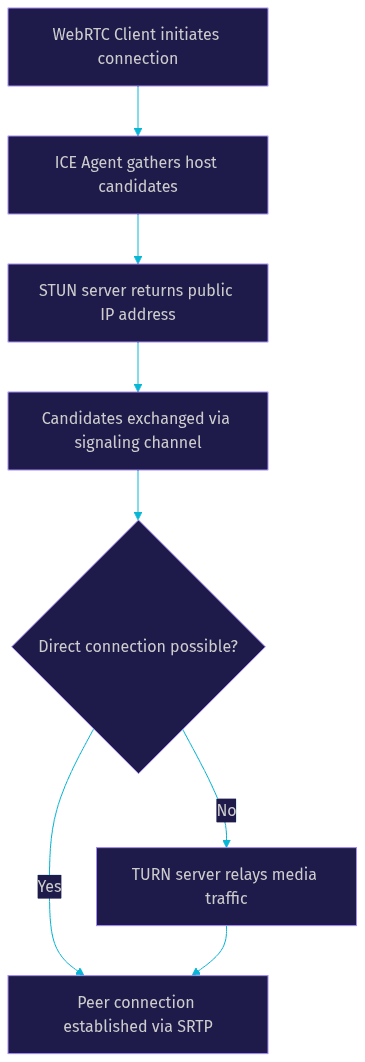
ICE candidate gathering is where most raw WebRTC implementations fail. The ICE agent on your WebRTC client collects three types of candidates: host candidates from local network interfaces, server-reflexive candidates obtained from STUN servers that reveal the client's public IP address, and relay candidates from TURN servers that act as media relays when direct connectivity is impossible. The client exchanges these candidates through the signaling channel, and both peers attempt to connect using the gathered candidates in priority order. STUN servers work for roughly 80% of connections where NAT allows direct peer-to-peer paths. TURN servers are essential for the remaining cases involving symmetric NAT, corporate firewalls, or restrictive network policies. Without TURN server fallback, your WebRTC client will fail to connect for a significant portion of users on restrictive networks.
Integrating a WebRTC client into a modern app
Integrating a WebRTC client into a production application requires careful attention to component lifecycle, state management, and platform-specific behavior. The integration pattern you choose affects everything from reconnection reliability to memory usage during long calls.
React integration patterns for a WebRTC client
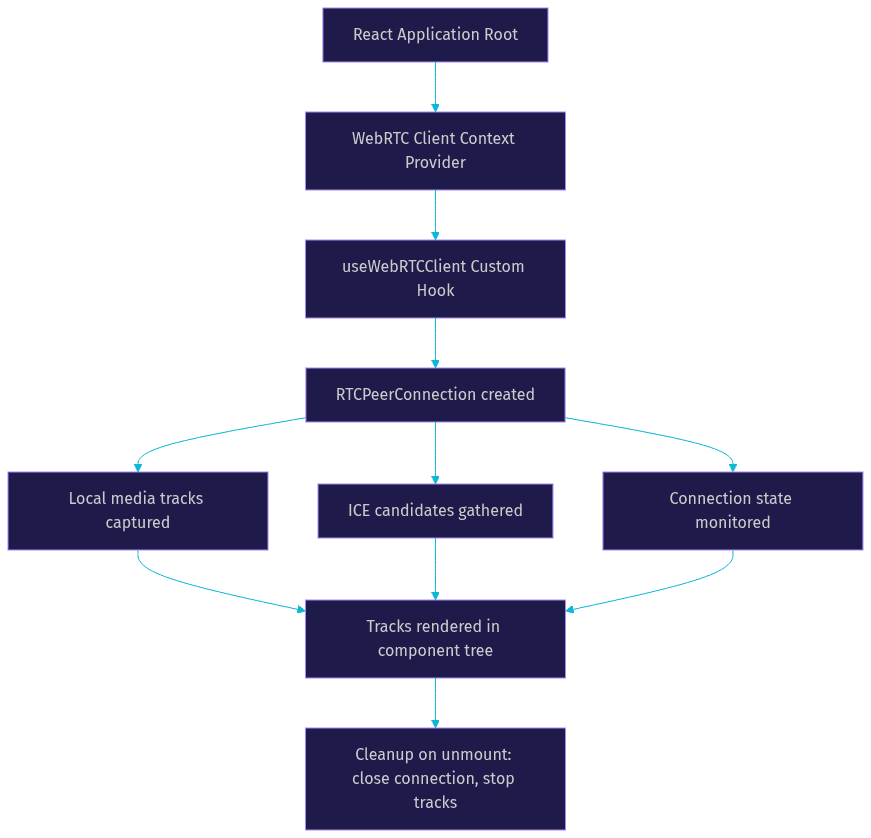
React's component lifecycle maps well to WebRTC client management when you use hooks and context providers. A custom hook wraps the peer connection lifecycle, exposing connection state, local media tracks, and remote participant tracks as reactive state values. A context provider at the application root holds the WebRTC client instance, preventing unnecessary re-initialization when components unmount and remount. Cleanup is critical: when a component unmounts, the hook must close the peer connection, stop all media tracks, and remove event listeners to prevent memory leaks and zombie connections. The VideoSDK React SDK provides this pattern out of the box through its useMeeting and useParticipant hooks, which manage the full WebRTC client lifecycle reactively.
React Native and Electron considerations for a WebRTC client
React Native requires a native WebRTC module because the JavaScript runtime does not include browser WebRTC APIs. Permission handling differs significantly from web: on iOS, you must request camera and microphone permissions through Info.plist entries and runtime permission prompts, while Android requires manifest declarations and runtime permission requests. Background call handling on mobile platforms demands native module integration to keep the media connection alive when the app is backgrounded. Electron applications can use the browser WebRTC implementation built into Chromium, but desktop-specific quirks include screen sharing permission prompts on macOS, audio device selection differences across operating systems, and GPU acceleration behavior that varies between Windows, Mac, and Linux. The VideoSDK React Native SDK handles these platform differences natively, so your WebRTC client code stays consistent across web and mobile.
Security and privacy best practices for a WebRTC client
WebRTC client security starts with transport encryption, which WebRTC provides by default through DTLS for data channels and SRTP for media. End-to-end encryption goes further by encrypting media at the source so that not even the media server can decrypt it, though this requires key exchange logic that the WebRTC API does not provide natively. Token handling is critical: never embed API secrets in client-side code, always generate short-lived tokens server-side, and rotate them before expiry to prevent session hijacking. Content Security Policy headers should restrict script sources and prevent injection attacks that could intercept media streams. Certificate pinning in mobile WebRTC clients prevents man-in-the-middle attacks by validating the server's TLS certificate against a known fingerprint. VideoSDK supports E2EE and token-based authentication, with server-side token generation documented in the VideoSDK authentication guide.
Advanced features you can add to a WebRTC client
Once your WebRTC client handles basic audio and video, advanced features differentiate your product and improve user experience. These features build on the same peer connection and media track infrastructure but require additional negotiation and state management.
Screen sharing, recording, and simulcast for a WebRTC client
Screen sharing extends your WebRTC client by capturing the display as an additional video track through the getDisplayMedia browser API. The client negotiates this track alongside camera and microphone tracks, and remote peers render it in a separate video element. Recording can happen client-side using the MediaRecorder API, which captures the local stream to a compressed file, or server-side through an SFU that composites multiple participants into a single recording. Simulcast sends multiple encoded versions of the same video track at different resolutions and bitrates, allowing the media server to forward the appropriate quality to each receiver based on their bandwidth. Enabling simulcast requires specifying multiple encoding parameters when the track is added to the peer connection, and the server must support simulcast ingestion. VideoSDK supports all three features natively, including participant recording and custom video tracks for screen share.
WHIP and WHEP for WebRTC client streaming
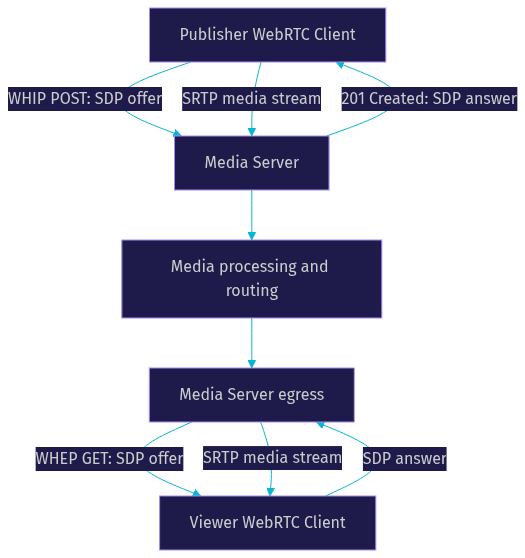
WHIP (WebRTC HTTP Ingestion Protocol) and WHEP (WebRTC HTTP Egress Protocol) simplify WebRTC client streaming by replacing custom signaling with standard HTTP requests. A WebRTC client sends an SDP offer to a WHIP endpoint via HTTP POST, receives the SDP answer in the response, and begins streaming media to the server. Viewers connect through WHEP by sending an HTTP GET request that returns an SDP offer, which the viewer answers to begin receiving media. This approach eliminates the need for WebSocket signaling servers for one-to-many streaming scenarios. WHIP and WHEP are particularly useful for broadcasting live events where low latency matters but bidirectional communication is not required. As of 2026, WHIP and WHEP are supported by major media servers including MediaMTX, Janus, and LiveKit, making them a viable alternative to RTMP for modern streaming pipelines.
Voice activity detection and bandwidth adaptation for a WebRTC client
Voice activity detection lets your WebRTC client determine when a participant is speaking, enabling features like active speaker detection and automatic muting of silent tracks. The WebRTC API provides voice activity data through the getStats method, which exposes audio energy levels and speaking state indicators. Bandwidth adaptation keeps your WebRTC client functional on variable networks by dynamically adjusting video bitrate and resolution based on available bandwidth. The peer connection's bandwidth estimation algorithm monitors packet loss, round-trip time, and available bitrate, then signals the encoder to adjust. You can influence this through sender parameters, setting maximum and minimum bitrates to prevent quality from dropping too low or consuming too much bandwidth on strong connections. VideoSDK's network-adaptive streaming handles this automatically, adjusting bitrate and resolution in real time based on each participant's connection quality.
Performance and troubleshooting for a WebRTC client
WebRTC client performance issues manifest as frozen video, robotic audio, connection drops, or complete call failure. Diagnosing these requires understanding the metrics that WebRTC exposes and knowing which fixes address each failure mode.
Measuring latency, jitter, and packet loss in a WebRTC client
The getStats API is your primary diagnostic tool for WebRTC client performance. It exposes per-track statistics including round-trip time, jitter buffer delay, packets lost, packets sent, and bytes received. Latency in a WebRTC client comes from several sources: capture latency from the camera, encoding latency from the codec, network transit time, decoding latency, and render latency. Jitter, the variation in packet arrival times, is smoothed by the jitter buffer but causes audio artifacts when it exceeds the buffer depth. Packet loss above 2% typically causes noticeable video degradation, and above 5% causes significant audio issues. Third-party tools like the WebRTC internals dashboard in Chrome provide real-time graphs of these metrics, and webrtcstats.com offers community benchmarks for comparison. For production monitoring, VideoSDK provides session analytics through its REST API, exposing call quality metrics without requiring client-side instrumentation.
Common pitfalls and fixes for a WebRTC client
NAT traversal failures are the most common WebRTC client issue, causing connections that work on some networks but fail on others. The fix is ensuring TURN server coverage for restrictive networks, not just STUN. Token expiry causes sudden disconnections in production: implement token refresh logic that generates a new token before the current one expires, typically at 80% of the token lifetime. Browser incompatibilities between Chrome, Safari, and Firefox affect codec selection, screen sharing API behavior, and ICE candidate timing. Test your WebRTC client across all target browsers early in development. Camera and microphone permission denials on mobile platforms require graceful fallback UI that guides users to their device settings. ICE connection state transitions from connected to disconnected indicate network interruptions: implement reconnection logic that attempts to re-establish the connection before tearing it down completely. VideoSDK handles all of these scenarios in its SDK layer, with automatic reconnection, TURN fallback, and cross-browser compatibility tested across the platform matrix.
Future trends for WebRTC clients
The WebRTC client landscape is evolving rapidly as AI, edge computing, and new protocols reshape what real-time communication can do.
AI-enhanced media, 5G edge, and emerging protocols for WebRTC clients
AI-enhanced media processing is moving into the WebRTC client layer itself, with features like real-time background blur, noise suppression, and language translation running on-device using WebGPU and WebAssembly. According to benchmarks from Artificial Analysis, on-device speech processing latency has dropped below 50ms on modern hardware, making real-time AI voice agents feasible directly in the browser. 5G edge computing reduces the first-hop latency for mobile WebRTC clients by processing media at edge nodes closer to the user, with major cloud providers deploying WebRTC-compatible media nodes in 2026. Emerging protocols like WebTransport and QUIC are being explored as alternatives to the WebRTC transport stack, promising lower connection setup times and better multiplexing. VideoSDK's AI Voice Agent SDK already integrates these trends, connecting LLM-powered voice agents to WebRTC rooms with sub-second response times, and the platform continues to track protocol-level innovations as they mature.
Definitions Glossary
RTCPeerConnection: The core WebRTC API object that manages the connection between two peers, handling codec negotiation, encryption, and media stream routing. Every WebRTC client creates at least one RTCPeerConnection per remote peer.
ICE (Interactive Connectivity Establishment): The framework that allows a WebRTC client to discover viable network paths to a remote peer by gathering host, server-reflexive, and relay candidates. ICE is the mechanism that makes NAT traversal possible.
STUN Server: A server that helps a WebRTC client discover its public IP address and port as seen from the internet. STUN works for approximately 80% of network configurations where NAT allows direct peer connections.
TURN Server: A media relay server that forwards traffic between WebRTC clients when direct peer-to-peer connectivity fails. TURN is essential for users behind symmetric NAT, corporate firewalls, or restrictive network policies.
WHIP/WHEP: HTTP-based protocols for WebRTC media ingestion and egress. WHIP lets a client publish media via HTTP POST, while WHEP lets a viewer receive media via HTTP GET, eliminating the need for custom signaling in streaming scenarios.
Simulcast: A WebRTC technique where the client sends multiple encoded versions of the same video track at different resolutions and bitrates, allowing the media server to forward the appropriate quality to each receiver based on their bandwidth.
SFU (Selective Forwarding Unit): A media server topology where the server receives each participant's stream and forwards selected tracks to other participants. VideoSDK uses an SFU architecture to scale multi-participant calls efficiently.
Key Takeaways
- A WebRTC client is the endpoint application responsible for media capture, signaling, ICE negotiation, and encrypted stream transmission, running in browsers, mobile apps, or desktop runtimes.
- Building a WebRTC client from raw browser APIs is valuable for learning but impractical for production due to NAT traversal complexity, cross-browser inconsistencies, and the maintenance burden of signaling and reconnection logic.
- ICE candidate gathering with STUN and TURN server fallback is the single most critical reliability factor for a WebRTC client, without which connections fail on restrictive networks.
- React integration requires careful lifecycle management through hooks and context providers, with explicit cleanup of peer connections and media tracks to prevent memory leaks.
- VideoSDK's multi-platform SDKs provide a complete WebRTC client implementation with room-based architecture, network-adaptive streaming, built-in recording, and cross-platform support across 10+ platforms including React, React Native, Flutter, and iOS.
Conclusion
Building a WebRTC client from scratch gives you deep appreciation for the engineering that goes into every video call, but production reliability demands more than browser APIs alone can provide. The signaling, ICE negotiation, bandwidth adaptation, and cross-platform compatibility layers each represent weeks of engineering that managed SDKs solve on day one. VideoSDK's video calling SDKs wrap the full WebRTC client stack into room-based APIs with sub-300ms latency, automatic reconnection, and network-adaptive streaming across 10+ platforms. You can start building for free with VideoSDK's free tier at app.videosdk.live/login, or explore code samples to see real integration patterns. What are you building with WebRTC? Drop a comment below, I would love to hear what kind of real-time communication use case you are working on.
Free $20 Balance for AI Voice Agents & Video Calls
FAQ