


A video chat API is a set of programmatic interfaces that allows developers to embed real-time video and audio calling into applications without building the underlying WebRTC infrastructure from scratch. VideoSDK provides a robust video chat API with sub-300ms latency, cross-platform SDKs, and a Prebuilt UI Kit for rapid deployment. You can start building by exploring the VideoSDK React SDK quick-start guide.
Real-time video is no longer a novelty. It is an essential feature for modern applications, from telehealth platforms to remote collaboration tools. Users expect high-quality, low-latency video interactions embedded directly within the apps they already use. A video chat API provides the programmatic interface developers need to embed real-time video and audio calling directly into their apps. This bypasses the immense complexity of building WebRTC infrastructure from scratch, handling signaling, media servers, and network traversal. By the end of this article, you will understand the core concepts of a video chat API, how to evaluate providers based on critical technical features, and the exact steps required to integrate one into your application using VideoSDK.
Understanding the Video Chat API Landscape
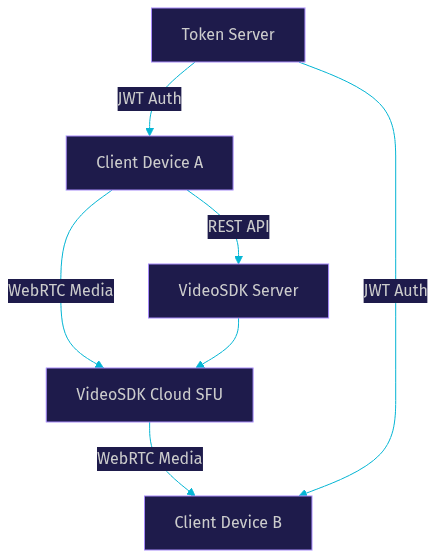
A video chat API operates on a few core concepts that abstract the underlying WebRTC protocols. The fundamental unit is the Room, a virtual space where participants connect and share media streams. Each participant has their own audio and video tracks, which represent the actual media flowing through the system. Access to a room is controlled by a meeting token, a short-lived credential generated server-side to authenticate users and define their permissions.
Most modern video chat APIs rely on WebRTC, an open-source project that provides browsers and mobile applications with real-time communications via simple application programming interfaces. According to the W3C WebRTC specifications, WebRTC handles peer connections, media devices, and data channels natively. However, managing WebRTC directly at scale requires significant infrastructure. Direct peer-to-peer connections work for one-to-one calls but fail for group calls due to client bandwidth limitations. This is where Selective Forwarding Units (SFUs) come in. An SFU is a media server that receives a single media stream from each participant and forwards it to all other participants. This drastically reduces upload bandwidth for the sender. VideoSDK abstracts this complexity, providing a cloud-based SFU that handles media routing, network adaptation, and global distribution automatically.
Key Features to Evaluate in a Video Chat API
When evaluating a video chat API, several technical features separate a basic prototype from a production-ready system capable of handling real user load.
Low-latency media transport is critical. Aim for a provider that guarantees sub-300ms latency for real-time interactivity. Higher latency creates awkward pauses and makes natural conversation difficult. VideoSDK is optimized for sub-300ms latency, ensuring conversations feel immediate.
Network-adaptive streaming is equally important. Users will join calls from varying network conditions, from fiber connections to spotty 4G. The API should automatically adjust bitrate and resolution based on real-time bandwidth detection to prevent call degradation. VideoSDK's network-adaptive streaming monitors packet loss and jitter, dynamically scaling video quality to maintain a smooth experience.
Cross-platform SDK coverage dictates where your app can run. A robust provider offers SDKs for React, JavaScript, Flutter, React Native, Android, iOS, and even Unity or Python. VideoSDK supports over 10 platforms, ensuring broad coverage whether you are building a web app, a mobile app, or an IoT device. You can explore the VideoSDK React Native SDK or Flutter SDK for mobile development.
Developers must also choose between a Prebuilt UI Kit and custom UI. A Prebuilt UI Kit allows you to embed a fully functional video call interface with minimal configuration, ideal for rapid prototyping or when UI is not a primary differentiator. Custom UI provides full control over the layout, necessary for branded experiences or specialized layouts like live shopping. VideoSDK offers both options, detailed in the Prebuilt SDK guide.
Developers should also understand the distinction between a standard video chat API and Interactive Live Streaming (ILS). A video chat API is optimized for symmetric group calls where everyone can speak. ILS is optimized for one-to-many broadcasts with sub-second latency, allowing audience members to be promoted to speakers. VideoSDK supports both modes natively, allowing you to switch a room from a video call to a live stream dynamically.
Additional features like recording, real-time transcription, and collaborative tools (chat, polls, whiteboard) add significant value. Recording allows you to archive meetings for compliance or replay. Transcription enables accessibility and searchability. Security cannot be overlooked. Look for token-based authentication, End-to-End Encryption (E2EE), and geo-fencing to ensure data sovereignty. Finally, ensure the API can scale to your needs, supporting 100k+ concurrent users via a global edge network.
Top Video Chat API Providers – Quick Comparison
Choosing the right provider depends on your specific use case, platform requirements, and budget. Here is a quick comparison of major players in the 2026 landscape.
VideoSDK offers broad SDK coverage, a Prebuilt UI Kit, and interactive live streaming with sub-second latency. It is ideal for developers who want a quick start and comprehensive features without managing infrastructure. The platform excels in providing both RTC and AI capabilities.
Stream provides a robust chat and video API, strong for apps already using their chat infrastructure. Their video offering is solid but may lack the breadth of platform support found in VideoSDK.
Zoom Video SDK is reliable for enterprise-grade video but can be heavier to integrate and lacks the flexible interactive live streaming modes optimized for modern social apps.
Tencent TRTC offers massive scale, particularly strong in the Asian market. However, documentation and developer experience outside of that region can be challenging.
LiveKit is a popular open-source option built on WebRTC, offering flexibility for self-hosting but requiring significant infrastructure management and DevOps expertise.
| Provider | Platform Support | Free Tier | Max Participants | Latency Claim | Best For |
|---|---|---|---|---|---|
| VideoSDK | React, JS, Flutter, RN, Android, iOS, Unity, Python | Yes | 100k+ | Sub-300ms | Rapid deployment, broad SDK coverage, ILS |
| Stream | JS, iOS, Android, Flutter, React Native | Yes | 10k+ | Sub-500ms | Apps needing integrated chat and video |
| Zoom Video SDK | JS, iOS, Android, Flutter, React Native | No | 1,000+ | Sub-500ms | Enterprise video, brand familiarity |
| Tencent TRTC | JS, iOS, Android, C++ | Yes | 100k+ | Sub-300ms | Massive scale, Asian market |
| LiveKit | JS, React, RN, Flutter, Android, iOS, Go, Python | Open Source | Varies | Sub-500ms | Self-hosted, open-source flexibility |
VideoSDK stands out for its balance of ease-of-use, extensive platform support, and advanced features like interactive live streaming and network-adaptive streaming. The VideoSDK pricing page offers transparent tiers suitable for startups and enterprises alike.
How to Integrate a Video Chat API into Your App
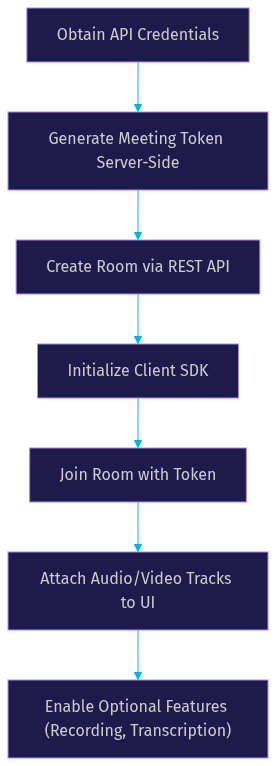
Integrating a video chat API involves a coordinated flow between your server and client application. Here is the step-by-step process to embed video calling using VideoSDK.
First, choose the SDK that matches your target platform. If you are building a web app, the React SDK or JavaScript SDK is appropriate. For mobile, select the React Native, Flutter, iOS, or Android SDK. Ensure you download or install the correct SDK version for your framework.
Second, obtain your API credentials from the provider dashboard. You will receive an API key and an API secret. Keep the secret secure on your server. Never commit it to your client-side code repository.
Third, generate a meeting token on your server. This token authenticates a participant's access to a room. It is a JWT (JSON Web Token) that contains your API key, a unique participant ID, and an expiration time. The token can also encode role-based permissions, such as whether the user is a host or a viewer. Never expose your API secret on the client side. Always generate tokens server-side. You can learn more about this in the VideoSDK authentication guide.
Fourth, create a room via the provider's REST API. Your server sends a request to the API endpoint, which returns a unique room ID. This room ID is what participants will join. You can also configure room settings at this stage, such as enabling recording or setting a geographic region for the media server.
Fifth, initialize the client SDK on the front-end. Pass the meeting token and room ID to the SDK's initialization method. The SDK handles the WebRTC handshake, ICE candidate exchange, and media device access. The client connects to the VideoSDK cloud SFU.
Sixth, attach the audio and video tracks to your UI elements. The SDK provides hooks or methods that expose participant streams. You map these streams to video elements in your view. When attaching tracks, you must handle both the local participant's stream and remote participants' streams. The local stream is accessed immediately upon joining. Remote streams become available as other participants join the room. You need to manage the lifecycle of these streams, updating your UI when a participant joins, leaves, or toggles their camera. VideoSDK's hooks handle much of this state management automatically, but you are responsible for rendering the streams in your application's view hierarchy.
Finally, enable optional features. You can start recording, enable real-time transcription, or configure custom video tracks for screen sharing or virtual backgrounds. These features are typically controlled via SDK methods once the room is joined.
Production-Ready Best Practices
Moving from a local prototype to production requires careful attention to network reliability and security.
Always use TURN servers and automatic fallback. While WebRTC can use STUN servers for direct peer connections, corporate firewalls and symmetric NATs often block these connections. A TURN server relays media traffic when direct connection fails. VideoSDK includes TURN server support automatically, but if you are building custom infrastructure, this is non-negotiable. Without TURN, a percentage of your users will simply fail to connect.
Handle participant disconnect and reconnect gracefully. Network interruptions happen frequently on mobile devices. Your application should listen to SDK events for disconnection and attempt automatic reconnection. If reconnection fails, provide clear UI feedback to the user rather than leaving them staring at a frozen screen. VideoSDK provides event listeners for connection state changes that you can hook into.
Monitor network quality and switch resolutions dynamically. VideoSDK's network-adaptive streaming handles this automatically, but if you are managing custom tracks, you must implement logic to degrade video quality when packet loss increases. You can access network quality metrics through the SDK to build custom UI indicators.
Secure token handling is paramount. Use short-lived tokens and implement role-based access control. VideoSDK allows you to define roles (host, speaker, viewer) with specific permissions, ensuring only authorized users can share media or moderate the call. Regularly rotate your API secret if you suspect a compromise.
Consider geo-fencing for data sovereignty. Some industries, like healthcare and finance, have strict regulations about where media data can be processed and stored. VideoSDK allows you to restrict media traffic to specific geographic regions, ensuring compliance with local data protection laws. This is configured at the room creation stage via the REST API.
Deploy behind HTTPS and configure CORS correctly. WebRTC requires a secure context to access camera and microphone APIs. Ensure your web server uses HTTPS and that your CORS policy allows requests from your client domains. Browsers will block media access on insecure origins without exception.
Common Pitfalls & Troubleshooting
Even with a solid API, developers encounter common issues during integration and production.
Token expiry errors are frequent. If a user stays in a call longer than the token's lifespan, the connection drops. Generate tokens with an appropriate expiration time or implement a token refresh mechanism before expiry. A common pattern is to request a new token from the server when the SDK fires a token expiring event.
Media not starting is usually due to permission blocks. Ensure your app requests camera and microphone permissions clearly. On iOS, add the required permission strings to your Info.plist file. On Android, request runtime permissions before joining the call. On web, ensure the user has granted permissions in their browser settings and that no other application is exclusively using the camera.
High jitter on poor networks causes audio stutter and video freezing. Rely on network-adaptive streaming to mitigate this. If issues persist, consider enabling audio-only mode for users on extremely poor connections. You can also adjust the default bitrate settings to lower values for mobile networks.
Scaling limits can be hit if you are not using an edge-SFU architecture. VideoSDK uses a global edge network to distribute load, but if you are self-hosting, ensure your SFU infrastructure scales horizontally. Monitor CPU and bandwidth usage on your media servers closely.
Mobile developers face unique challenges. Backgrounding the app can cause the WebRTC connection to drop if not handled properly. You must explicitly manage the connection state when the app moves to the background, typically by pausing video tracks and maintaining an audio-only connection. Additionally, thermal throttling on mobile devices can degrade video quality over long calls. Monitor device temperature and reduce video resolution if necessary.
Debugging is easier when you use SDK event logs. VideoSDK provides detailed event listeners for connection state, participant join/leave, and media track status. Log these events to your console or a monitoring service to trace issues in production. The VideoSDK community on Discord is also a great resource for troubleshooting specific issues.
Real-World Use Cases
A video chat API powers diverse applications across industries.
In telehealth, a secure video consultation API allows doctors to see patients remotely. Features like E2EE and recording compliance are critical here. VideoSDK's secure infrastructure makes it a strong choice for telehealth video calling. Patients can join from a browser without installing software, lowering the barrier to care.
Live-shopping platforms use interactive live streaming to engage audiences. Hosts demonstrate products while viewers ask questions in real-time. VideoSDK's Interactive Live Streaming (ILS) mode supports this with sub-second latency, allowing real-time interaction that traditional HLS streaming cannot provide. This capability is explored further in the VideoSDK ILS documentation.
Remote team collaboration tools rely on video conferencing APIs for daily standups and screen sharing. The ability to embed video directly into the workflow app, rather than switching to a separate tool, boosts productivity. Features like screen share, chat, and polls enhance the collaborative experience.
In-app customer support video allows agents to see a customer's issue directly. This reduces resolution time for complex technical problems. Integrating video into a support ticketing system provides a richer context than voice or text alone.
Definitions Glossary
Room: A virtual meeting space in a video chat API where participants connect and share media streams, identified by a unique room ID.
Participant: A user or AI agent connected to a room, with their own audio and video tracks.
Meeting Token: A JWT generated server-side that authenticates a participant's access to a room and defines their permissions.
WebRTC: An open-source project that provides web browsers and mobile applications with real-time communication via simple APIs.
SFU (Selective Forwarding Unit): A media server that receives a single media stream from each participant and forwards it to other participants, enabling scalable group calls.
Prebuilt UI Kit: A drop-in video calling interface provided by VideoSDK that requires minimal configuration to embed a working video call.
Key Takeaways
- A video chat API abstracts the complexity of WebRTC, allowing developers to embed real-time video quickly.
- Key features to evaluate include latency, network adaptation, cross-platform SDKs, and security.
- VideoSDK offers a comprehensive solution with broad SDK coverage, a Prebuilt UI Kit, and sub-300ms latency.
- Production readiness requires TURN servers, graceful reconnection handling, and secure token management.
- Real-world applications span telehealth, live shopping, remote collaboration, and customer support.
Conclusion
A dedicated video chat API is essential for any application requiring real-time video communication. Building WebRTC infrastructure from scratch is complex and resource-intensive. VideoSDK provides a robust, scalable, and developer-friendly platform to embed video chat seamlessly. With sub-300ms latency, cross-platform SDKs, and a generous free tier, it is an excellent choice for your next project. Try VideoSDK's free tier today by visiting app.videosdk.live/login or explore the quick-start guides to begin building. What are you building with VideoSDK? Drop a comment below, I would love to hear about your video chat use case.
Free $20 Balance for AI Voice Agents & Video Calls
FAQ