


Amazon Chime WebRTC is the real-time media transport layer powering the Amazon Chime SDK, enabling developers to embed audio, video, and screen sharing into web and mobile applications using standard WebRTC protocols. It provides AWS-managed signaling, TURN/STUN infrastructure, adaptive bitrate streaming, and global media region selection across JavaScript, React, iOS, and Android client libraries. Developers can build production-grade real-time communication experiences without managing their own media servers or signaling stacks.
Building real-time video applications that work reliably across networks, devices, and browsers remains one of the hardest problems in modern web development. Amazon Chime WebRTC addresses this by providing a managed real-time communication infrastructure built on standard WebRTC protocols, with AWS handling the signaling, media routing, and TURN/STUN complexity that typically takes months to engineer from scratch. Whether you are building a telehealth platform, a virtual classroom, or a customer support video service, understanding how Amazon Chime WebRTC works under the hood helps you make better architectural decisions. This guide walks through the architecture, media capabilities, network requirements, scaling strategies, and production best practices you need to ship a reliable RTC experience. If you are also evaluating alternative SDKs, VideoSDK's video calling API offers a comparable multi-platform solution with prebuilt UI components and sub-300ms latency.
Understanding Amazon Chime WebRTC Architecture
Amazon Chime WebRTC abstracts the complexity of raw WebRTC by providing a managed service where AWS handles signaling negotiation, media relay, and NAT traversal while developers interact with a high-level client SDK.
The architecture follows a client-server model where participant devices connect to AWS-hosted media services rather than establishing direct peer-to-peer connections. This design simplifies scaling because the media service handles fan-out, recording, and quality adaptation without requiring each client to manage multiple peer connections. According to the W3C WebRTC specification, standard WebRTC requires signaling, ICE candidate exchange, and SDP negotiation between peers. Amazon Chime SDK handles all of this server-side, exposing a simpler API surface where developers join sessions, publish tracks, and subscribe to remote streams.
Core Components
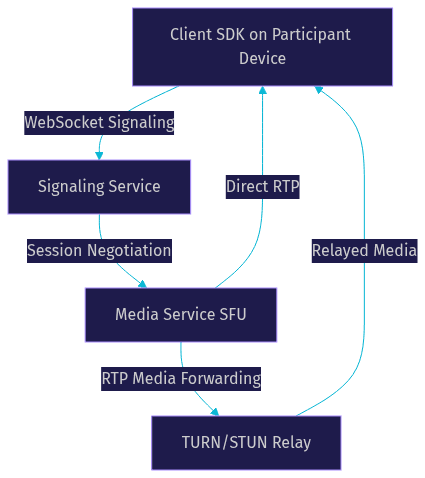
The Amazon Chime WebRTC stack consists of four primary components that work together to establish and maintain media sessions.
The client SDK runs on participant devices and manages local media capture, encoding, decoding, and rendering. It is available for JavaScript, React, iOS, Android, and React Native, with each platform exposing device controllers, session handlers, and audio-video controllers. The signaling service orchestrates session creation, participant joins and leaves, and media negotiation. It operates over WebSocket connections and handles SDP offer-answer exchanges transparently. The media service routes audio and video packets between participants using an SFU (Selective Forwarding Unit) architecture, which receives encoded media from each publisher and forwards it to subscribers without transcoding. The TURN/STUN infrastructure handles NAT traversal for participants behind restrictive firewalls, relaying media through AWS-hosted relay servers when direct UDP connectivity fails.
Media Session Types: Standard vs High-Definition
Amazon Chime WebRTC supports two distinct session types that differ in participant capacity, video resolution, and bitrate ceilings.
Standard sessions support up to 16 active participants with video and up to 100 audio-only participants. Video resolution caps at 720p with a maximum bitrate of approximately 1.4 Mbps per video stream. These sessions are optimized for typical meeting scenarios like team standups, customer support calls, and small group collaborations. High-definition sessions raise the ceiling to 1080p video with bitrates up to 2.5 Mbps per stream, though participant limits remain similar. High-definition mode is appropriate for scenarios where visual fidelity matters more than raw participant count, such as design reviews, medical imaging consultations, or broadcast-quality interviews.
The session type is selected at meeting creation time and cannot be changed mid-session. Developers should evaluate their use case requirements before committing, since high-definition sessions consume more bandwidth and encoding resources on participant devices.
Audio and Video Capabilities
Amazon Chime WebRTC provides configurable audio and video pipelines that adapt to device capabilities and network conditions, with support for industry-standard codecs and resolution tiers.
Audio Streams and Opus Codec
Audio in Amazon Chime WebRTC sessions uses the Opus codec exclusively, which is the mandatory audio codec in the WebRTC standard. Opus supports sample rates up to 48 kHz with both mono and stereo channel configurations. The Chime SDK typically operates audio at 48 kHz with a target bitrate of 32 kbps for mono speech and up to 64 kbps for stereo music sharing. Developers can adjust the audio bitrate through the audio profile configuration when creating a session, though the SDK applies sensible defaults optimized for speech.
The SDK also provides active speaker detection, which identifies the dominant speaker in a session and fires volume notification callbacks. This enables UI patterns like highlighting the active speaker in a gallery view or switching to a speaker-focused layout automatically. Echo cancellation, noise suppression, and automatic gain control are enabled by default and can be toggled through the device controller API.
Video Resolutions, Codecs, Simulcast and SVC
Video in Amazon Chime WebRTC supports resolutions from 180p up to 1080p, with the SDK automatically selecting an appropriate resolution based on the session type and available bandwidth. The supported video codecs include H.264, VP8, VP9, and AV1, though codec availability depends on the client platform and browser. Chrome and Firefox typically support VP8 and VP9, while Safari leans toward H.264. AV1 support is expanding across browsers in 2026 but is not yet universal.
Simulcast allows the publishing client to encode and send multiple resolution tiers of the same video stream simultaneously. The media service then selects the appropriate tier for each subscriber based on their downstream bandwidth and display size. This is critical for mixed-device environments where a participant on a mobile phone with limited bandwidth should receive a lower-resolution stream while a desktop participant receives full HD.
Scalable Video Coding (SVC) provides a similar adaptation mechanism but encodes multiple quality layers within a single stream, reducing upstream bandwidth compared to simulcast. The Chime SDK supports SVC with VP9 and AV1 codecs where available. Both simulcast and SVC operate transparently once enabled, with the media service handling layer selection per subscriber.
Content Sharing and Data Channels
Beyond live camera and microphone streams, Amazon Chime WebRTC provides content sharing for screen capture and a data message channel for real-time collaboration metadata.
Screen Share and Pre-Recorded Media
Content share in the Amazon Chime SDK creates a separate video track that is distinct from the camera feed. This means a participant can share their screen while simultaneously broadcasting their camera, and other participants can view both streams independently. The content share track supports both real-time screen capture and pre-recorded media playback, where a developer can pipe a video file or stream into the content share track as if it were a camera input.
The content share track uses the same video codecs as camera streams but typically operates at higher resolutions since screen content demands more visual detail. The SDK handles frame rate adaptation for content share separately from camera video, prioritizing clarity over smoothness for static screen content while maintaining higher frame rates for video playback sharing.
Data Messages for Collaboration
Amazon Chime WebRTC includes a data message channel that operates over WebRTC data channels, enabling real-time transmission of arbitrary JSON or binary payloads between session participants. This is the mechanism powering in-meeting chat, live polls, Q&A submissions, and custom signaling between clients.
Data messages are sent through the media service rather than peer-to-peer, which means they benefit from the same reliability and ordering guarantees as the signaling channel. Developers define their own message schema and handle parsing on the receiving end. Common patterns include sending chat messages with sender metadata, broadcasting poll questions and collecting responses, synchronizing whiteboard drawing commands, and coordinating state changes like hand raises or emoji reactions.
For applications needing richer collaborative features, VideoSDK's video calling SDK includes built-in chat, polls, Q&A, and whiteboard features directly in the SDK, reducing the amount of custom data channel logic developers need to implement.
Network Configuration and Bandwidth Management
Reliable WebRTC delivery depends on correct network configuration, and Amazon Chime WebRTC provides specific guidance on ports, firewall rules, and adaptive bitrate policies to ensure media flows consistently.
Required Ports, Firewalls, and AWS IP Ranges
For Amazon Chime WebRTC sessions to connect successfully, participant networks must allow traffic on specific ports and protocols. The primary requirements are TCP port 443 for signaling and HTTPS, and UDP port 3478 for STUN and TURN. Media traffic itself flows over a range of UDP ports that AWS publishes in its IP range documentation. Corporate firewalls that block outbound UDP or restrict traffic to specific IP ranges will cause connection failures unless the Chime media service IPs are explicitly allow-listed.
Best practice for enterprise deployments is to configure firewall rules using the AWS IP ranges published in the AWS IP address ranges documentation. Since these ranges change periodically, network administrators should subscribe to AWS SNS notifications for IP range updates. If UDP is entirely blocked, the Chime SDK falls back to TCP relay through the TURN server, though this increases latency and reduces media quality due to TCP head-of-line blocking.
Adaptive Bitrate Policies and Bandwidth Estimation
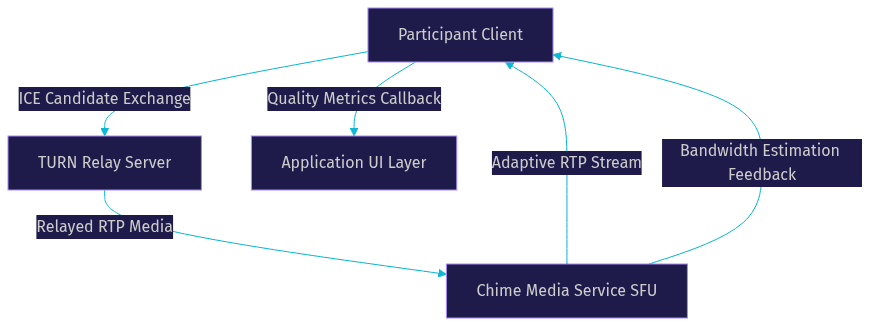
The Amazon Chime SDK continuously estimates available bandwidth between each participant and the media service using WebRTC's standard transport-cc (transport congestion control) feedback. Based on these estimates, the SDK adjusts video encoding bitrate, resolution, and frame rate in real time.
The default adaptive bitrate policy reduces video quality gracefully as bandwidth degrades, prioritizing audio continuity over video fidelity. Developers can override the default policy with custom configurations that set minimum and maximum bitrate bounds, preferred resolutions, and frame rate floors. For example, a telehealth application might set a higher minimum bitrate to ensure clinical visual detail, while a social app might allow more aggressive quality reduction to maintain call continuity on poor mobile networks.
The SDK fires connection quality callbacks that report metrics like upstream and downstream bitrate, packet loss percentage, and round-trip time. Applications can use these callbacks to display quality indicators to users or trigger UI changes like switching from video to audio-only mode when conditions deteriorate beyond a threshold.
Device Management and Browser Compatibility
Managing input and output devices correctly is essential for a smooth user experience, and Amazon Chime WebRTC provides a device controller abstraction that works across supported platforms.
Device Controller API Overview
The device controller in the Amazon Chime SDK provides a unified interface for enumerating, selecting, and managing audio input (microphones), audio output (speakers), and video input (cameras). When a participant joins a session, the SDK prompts for device permissions and then exposes available devices through the controller.
Developers can build pre-call device selection screens where users choose their preferred microphone, camera, and speaker before joining. The controller also supports real-time device switching, so a user can switch from a built-in microphone to a USB headset mid-call without dropping the session. On mobile platforms, the controller handles platform-specific concerns like Bluetooth audio routing and camera switching between front and rear lenses.
Supported Browsers and Known Issues
Amazon Chime WebRTC supports the four major browsers: Chrome, Firefox, Safari, and Edge (Chromium-based). Chrome provides the most complete WebRTC support and is the recommended browser for Chime applications. Firefox works well for standard sessions but has occasional quirks with simulcast layer configuration. Safari support has historically been the most challenging, with issues around device permission prompts, iOS Safari's aggressive tab suspension killing active sessions, and limited codec support favoring H.264 over VP8 or VP9.
Mobile browser support is more constrained. iOS Safari does not support simultaneous camera and screen share, and background audio continues only if the application uses the Web Audio API to maintain an audio context. Android Chrome generally provides robust support but may struggle with hardware encoding on older devices. For production mobile applications, the native iOS and Android Chime SDKs provide better performance and reliability than browser-based sessions.
Scaling and Interactive Audience Features
Amazon Chime WebRTC provides mechanisms for scaling beyond standard session limits, enabling large-audience scenarios like webinars, town halls, and live broadcasts.
Large-Audience Replication and Read-Only Streams
For sessions exceeding the standard participant limits, Amazon Chime supports an interactive audience mode where up to 10,000 viewers can consume the primary session's audio and video streams in a read-only capacity. These viewers do not publish media and do not appear in the participant roster, but they receive real-time audio and video with low latency.
The replication mechanism works by distributing the media service load across multiple AWS media resources. The primary session publishes media as usual, and the replication infrastructure fans out the streams to additional media nodes that serve clusters of viewers. This maintains sub-second latency for the audience while keeping the active participant session performant.
Transitioning Audience to Active Participants
A key feature of the interactive audience mode is the ability to promote a read-only viewer to an active participant. This is essential for webinar Q&A sessions, town halls, and live shows where audience members need to speak or share video at specific moments.
The promotion workflow involves the application server requesting a role change for a specific attendee. The Chime SDK handles the transition by upgrading the viewer's connection from read-only to full-duplex, enabling media publishing. The application must manage permissions and UI state to ensure only authorized viewers are promoted. This pattern mirrors the host, co-host, and viewer role model found in VideoSDK's Interactive Live Streaming mode, where viewers can be promoted to speakers dynamically.
Real-World Use Cases
Amazon Chime WebRTC powers real applications across industries where reliable real-time communication is mission-critical. Two common scenarios illustrate the platform's strengths and considerations.
Telehealth Consultations
Telehealth platforms require reliable audio, clear video, and compliance with healthcare regulations. Amazon Chime WebRTC's Opus audio codec at 48 kHz provides speech clarity sufficient for clinical consultations, while 1080p high-definition sessions support visual assessment of patient conditions. The SDK's adaptive bitrate ensures calls continue even when patients join from mobile networks with variable quality.
For HIPAA compliance, developers must configure AWS services in compliance-ready regions and implement encryption, audit logging, and access controls at the application layer. The Chime SDK itself encrypts media in transit using DTLS-SRTP, which is the WebRTC standard. However, HIPAA compliance extends beyond transport encryption to include business associate agreements with AWS, session recording storage policies, and participant authentication. Developers building telehealth applications should consult the AWS HIPAA compliance documentation and engage AWS support for architecture review.
Online Education and Live Tutoring
Online education platforms benefit from Amazon Chime WebRTC's content sharing, interactive audience mode, and low-latency media delivery. A tutor can share their screen to walk through a problem set while maintaining a camera feed for personal interaction. The data message channel enables real-time quiz distribution, answer collection, and interactive whiteboard synchronization.
For large lecture scenarios, the interactive audience mode allows hundreds of students to watch a lecture in read-only mode while the instructor and teaching assistants participate as active speakers. When a student has a question, the application can promote them to an active participant for the duration of their interaction. The low-latency WebRTC transport ensures that interactions feel natural, unlike HLS-based streaming where 10 to 30 seconds of delay makes real-time Q&A impractical.
Best Practices for Production Deployments
Moving an Amazon Chime WebRTC application from prototype to production requires attention to security, monitoring, and operational resilience. These practices separate reliable applications from demos.
Security, Token Handling, and Role-Based Access
Amazon Chime uses meeting tokens and attendee tokens for authentication. The application server generates these tokens using AWS credentials and passes them to client devices. Never embed AWS credentials in client-side code. The standard pattern is to create a backend service that accepts authenticated user requests, creates Chime meetings using the AWS SDK, generates attendee tokens, and returns them to the client.
Role-based access control should be enforced at the application layer. The Chime SDK distinguishes between attendees and moderators, with moderators having capabilities like muting other participants and ending the session. Implement waiting room patterns by having the application server hold attendee tokens until a moderator approves each participant. For sensitive sessions, use the Chime SDK's built-in encryption and consider additional application-level encryption for data messages.
Monitoring, Analytics, and Troubleshooting
Amazon Chime integrates with Amazon CloudWatch for session monitoring. Key metrics to track include meeting duration, participant join and leave events, media quality scores, and connection failure rates. The SDK also provides client-side callbacks for connection quality, device changes, and media errors that applications should log to a centralized monitoring service.
Common troubleshooting patterns include ICE connection failures, which typically indicate firewall or NAT issues. If participants cannot connect, verify that UDP 3478 and TCP 443 are open and that AWS media service IPs are allow-listed. Audio-video reconnection issues often stem from network transitions, such as switching from WiFi to cellular. The SDK attempts automatic reconnection, but applications should implement UI feedback during reconnection attempts and provide manual retry options. For persistent issues, enable SDK debug logging and correlate client-side logs with CloudWatch metrics to identify whether problems are client-side, network-side, or service-side.
For developers seeking a more streamlined monitoring experience, VideoSDK's REST APIs provide session analytics, participant management, and recording control through a unified interface, reducing the operational overhead of building custom monitoring pipelines.
Definitions Glossary
WebRTC: A free, open-source project that provides web browsers and mobile applications with real-time communication via simple application programming interfaces, enabling peer-to-peer audio, video, and data transfer without plugins.
SFU (Selective Forwarding Unit): A media server architecture that receives encoded media streams from publishers and forwards them to subscribers without transcoding, enabling efficient multi-party communication.
Simulcast: A technique where a sender encodes and transmits multiple versions of the same video stream at different resolutions and bitrates, allowing the server to select the appropriate version for each receiver based on their bandwidth.
TURN (Traversal Using Relays around NAT): A protocol that relays network traffic through a server when direct peer-to-peer or STUN-assisted connections fail, commonly used when participants are behind restrictive firewalls.
Opus Codec: A lossy audio coding format standardized by the IETF that is designed to handle speech and music efficiently across a wide range of bitrates, and is the mandatory audio codec for WebRTC.
Adaptive Bitrate Streaming: A method of dynamically adjusting video quality based on real-time network conditions, reducing resolution and bitrate when bandwidth decreases to maintain stream continuity.
Key Takeaways
- Amazon Chime WebRTC provides a managed WebRTC infrastructure with AWS handling signaling, media routing, and TURN/STUN relay, eliminating the need to build these components from scratch.
- Standard sessions support up to 16 video participants at 720p, while high-definition sessions extend to 1080p with higher bitrate ceilings for visually demanding use cases.
- Simulcast and SVC enable the media service to deliver appropriate video quality to each participant based on their downstream bandwidth and display capabilities.
- Interactive audience mode scales sessions to 10,000 read-only viewers with the ability to promote individuals to active participants for webinars and town halls.
- Production deployments require server-side token generation, firewall configuration for UDP 3478 and TCP 443, CloudWatch monitoring, and client-side reconnection handling.
- For developers evaluating alternatives, VideoSDK offers a multi-platform RTC SDK with prebuilt UI, built-in collaborative features, and sub-300ms latency across 10+ platforms including React, Flutter, and Unity.
Conclusion
Amazon Chime WebRTC provides a solid foundation for building real-time communication applications on AWS infrastructure, with managed signaling, global media regions, and adaptive streaming that handles the hardest parts of WebRTC delivery. The platform's session types, codec support, and interactive audience features cover most common RTC use cases from small team meetings to large-scale webinars. That said, the operational overhead of managing AWS service configurations, CloudWatch monitoring pipelines, and cross-browser compatibility is non-trivial. If you want a faster path to production with prebuilt UI components, built-in chat and polls, and broader platform coverage, VideoSDK's video calling SDK is worth evaluating alongside Chime. You can start building with VideoSDK's free tier and ship a working video call in minutes. What are you building with real-time communication? Drop a comment below, I would love to hear what kind of RTC use case you are working on.
Free $20 Balance for AI Voice Agents & Video Calls
FAQ