


A 1on1 video call is a private, real-time video conversation between exactly two participants, powered by WebRTC peer-to-peer technology and room-based media routing. VideoSDK enables developers to embed secure 1on1 video calls into any app with token-authenticated rooms, network-adaptive streaming, and optional end-to-end encryption. You can ship a working private video chat in minutes using the Prebuilt UI Kit or a custom SDK integration.
The way people communicate online has shifted dramatically. A 1on1 video call is no longer just a convenience. It is the preferred medium for private, high-bandwidth conversations that text chat and phone calls cannot match. Whether it is a recruiter screening a candidate, a tutor walking a student through a problem, or a doctor consulting a patient, the demand for instant, secure, two-person video is growing fast.
Developers building these experiences face a common set of challenges: authentication, media quality on unreliable networks, privacy compliance, and the friction of getting users into a call quickly. This guide covers everything you need to know about building a 1on1 video call, from core architecture to production deployment, with VideoSDK as the reference platform.
What Is a 1on1 Video Call?
A 1on1 video call is defined as a real-time, two-participant video and audio session where both parties can see and hear each other with minimal latency. Unlike group video calls that require complex media mixing or multi-party SFU routing, a 1on1 video call can often operate as a direct peer-to-peer connection, though production systems typically route through a media server for reliability and feature support.
A 1on1 video call works by establishing a WebRTC connection between two participants. Each participant's device captures audio and video media streams, which are encoded and transmitted over a secure channel. The connection is negotiated through a signaling layer that exchanges session descriptions and ICE candidates before media flows directly between peers or through a selective forwarding unit.
VideoSDK provides 1on1 video call capabilities through its Rooms-based architecture. Two participants join the same VideoSDK room using authenticated meeting tokens, and the SDK handles media capture, encoding, transmission, and rendering on both ends. The same SDK surface supports video calling across React, React Native, Flutter, Android, iOS, JavaScript, and Unity, making it straightforward to embed a private video chat into any application. You can explore the full VideoSDK video calling documentation to get started.
When to Choose a 1on1 Video Call
A 1on1 video call is the right choice when the conversation requires visual context, real-time interaction, and privacy between exactly two people. It fills the gap between asynchronous text chat and high-overhead group meetings.
Common scenarios include remote job interviews, online tutoring sessions, telehealth consultations, customer support escalations, dating app conversations, and quick internal check-ins between colleagues. In each case, the two participants need to read facial expressions, share screens, or collaborate in real time without the complexity of scheduling a full conference.
Here is a quick decision matrix to help you choose the right communication format:
| Scenario | Best Format | Why |
|---|---|---|
| Private interview or consultation | 1on1 video call | Visual cues, real-time Q&A, privacy |
| Quick status update | Text chat | Low overhead, async-friendly |
| Team standup or brainstorm | Group video call | Multi-party interaction needed |
| Urgent issue with visual context | 1on1 video call | Instant, screen-share capable |
| Sensitive medical or legal discussion | 1on1 video call with E2EE | Privacy and compliance |
| Broad announcement | HLS streaming | One-to-many, no interaction needed |
If your use case involves exactly two people who need to see each other and interact in real time, a 1on1 video call is almost always the optimal format.
Core Features of a Modern 1on1 Video Call
A production-grade 1on1 video call needs more than just a camera feed and a microphone stream. Modern users expect HD quality, strong privacy guarantees, and a frictionless join experience.
HD Video and Audio Quality
Both participants should experience clear, high-definition video and crisp audio. VideoSDK supports HD and Full-HD video resolutions with automatic noise suppression to filter out background sounds. The SDK encodes audio using industry-standard codecs that preserve voice clarity even on moderate connections.
End-to-End Encryption and Privacy Controls
Privacy is non-negotiable for a private video call. VideoSDK offers TLS encryption for all media in transit, with optional end-to-end encryption for sessions that require maximum confidentiality. Role-based access control lets you define who can join, who can speak, and who can record. Meeting tokens can be scoped to specific rooms and set to expire after a defined period.
Browser-Only Access with No Download
A browser-based video call removes the biggest friction point: app installation. VideoSDK's Prebuilt UI Kit lets you embed a fully functional 1on1 video call interface into any web page with a single component. Participants click a link, grant camera and microphone permissions, and join the call instantly.
Network-Adaptive Streaming
Not every participant has a fiber connection. VideoSDK's network-adaptive streaming automatically adjusts video bitrate and resolution based on real-time bandwidth conditions. If a participant's connection degrades, the SDK scales down gracefully instead of dropping the call. This is critical for 1on1 video calls where one party may be on mobile data.
Session Recording and Transcription
For interviews, consultations, and support calls, recording and transcription add significant value. VideoSDK supports both individual and composite recording, plus real-time and post-call transcription. You can review the recording documentation for implementation details.
Custom Video Tracks
A 1on1 video call often benefits from screen sharing, virtual backgrounds, or canvas-based custom feeds. VideoSDK's custom video track feature lets developers send processed video alongside or instead of the camera feed, enabling use cases like collaborative document review or branded virtual backgrounds.
Setting Up a 1on1 Video Call with VideoSDK
Building a 1on1 video call with VideoSDK follows a clear four-step flow: generate a meeting token on your backend, create a room, share the join link with the second participant, and connect both participants to the room.
Step 1: Generate Your VideoSDK Token
VideoSDK uses token-based authentication. You need to generate a token server-side using your API key and secret, then pass it to the SDK on the frontend. Never expose your API secret on the client side. Always generate tokens on a backend server and deliver them to the frontend over a secure channel. The authentication and token guide walks through this process in detail.
Step 2: Create a Room
Using the VideoSDK REST API, your backend creates a room and receives a unique room ID. This room ID is what both participants will use to join the same 1on1 video call. You can create rooms on demand or pre-generate them for scheduled sessions. The REST API reference covers all available endpoints.
Step 3: Share the Join Link
Once the room exists, your app generates a join link or triggers the SDK's join flow directly. In a typical user experience, one participant clicks a "Start Call" button, the app requests camera and microphone permissions, and the participant enters the private room. The second participant joins via a shared link or an in-app notification.
Step 4: Connect Both Participants
When both participants have valid tokens and the room ID, the VideoSDK SDK initializes the WebRTC connection on each device. Media streams flow through the VideoSDK cloud, which handles signaling, NAT traversal, and media routing. The call is live as soon as both participants' streams are connected.
Here is the architecture flow for a typical 1on1 video call built with VideoSDK:
The token server sits between your application backend and the VideoSDK cloud. It generates short-lived JWT tokens that authenticate each participant. The VideoSDK cloud handles the WebRTC media routing, ensuring both participants receive each other's audio and video streams with sub-300ms latency.
Ensuring Privacy and Security in a 1on1 Video Call
Privacy is the defining characteristic of a 1on1 video call. Unlike public streams or group meetings, a private video call must guarantee that only the intended participants can access the session.
Unique room URLs are the first line of defense. Each VideoSDK room has a unique identifier that is not guessable. Only participants with a valid token and the correct room ID can join. This prevents unwanted participants from dropping into a private conversation.
Role-based access control adds a second layer. VideoSDK lets you define roles such as host, speaker, and viewer, each with different permissions. For a 1on1 video call, you typically assign both participants as speakers, but you can restrict recording or screen sharing to one role only.
Meeting tokens should be short-lived. Set an expiration time that matches the expected call duration. If a token is compromised, its usefulness is limited to a narrow window. VideoSDK's token system supports custom claims and scopes, so you can restrict a token to a single room and a single role.
All media in transit is protected by TLS encryption. For sessions requiring end-to-end encryption, VideoSDK supports E2EE so that even the media server cannot decrypt the video and audio payloads. This is essential for telehealth, legal consultations, and any scenario where regulatory compliance demands it.
For GDPR compliance, handle recordings carefully. Store recordings in regions that comply with your data residency requirements, implement retention policies that automatically delete recordings after a defined period, and always inform participants that a session is being recorded. VideoSDK's recording features include programmatic start and stop controls, so you can record only when explicit consent is given.
Optimizing Call Quality on Different Networks
A 1on1 video call is only as good as its weakest connection. If one participant is on a spotty mobile network, the entire call suffers. VideoSDK addresses this with network-adaptive streaming, but understanding the underlying mechanics helps you tune the experience.
Adaptive Bitrate and Resolution
VideoSDK continuously monitors each participant's available bandwidth. When bandwidth is sufficient, the SDK transmits HD video at a higher bitrate. When bandwidth drops, the SDK automatically reduces the video resolution and bitrate to maintain a smooth, lag-free experience. This happens without any manual intervention from the developer or the user.
Recommended Bandwidth Thresholds
For a stable HD 1on1 video call, each participant needs roughly 1.2 to 2 Mbps of available upstream bandwidth. For SD quality, 300 to 500 Kbps is typically sufficient. Audio-only fallback requires as little as 50 to 100 Kbps. These are practical thresholds, not theoretical minimums, and real-world performance depends on network congestion and packet loss.
Handling Poor Connections
When a participant's connection degrades beyond what adaptive streaming can handle, VideoSDK can fall back to audio-only mode. The video track is paused, but the conversation continues with clear audio. If the connection drops entirely, the SDK's reconnection logic attempts to re-establish the session automatically. Participants rejoin the same room without needing to click a new link.
Here is how the network quality detection and adaptation flow works:
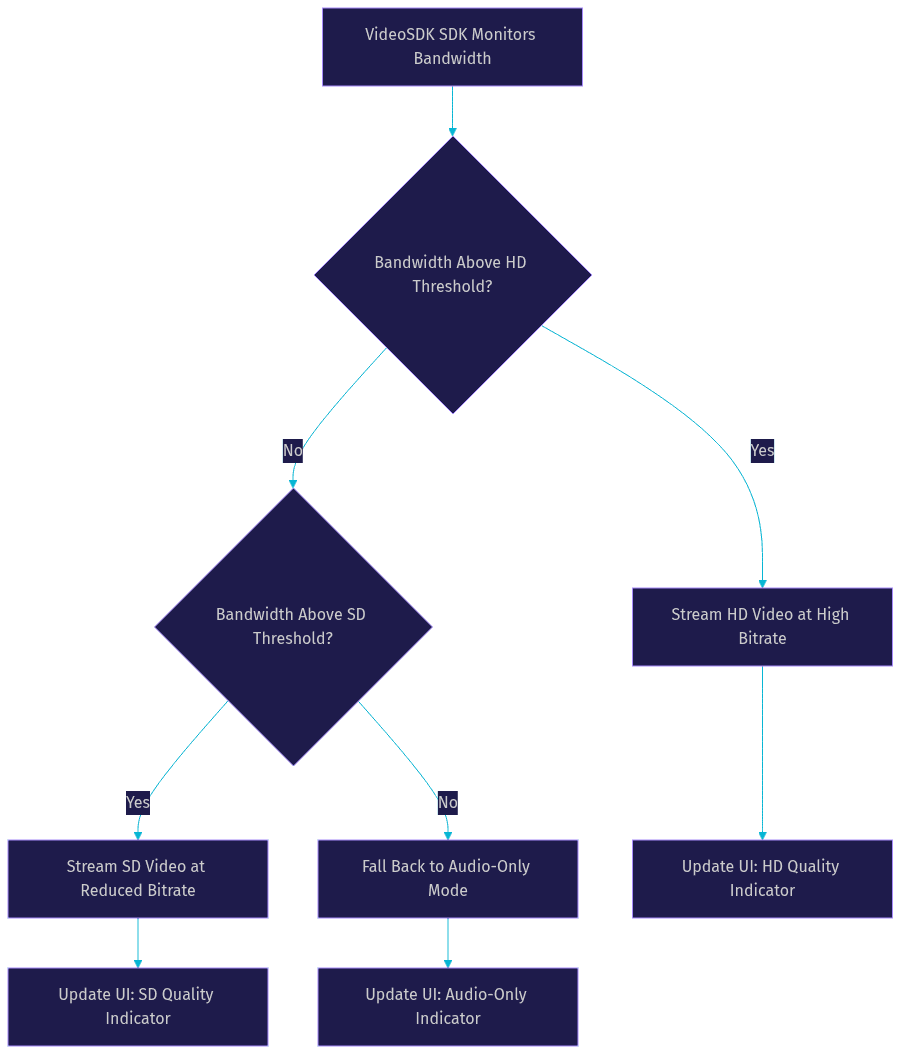
The SDK makes these decisions in real time, and you can listen for quality change events in your app to update the UI accordingly. Showing a subtle quality indicator helps participants understand why video quality may have dropped, reducing frustration.
Common Pitfalls and How to Avoid Them
Even with a robust SDK, developers hit predictable issues when building a 1on1 video call for the first time. Here are the most common pitfalls and how to handle them.
Forgetting HTTPS in Production
WebRTC requires a secure context. Camera and microphone access is blocked by browsers on non-HTTPS origins, with the exception of localhost during development. If your production app is served over HTTP, the browser will deny media device access and the call will fail silently or with a permissions error. Always serve your application over HTTPS in production, and ensure your token server endpoint is also secured.
Browser Permission Denials
Users can accidentally deny camera or microphone permissions, especially on mobile browsers where the prompt is easy to dismiss. Build a graceful fallback that detects denied permissions, shows a clear message explaining what is needed, and provides a button to retry or open browser settings. VideoSDK's SDK surfaces permission errors through event handlers, so you can respond programmatically.
TURN Server Connectivity Issues
If one or both participants are behind restrictive firewalls or NATs, the WebRTC connection may fail without a TURN server to relay traffic. VideoSDK includes TURN server infrastructure, but if you are self-hosting or using a custom network configuration, verify that TURN connectivity is working. Test your 1on1 video call from behind a corporate firewall before shipping.
Session Time-Outs
Meeting tokens expire. If a participant joins a 1on1 video call late and the token has already expired, the join will fail. Set token expiration times generously enough to account for late arrivals, and implement a refresh mechanism that requests a new token if the current one is about to expire during an active call.
Real-World Example: A 5-Minute Interview Using a 1on1 Video Call
Consider a recruitment platform that uses VideoSDK to power instant screening interviews. A recruiter logs into the platform, selects a candidate from their pipeline, and clicks "Start Interview." The platform's backend generates a meeting token, creates a VideoSDK room, and opens the recruiter's 1on1 video call interface.
The candidate receives a push notification or email with a join link. They tap the link, the browser opens, and they are prompted to grant camera and microphone access. Within seconds, both the recruiter and candidate are in a private, encrypted video session.
The recruiter uses screen sharing to walk through a coding problem. The candidate shares their screen in return to show their solution. VideoSDK's network-adaptive streaming keeps the call smooth even when the candidate joins from a coffee shop WiFi connection.
When the interview ends, the recruiter stops the recording. The composite recording is available for review within minutes, and the post-call transcription is generated automatically. The recruiter can share the recording with the hiring manager without needing to schedule a follow-up debrief.
This entire flow, from token generation to recording retrieval, happens through VideoSDK's SDK and REST API. No third-party video platform is involved. The recruitment platform owns the user experience end to end, and the 1on1 video call feels like a native feature of the product, not an embedded widget from an external service. You can explore more code samples to see how other teams have built similar experiences.
Definitions Glossary
1on1 Video Call: A real-time, two-participant video and audio session where both parties communicate over a WebRTC connection with minimal latency.
Meeting Token: A JWT generated server-side using your VideoSDK API key and secret that authenticates a participant's access to a specific room.
Room: A VideoSDK meeting room identified by a unique room ID that participants join to share media streams with each other.
Network-Adaptive Streaming: VideoSDK's automatic adjustment of video bitrate and resolution based on real-time bandwidth detection to maintain call quality.
Custom Video Track: A VideoSDK feature that allows developers to send processed video, such as screen share or virtual backgrounds, alongside or instead of the camera feed.
WebRTC: The W3C-standardized protocol that enables real-time peer-to-peer audio and video communication in browsers and mobile applications.
Key Takeaways
- A 1on1 video call is the optimal format for private, real-time, two-person conversations that require visual context and low latency.
- VideoSDK's Rooms-based architecture handles token authentication, WebRTC signaling, media routing, and network adaptation so developers can focus on the user experience.
- Privacy is enforced through unique room IDs, short-lived scoped tokens, role-based access control, TLS encryption, and optional end-to-end encryption.
- Network-adaptive streaming automatically scales video quality up or down based on bandwidth, with audio-only fallback for severely degraded connections.
- The Prebuilt UI Kit lets you ship a working 1on1 video call with zero custom UI code, while the full SDK supports deep customization across 10+ platforms including React, Flutter, Android, and iOS.
Conclusion
A 1on1 video call remains the most effective way to connect two people in a private, real-time, visually rich conversation. Whether you are building a telemedicine platform, a recruitment tool, or a customer support escalation flow, the combination of WebRTC reliability and VideoSDK's developer-friendly SDKs gets you to production fast. Start with the VideoSDK free tier or explore the Prebuilt UI Kit to ship a 1on1 video call in minutes. What are you building with VideoSDK? Drop a comment below, I would love to hear what kind of 1on1 video call use case you are working on.
Free $20 Balance for AI Voice Agents & Video Calls
FAQ