


A speech recognition threshold is the minimum level of speech energy or confidence a system requires before it classifies incoming audio as actual speech and begins processing it. Setting this threshold correctly is the single biggest factor in whether your speech-to-text pipeline transcribes clean speech or garbage background noise. This guide covers the underlying signal concepts, how major providers expose threshold settings, and a repeatable calibration workflow you can apply in any environment. If you are building voice features on a real-time platform, VideoSDK's real-time transcription capabilities handle much of this tuning for you, and its AI agents documentation covers voice activity detection in depth.
Every voice-enabled application eventually confronts the same question: at what point does incoming audio stop being background hum and start being speech worth processing? Get that boundary wrong in one direction, and your system transcribes a passing truck. Get it wrong in the other direction, and it silently drops the first two words of every sentence. That boundary is the speech recognition threshold, and it sits at the intersection of audiology, signal processing, and machine learning.
This article explains what the threshold actually measures, how static and dynamic threshold strategies differ, how major speech-to-text services expose threshold controls, and how to run a disciplined calibration workflow. By the end, you will have a repeatable process for choosing and validating threshold settings in any deployment environment, from a quiet telehealth consult room to a warehouse floor.
What Is the Speech Recognition Threshold?
The speech recognition threshold is defined as the minimum signal level, expressed either as audio energy or as a confidence percentage, at which a system determines that speech is present and should be recognized. In audiology, the closely related speech reception threshold refers to the softest level at which a listener can correctly identify spondaic words (two-syllable words with equal stress, such as "hotdog" or "upstairs") roughly half the time. The clinical spondee threshold is measured in decibels of hearing level and is a cornerstone of hearing assessment.
In software, the concept translates into a detection boundary inside a speech activity detection layer. Before any transcription model runs, the system continuously evaluates the audio stream and asks a simpler question first: is this speech? The threshold determines how much evidence the system needs before answering yes. A threshold set too high means quiet or distant speakers are ignored. A threshold set too low means fans, keyboard clicks, and hallway conversations are treated as speech, wasting compute and polluting transcripts.
The distinction matters because developers often borrow the audiology term while implementing something operationally different. A clinical threshold is about human perceptual ability. A software threshold is about statistical confidence in a signal classifier. Both describe a boundary between signal and noise, but they are measured, calibrated, and applied differently.
Core Concepts Behind Speech Thresholds
Understanding thresholds requires two foundational ideas: how audio energy is quantified, and whether your threshold adapts to changing conditions. Together they explain most threshold-related failures in production voice systems.
Energy Threshold and Signal-to-Noise Ratio
Audio energy is typically quantified as root mean square (RMS) amplitude, a measure of the average power in an audio window over a short time span, usually 10 to 30 milliseconds. A speech activity detector compares the RMS of the current window against a reference level, and speech is declared present when the measured energy exceeds that reference by the configured margin.
What really governs detection quality, though, is the signal-to-noise ratio (SNR): the difference in level between the speech you want and the ambient noise you do not. A speaker at 65 dB against 30 dB of background noise gives a comfortable 35 dB SNR, and almost any reasonable threshold works. The same speaker in 60 dB of cafeteria noise gives a 5 dB SNR, and no static threshold setting will cleanly separate speech from environment. This is why speech recognition in noise is its own research field, and why threshold tuning alone cannot rescue a fundamentally bad acoustic environment. Microphone placement and noise suppression, such as the built-in de-noise processing available in VideoSDK's real-time audio pipeline, often deliver more improvement than any threshold adjustment.
Dynamic vs. Static Thresholds
A static threshold is a fixed energy or confidence boundary configured once and applied to all audio. It is predictable, easy to reason about, and easy to test. Its weakness is that real environments change: a call center is quiet at 3 AM and chaotic at noon, and a static threshold tuned for one condition fails in the other.
A dynamic energy threshold continuously re-estimates the noise floor and adjusts the speech boundary relative to it. When the room gets louder, the threshold rises; when it quiets, the threshold falls. This adaptivity makes dynamic thresholds the better default for mobile apps, vehicles, and any deployment where the microphone moves between environments. The trade-off is responsiveness: a dynamic threshold that reacts too quickly can be fooled by a burst of speech itself, raising the noise floor estimate and clipping the tail of an utterance. Most production systems use a moderately dynamic threshold with a slow adaptation rate, so short noise spikes do not destabilize it.
Measuring Speech Recognition Threshold in Practice
How the threshold gets measured depends on whether a human audiologist or a software pipeline is doing the measuring. Both traditions offer lessons for developers building voice systems.
Traditional Audiology Methods
Audiologists measure the speech reception threshold using spondaic word lists presented at descending and then ascending intensity levels. The clinician starts above the expected threshold, presents spondee words, and lowers the presentation level after each correct response. When the patient begins missing words, the direction reverses and intensity climbs until responses stabilize. The threshold is the level at which the patient correctly repeats roughly half of the presented words.
This descending-then-ascending technique is worth stealing as a design pattern. It is essentially a binary search on the detection boundary, converging on the point where performance crosses 50 percent. Developers can apply the same logic to threshold tuning: start with a permissive setting, tighten until speech starts being missed, then back off to the last reliable point. It converts an arbitrary guess into a measured value.
Modern Automated Approaches
Contemporary speech-to-text services replace the audiologist with a statistical classifier. Instead of pure energy comparison, modern speech activity detection uses trained models that weigh spectral characteristics, voicing patterns, and energy together, then output a confidence score between zero and one that a given audio segment contains speech. The developer's threshold becomes a percentage: the minimum speech probability required before the segment is processed.
Automated approaches also handle ambient noise calibration. Many services offer a listening period at session start, during which the system samples the environment and establishes a baseline noise profile before any speech is expected. Some pipelines expose a minimum-speech-percentage setting, letting you declare that audio must be at least, say, 60 percent likely to be speech before transcription begins. These controls give developers audiology-grade precision without manual signal analysis, but they still require deliberate tuning, which is where provider-specific settings come in.
Setting the Threshold in Speech-to-Text Services
Each major provider exposes threshold control differently, and knowing the exact semantics of each setting prevents a common class of silent failures.
AssemblyAI's Speech Threshold Parameter
AssemblyAI's speech-to-text API exposes a speech threshold parameter expressed as a percentage between 0 and 100, controlling how aggressively the service filters non-speech audio. At the default setting, the balance favors catching genuine speech while filtering routine silence. Lowering the percentage makes the detector more permissive, accepting quieter and more marginal audio as speech, which helps with soft-spoken speakers or distant microphones but increases the chance that music or chatter gets transcribed. Raising it makes detection stricter, producing cleaner transcripts in noisy settings at the cost of occasionally clipping quiet utterance onsets.
The practical guidance from AssemblyAI's own documentation is to treat this as a noise-environment dial rather than a speaker-quality dial. If your recordings are studio-clean, the default is fine. If your source is a restaurant or a call center floor, raise the threshold and accept some onset clipping, because a transcript polluted with background chatter is usually worse than one missing a syllable. Always validate changes against a labeled test set rather than adjusting based on a single anecdotal transcript.
IBM Watson Speech Activity Detection
IBM Watson Speech to Text provides a speech detector sensitivity parameter, also on a 0 to 1 scale, that governs its speech activity detection. The semantics are inverted relative to what many developers expect: higher sensitivity values make the detector more permissive, more willing to classify marginal audio as speech, while lower values make it stricter. Watson's documentation recommends values around 0.5 as a balanced default and notes that raising sensitivity increases the risk of false positives, where non-speech audio triggers recognition, while lowering it increases false negatives, where genuine speech is skipped.
The setting interacts with a companion parameter that suppresses audio segments shorter than a minimum duration, which together let you build a two-stage filter: sensitivity decides what counts as speech, and the duration floor eliminates transient blips that pass the sensitivity check. This pairing is a good pattern to replicate in any pipeline, because short noise bursts are the most common false-positive source in real deployments.
Adjusting Energy Threshold in Open-Source Libraries
The popular open-source SpeechRecognition library for Python illustrates the energy-threshold approach directly. Its recognizer listens for audio exceeding an internal energy threshold, and it provides an ambient noise adjustment routine that samples the first second or so of a stream and sets the energy threshold just above the measured noise floor. The library also supports dynamic threshold mode, where the threshold re-estimates during operation. The key behavior to understand is that the ambient adjustment routine consumes audio, so it must run before the actual listening call, and its duration parameter controls how much environment is sampled. A one-second sample in a variable environment will produce an unreliable floor, so longer sampling windows are worth the startup delay.
Best-Practice Workflow for Reliable Threshold Configuration
A reliable threshold configuration comes from a repeatable loop, not a one-time guess. The workflow below adapts the audiology descending-ascending method to software pipelines and works with any provider or library.
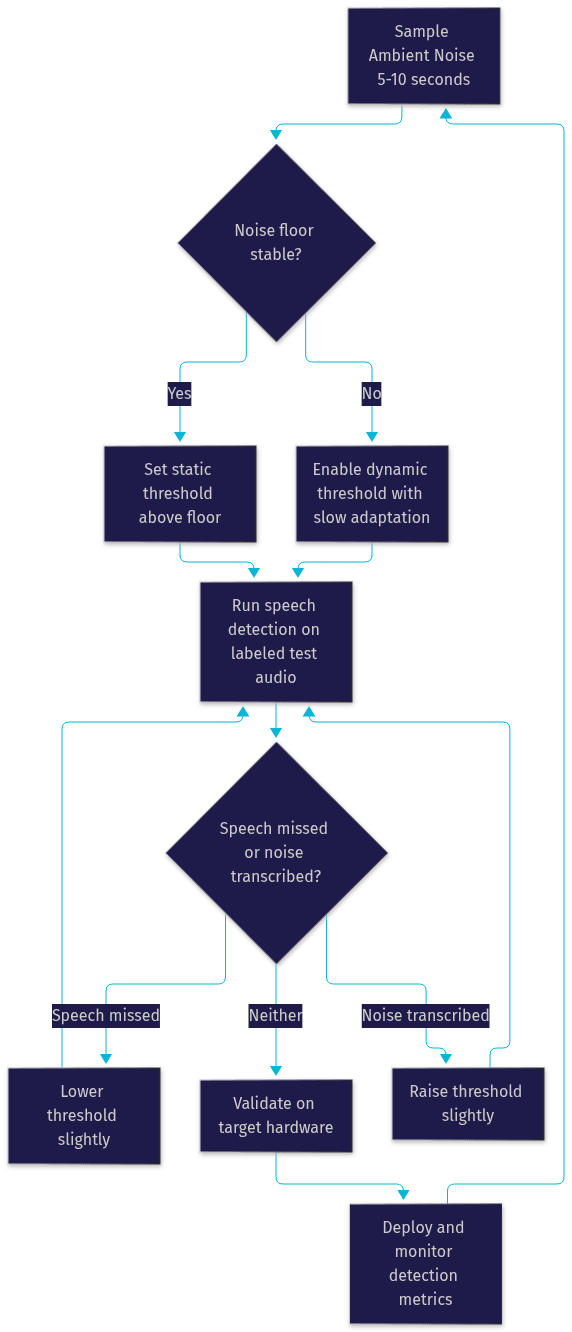
Step 1: Sample the ambient environment. Before any speech processing, capture 5 to 10 seconds of representative silence from the actual deployment location, not a test bench. This establishes your noise floor and reveals whether the environment is stable or variable. If the noise floor varies by more than a few decibels across samples, plan for a dynamic threshold from the start.
Step 2: Choose static or dynamic mode. Pick a static threshold when the environment is controlled and consistent, such as a fixed kiosk or a sound-treated room. Pick a dynamic threshold when the microphone moves between environments or the background shifts, such as mobile apps, vehicles, or open offices. Configure the adaptation rate conservatively so short bursts do not destabilize the estimate.
Step 3: Run a descending-ascending sweep. Start with a permissive threshold and a labeled test set containing quiet speech, normal speech, and known noise events. Tighten the threshold in small increments until genuine speech begins to be missed, then back off to the last fully reliable setting. Record the value. This is your measured threshold, not a guess.
Step 4: Validate against edge cases. Replay your worst-case audio: the softest speaker, the loudest background, and a speaker who trails off mid-sentence. Confirm the threshold holds. Then validate on the actual target hardware, because microphone frequency response differs significantly between a laptop array and a headset boom mic.
Step 5: Monitor and iterate. Thresholds decay as environments change, hardware ages, and user populations shift. Log detection events and false-positive rates in production, and re-run the sweep whenever metrics drift.
The loop is easiest to see as a cycle:
If you are building this loop inside a real-time communication product, VideoSDK's real-time transcription features integrate detection and transcription directly into the room pipeline, and the Python SDK lets you connect custom detection logic to live media streams.
Common Pitfalls and How to Avoid Them
Most threshold failures fall into three recurring patterns, and each has a straightforward fix.
Over-sensitivity that drops real speech. A threshold tuned in a quiet test lab will miss soft-spoken users in the field, particularly the onset of utterances, which start at lower energy than the body of speech. The fix is validating against your quietest realistic speaker, not your average one, and considering a brief permissive window at utterance start.
Under-sensitivity that transcribes background chatter. The opposite failure floods transcripts with hallway conversations and keyboard noise, which is worse than it sounds because downstream consumers, such as analytics or LLM summarization, treat every transcribed word as signal. The fix is pairing the threshold with a minimum-speech-duration filter and raising the confidence requirement in known-noisy deployments.
Ignoring device-specific microphone characteristics. A threshold calibrated on one microphone model will misbehave on another, because sensitivity, directionality, and built-in processing differ. Conference-room devices often apply their own noise suppression, which changes the noise floor the detector sees. The fix is treating hardware as part of the calibration: test on every microphone class you ship to, and consider per-device threshold profiles for heterogeneous fleets.
Real-World Use Cases
Threshold configuration looks different across industries, and the patterns are instructive.
In call-center analytics, thresholds determine whether silence between agent and customer turns is measured accurately, which directly affects talk-time metrics and pause detection. Over-permissive settings inflate handle-time statistics with hold music and neighboring-agent audio.
In voice-controlled robotics and industrial IoT, thresholds gate whether the device wakes at all. A robot on a factory floor needs a strict threshold plus noise suppression, or it responds to machinery. Here, dynamic thresholds paired with acoustic echo handling are standard practice.
In telehealth, hearing-assessment apps now deliver spondee-style threshold tests remotely, presenting calibrated word stimuli and measuring patient responses over the app's own audio pipeline. The app's detection threshold must be far stricter than a transcription threshold, because the measurement itself depends on controlled stimulus levels.
In hearing-test and accessibility apps, thresholds protect users from the frustration of a device that either never listens or never stops. For teams building these experiences on live audio, VideoSDK's audio calling capabilities provide the low-latency transport layer these applications depend on.
Future Trends in Speech Threshold Technology
Threshold configuration is moving from a developer-tuned parameter toward a self-tuning system property, and three trends are converging.
Adaptive AI models are replacing fixed energy logic with neural speech activity detectors that learn a given environment's noise signature in real time, effectively maintaining a personalized threshold without explicit configuration. These models already outperform classical energy-based detection at low SNR, and provider APIs are beginning to expose them as drop-in replacements for legacy threshold settings.
Multimodal detection combines audio with visual and contextual cues. A video-call system can use lip movement to confirm that audio energy is genuinely a speaking participant rather than a television in the room, which dramatically reduces false positives in multi-participant settings. Real-time platforms with access to both audio and video tracks, such as VideoSDK rooms, are natural homes for this approach.
Integration with hearing-aid hardware is closing the loop back to audiology. Modern hearing aids already perform on-device speech-in-noise classification, and the same techniques are flowing into consumer voice products, including beamforming-assisted detection and environment classification that selects threshold profiles automatically. Expect the line between clinical speech reception threshold measurement and consumer voice-assistant tuning to keep blurring.
Definitions Glossary
Speech Recognition Threshold: The minimum energy level or confidence score at which a system classifies incoming audio as speech and begins processing it. In software pipelines, it is typically configured as a percentage or sensitivity value in a speech activity detection layer.
Speech Reception Threshold: The audiology counterpart, defined as the softest sound level at which a listener correctly identifies spondaic words roughly half the time, measured in decibels of hearing level during a hearing assessment.
Energy Threshold: A fixed or adaptive reference level of audio energy, usually based on RMS amplitude in short analysis windows, against which incoming audio is compared to decide whether speech is present.
Dynamic Energy Threshold: A threshold that continuously re-estimates the ambient noise floor and adjusts the speech detection boundary relative to it, suited to environments where background noise changes over time.
Signal-to-Noise Ratio (SNR): The level difference between desired speech and ambient noise, usually in decibels. SNR, more than any threshold setting, determines how cleanly speech can be separated from background sound.
Speech Activity Detection: The preprocessing stage in a speech pipeline that decides whether a given audio segment contains speech before transcription or recognition runs, using energy, spectral features, or trained models.
Key Takeaways
- The speech recognition threshold is the boundary at which a system decides audio is speech, and it is the single setting that most directly determines transcript cleanliness in noisy environments.
- Signal-to-noise ratio governs what any threshold can achieve: a 5 dB SNR environment defeats even perfect threshold tuning, so microphone placement and noise suppression often matter more than configuration.
- Use static thresholds in controlled environments and dynamic energy thresholds in variable ones, with a conservative adaptation rate so short noise bursts do not destabilize detection.
- Apply the audiology descending-ascending method to tuning: tighten the threshold until speech is missed, then back off to the last reliable point, and validate on every target hardware class.
- Real-time platforms like VideoSDK integrate speech activity detection, noise suppression, and transcription directly into the room pipeline, reducing the manual calibration surface developers must manage.
Conclusion
The speech recognition threshold is a small setting with outsized consequences for any voice-enabled product. Understanding the signal concepts behind it, choosing between static and dynamic strategies, and running a disciplined calibration loop turns threshold configuration from guesswork into measurement. The workflow in this article, sample the environment, choose a mode, sweep, validate, and monitor, works whether you are tuning a single parameter in a cloud speech-to-text service or building a full custom detection pipeline. To put these ideas into practice inside a real-time application, start with the VideoSDK quickstart, explore the code samples, or sign up free at app.videosdk.live/login. What are you building with speech detection? Drop a comment, I'd love to hear what kind of voice use case you're working on.
Free $20 Balance for AI Voice Agents & Video Calls
FAQ