


Socket.io is a JavaScript library that provides real-time, bidirectional event-based communication between a browser and a server, built on top of WebSocket with automatic transport fallbacks. In a React app, you initialize the Socket.io client once, wire its events into your component tree through hooks or context, and exchange named events such as joining rooms and sending messages. This guide walks through the full architecture, connection lifecycle, scaling with Redis, and production best practices for a Socket.io React chat application.
Real-time chat has become a baseline expectation for modern web applications. Users of a marketplace expect to negotiate prices live, students in an online classroom expect instant questions and answers, and support teams expect conversations that feel immediate. Anything that requires a page refresh to see new messages now feels broken.
Socket.io paired with React has become one of the most popular stacks for meeting that expectation. Socket.io handles the messy transport layer, including fallbacks when WebSocket is unavailable, automatic reconnection, and room-based broadcasting. React, in turn, offers a component model and hooks that make it natural to bind socket events directly to UI state.
This article covers the complete picture: what Socket.io actually is and how it fits into React's component model, the core architecture of a chat application, how to manage the connection lifecycle and authentication tokens, real-time messaging patterns including typing indicators and optimistic updates, how to scale horizontally with Redis, and the pitfalls and security practices that separate a demo from a production system.
What Is Socket.io and How Does It Fit Into a React App?
Socket.io is defined as a library that enables real-time, bidirectional, event-based communication between a client and a server. Under the hood, it uses the WebSocket protocol as its primary transport, but it wraps it in an additional layer that adds features raw WebSocket does not provide: automatic reconnection, event acknowledgments, rooms, namespaces, and fallback to long polling when WebSocket connections are blocked by proxies or corporate firewalls.
Socket.io works by letting both sides emit named events with JSON payloads and register handlers for those events. Instead of a raw stream of bytes, you get a semantic event bus: a client can emit a "send message" event, and the server can broadcast a "receive message" event to everyone in a specific room. The library also supports acknowledgments, where the emitter receives a confirmation callback once the other side has processed the event, which is essential for reliable message delivery.
On the client side, Socket.io ships a lightweight browser library that integrates cleanly with React's component model. Because a socket is a long-lived object independent of any component, the idiomatic pattern is to create it once at the application level, then expose it to components through a custom hook or React context. Components subscribe to the events they care about and update local state when events arrive, letting React's rendering model handle the UI while Socket.io handles the transport.
Core Architecture of a Socket.io React Chat Application
A Socket.io React chat application follows a predictable flow: the React client establishes a connection to a Node.js server running the Socket.io server library, the server authenticates the handshake, the client joins a room, and messages broadcast through that room to all participants. The diagram below shows the full connection lifecycle from initial connect through room join, message exchange, acknowledgment, and disconnect.
The server acts as an event bus and authorization boundary. Every incoming event should be validated before it is broadcast, and every outgoing broadcast should be scoped to a room so users only receive messages intended for them. Persistence typically happens in parallel with the broadcast: the server writes the message to a database, then emits it to the room, and returns an acknowledgment to the sender.
When you outgrow a single Node process, a Redis adapter slots in as a pub/sub layer between server instances. Each instance subscribes to Redis channels, so a message received by instance one can be broadcast to clients connected to instance two. The scaling section below covers this in detail.
Setting Up the Connection in React
The single most important rule for Socket.io in React is that the socket instance must live outside the component lifecycle. Creating a new connection on every render, or inside a component that remounts frequently, causes connection churn, wasted handshakes, and hard-to-debug duplicate events.
The idiomatic approach is a custom hook, often called a useSocket hook, that initializes the client once and returns the socket instance to whichever component needs it. Connection setup happens when the hook first runs, and cleanup happens when the application unmounts. React's effect mechanism is designed for exactly this pattern: run setup once, register event handlers, and return a teardown function that removes those handlers and disconnects the socket.
Reconnection deserves explicit attention. Socket.io attempts reconnection automatically, but your UI should reflect the connection state so users understand why messages might pause. You should also rejoin rooms after a reconnect, because room membership is tied to the connection, and a reconnected socket starts with a clean slate.
Managing Connection State
Expose the connection status (connected, reconnecting, disconnected) through React context or a state-management library so any component can render it. A small status indicator in the chat header, driven by connection events, dramatically improves perceived reliability: users tolerate a brief reconnecting state far better than silent message loss. Store the status as a simple enumerated value and update it from the socket's connect, disconnect, and reconnect events, keeping the rest of your message state untouched.
Handling Authentication Tokens
Pass your JWT or session token during the initial handshake rather than as a first message after connecting. The handshake is the natural authorization point because the server can reject unauthenticated connections before any event handling begins. Most teams attach the token to the connection options on the client and validate it in the server's connection middleware.
For token expiry, plan a refresh strategy: either issue short-lived tokens and reconnect with a fresh one when the socket disconnects due to an expired credential, or implement a dedicated token-refresh event before expiry. Never send credentials in plain event payloads, and always validate tokens server-side on every reconnection, not just the first one.
Real-Time Messaging Patterns
Well-designed Socket.io applications use a small, well-named set of events. A typical chat uses events for joining a room, sending a message, receiving a message, typing indicators, and read receipts. Consistent naming matters more than it sounds: verb-based event names like "message:send" and "message:receive" make the event flow obvious to every developer on the team, and a predictable payload structure (sender identifier, room identifier, message body, client-generated identifier, timestamp) makes debugging and persistence straightforward.
The join-room event tells the server which conversation the user is entering. The server validates membership, adds the socket to the room, and typically replies with the recent message history so the client can hydrate its state. The send-message event carries the user's message; the server validates it, persists it, broadcasts it to the room, and acknowledges the sender. The receive-message event is what other participants listen for.
Typing indicators follow a lighter pattern: a short-lived broadcast with no persistence, often throttled on the client so it fires at most every few seconds while the user types. Read receipts are small events that update a per-message status, and they work best when batched, so the client sends one receipt for the latest visible message rather than one per message.
Rooms and Namespaces
Rooms are server-side groupings of sockets used to broadcast to a subset of connections, and they are the right tool for chat: each conversation, whether a group chat or a private two-person chat, maps to one room. Namespaces are a higher-level partition that splits the server into entirely separate communication channels with their own middleware and event handlers. Use namespaces when you need hard isolation between different parts of a product, for example a customer-facing chat and an internal admin dashboard, and use rooms for everything conversation-level.
Optimistic UI Updates
Optimistic updates mean rendering the sent message immediately in the sender's own UI, before the server confirms it. The message appears instantly with a pending state, and when the server's acknowledgment arrives, it flips to delivered. If the server rejects it or the connection drops, the UI marks it as failed and offers a retry. This pattern removes the perceived round-trip latency and is the single biggest UX improvement in chat applications. The key is a client-generated identifier on every message so the acknowledgment can be matched to the correct optimistic entry in state.
Scaling Socket.io with Redis
A single Node.js process caps your concurrency because every socket connection consumes memory and every event consumes a tick of the event loop. Once you run multiple server instances behind a load balancer, a new problem appears: users connected to instance one cannot receive messages broadcast by instance two, because broadcasts only reach sockets held in that process's memory.
The Redis adapter solves this. Each server instance publishes its broadcasts to Redis, and every instance subscribes to those channels, so a message emitted on any instance reaches clients on all instances. The diagram below shows the topology.
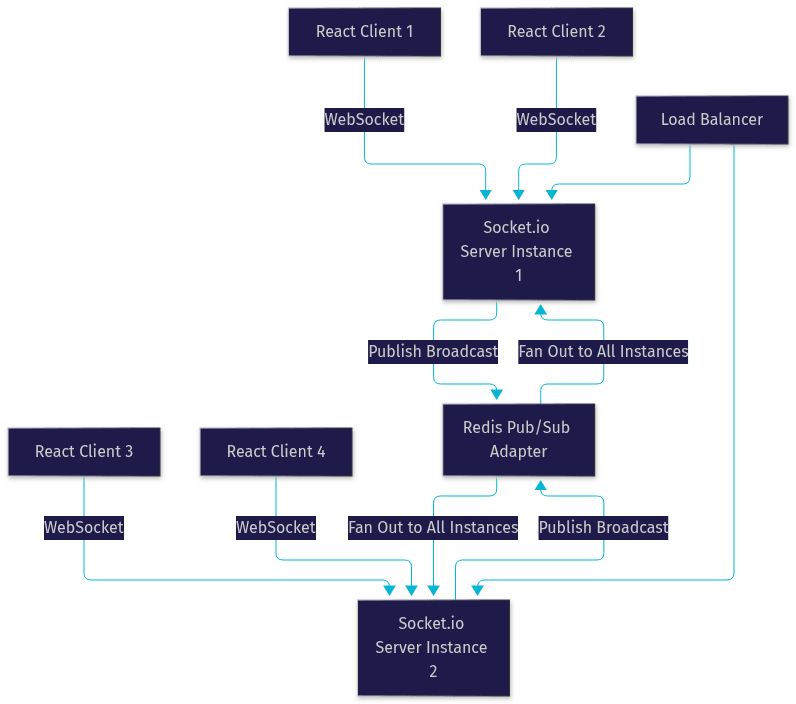
Two operational notes matter here. First, configure your load balancer for sticky sessions, because Socket.io's handshake and upgrade steps must land on the same instance that initiated them. Second, remember that Redis pub/sub does not persist messages, so it complements, rather than replaces, your database persistence layer.
Common Pitfalls and How to Avoid Them
Most Socket.io React failures trace back to a handful of recurring mistakes.
Stale connections. When a user navigates away or the tab is backgrounded, mobile browsers may freeze the socket. The connection appears alive on the server but delivers nothing. Mitigate this with heartbeat and timeout settings tuned to your audience, and treat prolonged silence as a disconnect.
Memory leaks from listeners. Registering event handlers inside components that remount, without removing them on cleanup, accumulates duplicate listeners. Every handler registered in an effect must be removed in that effect's teardown. Symptoms include messages rendering twice and steadily climbing memory usage.
Race conditions on reconnection. A reconnecting socket may rejoin rooms before your state has rehydrated, or fire events out of order. Serialize the recovery: reconnect, re-authenticate, rejoin rooms, then resume messaging, and buffer outgoing messages while disconnected.
Message duplication. Retries and reconnects can deliver the same message twice. Client-generated message identifiers let both server and clients deduplicate reliably.
Security oversights. Trusting client-provided sender identity, skipping room membership checks before broadcasting, and leaving the server open to any origin are the most common vulnerabilities. Always derive identity from the validated token, never from the payload.
Performance and Security Best Practices
For latency, enable payload compression for larger messages, throttle high-frequency events like typing indicators, and keep payloads small by sending identifiers rather than embedded objects. Batch read receipts and presence updates rather than emitting them per change. On the client, avoid re-rendering the entire message list for each new message; scope state updates so only the affected components re-render.
For security, run everything over HTTPS so WebSocket upgrades occur over TLS, restrict CORS to your actual origins, validate every token on every connection and reconnection, and verify room membership before both joining and broadcasting. Add rate limiting per socket on sensitive events to blunt abuse, and sanitize all message content before persisting or broadcasting it.
For monitoring, track connection counts, event throughput, reconnection rates, and error events as metrics. Sudden spikes in reconnections usually point to a network or deployment issue, while climbing memory points to a listener leak. Admin dashboards and structured logging of event names and latencies make production issues diagnosable instead of mysterious.
Deploying and Monitoring in Production
Containerize the server with Docker so the Node process, its dependencies, and the Redis adapter configuration ship as one unit. Keep all secrets and environment-specific settings, such as the Redis connection string and token signing keys, in environment variables rather than baked into the image. Add a health check endpoint so your orchestrator or load balancer can route traffic away from unhealthy instances, and confirm sticky sessions are enabled at the load balancer layer.
Run the process under a manager like PM2 for zero-downtime restarts on a single host, or use a container platform for multi-instance deployments. Finally, wire up monitoring from day one: connection metrics, event latency, and error rates should be visible before your first traffic spike, not after your first incident.
Definitions Glossary
Socket.io: A JavaScript library for real-time, bidirectional, event-based communication between client and server, built on WebSocket with fallback transports, automatic reconnection, rooms, and acknowledgments.
Room: A server-side grouping of connected sockets that lets the server broadcast events to a subset of clients, typically one room per conversation in a chat application.
Namespace: A top-level partition of a Socket.io server that provides isolated communication channels with separate middleware and handlers, used for hard separation between product areas.
Redis Adapter: A pub/sub layer that lets multiple Socket.io server instances share broadcasts, enabling horizontal scaling beyond a single Node process.
Optimistic UI Update: A pattern where the client renders a sent message immediately with a pending state, then reconciles with the server acknowledgment to mark it delivered or failed.
Handshake: The initial connection negotiation between Socket.io client and server, the natural point for validating authentication tokens before any events flow.
Key Takeaways
- Initialize the Socket.io client once outside the component lifecycle and expose it through a custom hook or context to avoid connection churn and duplicate listeners.
- Authenticate during the handshake with a JWT, validate it on every connection and reconnection, and always rejoin rooms after a reconnect.
- Use rooms for conversations, namespaces for hard product-level isolation, and consistent verb-based event names with predictable payload structures.
- Optimistic UI updates with client-generated message identifiers eliminate perceived latency and enable deduplication and retry handling.
- Scale horizontally with the Redis adapter and sticky sessions at the load balancer, and monitor connection counts, reconnection rates, and event throughput from day one.
Conclusion
Socket.io and React remain one of the most developer-friendly stacks for real-time chat in 2026: Socket.io handles transport, reconnection, and room-based broadcasting, while React's hooks and state model make binding live events to UI straightforward. The difference between a demo and a production system lies in the details covered here: handshake-based authentication, disciplined listener cleanup, optimistic updates, Redis-backed scaling, and real monitoring.
If you are building chat, collaboration, or live-notification features and want managed real-time infrastructure instead of operating your own socket fleet, explore VideoSDK's real-time communication SDKs, which handle rooms, presence, and scaling for you. What are you building with Socket.io and React? Drop a comment, I'd love to hear what kind of real-time use case you are working on.
Free $20 Balance for AI Voice Agents & Video Calls
FAQ