



A Socket.IO CDN lets you load the Socket.IO client library from a globally distributed edge network instead of bundling it with your application. The three most popular providers are jsDelivr, cdnjs, and unpkg, each offering versioned URLs, minified bundles, and subresource integrity support. Choosing the right CDN depends on your latency requirements, version control needs, and security posture.
Real-time communication has become a baseline expectation in modern web applications. Whether you are building a chat interface, a live dashboard, or a collaborative editing tool, users expect instant updates without page refreshes. Socket.IO remains one of the most widely adopted libraries for enabling that real-time bidirectional communication between browsers and servers.
When it comes to loading the Socket.IO client library into a browser, developers face a choice: bundle it locally through a build pipeline or load it from a Content Delivery Network. Loading from a CDN can reduce your application's bundle size, improve initial page load times, and leverage globally cached edge servers. But it also introduces considerations around version control, security, and client-server compatibility that every developer should understand before shipping to production.
What is Socket.IO?
Socket.IO is a JavaScript library that enables real-time, bidirectional communication between web clients and servers. It is built on top of the WebSocket protocol but adds a layer of reliability features that raw WebSockets do not provide out of the box. These features include automatic reconnection, message buffering during disconnections, and fallback to long-polling when WebSocket connections are not available.
The library follows a client-server model. The server-side component runs on Node.js and listens for incoming connections. The client-side component runs in the browser and initiates the connection to the server. Both sides must use compatible versions of the library, because the protocol handshake between them depends on version-matched implementations.
Typical use cases for Socket.IO include chat applications, live notifications, multiplayer game state synchronization, real-time analytics dashboards, and collaborative document editing. Any scenario where the server needs to push data to the client without the client explicitly requesting it is a candidate for Socket.IO.
Understanding CDNs and Their Role
A Content Delivery Network is a geographically distributed network of servers that caches and serves static assets to users from the nearest possible location. When a user in Tokyo requests a JavaScript file hosted on a CDN, the file is delivered from an edge server in Japan rather than from an origin server in the United States. This reduces round-trip time and improves page load performance.
CDNs matter for real-time libraries like Socket.IO because the client library must be downloaded and parsed by the browser before a WebSocket connection can be established. The faster the library loads, the sooner the real-time connection can open. A CDN that serves the file from a nearby edge node with proper caching headers can shave tens or hundreds of milliseconds off that initial load compared to serving the file from a single origin server.
Beyond latency, CDNs provide reliability through redundancy. If one edge server goes offline, the CDN routes the request to another. Most major CDNs also offer built-in DDoS mitigation, TLS termination, and HTTP/2 or HTTP/3 support, all of which contribute to faster and more secure asset delivery.
Why Use a Socket.IO CDN?
Loading the Socket.IO client from a CDN offers several practical benefits for developers. The most immediate advantage is reduced bundle size. When you load the library from a CDN, it does not count toward your application's JavaScript bundle. This means faster parse and execution times for your own application code, which is especially important on mobile devices with slower CPUs.
Another benefit is browser caching across origins. Because CDNs like jsDelivr and cdnjs serve millions of websites, there is a reasonable chance that a user's browser already has the Socket.IO client cached from a previous visit to another site using the same CDN URL. In that case, the library loads instantly from cache with zero network overhead.
CDNs also simplify deployment. You do not need to manage the library file in your version control system, run a build step to copy it into your public directory, or worry about updating it manually when a new version is released. You simply reference a versioned CDN URL, and the CDN handles distribution and caching.
Finally, CDN edge servers provide global coverage. If your application serves users across multiple continents, a CDN ensures that the Socket.IO client library is delivered from a nearby edge node regardless of where your origin server is hosted.
Popular Socket.IO CDN Options
Three CDN providers dominate the landscape for serving npm-published JavaScript libraries: jsDelivr, cdnjs, and unpkg. Each has distinct characteristics that make it suitable for different scenarios.
jsDelivr
jsDelivr is a free, open-source CDN that serves files directly from npm and GitHub repositories. It is widely used in production by major projects and has a strong reputation for reliability and performance. jsDelivr supports range-based version selection, meaning you can pin a specific major version and automatically receive patch and minor updates within that version range.
The jsDelivr URL pattern for Socket.IO follows a predictable structure that includes the library name and version. jsDelivr also combines multiple CDN providers behind the scenes, using a multi-CDN architecture to maximize uptime and geographic coverage. If one upstream provider experiences issues, jsDelivr can failover to another.
For developers who want automatic security patches without breaking changes, jsDelivr's version range feature is particularly useful. You can reference a major version and trust that minor patches will be delivered without requiring a URL change.
cdnjs
cdnjs is a CDN maintained by Cloudflare that focuses specifically on JavaScript and CSS libraries. It has one of the largest catalogs of front-end libraries available, and Socket.IO is well-represented in its collection. cdnjs is backed by Cloudflare's global edge network, which provides excellent latency and availability.
One standout feature of cdnjs is its built-in support for Subresource Integrity (SRI) hashes. When you look up a library on the cdnjs website, it provides the integrity attribute alongside the script tag. This makes it easy to add an extra layer of security by ensuring the file served by the CDN matches a known cryptographic hash.
cdnjs also provides a search interface and library pages that show available versions, file sizes, and download statistics. This makes it easy to compare minified versus unminified bundles and pick the right file for your use case.
unpkg
unpkg is a CDN that serves files directly from npm packages. It is extremely fast at reflecting new publishes, often making a new version available within minutes of its npm release. This makes unpkg a popular choice during development when you want to test against the latest version immediately.
The unpkg URL pattern is straightforward: it mirrors the npm package structure. You can request a specific file within the package, or use the unpkg default file convention to get the package's main entry point.
One consideration with unpkg is that it does not offer the same multi-CDN failover architecture as jsDelivr. It is a single-provider CDN, which means it is generally reliable but does not have the same redundancy guarantees. For production use, some developers prefer jsDelivr or cdnjs for this reason. However, unpkg remains an excellent choice for development, prototyping, and quick experimentation.
How to Choose the Right Socket.IO CDN
Choosing the right CDN for loading the Socket.IO client library depends on several factors that vary by project. No single CDN is universally best; the right choice depends on your specific constraints around performance, security, and workflow.
The first factor to evaluate is latency and regional coverage. If your application serves a global audience, you want a CDN with edge servers in all your major user regions. jsDelivr and cdnjs both leverage large global networks, making them strong choices for international applications. unpkg also performs well but operates a smaller footprint.
The second factor is version control. If you want to pin an exact version for reproducibility, all three providers support that. If you prefer automatic patch updates within a major version, jsDelivr's range syntax gives you that flexibility. cdnjs and unpkg require you to update the URL manually when a new version is released.
The third factor is security. If Subresource Integrity is important to your security posture, cdnjs makes it easiest by providing SRI hashes directly on its library pages. jsDelivr also supports SRI, though you may need to generate the hash yourself. unpkg does not prominently feature SRI support.
The fourth factor is integration with your build tools. If you are using a bundler like webpack or Vite, you might load Socket.IO from npm in your build pipeline rather than from a CDN at all. But if you are building a simple page without a build step, a CDN is the most practical approach.
This decision flow helps narrow the choice based on your project's priorities. In practice, all three providers are reliable enough for production use, and the differences are often marginal. The most important thing is to pick one and use it consistently with proper version pinning.
Best Practices for Integrating Socket.IO via CDN
Integrating the Socket.IO client library via a CDN requires attention to several details that can affect performance, security, and correctness. Following established best practices helps avoid common issues.
Select the Correct Bundle
Socket.IO client distributions typically include both minified and unminified versions of the library. The minified version is smaller and should be used in production. The unminified version is larger but includes readable source code and is useful during development for debugging. Most CDN URLs let you choose between the two by selecting a different file path within the package.
The minified bundle for Socket.IO is roughly 40 to 50 kilobytes, while the unminified version can be significantly larger. Always use the minified version in production to minimize download size and parse time.
Use Subresource Integrity
Subresource Integrity (SRI) is a security feature that lets you specify a cryptographic hash of the file you expect the CDN to serve. The browser compares the hash of the downloaded file against the hash in the integrity attribute. If they do not match, the browser refuses to execute the file.
This protects against a scenario where a CDN is compromised and the attacker replaces the library file with malicious code. Without SRI, the browser would execute the tampered file without any verification. With SRI, the tampered file is blocked.
When using SRI with a Socket.IO CDN, you must ensure that the hash corresponds to the exact version and file you are referencing. If you update the version, you must also update the integrity hash. This is why cdnjs is convenient: it provides the correct hash alongside each version.
Handle Version Compatibility
The Socket.IO client and server must use compatible protocol versions. If the client is loaded from a CDN at version 4.x and the server is running version 3.x, the connection may fail or behave unpredictably. Always verify that the CDN version matches your server version.
A good practice is to pin the CDN URL to the exact version of Socket.IO that your server is running. Avoid using floating version ranges in production, because an automatic update could introduce a protocol mismatch if your server has not been updated to match.
Implement Caching Strategies
CDN URLs are inherently cacheable, and most CDN providers set long expiration headers for versioned URLs. This means the browser will cache the file and not re-request it on subsequent page loads. This is desirable behavior.
However, if you need to update the Socket.IO version, the cache will continue serving the old version until it expires. This is why versioned URLs are important: changing the version in the URL forces the browser to fetch the new file. Never use unversioned URLs like "latest" in production, because you lose cache predictability and may serve stale or unexpected versions.
Performance and Security Considerations
Loading the Socket.IO client from a CDN has measurable effects on both performance and security. Understanding these effects helps you make informed decisions about whether a CDN is the right approach for your application.
Impact on Page Load Time
When the browser encounters a script tag referencing a CDN URL, it must resolve the CDN domain, establish a TLS connection, and download the file. This adds a DNS lookup and a new TLS handshake that would not be necessary if the file were served from the same origin as your HTML.
However, this overhead is typically offset by two factors. First, the CDN serves the file from a geographically closer edge server, reducing download time. Second, if the user has previously visited another site that loads the same CDN URL, the file is already in the browser cache and no network request is needed at all.
To minimize the DNS and TLS overhead, you can use preconnect hints in your HTML head section. These hints tell the browser to start resolving the CDN domain and establishing the TLS connection before the script tag is reached, which can save 100 to 300 milliseconds on the first load.
TLS and HTTPS
All major CDN providers serve files over HTTPS by default. This is important because loading a script over HTTP on an HTTPS page would trigger mixed-content blocking in modern browsers. Always use the HTTPS variant of the CDN URL.
CDN providers also manage TLS certificate renewal and configuration, which means you benefit from their optimized cipher suites and OCSP stapling without any configuration on your end. This is one less thing to manage compared to serving the file from your own origin.
Subresource Integrity as a Security Layer
As discussed in the best practices section, SRI adds a verification layer that prevents execution of tampered files. While CDN compromise is rare, it has happened in the past with other libraries. SRI is a low-cost, high-value security measure that every production deployment should include.
The combination of HTTPS delivery and SRI verification provides a strong security posture for CDN-loaded libraries. The HTTPS connection prevents in-transit tampering, and SRI prevents execution of files that do not match the expected hash.
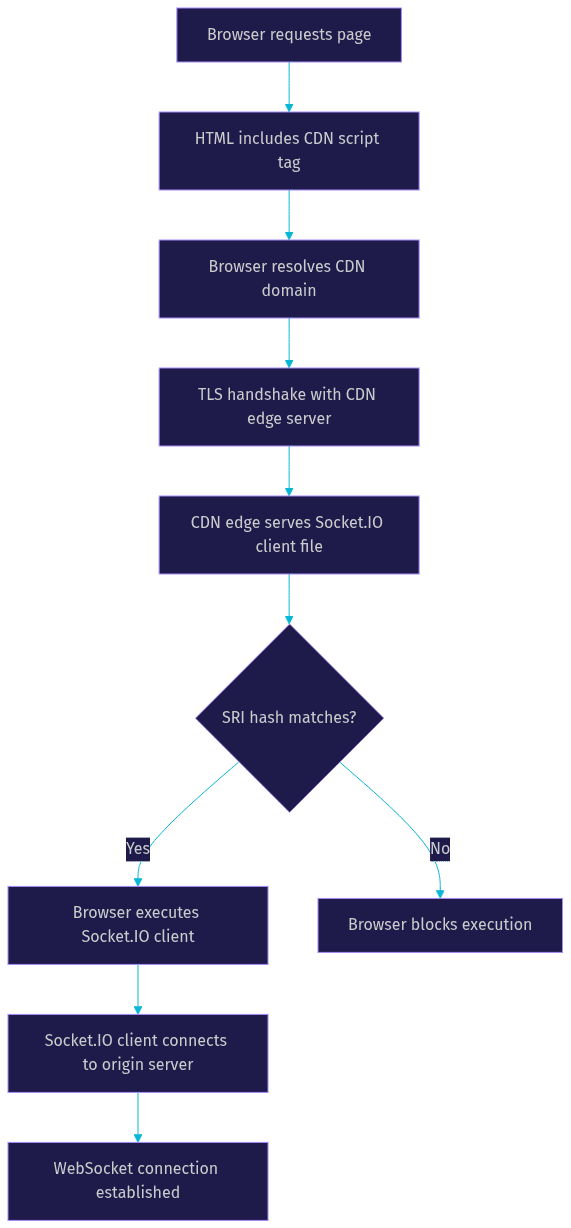
This flow illustrates the full path from page request to real-time connection establishment. The SRI check is a critical gate that prevents compromised files from running in the user's browser.
DDoS Mitigation and Availability
Major CDN providers include DDoS mitigation at the edge. This means that if your CDN URL is targeted by a denial-of-service attack, the CDN absorbs and filters the traffic before it reaches your origin server. This is a benefit you do not get when serving the file from your own server.
Additionally, CDN redundancy means that if one edge server or even an entire data center goes offline, the CDN routes requests to another available server. This level of availability is difficult to achieve with a single-origin setup.
Common Pitfalls and Troubleshooting
Even with a straightforward setup, loading Socket.IO from a CDN can introduce issues that are frustrating to debug. Here are the most common pitfalls and how to address them.
Mismatched Client and Server Versions
The most frequent issue developers encounter is a version mismatch between the Socket.IO client loaded from the CDN and the Socket.IO server running on their backend. When the client and server use incompatible protocol versions, the connection attempt fails with a generic error that does not clearly indicate the root cause.
To troubleshoot this, check the exact version string in your CDN URL and compare it against the version installed on your server. The major and minor versions should match. If you recently updated the server but not the CDN URL (or vice versa), update the one that is out of date. Always pin both to the same version in production.
Stale Cache Serving Old Versions
If you update the version in your CDN URL but the browser continues to load the old version, the issue is likely browser caching. This can happen if you previously used an unversioned URL or if the CDN's cache headers are being overridden by a service worker.
To resolve this, ensure your CDN URL includes a specific version number. If a service worker is caching the old file, you may need to update the service worker's cache key or bypass the cache during development. In production, versioned URLs should prevent this issue entirely.
SRI Hash Mismatches
If you add a Subresource Integrity hash to your script tag and the browser refuses to load the file, the hash does not match the file being served. This can happen if you generated the hash for a different version or a different file path than the one in the URL.
To fix this, regenerate the integrity hash for the exact file and version you are referencing. Tools like the srihash.org website can generate the correct hash from a URL. cdnjs also provides pre-generated hashes on its library pages, which eliminates the need to compute them manually.
CDN Unavailability
While rare, CDN outages do happen. If your CDN provider experiences downtime, your Socket.IO client will fail to load, and real-time features will be unavailable. To mitigate this, you can implement a fallback mechanism that loads the library from a secondary CDN or from your own origin if the primary CDN fails. This adds complexity but provides an additional layer of reliability for critical applications.
Definitions Glossary
Socket.IO: A JavaScript library that enables real-time, bidirectional communication between web clients and servers, built on top of the WebSocket protocol with added reliability features like automatic reconnection and fallback to long-polling.
Content Delivery Network (CDN): A geographically distributed network of edge servers that caches and serves static assets to users from the nearest available location, reducing latency and improving availability.
Subresource Integrity (SRI): A browser security feature that verifies a downloaded script file against a cryptographic hash, preventing execution of files that have been tampered with or modified on the CDN.
jsDelivr: A free, open-source CDN that serves npm and GitHub files with multi-CDN failover support and version range selection for automatic patch updates.
cdnjs: A Cloudflare-backed CDN focused on JavaScript and CSS libraries, known for its large catalog and built-in SRI hash generation for each library version.
unpkg: A CDN that serves files directly from npm packages, known for fast update propagation and a simple URL pattern that mirrors the npm package structure.
WebSocket: A communication protocol providing full-duplex communication channels over a single TCP connection, serving as the transport layer beneath Socket.IO.
Key Takeaways
- Loading the Socket.IO client from a CDN reduces your application bundle size and leverages global edge caching for faster delivery.
- jsDelivr, cdnjs, and unpkg are the three primary CDN providers, each with distinct strengths in versioning, security, and update speed.
- Always pin the CDN URL to a specific Socket.IO version that matches your server version to avoid protocol mismatch errors.
- Subresource Integrity adds a critical security layer by verifying that the CDN-served file matches a known cryptographic hash before execution.
- Use minified bundles in production to minimize download size, and reserve unminified bundles for development and debugging.
Conclusion
Loading the Socket.IO client library from a CDN is a practical approach that simplifies deployment, reduces bundle size, and leverages global edge networks for faster delivery. The key is to choose a provider that aligns with your project's needs: jsDelivr for automatic patch updates and multi-CDN redundancy, cdnjs for built-in SRI support and Cloudflare-backed reliability, or unpkg for fast access to the latest npm publishes during development.
Regardless of which CDN you choose, the non-negotiable practices remain the same: pin your versions, use Subresource Integrity in production, ensure client-server version compatibility, and serve over HTTPS. These steps protect your users and your application from the most common CDN-related issues.
If you are building real-time features and want a managed approach to video, audio, and interactive streaming, explore VideoSDK's documentation for developer-friendly SDKs that handle the infrastructure for you. What are you building with real-time communication? Drop a comment below and share your use case.
Free $20 Balance for AI Voice Agents & Video Calls
FAQ