


Socket.io and Express are the classic Node.js pairing for real-time web applications: Express handles HTTP routing, REST endpoints, and middleware, while Socket.io layers event-based, bidirectional WebSocket communication on top of the same server process. Socket.io adds automatic transport fallback, reconnection handling, and room-based broadcasting. For teams that also need embedded video or voice, VideoSDK's real-time communication SDKs extend the same event-driven model to media streams.
Real-time features have shifted from a nice-to-have to a baseline expectation. Live dashboards, collaborative editors, chat, notifications, and multiplayer experiences all assume the server can push data to the browser the moment it changes, without the client polling for updates. That expectation is why so many Node.js developers reach for Socket.io paired with Express.
The pairing is pragmatic rather than glamorous. Express is already the HTTP backbone of countless Node.js applications, and Socket.io attaches cleanly to the same server instance. You get one process, one deployment, and two communication models: request-response for your REST surface and persistent event streams for everything real-time. This article walks through how the two fit together, from the WebSocket handshake through rooms, clustering, security, and production deployment.
Understanding socketio and express for Real-Time Apps
Socket.io and Express solve two different halves of the same problem. Express manages the request-response lifecycle: routing, parsing request bodies, applying middleware, and returning HTTP responses. Socket.io manages a long-lived, bidirectional channel where either side can send events at any time. When combined, one Node.js process serves both.
The reason this pairing endures in 2026 is simplicity. A single server handles your REST API, serves your frontend assets, and maintains thousands of concurrent socket connections, all sharing the same application logic, database access, and configuration. You avoid running a separate real-time service until your scale genuinely demands one.
What is Socket.io?
Socket.io is defined as an event-based abstraction over WebSocket communication. It provides a client and server library that exchange named events with JSON-serializable payloads. Crucially, Socket.io is not a raw WebSocket implementation: it adds automatic fallback to long polling when WebSockets are blocked, built-in reconnection with exponential backoff, acknowledgements for request-response patterns over the socket, and higher-level grouping primitives like rooms and namespaces. These extras are why many teams choose it over the native browser WebSocket API.
What is Express?
Express is a lightweight, unopinionated web framework for Node.js. It provides URL routing, middleware chaining for concerns like body parsing, authentication, and logging, and template or static file serving. In a Socket.io integration, Express typically plays the HTTP backbone role: it terminates the initial HTTP requests, serves the client application, exposes REST endpoints, and hands the upgraded WebSocket connection to Socket.io's engine. Its middleware model also becomes the natural place to enforce security policies before a socket handshake is ever accepted.
Integrating socketio and express: Core Concepts
Socket.io works by attaching itself to an existing HTTP server instance that Express is already using. When a browser client requests a WebSocket upgrade, the HTTP server intercepts the upgrade request and hands the resulting connection to Socket.io's engine. From that point, Express routing is bypassed entirely for that connection; events flow through Socket.io's own event system while Express continues serving normal HTTP traffic on the same port.
This coexistence is the core concept. Both libraries sit on top of Node's non-blocking I/O, so a single-threaded event loop interleaves HTTP request handling and socket event dispatch without either blocking the other. The practical implication is that your Express middleware and your Socket.io event handlers can share the same modules, database connections, and business logic.
Handshake Process
The handshake begins as an ordinary HTTP request from the Socket.io client library, carrying connection parameters and authentication data. The server validates these parameters, and if the upgrade is accepted, the protocol switches from HTTP to the WebSocket transport. Socket.io then performs its own negotiation, agreeing on a transport (WebSocket, or polling as a fallback) and exchanging session identifiers. Once the handshake completes, the server fires its connection event, and your application registers listeners for the events that client is expected to emit. Any token-based authentication you enforce happens during this handshake, before the connection is fully established.
Event Loop Interaction
Node's event loop is the shared foundation. Express middleware runs when an HTTP request arrives; Socket.io handlers run when a socket event arrives. Both are scheduled onto the same loop, which is why CPU-heavy work in either layer degrades both. In practice, teams keep socket handlers lean, offload intensive computation to worker processes or queues, and rely on the loop to interleave thousands of small, fast operations. This is also why clustering matters once you outgrow a single core, a topic covered later in this article.
Architecture Overview
A typical real-time application built on Socket.io and Express follows a layered flow. The browser client loads your frontend from Express's static file serving or a separate CDN. The client then opens a socket connection, which upgrades through the Express-backed HTTP server into Socket.io's engine. Socket events carry application events (a new chat message, a cursor movement, a notification) into your application logic layer, which reads from and writes to your database, then broadcasts results back to connected clients. Meanwhile, ordinary REST requests from the same or other clients flow through Express routes to the same logic and database.
The diagram below shows how the pieces connect:
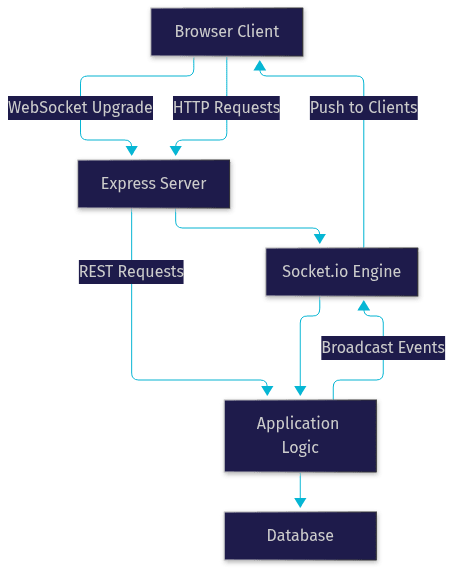
The key architectural decision is where your event handlers live. Keeping them in a shared application logic layer, rather than inline in socket callbacks, means your REST endpoints and socket handlers trigger the same business rules. A chat message sent through a socket and a message created through a REST API both validate, persist, and broadcast identically. That symmetry keeps behavior consistent and makes testing far easier.
For applications that need real-time audio and video rather than just messages, the same event-driven architecture extends naturally. VideoSDK's video calling SDKs handle the media plane over WebRTC while your Socket.io layer handles signaling and presence, a common production pattern.
Setting Up the Server Environment
Setting up a Socket.io and Express server starts with a current Node.js runtime. As of 2026, run a supported LTS release of Node, since both libraries track modern JavaScript features and the LTS line receives security patches. Initialize a project with a package manifest, then add Express and Socket.io as dependencies. Both install from the npm registry as first-class packages, and their major versions matter: Socket.io's client and server versions should stay compatible, so pin versions deliberately rather than floating.
The structural pattern is straightforward in prose terms: you create an Express application, create an HTTP server that wraps it, and attach Socket.io to that HTTP server. Attaching to the shared server instance, rather than letting Socket.io create its own, is what allows Express and Socket.io to share a port and process.
Environment configuration deserves early attention. Store your port binding, allowed client origins, authentication secrets, and database connection strings in environment variables from day one. Hardcoding these values is the most common source of leaked secrets and broken deployments. In development you can run plain HTTP on localhost, but browsers only permit WebSocket connections in secure contexts in many scenarios, so plan for HTTPS early rather than retrofitting it.
Managing Connections and Events
Once the server is running, Socket.io manages a connection registry for you. Every successful handshake produces a socket object representing one connected client, and the server fires a connection event you handle to register that client. From there, communication is entirely event-driven: the client emits named events with payloads, the server listens for those names, and the server can emit events back.
The mental model is publish-subscribe over a persistent channel. Each side declares interest in event names; when a matching event arrives, the registered handler runs with the payload. Acknowledgement callbacks add an optional request-response flavor on top, letting the sender confirm delivery and receive a reply without a separate event.
Connection Lifecycle
The lifecycle runs from connection to disconnection. On connection, you typically authenticate, join the socket to relevant rooms, and register listeners. While connected, the socket may automatically reconnect after network interruptions, since Socket.io's client handles reconnection with backoff by default; the server sees this as a disconnect followed by a fresh connection, so any per-connection state you keep must be rebuilt or reattached on reconnect. On disconnect, you clean up: leave rooms, clear timers, and notify other participants if your domain requires it. Treating reconnection as a new connection, and designing state to survive it, is the single most important lifecycle habit.
Broadcasting vs. Targeted Emission
Socket.io gives you three emission scopes. Broadcasting sends an event to every connected client, or every client except the sender, which suits global notifications. Room-scoped emission sends to sockets that have joined a named room, which suits channel chats or per-document collaboration. Targeted emission sends to one specific socket by its identifier, which suits private messages or per-user updates. The discipline worth building early: default to room-scoped emission, not global broadcast. Broadcasting everything to everyone wastes bandwidth and leaks information to clients that have no business receiving it.
Rooms and Namespaces
Rooms and namespaces are Socket.io's two grouping primitives, and they serve different scales of isolation. A room is a server-side grouping of sockets that a connection can join and leave dynamically. Rooms are the natural fit for chat channels, per-match groupings in games, or per-document sessions in collaborative editors. A socket can belong to many rooms at once, and emission to a room reaches every member regardless of which server worker they connected to, provided you run a shared adapter as discussed in the scaling section.
Namespaces sit above rooms. A namespace is a separate communication channel on the same server, identified by a path prefix, with its own connection handlers and middleware. Teams use namespaces to segment functionality, for example one namespace for admin dashboards and another for end-user chat, so each can carry its own authentication rules and event sets without polluting a single global space. A useful rule of thumb: namespaces separate different applications or audiences; rooms separate different groups within the same audience.
Scaling Socket.io with Clustering
A single Node.js process uses one CPU core. When socket traffic grows, the standard move is clustering: running multiple worker processes, either through Node's built-in cluster module or a process manager, each handling a share of connections. The complication is that Socket.io's default in-memory adapter only knows about sockets connected to its own process. Broadcast from one worker, and clients attached to other workers never receive the event.
The fix is a shared adapter, most commonly backed by Redis. Every worker connects to the same Redis instance, and the adapter publishes emissions through Redis so all workers can fan them out to their local sockets. With that in place, horizontal scaling works: a load balancer distributes connections across workers, and room-scoped broadcasts still reach every member.
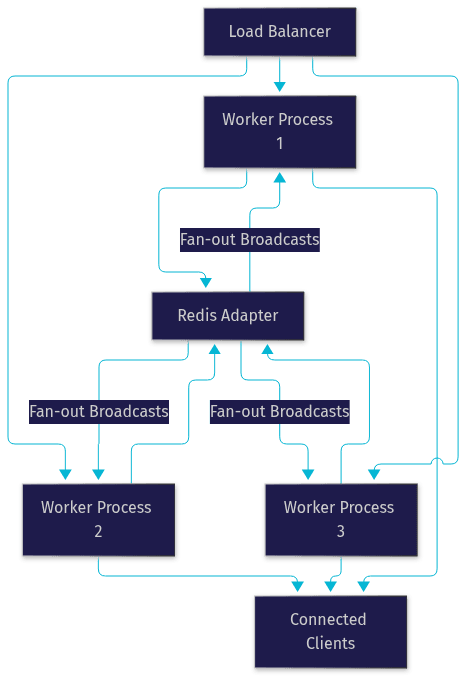
Two operational notes matter here. First, sticky sessions are required when you allow the polling fallback transport, because a client's polling requests must keep hitting the same worker that holds its session state. Second, Redis itself becomes infrastructure you must monitor and scale; treat it as a production dependency, not a development convenience.
Security and Authentication
Socket connections deserve the same authentication rigor as HTTP routes, and the mistake teams make is treating the socket channel as trusted by default. The right pattern is token-based authentication during the handshake: the client presents a token, typically a signed JWT, as part of its connection parameters, and Socket.io middleware validates it before the connection event ever fires. Reject the handshake on invalid credentials, exactly as Express middleware would reject an unauthenticated REST request.
CORS configuration is the second pillar. Socket.io's server accepts an explicit list of allowed origins, and in production that list should contain only your real frontend domains. Leaving origins unrestricted invites cross-site socket abuse from any page on the web.
Beyond the handshake, apply authorization per event where domains demand it. A socket authenticated as a regular user should not be able to join an admin room or receive another tenant's data. Validate room membership server-side before joining, and treat every incoming event payload as untrusted input, since any connected client can emit any event name with any payload. Rate limiting high-frequency events and validating payload shapes closes most of the remaining gaps.
Deployment Considerations
Production deployment changes several assumptions. Most teams run Node behind a reverse proxy such as NGINX, which terminates HTTPS and forwards traffic to the Node process. The proxy must be configured to upgrade connections rather than treat them as ordinary requests, and timeouts on the proxy must be long enough that idle sockets are not severed prematurely.
HTTPS is non-negotiable in production. Secure WebSocket connections run over TLS, and mixed-content rules in browsers block unsecured sockets from secured pages. Your certificates, whether from your proxy or a CDN, must cover the domain clients connect from.
Sticky sessions return as a deployment concern: your load balancer must route repeated requests from the same client to the same worker whenever the polling fallback is enabled. Most cloud load balancers support this via a cookie or client IP affinity. Finally, keep environment-specific settings externalized: allowed origins, token secrets, and adapter connection details should differ between development, staging, and production, driven entirely by environment variables.
Best Practices and Common Pitfalls
The recurring pitfalls in Socket.io and Express applications are well documented by the community. Keep payloads small: ship identifiers and deltas, not entire objects, and let clients fetch full state through REST when needed. Design for reconnection: assume every client will disconnect and reconnect, keep no critical state in the socket object itself, and rehydrate state on each connection. Avoid memory leaks by removing listeners and clearing intervals when sockets disconnect, since abandoned timers attached to dead sockets accumulate quietly over weeks of uptime.
Monitor event traffic volume per event name. An event emitted a thousand times per second is usually a design smell, often a client-side loop or a missing debounce. Prefer room-scoped emission over global broadcast, as covered earlier. And keep handlers fast: anything slow on the event loop delays every connected client, so push heavy work to queues or worker processes. Teams building real-time features beyond messaging, such as live video rooms, often pair this stack with VideoSDK's interactive live streaming so the message plane and media plane scale independently.
Monitoring and Debugging
Socket.io ships with a built-in debug facility that surfaces handshake, transport, and event activity when enabled through the standard Node debug environment. It is the first tool to reach for when connections fail silently, because it reveals whether the failure is at the transport, handshake, or application event layer.
Browser developer tools complement the server-side view. The network panel shows the WebSocket upgrade and, when the frame inspection feature is enabled, every event frame in both directions, with payloads. This is the fastest way to confirm whether the client is actually emitting what you think it is, and whether the server response ever left.
For production monitoring, track connection counts, disconnection reasons, event throughput, and reconnect frequency as metrics. Sudden spikes in reconnections usually point to infrastructure problems, a proxy timeout or load balancer misconfiguration, rather than application bugs. Correlate socket metrics with your Express request metrics so you can see whether degradation in one channel affects the other, since both share the same event loop and process.
Definitions Glossary
Socket.io: An event-based library that abstracts WebSocket communication, adding transport fallback, automatic reconnection, acknowledgements, rooms, and namespaces on top of the raw WebSocket protocol.
Express: A lightweight Node.js web framework providing routing, middleware chaining, and HTTP request handling, serving as the backbone to which Socket.io attaches.
Room: A server-side grouping of sockets that can be joined and left dynamically, used to scope event broadcasting to a subset of connected clients such as a chat channel.
Namespace: A separate communication channel on a Socket.io server, identified by a path, with its own connection handlers and middleware, used to segment different audiences or features.
Adapter: The component that synchronizes events across server processes, commonly backed by Redis, enabling broadcasts to reach sockets connected to different cluster workers.
Handshake: The initial HTTP request and protocol negotiation through which a client establishes a Socket.io connection, and the point where token-based authentication is enforced.
Sticky Sessions: A load balancing configuration that routes a client's repeated requests to the same server worker, required when Socket.io's polling fallback transport is enabled.
Key Takeaways
- Socket.io and Express coexist on a single Node.js process: Express handles HTTP routing and middleware while Socket.io manages persistent, event-based bidirectional connections over the same server instance.
- Rooms scope broadcasts to groups of sockets, while namespaces segment entire audiences or features; default to room-scoped emission instead of global broadcasting.
- Scaling requires a shared adapter, typically Redis, so that events emitted on one cluster worker reach sockets connected to every other worker.
- Enforce token-based authentication during the handshake and configure explicit CORS origins, treating every socket event payload as untrusted input.
- Production deployment demands HTTPS, a reverse proxy that supports connection upgrades, sticky sessions for the polling fallback, and environment-driven configuration.
- For real-time media beyond messaging, pairing this stack with VideoSDK's video calling SDKs lets the message plane and media plane scale independently.
Conclusion
Socket.io and Express remain the pragmatic default for real-time Node.js applications in 2026 because they solve complementary problems inside one process: request-response HTTP and persistent event streams, sharing the same logic, configuration, and deployment. The concepts covered here, from the handshake and event lifecycle through rooms, clustering with a Redis adapter, handshake authentication, and reverse-proxy deployment, are the full path from a working prototype to a production system. Start by prototyping the connection lifecycle and room-scoped broadcasting, then harden authentication and scaling as traffic grows. Explore the VideoSDK docs and code samples if your real-time app needs embedded video or voice, and grab a free tier at app.videosdk.live to experiment. What are you building with Socket.io and Express? Drop a comment, I'd love to hear what kind of real-time use case you're working on.
Free $20 Balance for AI Voice Agents & Video Calls
FAQ