


Chat gaming is the practice of embedding real-time voice and text communication directly into or alongside multiplayer games. Modern players expect sub-second voice latency, cross-platform sync, and built-in moderation as baseline features. VideoSDK provides video and audio calling SDKs across ten-plus platforms, plus an open-source AI agent SDK, making it a strong foundation for chat gaming features in 2026.
A decade ago, in-game chat meant a scratchy voice channel that dropped every few minutes. Today, chat gaming is a core gameplay pillar. Squad-based shooters live or die on voice coordination, MMO guilds organize entire economies through text channels, and live-service games treat communication as a retention and monetization engine.
For developers, this raises a real engineering question: do you build real-time chat yourself on raw WebRTC, or do you embed a proven SDK? This guide covers what players expect, how to evaluate platforms, how integration actually works in production, and where AI is taking chat gaming next.
The Rise of Chat Gaming: Why Real-Time Communication Matters
Chat gaming has moved from a nice-to-have to a measurable driver of engagement. When players can talk to each other in real time, they coordinate better, stay in matches longer, and form the social bonds that keep them returning to a game months after launch.
The commercial impact is well documented. Industry analyses of live-service and social games consistently show that voice-enabled sessions run longer and retain players at higher rates than silent ones. Discord's own growth is the clearest signal: the platform reported surpassing 200 million monthly active users, with gaming communities as its foundation, before most game studios had even shipped in-game voice.
Three forces explain the shift. First, competitive and cooperative games now demand split-second coordination, which text alone cannot deliver. Second, cross-platform play means console, PC, and mobile players must share one communication layer. Third, social features drive monetization: players who make friends in a game buy cosmetics, battle passes, and expansions at higher rates.
In practice, teams building multiplayer games consistently find that shipping reliable low-latency chat from scratch consumes months of engineering time that could go toward gameplay. That is why chat gaming in 2026 is overwhelmingly an SDK conversation, not a build-from-scratch conversation.
Core Features Gamers Expect from a Chat Gaming Platform
Player expectations for chat gaming have hardened around five pillars. Miss any one of them and players will route around your in-game chat using external apps, which fragments your community and hides engagement data from you.
Voice Quality & Latency
Voice is the non-negotiable feature. Competitive players need sub-second, ideally sub-300ms, end-to-end latency so callouts land before the situation changes. Look for platforms built on WebRTC with selective forwarding rather than mesh topologies, automatic bitrate adjustment on poor connections, and built-in noise suppression so keyboard clatter and household noise do not drown out callouts. VideoSDK's audio calling, for example, runs on the same rooms-based architecture as its video SDK, with network-adaptive streaming that scales bitrate down on weak mobile connections instead of dropping the call.
Text Chat & Emoji Support
Text remains essential for lobbies, guild announcements, and players who cannot or prefer not to speak. Expect channel-based text chat, emoji and reaction support, message persistence, and in-meeting chat overlays that work during gameplay without forcing a window switch.
Group & Guild Management
Persistent groups are the backbone of gaming communities. A chat gaming platform should support roles (leader, officer, member), permissions, breakout rooms for squad splits, and waiting rooms for invite-controlled events. Role-based access control matters here: a raid leader should be able to mute, promote, or kick without leaving the voice channel.
Cross-Platform Sync
A player on Xbox should hear a player on Android with no setup friction. Cross-platform gaming chat requires SDKs that cover every target natively. VideoSDK supports React, React Native, Android, iOS, Flutter, Unity, C++, and more, which matters because Unity and C++ coverage is exactly what most game studios need and what many chat vendors lack.
Moderation & Safety Tools
Toxic chat destroys communities. Baseline expectations now include real-time profanity and harassment filtering, user reporting, mute and block controls, and audit logs. We cover safety in depth later in this guide.
Choosing the Right Chat Gaming Platform
The right choice depends on your game's scale, platforms, and how much control you want over the experience.
Evaluation Criteria
Evaluate any chat gaming platform against five criteria. Latency: measured end-to-end voice delay under real network conditions, not vendor benchmarks. SDK breadth: native support for every platform your game ships on, including Unity and consoles where applicable. Pricing: per-participant or per-minute costs at your expected concurrent player count, since gaming traffic spikes hard at launch. Data privacy: where media is processed, encryption options, and GDPR/CCPA compliance posture. Customization: whether you can build fully branded in-game UI or are locked into a vendor's interface.
Top-Tier Options Overview
[LINKABLE ASSET — comparison table]
| Platform | Strength | SDK Breadth | Best For |
|---|---|---|---|
| VideoSDK | Low-latency RTC with 10+ platform SDKs, Prebuilt UI Kit, open-source AI agent SDK | React, React Native, Android, iOS, Flutter, Unity, C++, Python, IoT | Studios embedding fully branded chat and voice into games |
| Discord | Massive existing gaming user base, rich community features | Embedded SDK (limited) | Games leaning on an existing external community |
| Vivox (Unity) | Mature game voice, console heritage | Unity, Unreal, consoles | AAA and console titles wanting battle-tested voice |
| Agora | Global RTC infrastructure at scale | Broad, including Unity | High-concurrency global titles |
The most important row depends on your goal. If you want to own the player relationship and keep chat inside your game, an embeddable SDK like VideoSDK wins. If your community already lives on Discord, meeting players there may be pragmatic, at the cost of engagement data living outside your game.
When to Build vs. When to Subscribe
Build chat yourself only if you have dedicated WebRTC engineers, unusual requirements (custom codecs, on-prem media servers), and months of runway. Everyone else should subscribe to an SDK. The decision flow looks like this:
Integrating Chat into Your Game: A High-Level Walkthrough
Every solid chat gaming integration shares the same architecture: the game client talks to your backend, your backend authenticates with the chat provider, and the provider routes media between players.
The flow works like this. Your backend server holds your API credentials and generates a short-lived authentication token for each player when they join a session. The client SDK uses that token to join a chat room identified by a room ID, typically derived from the match ID or guild ID. Once joined, each participant's audio is routed through the provider's media infrastructure to every other participant.
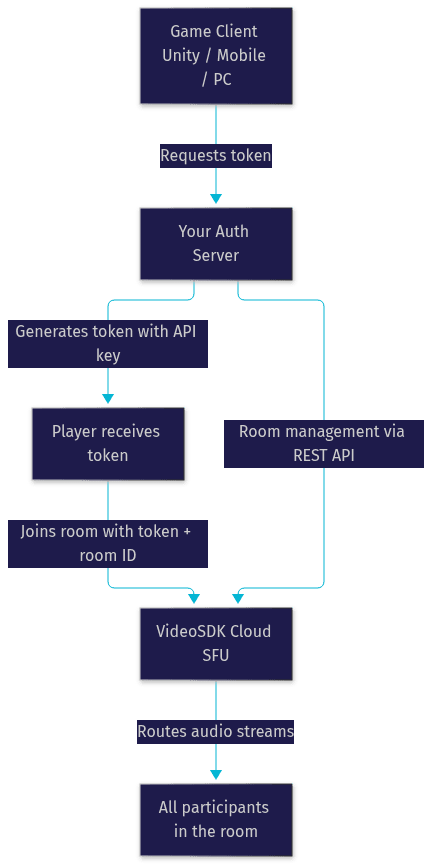
Token generation is the step most tutorials skip, and it is the number one source of failed integrations. Never embed your API secret in the game client; it will be extracted. Generate tokens server-side, scope them to a specific room and role, and give them a short expiry so a leaked token is useless quickly. VideoSDK's authentication and token guide explains the full pattern, and its REST API reference covers server-side room creation and participant management.
Room management deserves design attention too. Map rooms to natural game concepts: one room per match, persistent rooms per guild, breakout rooms for squad splits. Use the REST API to create rooms ahead of scheduled events and to deactivate them after, so orphaned rooms do not accumulate.
Common pitfalls in production: token expiry mid-session (implement silent re-authentication before expiry), mic permission denials on mobile (guide the player to OS settings gracefully), and NAT traversal failures on restrictive networks, which is where TURN server fallback saves the call. Also remember that production requires HTTPS everywhere; media connections that worked on localhost can fail behind corporate firewalls without proper TURN configuration.
For a faster path, VideoSDK's Prebuilt UI Kit lets you embed a working chat and voice interface with minimal integration effort, ideal for prototypes and smaller titles. The code samples library shows complete reference implementations per platform.
Enhancing Player Experience with AI-Powered Features
AI is reshaping chat gaming from a passive channel into an active layer. Three applications stand out in 2026.
AI moderation is the most immediate. Real-time transcription of voice chat, filtered through a moderation model, catches harassment as it happens rather than in post-game reports. This dramatically reduces the moderation burden on community managers for large titles.
Real-time transcription itself has accessibility value: deaf and hard-of-hearing players can follow voice callouts via live captions, and post-call transcripts and summaries let players review strategy discussions after a match. VideoSDK ships real-time and post-call transcription as built-in SDK features.
The most experimental frontier is AI-driven conversational NPCs and in-game assistants. Voice agents that listen, respond, and take actions inside the game world are now practical. VideoSDK's AI agent SDK is open source, connects leading speech-to-text, LLM, and text-to-speech providers, and runs agents inside the same rooms your players occupy. For structured flows like tutorial guides or support assistants, the Conversational Graph layer lets you define deterministic conversation steps while the LLM handles only the natural language, which is exactly what you want when an NPC must follow game logic rather than improvise.
Safety, Privacy, and Community Management in Chat Gaming
Chat gaming safety is now a legal and reputational requirement, not an optional extra. Start with encryption: media should be encrypted in transit as standard, and end-to-end encryption should be available for sensitive contexts. Know where your chat provider processes and stores data, because data residency determines your GDPR and CCPA obligations.
A practical safety checklist for any chat gaming launch:
- Enable real-time moderation filtering on both text and transcribed voice
- Ship one-tap report, mute, and block controls in the chat UI
- Age-gate voice chat where regulations require it, and default minors to filtered modes
- Publish a clear code of conduct and enforce it visibly
- Keep audit logs of moderation actions for compliance review
- Scope authentication tokens narrowly and expire them quickly
- Choose providers with documented GDPR and CCPA compliance postures
Community management is the human half of safety. Recruit moderators from your most engaged players, give them role-based tools inside the chat system, and review moderation metrics weekly. Toxic communities do not just lose players; they generate the negative reviews that stop new players from installing.
Future Trends in Chat Gaming for 2026
Three trends will define chat gaming over the next year. Spatial audio is moving from VR novelty to standard shooter and MMO feature, with voice positioned directionally so players hear teammates as if they were standing next to them in the game world. AR and VR titles are making chat overlays native, with participant avatars and gaze-aware mute indicators. And AI-driven NPC conversations, powered by real-time voice agent pipelines, are turning single-player and co-op worlds into places where players can actually talk to the characters. Studios that treat chat as a gameplay system rather than a menu option will be the ones that benefit.
Definitions Glossary
Chat gaming: The integration of real-time voice and text communication into or alongside video games, treated as a core gameplay and community feature rather than an accessory.
Room: A VideoSDK meeting room that participants join to share audio and video streams, identified by a unique room ID, and typically mapped to a match or guild in chat gaming.
Meeting Token: A short-lived JWT that authenticates a participant's access to a room, generated server-side so API secrets never reach the game client.
TURN Server: A relay server that keeps WebRTC media flowing when players sit behind restrictive firewalls or NATs, a common requirement in production chat gaming deployments.
Agent Worker: The Python process that runs a VideoSDK AI agent, managing its session lifecycle inside a room for applications like AI moderation or conversational NPCs.
Key Takeaways
- Chat gaming is now a core gameplay pillar: low-latency voice and text drive coordination, retention, and monetization in multiplayer games.
- Players expect five baseline features: sub-second voice, channel text chat, group and guild management, cross-platform sync, and moderation tools.
- Generate authentication tokens server-side with short expiry, and never ship API secrets inside the game client.
- Production chat needs HTTPS, TURN server fallback, and graceful handling of token expiry and permission denials.
- VideoSDK covers chat gaming end to end with 10+ platform SDKs including Unity, a Prebuilt UI Kit, built-in transcription, and an open-source AI agent SDK for moderation and conversational NPCs.
Conclusion
Chat gaming in 2026 is an SDK decision, a safety decision, and increasingly an AI decision, all in one. The studios that win are those that embed low-latency, cross-platform, well-moderated communication directly into their games instead of outsourcing community to external apps. VideoSDK gives you the full stack for that: multi-platform RTC SDKs, a Prebuilt UI Kit for fast shipping, and an open-source AI agent SDK for the conversational features coming next. Start with the free tier at app.videosdk.live, explore the quickstart docs, and join the VideoSDK Discord community to compare notes with other developers. What are you building with chat gaming? Drop a comment, I'd love to hear what kind of multiplayer experience you're working on.
Free $20 Balance for AI Voice Agents & Video Calls
FAQ