


A SIP request is a message sent by a SIP client to initiate, modify, or terminate a real-time communication session, such as a voice or video call. Every SIP request carries a method (like INVITE or BYE), a destination URI, and headers that identify the sender, receiver, and dialog. VideoSDK bridges SIP requests from traditional phone networks into WebRTC rooms, letting developers connect telephony and AI voice agents without managing raw SIP infrastructure.
A support engineer at a growing SaaS company gets a ticket at 9 a.m.: customers dialing the support line hear silence, then a busy tone. The CRM shows no missed calls. The PBX logs, however, are full of SIP traffic. Somewhere in that stream, a SIP request failed, and nobody on the team knows how to read it.
This scenario plays out daily in teams that adopt VoIP without understanding the protocol underneath. The Session Initiation Protocol, defined by the IETF in RFC 3261, is the signaling workhorse of modern telephony. Every call setup, every registration, every hangup begins with a SIP request. If you build, operate, or troubleshoot any voice or video system that touches the phone network, you need to understand what a SIP request is and what it does.
By the end of this article, you will know the structure of a SIP request, the most important request methods, how requests flow through a call, the headers that matter most, and a practical checklist for diagnosing broken SIP traffic.
What Is a SIP Request?
A SIP request is defined as a message sent from a SIP client (called a User Agent) to a SIP server or another user agent, asking the receiving side to perform a specific action related to a communication session. SIP is a method-based, text-based protocol, which means every request names its intent explicitly, much like an HTTP verb names the intent of a web request.
SIP requests work by traveling through the SIP network, often via proxy servers, until they reach the endpoint responsible for answering. The receiving side then sends back a SIP response, a numeric status message that reports the outcome. A phone call, for example, begins with an INVITE request, proceeds through provisional responses like Ringing, and completes when the caller acknowledges the final answer with an ACK request.
SIP itself does not carry the voice or video media. It only negotiates the session: who is calling whom, what codecs and ports will be used, and when the session ends. The actual media flows separately, typically over RTP. This separation of signaling and media is what makes SIP flexible enough to power desk phones, mobile softphones, cloud PBX systems, and gateways that bridge into WebRTC platforms like VideoSDK.
SIP Request Structure
Every SIP request starts with a Request-Line, followed by headers, and sometimes a message body (most commonly SDP, the session description that negotiates media parameters).
The Request-Line contains three parts: the method, the Request-URI, and the SIP version. The method tells the receiver what to do. The Request-URI identifies the destination of this particular request, usually a SIP address such as a user at a domain. The version declares the protocol version in use, almost always SIP 2.0 in current deployments.
After the Request-Line come the headers, which carry routing and identity information. Understanding this structure is the first step to reading a SIP trace, because most failures can be located by inspecting the Request-Line and headers before anything else.
Common SIP Request Methods
SIP defines a core set of request methods, and each one triggers a different behavior in the receiving endpoint. These are the methods you will encounter most often in real traffic.
INVITE is the most important method. It initiates a session, inviting the called party to establish a call. For voice calls, the INVITE usually carries the SDP offer describing the caller's supported codecs and media transport details.
ACK confirms that the caller received the final response to an INVITE. It completes the three-way handshake that establishes a call. ACK is unusual because it never triggers a response of its own.
BYE terminates an established session. When either party hangs up, their client sends a BYE, and the media session ends.
CANCEL abandons an INVITE that has not yet received a final response. If a caller hangs up before the other side answers, CANCEL stops the ringing instead of leaving a dangling call attempt.
REGISTER tells a SIP registrar where a user agent can be reached. It binds the user's SIP address to their current contact address, which is how a phone system knows where to route an incoming INVITE.
OPTIONS queries the capabilities of another endpoint or server. It is widely used as a keepalive and health-check mechanism between SIP trunks and PBX systems.
INFO, NOTIFY, SUBSCRIBE, and REFER extend SIP for mid-call events, presence, and call transfer. REFER, for example, powers attended and blind transfers in contact centers.
How SIP Requests Fit Into a Call Flow
A SIP request only makes sense as part of a dialog, a structured exchange of requests and responses that together establish and manage a session. The classic flow is the call setup sequence, and it is worth walking through end to end.
The caller's user agent sends an INVITE request toward the callee's address. A proxy server receives it, performs routing (possibly consulting a registrar or location service), and forwards it toward the destination. The proxy immediately sends back a 100 Trying response, telling the caller that the request is in progress and stopping retransmissions.
When the INVITE reaches the callee's phone, that endpoint responds with 180 Ringing, so the caller hears ringback tone. If the callee answers, their user agent sends a 200 OK response, which includes the SDP answer confirming the negotiated codecs and media ports. The caller's user agent then sends the ACK request, completing the three-way handshake. At this point signaling is done, and RTP media flows directly between the endpoints (or through a media relay if NAT or firewall conditions require it).
When either party hangs up, a BYE request travels to the other side, which confirms with its own 200 OK. The dialog is closed, and the session is over.
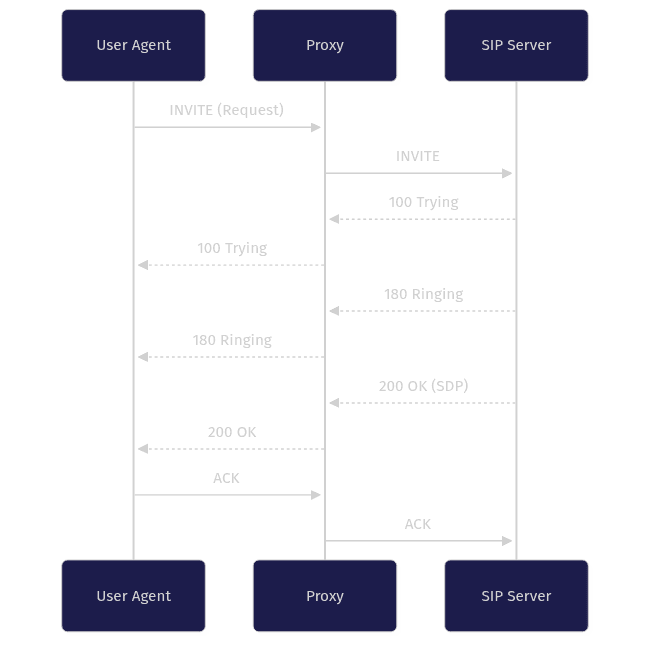
This sequence diagram shows the full lifecycle: one INVITE request, two provisional responses, one final response, and one ACK. Every failed call you will ever troubleshoot is a deviation somewhere in this chain.
Detailed Look at Key SIP Request Headers
Headers are where a SIP request carries its identity, routing, and dialog state. Reading them fluently is what separates engineers who can debug SIP from engineers who can only restart the PBX.
Via records the path a request has taken so responses can travel the same way back. Each proxy appends its own Via header, forming a route record. If a response cannot retrace this path, you get one-way audio or dead calls.
From identifies the initiator of the request and carries a tag that contributes to dialog identification. To identifies the intended recipient and gains its own tag once the callee answers. Call-ID is a unique identifier for this dialog; the combination of Call-ID, From tag, and To tag uniquely identifies a call. CSeq (Command Sequence) numbers the requests within a dialog and labels the method, which lets the receiver distinguish a retransmission from a new request.
Contact tells the remote party where to send future requests directly, bypassing the proxy once the dialog is established. Max-Forwards limits how many proxies a request may traverse, preventing routing loops; it decrements at each hop, and a request that hits zero is rejected.
Header Purpose and Typical Values
In practice, these headers carry concrete, readable values. A From header typically shows a SIP address of record plus a display name, such as a support agent's name with their extension address. A To header shows the dialed party's address. A Call-ID is a long unique string, often combining a random token with the sender's host. A Contact header points at the caller's direct IP address and port. A Max-Forwards commonly starts at 70.
When debugging, check these five things first: the From and To addresses match the intended parties, the Call-ID is consistent across the dialog, the CSeq increments correctly for each new request, and the Contact address is actually reachable from the other side. Most one-way audio problems trace back to an unreachable Contact value behind NAT.
SIP Request vs. SIP Response
SIP messages come in exactly two flavors: requests and responses. A SIP request asks the receiving endpoint to do something. A SIP response reports the result of that ask. Responses carry a three-digit status code and a reason phrase, grouped into classes: 1xx provisional (Trying, Ringing), 2xx success (OK), 3xx redirection, 4xx client failure (Unauthorized, Not Found), 5xx server failure, and 6xx global failure.
Every request expects a response, with one exception: ACK. ACK exists specifically to confirm receipt of the final response to an INVITE, so it completes the handshake rather than starting a new exchange. CANCEL is another special case; it stops a pending INVITE but the original INVITE still receives its own final response, typically 487 Request Terminated.
The request-response pairing is what makes SIP traceable. When you capture traffic, you match responses to requests using the Call-ID and CSeq. If you see a request with no matching response, you have found your failure point, whether it is a firewall silently dropping packets, a misrouted URI, or a server that never received the message at all.
Common Issues with SIP Requests
Most SIP failures come from a small set of recurring problems, and they almost always involve the request itself rather than the media path.
A malformed Request-Line, such as an invalid URI scheme or a missing SIP version, causes servers to reject the request outright with a 400 Bad Request. Missing or malformed headers produce similar rejections; a request without a valid Via header cannot be routed back, and one without a Call-ID cannot be tracked.
A wrong Request-URI sends the request to the wrong destination, producing 404 Not Found or, worse, a silent drop. NAT traversal is the most notorious problem in real deployments: a user agent behind NAT places its private IP address in the Contact header and SDP, so responses and media attempt to reach an unreachable address. The result is failed calls or one-way audio. STUN, TURN, and SIP ALGs on routers exist to mitigate this, though ALGs frequently cause more problems than they solve.
Authentication failures (401 and 407 responses) occur when a request lacks valid credentials, and loop detection via Max-Forwards rejects requests that bounce between misconfigured proxies.
Troubleshooting Checklist
When a SIP call fails, run through this checklist in order:
- Verify the Request-Line: correct method, valid destination URI, and SIP 2.0 version.
- Confirm required headers are present: Via, From, To, Call-ID, CSeq, Contact, and Max-Forwards.
- Match each request to its response using Call-ID and CSeq; note any request with no reply.
- Check that the Contact header contains an address reachable from the far side, not a private NAT address.
- Confirm Max-Forwards is not exhausted, which indicates a routing loop.
- Verify authentication credentials are being presented after a 401 or 407 challenge.
- Check that the SDP offer in the INVITE lists codecs both sides support.
- Inspect firewall rules to confirm SIP signaling and RTP media ports are both open.
SIP Requests in Modern VoIP Environments
SIP requests are not a legacy curiosity. They are the connective tissue between traditional telephony and modern cloud communications.
Cloud PBX platforms like Twilio, Vonage, Telnyx, and Plivo expose SIP trunks that accept SIP requests from your infrastructure, letting you send and receive calls over the public phone network. When your application dials out, it emits an INVITE toward the provider's SIP endpoint. When a customer calls in, the provider sends an INVITE to your configured SIP URI.
The interesting frontier is bridging SIP into WebRTC. WebRTC powers browser and mobile calling, while SIP powers the phone network, and production systems increasingly need both. VideoSDK's telephony integration handles this bridge with an inbound gateway, an outbound gateway, and a routing rules engine. A SIP INVITE arriving from a carrier is translated into a participant joining a VideoSDK room over WebRTC, and vice versa. This is also how AI voice agents answer phone calls: the SIP request brings the caller into a room where a Python agent worker processes speech through a transcription, LLM, and text-to-speech pipeline.
For developers, the practical takeaway is that understanding SIP requests lets you integrate telephony without abandoning your WebRTC stack. You describe routing rules, handle DTMF events, and manage call transfer, while the gateway manages the SIP request and response mechanics described earlier in this article.
Quick Reference: SIP Request Method Cheat Sheet
[LINKABLE ASSET — comparison table]
| Method | Purpose | Typical Use Case |
|---|---|---|
| INVITE | Initiate a session | Starting a voice or video call |
| ACK | Confirm final response to INVITE | Completing call setup handshake |
| BYE | Terminate an established session | Hanging up a call |
| CANCEL | Abandon a pending INVITE | Caller hangs up before answer |
| REGISTER | Bind address to contact location | Phone startup, re-registration |
| OPTIONS | Query capabilities or keepalive | Trunk health checks between systems |
| REFER | Transfer the session | Contact center call transfer |
| SUBSCRIBE / NOTIFY | Presence and event updates | Line status, voicemail indicators |
The INVITE row is the one to memorize first. Nearly every call you debug will start with an INVITE request and end with a BYE, with everything interesting happening in between.
Definitions Glossary
SIP Request: A message sent by a SIP client asking a server or another endpoint to perform an action, such as starting or ending a session. Every SIP request carries a method, a destination URI, and headers that identify the dialog.
User Agent (UA): The SIP endpoint that acts as a client or server, such as a desk phone, softphone, or gateway. The calling side sends SIP requests; the called side responds to them.
INVITE: The SIP request method that initiates a session, usually carrying an SDP offer describing codecs and media transport for the proposed call.
Dialog: The peer-to-peer relationship between two user agents created by an INVITE, identified by the Call-ID, From tag, and To tag combination. All mid-call requests travel within a dialog.
SIP Trunk: A virtual connection between a PBX or application and a service provider that carries SIP requests and media, replacing traditional phone lines.
Request-URI: The address in a SIP request's Request-Line identifying where the request should be delivered, typically a SIP address of a user or service.
Key Takeaways
- A SIP request is a method-based message that initiates, modifies, or ends a real-time session, and every request except ACK expects a matching response.
- The core methods to know are INVITE, ACK, BYE, CANCEL, REGISTER, and OPTIONS; INVITE and BYE bracket every call you will ever debug.
- Headers like Via, From, To, Call-ID, CSeq, Contact, and Max-Forwards carry the routing and dialog state, and most failures trace back to one of them.
- NAT traversal and malformed Request-Lines cause the majority of real-world SIP request failures, so the troubleshooting checklist above is your first stop.
- VideoSDK bridges SIP requests from carriers into WebRTC rooms, enabling telephony and AI voice agents without managing raw SIP infrastructure.
Conclusion
Understanding the SIP request is the foundation for working with any VoIP system, from a desk phone on a desk to a cloud contact center handling thousands of calls. You now know the structure, the methods, the headers, the call flow, and the failure modes that matter in production.
The next step is hands-on. Capture a SIP trace from your own PBX or trunk, match requests to responses by Call-ID, and watch an INVITE become a call. If you want to go further and connect phone calls into WebRTC applications or AI voice agents, explore the VideoSDK telephony documentation and grab a free account at app.videosdk.live/login to start building.
What are you building with SIP or WebRTC? Drop a comment, I'd love to hear what kind of telephony use case you're working on.
Free $20 Balance for AI Voice Agents & Video Calls
FAQ