


A SIP scan is the process of systematically probing Session Initiation Protocol endpoints to discover VoIP devices, identify configurations, and assess security posture. Security professionals use SIP scanning to fingerprint devices, detect open ports, and uncover weak authentication before attackers do. VideoSDK's SIP integration capabilities let developers build secure telephony applications that connect traditional phone networks to WebRTC rooms with built-in security controls.
Most enterprise networks now run some form of Voice over IP infrastructure, and Session Initiation Protocol (SIP) is the signaling standard that makes those voice and video sessions possible. But every SIP endpoint on your network is also a potential attack surface. A SIP scan is how security teams and network administrators discover what SIP devices exist, what software they run, and whether they expose vulnerabilities that an attacker could exploit.
By the end of this guide you will understand the core SIP scanning methods, how to choose the right tool, how to run scans safely without disrupting production voice services, and how to interpret and act on the results.
Understanding SIP Scan
SIP is defined as a text-based signaling protocol used to establish, modify, and terminate real-time communication sessions over IP networks. It operates at the application layer and handles call setup, registration, and teardown for VoIP calls, video conferences, and other multimedia sessions. SIP scanning is the practice of sending targeted probe messages to SIP endpoints to discover which devices are active, what software or firmware they run, and what configuration they expose.
SIP scanning works by sending crafted SIP requests to candidate IP addresses and ports, then analyzing the responses. The most common target port is 5060 for unencrypted SIP, with port 5061 typically used for SIP over TLS. When a SIP device receives a well-formed request, it responds with a status code and headers that reveal information about its identity, capabilities, and configuration.
There is an important distinction between passive monitoring and active SIP scanning. Passive monitoring listens to existing network traffic without injecting any packets, which is useful for auditing but limited to devices already communicating. Active SIP scanning, by contrast, sends probes to address ranges to discover devices that may be idle, misconfigured, or forgotten. This proactive discovery is what makes SIP scanning a foundational step in any VoIP security assessment.
The typical goals of a SIP scan fall into three categories. Discovery identifies which IP addresses and ports have active SIP services. Fingerprinting determines the device type, software version, and vendor by analyzing response headers such as User-Agent and Server. Vulnerability identification looks for weak authentication, open registration, default credentials, or misconfigured extensions that an attacker could leverage.
Why SIP Scan Matters for Your Infrastructure
Unidentified SIP devices on your network represent one of the most expensive security blind spots in modern IT. Toll fraud alone costs organizations hundreds of millions of dollars annually, according to the Communications Fraud Control Association. Attackers scan for SIP endpoints with weak or default credentials, register rogue extensions, and then route premium-rate international calls through your PBX at your expense.
Beyond toll fraud, exposed SIP devices enable eavesdropping on voice calls, call interception, and denial-of-service attacks that can take down an entire phone system. A single unpatched IP phone with an open SIP registration can become the entry point for a broader network compromise.
The scale of SIP scanning activity on the public internet is substantial. Research published by the CAIDA (Center for Applied Internet Data Analysis) project documented large-scale SIP scanning campaigns that targeted millions of IP addresses across the internet. The study, often referenced as the "SipScan" research, showed that attackers routinely sweep entire network blocks looking for SIP responses on port 5060. This means that if your SIP devices are internet-facing, they are almost certainly being scanned already.
This reality makes proactive SIP scanning essential. If attackers are scanning your address ranges, you need to scan them first to find and fix vulnerabilities before they do. Regular SIP scanning as part of your security audit cycle ensures that newly deployed devices, forgotten test extensions, and firmware updates that introduce new exposures are all caught before they become incidents.
Common SIP Scan Methods and Protocols
SIP scanning uses several distinct request methods, each of which reveals different information about the target endpoint. Understanding when to use each method is critical for effective and non-disruptive scanning.
OPTIONS Method Overview
The OPTIONS method is the most commonly used SIP scanning probe because it is designed specifically to query device capabilities without initiating a call. When a SIP device receives an OPTIONS request, it responds with a status code indicating availability and a set of headers describing its supported features, codecs, and extensions.
A 200 OK response confirms the device is active and reachable. The response headers typically include Allow, which lists supported SIP methods, and Supported, which lists SIP extensions the device understands. The User-Agent or Server header reveals the device vendor and software version, making OPTIONS ideal for fingerprinting without triggering any call behavior.
Security professionals prefer OPTIONS scanning for initial discovery because it is lightweight, unlikely to disrupt service, and widely supported across SIP implementations. Some devices may not respond to OPTIONS from unknown sources, which is itself useful information about their security configuration.
INVITE Method for Ringing Tests
The INVITE method initiates a SIP session and can be used during scanning to verify that a device not only responds to signaling but also processes call setup. When a SIP scanner sends an INVITE to a target, the device typically returns a 180 Ringing response followed by a 200 OK, indicating that the endpoint is fully functional for call processing.
INVITE-based scanning is more intrusive than OPTIONS scanning because it can trigger audible ring-back on the target device. In a production environment, sending INVITE probes to IP phones can cause them to ring, which disrupts users and may trigger alerts. For this reason, INVITE scanning is best used in controlled testing windows or against non-production targets.
The value of INVITE scanning lies in confirming that a discovered device is not just listening on port 5060 but is actually processing calls. This distinguishes live phones and soft clients from dormant services or honeypots that respond to OPTIONS but do not handle real call flows.
REGISTER Method for Authentication Checks
The REGISTER method tests how a SIP registrar handles registration attempts. When a scanner sends a REGISTER request, the registrar typically responds with a 401 Unauthorized challenge, requiring the client to provide authentication credentials. This exchange reveals whether the registrar is active, what authentication scheme it uses, and whether it accepts registrations from arbitrary sources.
REGISTER probing can also detect devices that accept registration without authentication, which is a critical vulnerability. Some misconfigured PBX systems or IP phones allow open registration, meaning any device on the network can register an extension without providing a password. Attackers exploit this to inject rogue endpoints into the phone system.
More advanced REGISTER scanning involves testing common or default credentials across discovered extensions. This brute-force approach should only be performed with explicit authorization and careful rate limiting, as it can trigger account lockouts or intrusion detection systems.
Transport Choices: UDP, TCP, and TLS
SIP supports three transport protocols, and each has implications for scanning. UDP is the default and most widely deployed transport for SIP. It is connectionless, which means scanners must handle retransmission and timeout logic manually. UDP scanning is fast but less reliable across networks with packet loss or firewalls that drop UDP traffic.
TCP provides reliable delivery and is increasingly supported by modern SIP implementations. TCP scanning benefits from the connection-oriented nature of the protocol, making it easier to detect when a port is truly open versus when packets are being silently dropped. Some firewalls and SIP-aware network devices handle TCP SIP traffic differently than UDP, so scanning over both transports gives a more complete picture.
TLS encrypts SIP signaling, providing confidentiality and integrity. Scanning SIP over TLS typically targets port 5061 and requires the scanner to establish a TLS handshake before sending any SIP messages. TLS scanning can reveal whether a device supports encrypted signaling, which is a positive security indicator. However, TLS scanning is slower and may fail if the target uses strict certificate validation or mutual TLS authentication.
A comprehensive SIP scan should test all three transports to avoid missing devices that only listen on one. For example, a device might accept UDP on port 5060 but also have a TLS listener on port 5061, and each transport may expose different configuration details.
Choosing the Right SIP Scan Tool
Selecting the right SIP scanning tool depends on your specific requirements for protocol coverage, speed, output format, and fingerprinting accuracy. Several open-source and commercial tools are widely used in the security community.
SIPVicious is one of the most well-known open-source SIP scanning toolsets. It includes tools for scanning SIP targets, enumerating extensions, and testing for weak passwords. SIPVicious supports UDP transport and provides clear text output that is easy to parse. It is a solid choice for quick assessments and extension enumeration but has limited support for TCP and TLS transports.
SIPpts is a newer open-source suite that supports UDP, TCP, and TLS scanning with multithreaded execution. It includes modules for scanning, enumeration, fingerprinting, and brute-force testing. SIPpts is particularly useful for comprehensive assessments that need to cover multiple transports and methods in a single workflow.
Mr.sip is a Python-based SIP scanning and fuzzing tool that offers modular architecture and supports multiple scanning modes. It provides fingerprinting capabilities and can generate reports in structured formats. Mr.sip is suitable for security researchers who need flexibility and extensibility in their scanning toolkit.
On the commercial side, dedicated VoIP security scanners offer more polished reporting, compliance mapping, and integration with vulnerability management platforms. These tools typically provide graphical interfaces, scheduled scanning, and automated remediation tracking, which are valuable for enterprise security teams managing large SIP estates.
When evaluating a SIP scanning tool, consider these criteria: support for all three transports (UDP, TCP, TLS), multithreading for performance on large address ranges, accurate fingerprinting based on response header analysis, structured output formats for integration with reporting pipelines, and clear licensing terms that permit use in your specific context. Tools that support rate limiting and configurable timeouts are essential for scanning production environments without causing service disruption.
Running a SIP Scan Safely
Running a SIP scan against production infrastructure requires careful planning to avoid disrupting voice services. The following steps outline a safe scanning workflow.
Preparing a Target List
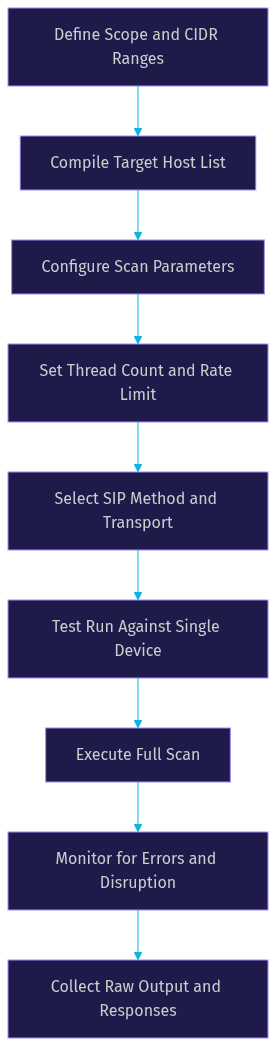
Start by defining the scope of your scan in terms of IP address ranges. Use CIDR notation to specify network blocks, or compile a host file listing individual IP addresses for targeted scanning. Your scope should include all known SIP infrastructure: PBX servers, IP phones, session border controllers, media gateways, and any SIP-enabled applications. Include both internal address ranges and any internet-facing SIP endpoints. Document the scope explicitly so that scans do not accidentally reach systems outside your authorization.
Configuring Scan Parameters
Configure your scanning tool with conservative parameters to minimize impact. Set a moderate thread count that balances speed against load on the network and target devices. A high thread count can overwhelm a PBX or trigger rate-limiting defenses that produce false negatives. Configure timeouts based on your network latency characteristics, with longer timeouts for TLS scans that require handshake negotiation. Select the SIP method for your initial probe, typically OPTIONS for discovery. Enable rate limiting to ensure the scan does not send probes faster than your targets can process them, which prevents accidental denial-of-service conditions.
Executing the Scan
Begin the scan with a small test run against a single known device to verify that your tool is configured correctly and producing expected responses. Once confirmed, execute the full scan against your prepared target list. Monitor the scan progress and watch for error rates that indicate network issues or aggressive firewall filtering. If the scan produces unexpected results or if users report phone disruptions, pause and reduce the scan rate. Collect all raw output for post-scan analysis, including response codes, headers, and timing data.
The following diagram illustrates the safe scanning workflow from target preparation through result collection:
Analyzing SIP Scan Results
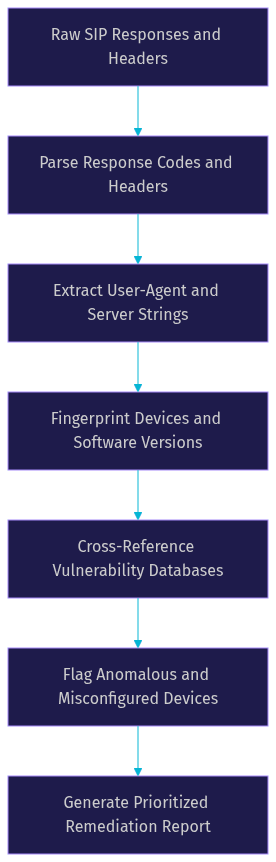
Interpreting SIP scan results requires understanding SIP response codes, header analysis, and pattern recognition across large result sets. The raw output from a SIP scan typically includes the target IP address, port, transport protocol, SIP response code, and full response headers for each responding device.
SIP response codes follow a three-digit format similar to HTTP. A 200 OK response indicates the device is active and processed the request successfully. A 401 Unauthorized response to a REGISTER probe confirms the registrar is enforcing authentication. A 403 Forbidden response may indicate the device rejects requests from unknown sources, which is a positive security signal. A 487 Request Terminated response often appears when a scan sends INVITE probes that are cancelled before completion.
The User-Agent header is the primary fingerprinting signal. It typically contains the vendor name, device model, and firmware version. For example, a User-Agent string revealing a specific IP phone model running outdated firmware immediately flags that device as a potential vulnerability. The Server header provides similar information for SIP servers and PBX systems. Comparing these strings against known vulnerability databases helps prioritize remediation.
Anomalous responses also warrant attention. A device that responds to OPTIONS but returns unusual status codes or malformed headers may be a honeypot, a misconfigured proxy, or a device running non-standard SIP software. Multiple devices responding from the same IP address on different ports may indicate a SIP proxy or registrar handling multiple virtual extensions.
The following diagram shows the result-processing pipeline from raw packet capture through to final reporting:
Open port detection is another key output. If your scan tests multiple ports beyond 5060 and 5061, any additional open SIP ports may indicate non-standard configurations or secondary services that need separate security evaluation.
Mitigating Vulnerabilities Discovered by SIP Scan
Once your SIP scan results identify vulnerabilities, remediation should follow a prioritized approach based on risk severity. Devices with open registration or default credentials represent the highest risk and should be addressed immediately.
Start by patching firmware on all discovered SIP devices. Vendor security updates frequently address SIP-specific vulnerabilities such as authentication bypass, buffer overflow in header parsing, and denial-of-service weaknesses. Establish a regular firmware update cycle tied to your scanning schedule so that new vulnerabilities are caught and patched promptly.
Disable unused extensions and features on your PBX. Every active extension is a potential entry point, so extensions that are no longer needed should be removed entirely rather than simply deactivated. Review your dial plan to ensure that no extensions allow unrestricted outbound routing without authentication.
Enforce strong authentication across all SIP registrations. Require complex passwords for all extensions, implement account lockout policies to prevent brute-force attacks, and consider IP-based access restrictions so that only known devices can register. If your PBX supports it, enable mutual TLS authentication for SIP trunk connections.
Enable TLS for SIP signaling wherever possible. This encrypts authentication credentials and call setup messages, preventing eavesdropping and credential interception. VideoSDK's telephony integration supports secure SIP connections, allowing developers to bridge traditional telephony with WebRTC rooms while maintaining encrypted signaling.
Configure rate limits on your SIP registrar and session border controller to slow down brute-force attempts and scanning activity. Most modern SIP platforms support registration rate limiting, which restricts the number of registration attempts per source IP within a given time window.
Best Practices and Legal Considerations
SIP scanning must always be performed within a clear legal and ethical framework. Scanning SIP infrastructure that you do not own or have explicit permission to test is illegal in most jurisdictions and can result in criminal charges, civil liability, or both.
Always obtain written authorization before scanning. This authorization should specify the exact IP ranges, ports, and methods you are permitted to test, along with the testing window and any restrictions on scan intensity. If you are scanning as part of a penetration test or security audit, ensure your authorization document, often called a rules of engagement or scope of work, covers SIP scanning explicitly.
Document your scanning scope, parameters, and results thoroughly. This documentation serves as evidence of authorized testing, supports remediation tracking, and provides a baseline for future scans to measure progress. Include timestamps, tool versions, scan parameters, and raw output files in your documentation.
Coordinate with network owners and operations teams before scanning. SIP scanning can trigger intrusion detection systems, cause phones to ring, or overload PBX servers. Notify the teams responsible for voice infrastructure so they can distinguish your authorized scan from an actual attack and avoid unnecessary incident response activities.
Follow established reporting standards when communicating findings. Prioritize vulnerabilities by severity, provide clear remediation steps, and include evidence such as response headers and status codes that demonstrate the vulnerability. Use industry-standard severity ratings such as CVSS scores where applicable.
Here is a quick checklist for ethical SIP scanning:
- Obtain written authorization specifying exact scope and methods
- Define IP ranges and ports in advance and document them
- Notify network operations and voice infrastructure teams
- Use conservative scan parameters with rate limiting enabled
- Test against a single device before full-scale scanning
- Document all results with timestamps and tool versions
- Report findings with prioritized remediation guidance
- Never scan infrastructure you do not own or have permission to test
Definitions Glossary
SIP (Session Initiation Protocol): A text-based application-layer protocol used to establish, modify, and terminate real-time communication sessions over IP networks, including VoIP calls and video conferences.
SIP Scan: The practice of sending targeted SIP probe messages to IP addresses and ports to discover active SIP devices, fingerprint their software, and identify security vulnerabilities.
OPTIONS Method: A SIP request method that queries a device's capabilities and availability without initiating a call, commonly used for non-disruptive SIP scanning and fingerprinting.
REGISTER Method: A SIP request method used to register a user agent with a SIP registrar, often probed during scanning to test authentication enforcement and detect open registration vulnerabilities.
User-Agent Header: A SIP response header that identifies the software, vendor, and version of the responding device, serving as the primary fingerprinting signal in SIP scanning.
Toll Fraud: The criminal practice of exploiting weak SIP authentication to route premium-rate calls through a victim's PBX, causing significant financial damage.
Session Border Controller (SBC): A network device that sits at the boundary of a VoIP network to manage SIP signaling, enforce security policies, and protect against malicious traffic.
Key Takeaways
- A SIP scan is a foundational VoIP security assessment technique that discovers active SIP devices, fingerprints their software, and identifies vulnerabilities before attackers can exploit them.
- The OPTIONS method is the safest and most common scanning probe, while INVITE and REGISTER methods provide deeper verification of call processing and authentication enforcement.
- Scanning all three transports (UDP, TCP, and TLS) is essential for complete coverage, as devices may only respond on specific transports.
- Tools like SIPVicious, SIPpts, and mr.sip offer different strengths in protocol support, multithreading, and fingerprinting accuracy for open-source SIP scanning.
- Safe scanning requires written authorization, conservative rate limiting, coordination with operations teams, and thorough documentation of scope and results.
- VideoSDK's SIP and telephony integration enables developers to build secure telephony applications that bridge traditional phone networks with WebRTC rooms while maintaining encrypted signaling.
Conclusion
SIP scanning is not just a security exercise. It is a critical operational practice for any organization running VoIP infrastructure. The same techniques that attackers use to find vulnerable SIP endpoints are available to defenders, and proactive scanning ensures you find weaknesses first. By combining the right tools, careful parameter configuration, and a structured approach to result analysis and remediation, you can significantly reduce your exposure to toll fraud, eavesdropping, and service disruption.
If you are building telephony applications that interface with SIP infrastructure, VideoSDK provides SIP integration that bridges traditional phone networks with modern WebRTC rooms, along with REST APIs for server-side orchestration. You can explore the code samples and join the VideoSDK Discord community to discuss your use case with other developers.
What are you building with SIP infrastructure? Drop a comment. I would love to hear what kind of VoIP security or telephony integration use case you are working on.
Free $20 Balance for AI Voice Agents & Video Calls
FAQ